
M5Stack Tough
Hướng dẫn sử dụng bộ phát triển IoT M5Stack Tough ESP32
Model: Tough
1. Sản phẩm hếtview
The M5Stack Tough is an industrial-grade ESP32-based IoT development board kit designed for robust and reliable performance in harsh environments. It features a durable, dustproof, and water-resistant enclosure, a powerful dual-core processor, an integrated touch display, and versatile connectivity options.

Figure 1: M5Stack Tough Development Board Kit, showcasing its robust design with water resistance.
Các tính năng chính:
- Độ bền cấp công nghiệp: Designed to withstand harsh environments with full dustproof and water-resistant capabilities.
- Powerful Dual-Core Performance: Powered by the Espressif ESP32 dual-core processor, ensuring swift and efficient performance for demanding applications.
- Hiển thị tích hợp: Features a 2.0-inch HD IPS capacitive multi-touch screen for intuitive interaction and data visualization.
- Kết nối mạnh mẽ: Built-in Wi-Fi and versatile interfaces (RS485/I2C/GPIO/UART) provide seamless connectivity and expandability for various sensors and devices.
- Low Power Management: Incorporates advanced power management solutions, including RTC wake-up capabilities, for energy-efficient operation.
2. Nội dung gói hàng
Xác minh rằng tất cả các mục được liệt kê dưới đây đều có trong gói hàng của bạn:
- 1x M5Stack TOUGH unit
- 1x Type-C USB cable (1m)
- 1x 2.5mm hexagon wrench
- 1x 1.25-2P single head terminal line
- 1x 1.25-4P single head terminal line
- 1x Waterproof O-ring
- 1x HY2.0-4P connector

Figure 2: Contents of the M5Stack Tough kit, including the main unit, cables, and tools.
3. Thiết lập và sử dụng lần đầu
3.1 Kết nối vật lý
- Kết nối nguồn điện: Connect the provided Type-C USB cable to the USB port on the M5Stack Tough unit and the other end to a 5V power source (e.g., computer USB port or USB power adapter). The device can also be powered via the RS485 interface (24V @ 1A).
- Khởi động ban đầu: Upon connecting power, the device's 2.0-inch IPS display should light up, indicating successful power-on.
- Kết nối bên ngoài: Utilize the M12 RS485 interface, I2C, GPIO, and UART interfaces for connecting external sensors, actuators, or other development modules as required by your application.
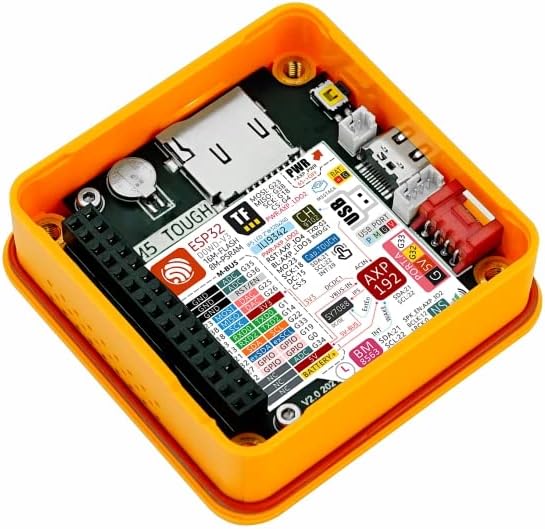
Figure 3: Internal components of the M5Stack Tough, highlighting the ESP32 module and various connection points.
3.2 Thiết lập phần mềm
The M5Stack Tough supports multiple development platforms, including UIFlow, Arduino, and ESP-IDF. For detailed programming guides and examples, refer to the official M5Stack documentation.

Figure 4: Steps to access online tutorials and documentation for M5Stack products.
To access tutorials and documentation:
- Visit the official M5Stack webđịa điểm: m5stack.com
- Click on "DOCUMENT" in the navigation menu.
- Tìm kiếm "Tough" or browse for your product.
- Scroll down to find the "Tutorial" section for specific guides and exampđồng nghiệp.
4. Vận hành thiết bị
The M5Stack Tough is designed for various industrial and IoT applications. Its 2.0-inch HD IPS capacitive multi-touch screen allows for direct interaction and data display. Programming the device determines its specific operational behavior.
4.1 Tương tác cơ bản
- Màn hình cảm ứng: Interact with on-screen elements by tapping or swiping, depending on the programmed interface.
- Trực quan hóa dữ liệu: The display can be used to show real-time sensor data, system status, or control interfaces.
4.2 ứng dụng Examptập
The M5Stack Tough can be deployed in various scenarios, including:
- Thu thập dữ liệu: Collecting and displaying data from various sensors in industrial or environmental monitoring.
- Bộ điều khiển hẹn giờ: Functioning as a programmable timer for industrial processes or fitness applications.
- IoT Controller: Acting as a central control unit for smart home or industrial IoT systems.

Figure 5: Illustrative applications of the M5Stack Tough in different environments.
5. Bảo trì
The M5Stack Tough is designed for durability and requires minimal maintenance. Follow these guidelines to ensure its longevity:
- Vệ sinh: Sử dụng một mềm, damp cloth to clean the exterior. Avoid abrasive cleaners or solvents that could damage the enclosure or screen.
- Bảo vệ môi trường: While the device is dustproof and water-resistant, avoid prolonged immersion in water or exposure to extreme temperatures beyond its operating range. Ensure the M12 connector is properly sealed with the waterproof O-ring if used in wet environments.
- Cập nhật chương trình cơ sở: Regularly check the official M5Stack website for firmware updates to ensure optimal performance and access to new features. Follow the provided instructions carefully for any update procedures.
- Quản lý cáp: Ensure all connected cables are securely fastened and not under undue strain to prevent damage to the ports.
KHAI THÁC. Xử lý sự cố
This section addresses common issues you might encounter with your M5Stack Tough unit.
6.1 Thiết bị không bật nguồn
- Kiểm tra nguồn điện: Ensure the USB Type-C cable is securely connected to a functional 5V power source or that the RS485 interface is receiving 24V power.
- Tính toàn vẹn của cáp: Inspect the USB cable for any visible damage. Try a different USB cable if available.
- Nút nguồn: Ensure the power button (if applicable, though not explicitly mentioned for Tough, common for M5Stack devices) is pressed.
6.2 Màn hình không phản hồi
- Khởi động lại thiết bị: Disconnect and reconnect the power to perform a hard reset.
- Vấn đề về phần sụn: If the display remains unresponsive after a reboot, it might indicate a software issue. Refer to the M5Stack documentation for instructions on reflashing the firmware.
- Thiệt hại vật lý: Inspect the screen for any cracks or physical damage.
6.3 Connectivity Issues (Wi-Fi/RS485)
- Cấu hình phần mềm: Verify that your code correctly initializes and configures the Wi-Fi or RS485 modules.
- Môi trường mạng: For Wi-Fi, ensure the network is active and the credentials are correct. For RS485, check wiring and termination.
- Sự can thiệp: Minimize potential electromagnetic interference from other devices.
For more advanced troubleshooting or specific programming issues, consult the comprehensive documentation and community forums available on the official M5Stack webđịa điểm.
7. Thông số kỹ thuật
Detailed technical specifications for the M5Stack Tough ESP32 IoT Development Board Kit:
| Tính năng | Tham số |
|---|---|
| Bộ xử lý | Espressif ESP32-D0WDQ6-V3, 240MHz dual-core |
| Bộ nhớ Flash | 16MB |
| PSRAM | 8MB |
| Đầu vào Voltage | USB (5V @ 500mA) / RS485 interface power input (24V @ 1A) |
| Giao diện | Type-C x 1, Grove x 4 (RS485 / I2C / GPIO / UART interfaces) |
| Trưng bày | 2.0" 320 x 240 ILI9342C full-color IPS LCD, max brightness 853 nits |
| Bộ điều khiển cảm ứng | CHSC6540 |
| Thiết lập loa | NS4168 16-bit I2S amplifier + 1W speaker |
| Loại không dây | Bluetooth, WiFi |
| Hệ điều hành | Linux (supported development environments) |
| Trọng lượng sản phẩm | 4.1 ounce (khoảng 116g) |
| Kích thước sản phẩm (DxRxC) | 2.99 x 2.28 x 1.64 inch (76 x 58 x 41 mm) |
| Màu sắc | Màu vàng |
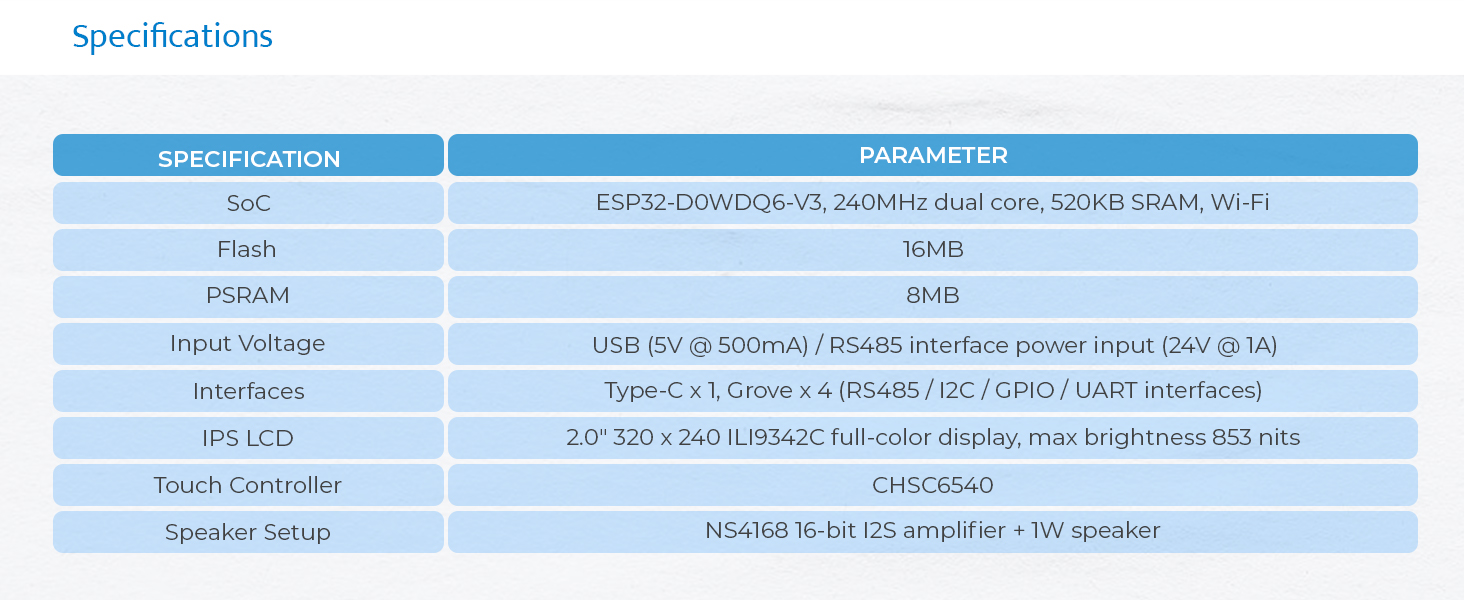
Figure 6: Visual representation of the M5Stack Tough's technical specifications.

Figure 7: Physical dimensions of the M5Stack Tough unit.

Figure 8: Weight of the M5Stack Tough unit.
8. Bảo hành và Hỗ trợ
8.1 Thông tin bảo hành
M5Stack products typically come with a standard manufacturer's warranty covering defects in materials and workmanship. For specific warranty terms and duration, please refer to the warranty card included with your product or visit the official M5Stack webVui lòng truy cập mục hỗ trợ của trang web. Giữ lại bằng chứng mua hàng để yêu cầu bảo hành.
8.2 Hỗ trợ kỹ thuật
For technical assistance, programming inquiries, or advanced support, please utilize the following resources:
- M5Stack chính thức Webđịa điểm: m5stack.com - Provides extensive documentation, tutorials, and community forums.
- Diễn đàn cộng đồng: Engage with other developers and M5Stack experts for solutions and project ideas.
- Liên hệ bộ phận hỗ trợ: If you cannot find a solution through documentation or forums, contact M5Stack customer support directly via their webđịa điểm.
Ask a question about this manual
Ask about setup, troubleshooting, compatibility, parts, safety, or missing instructions. Manuals+ will review the question and use this page’s manual context to help answer it.