
Deiss DT-116A
Deiss PRO Bluetooth Meat Thermometer Wireless - Instruction Manual
Thương hiệu: Deiss | Người mẫu: DT-116A
1. Sản phẩm hếtview
The Deiss PRO Bluetooth Meat Thermometer is designed to provide precise, instant-read temperatures for various meats, ensuring perfect cooking results. It features dual probes for multi-zone cooking and connects wirelessly to your smartphone via a dedicated app, allowing remote monitoring and alerts.

Figure 1: Deiss PRO Bluetooth Meat Thermometer and App Interface.
Các tính năng chính:
- Đọc nhiệt độ chính xác: Provides precise, instant-read temperatures for various food types.
- Thiết kế đầu dò kép: Allows simultaneous monitoring of two different temperatures, such as two cuts of meat or meat and ambient oven/smoker temperature.
- Kết nối Bluetooth: Connects to iOS/Android devices for remote monitoring and alerts.
- Các thiết lập được USDA khuyến nghị: Includes pre-programmed temperature settings for common meats, with options to create custom settings.
- Phạm vi nhiệt độ rộng: Operates from 32°F to 572°F (0°C to 300°C) with probes built to withstand up to 716°F (380°C).
- Nhiều tùy chọn gắn kết: Features anti-slip pads, a hanging hole, and an internal magnet for versatile placement.
2. Có gì trong hộp
Khi mở gói hàng, hãy đảm bảo có đầy đủ tất cả các thành phần:
- Deiss PRO Bluetooth Meat Thermometer Unit
- 2 x Stainless Steel Probes with Waterproof Probe Cables
- 2 x Pin AAA (được lắp sẵn hoặc bao gồm riêng)
- Hướng dẫn sử dụng (tài liệu này)

Hình 2: Nội dung gói hàng.
3. Hướng dẫn cài đặt
3.1. Thiết lập ban đầu
- Chèn pin: If not already installed, open the battery compartment on the back of the thermometer unit and insert 2 AAA batteries, observing polarity.
- Bật nguồn: Press the power button on the thermometer unit to turn it on.
- Tải ứng dụng: Scan the QR code provided in the product packaging or search for "Deiss Thermo" in your device's app store (iOS or Android). Download and install the application.

Download the Deiss Thermo App.
- Kết nối đầu dò: Insert the probe cables into the corresponding ports (Probe 1 and Probe 2) on the side of the thermometer unit. Ensure they are securely connected.

Connect the probes.
3.2. Ghép nối Bluetooth
- Bật Bluetooth: Đảm bảo Bluetooth được bật trên điện thoại thông minh của bạn.
- Mở chương trình: Launch the "Deiss Thermo" app. The app will automatically scan for and connect to your thermometer unit.
- Xác nhận kết nối: Once connected, the app will display the current temperatures from the probes.

Figure 3: Connecting the thermometer to the app.
3.3. Video trình diễn sản phẩm
Video 1: Một kết thúcview and demonstration of the Deiss PRO Bluetooth Meat Thermometer, showing unboxing, setup, and usage.
4. Hướng dẫn vận hành
4.1. Sử dụng các đầu dò
- Chèn đầu dò: Carefully insert the stainless steel probe into the thickest part of the meat, avoiding bones. For dual probe use, insert the second probe into another piece of meat or position it to measure ambient oven/smoker temperature.

Đưa đầu dò vào thức ăn của bạn.
- Theo dõi nhiệt độ: The thermometer unit and the app will display real-time temperatures from both probes.

Figure 4: Proper probe insertion for accurate readings.
4.2. Using the Deiss Thermo App
- Chọn loại thực phẩm: In the app, tap on the probe you wish to configure (P1 or P2). Select a food type from the USDA-recommended presets (e.g., Beef, Chicken, Pork, Fish, Turkey, Lamb, Hamburger, BBQ Smoke, Hot Smoke, Cold Smoke, Bread).

Select food type in the app.
- Tùy chỉnh nhiệt độ (Tùy chọn): For certain food types like beef, you can select desired doneness (Rare, Medium Rare, Medium, Medium Well, Well Done). You can also create custom temperature alerts by setting a specific target temperature.
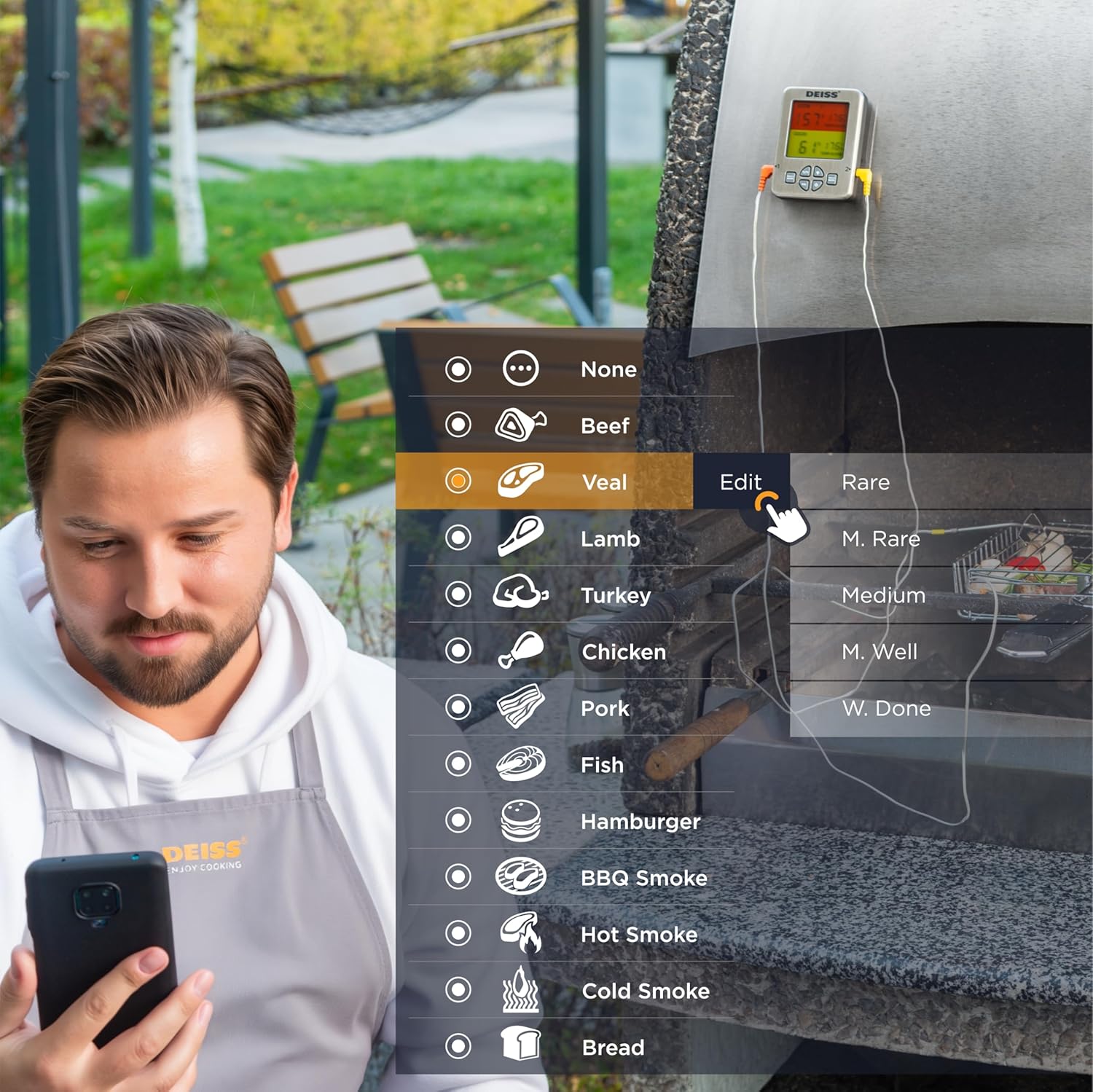
Figure 5: Customizing temperature settings in the app.
- Đặt hẹn giờ: The app allows you to set a countdown timer for your cooking.

Utilize the timer function.
- Biểu đồ nhiệt độ: View a historical graph of the temperature readings for better cooking insights.

View temperature trends.
- Nhận thông báo: The app will send real-time alerts to your phone when the target temperature is reached, or if the temperature deviates significantly. The thermometer unit also has an audible alarm.

Receive alerts for perfect doneness.
4.3. Unit Controls
- Công tắc °C/°F: Press the "C/F" button on the unit to toggle between Celsius and Fahrenheit temperature display.

Chuyển đổi giữa độ C và độ F.
- Kiểm soát âm lượng: Use the "VOL" button to adjust the alarm volume.
- Đèn nền: The unit features a backlight for easy reading in low light conditions.

Figure 6: Thermometer unit controls and features.
5. Chăm sóc và bảo dưỡng
- Đầu dò làm sạch: The stainless steel probes are food-safe and designed to withstand high temperatures. After each use, wipe the probes clean with a damp cloth and mild detergent. Rinse thoroughly and dry completely before storage. Do not immerse the entire probe cable or the main unit in water.
- Đơn vị vệ sinh: Wipe the thermometer unit with a soft, damp vải. Không sử dụng chất tẩy rửa có tính mài mòn hoặc nhúng thiết bị vào nước.
- Kho: Store the thermometer and probes in a clean, dry place when not in use. The unit has a hanging hole and internal magnets for convenient storage.

Figure 7: Multiple mounting and storage options.
- Thay thế pin: Replace AAA batteries when the display indicates low power or the unit does not turn on.
KHAI THÁC. Xử lý sự cố
| Vấn đề | Nguyên nhân có thể | Giải pháp |
|---|---|---|
| Nhiệt kế không bật. | Pin chết hoặc lắp không đúng cách. | Thay pin bằng pin AAA mới, đảm bảo lắp đúng cực. |
| Không có kết nối Bluetooth. | Bluetooth is off on phone; app not open; device out of range; interference. | Ensure Bluetooth is enabled on your phone. Open the "Deiss Thermo" app. Move closer to the thermometer unit. Avoid strong electromagnetic interference. Restart both the thermometer and the app. |
| Đo nhiệt độ không chính xác. | Probe not inserted correctly; probe damaged; temperature range exceeded. | Ensure the probe is inserted into the thickest part of the meat, away from bones. Check probes for visible damage. Ensure temperatures are within the specified range (32-572°F / 0-300°C). |
| App alarms are not working or are too frequent. | App notification settings; incorrect temperature set points. | Check your phone's notification settings for the "Deiss Thermo" app. Verify the target temperature settings in the app are correct for your desired doneness. Adjust alarm interval settings in the app if available. |
| Màn hình mờ hoặc nhấp nháy. | Pin yếu. | Thay pin. |
7. Thông số kỹ thuật sản phẩm
| Tính năng | Chi tiết |
|---|---|
| Số hiệu mẫu | DT-116A |
| Kích thước sản phẩm | 3.86 x 2.93 x 1 inch; 8.15 ounce |
| Phạm vi nhiệt độ | 32°F đến 572°F (0°C đến 300°C) |
| Probe Withstand Temperature | Lên đến 716 ° F (380 ° C) |
| Sự chính xác | ±1.8°F (±1°C) resolution |
| Kết nối | Bluetooth |
| Nguồn điện | 2 pin AAA (có kèm theo) |
| Kiểu hiển thị | Màn hình LCD kỹ thuật số có đèn nền |
| Vật liệu thăm dò | Thép không gỉ |
| Vật liệu bên ngoài | Nhựa |
| Hướng dẫn chăm sóc | An toàn khi sử dụng trong lò nướng (đầu dò), dễ dàng lau chùi (thân máy) |
| Nhà sản xuất | Deiss Kitchenware |
| Nước xuất xứ | Trung Quốc |

Hình 8: Kích thước sản phẩm.
8. Bảo hành và Hỗ trợ
For warranty information, technical support, or any inquiries regarding your Deiss PRO Bluetooth Meat Thermometer, please contact Deiss Kitchenware customer service or visit their official website. Refer to the product packaging or the Deiss Thermo app for specific contact details.
You can also visit the Deiss Store on Amazon for more information: Deiss Kitchenware Store.
Ask a question about this manual
Ask about setup, troubleshooting, compatibility, parts, safety, or missing instructions. Manuals+ will review the question and use this page’s manual context to help answer it.