
1. Giới thiệu
This manual provides detailed instructions for the installation, setup, operation, and maintenance of your Decdeal WKQ-BL WLAN Thermostat. This programmable room thermostat is designed for water underfloor heating systems and features remote control via the Tuya app. Please read this manual thoroughly before installation and use to ensure proper function and safety.
2. Thông tin an toàn
- Việc lắp đặt phải được thực hiện bởi thợ điện có trình độ theo đúng quy định về điện tại địa phương.
- Hãy đảm bảo ngắt nguồn điện trước khi lắp đặt hoặc bảo trì để tránh bị điện giật.
- This thermostat is designed for 230V systems. Verify your system's voltage trước khi kết nối.
- Do not use this thermostat for electric underfloor heating systems. It is specifically for water underfloor heating and boiler-controlled heating.
- Tránh để thiết bị tiếp xúc với nước và môi trường có độ ẩm cao.
3. Sản phẩm hếtview
The Decdeal WKQ-BL WLAN Thermostat offers precise temperature control for your home. It features an LCD display, Wi-Fi connectivity for remote control via the Tuya app, and a 6+1 programmable function for customized heating schedules.
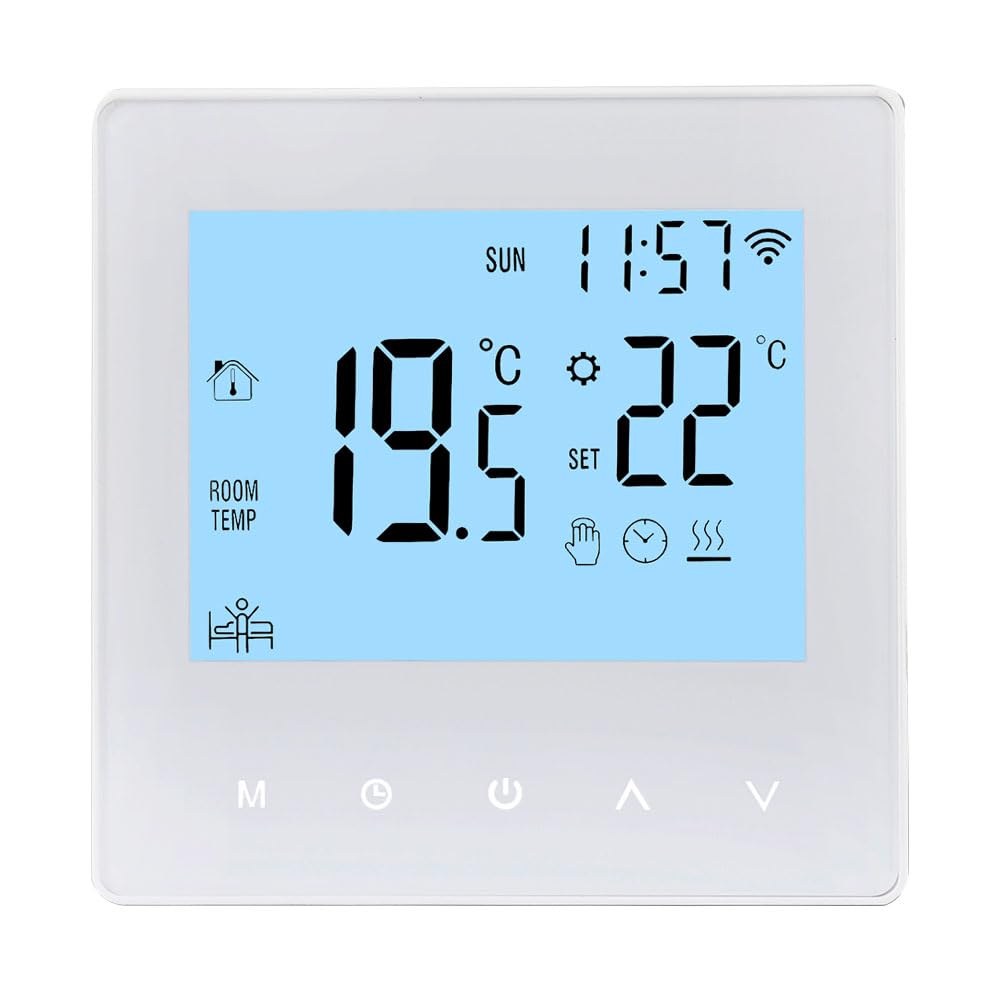
Image: The Decdeal WKQ-BL WLAN Thermostat shown alongside its control interface on the Tuya mobile application. This illustrates the remote control capability.

Hình ảnh: Một chi tiết view of the Decdeal WKQ-BL thermostat's LCD screen and physical buttons. Labels indicate functions such as Time, Week, Room Temperature, Heat indicator, Programming, Manual mode, Mode selection, Clock setting, Power, Up, Down, and Wi-Fi status.
4. Cài đặt
The thermostat is designed for wall mounting. Ensure the installation location is free from direct sunlight, drafts, or other heat sources that could affect temperature readings. Connect the thermostat to your water underfloor heating system's wiring according to the provided wiring diagram (not included in this general manual, refer to product packaging for specific diagrams). Remember to disconnect power before beginning installation.
5. Thiết lập
5.1 Bật nguồn ban đầu
After successful installation and power connection, the thermostat's LCD screen will illuminate, displaying current room temperature and time.

Image: The Decdeal WKQ-BL thermostat displaying its LCD color screen, showing room temperature, set temperature, time, and Wi-Fi status in a living room setting.
5.2 Wi-Fi and App Connection (Tuya App)
- Download the Tuya Smart app from your mobile device's app store.
- Đăng ký hoặc đăng nhập vào tài khoản Tuya Smart của bạn.
- Ensure your mobile phone's Wi-Fi and Bluetooth are enabled simultaneously.
- Switch your Wi-Fi network to a 2.4GHz band or use a mobile phone hotspot for the initial connection process.
- Follow the in-app instructions to add your Decdeal WKQ-BL thermostat. This typically involves putting the thermostat into pairing mode (refer to the device's specific instructions for pairing mode activation, usually by holding a button).
- Once connected, you can control the thermostat remotely via the Tuya app.
6. Hướng dẫn vận hành
6.1 Manual and Automatic Operation
The thermostat supports both manual and automatic (programmable) operation modes. You can switch between these modes using the designated button on the thermostat or through the Tuya app.

Image: A hand interacting with the Decdeal WKQ-BL thermostat, illustrating its manual and automatic operation capabilities. The display shows current temperature and settings.
6.2 Programming Function (6+1 Schedule)
The thermostat features a 6+1 programming function, allowing you to set different temperature schedules for weekdays (6 periods) and weekends (1 period). This optimizes energy consumption and comfort.

Image: A table illustrating the programming options for the Decdeal WKQ-BL thermostat, showing key, option, icon, time, and adjustable default temperatures for workday and holiday schedules. Below the table, the thermostat is shown in a living room setting, with the Tuya app on a phone.
Để thiết lập chương trình:
- Access the programming menu on the thermostat or via the Tuya app.
- For each period (e.g., morning, day, evening, night for weekdays, and specific times for holidays), set the desired start time and target temperature.
- Save your settings. The thermostat will then automatically adjust the heating according to your schedule.
7. Bảo trì
Để đảm bảo hiệu suất tối ưu và tuổi thọ của bộ điều nhiệt, hãy làm theo các hướng dẫn bảo trì đơn giản sau:
- Lau sạch lưới lọc của bộ điều nhiệt và...asinThường xuyên lau chùi bằng khăn mềm, khô. Tránh sử dụng chất tẩy rửa có tính mài mòn hoặc dung môi.
- Do not attempt to open or repair the thermostat yourself. Refer to qualified service personnel for any issues.
- Ensure the area around the thermostat is clear of obstructions that could block airflow or affect temperature readings.
KHAI THÁC. Xử lý sự cố
| Vấn đề | Nguyên nhân có thể | Giải pháp |
|---|---|---|
| Bộ điều nhiệt không hoạt động | Không có nguồn điện; đấu dây sai | Check circuit breaker; verify wiring connections (consult electrician if unsure). |
| Cannot connect to Wi-Fi/Tuya app | Incorrect Wi-Fi band; Bluetooth off; incorrect pairing procedure | Ensure 2.4GHz Wi-Fi; enable Bluetooth; follow app pairing instructions carefully. |
| Đọc nhiệt độ có vẻ không chính xác | Thermostat exposed to drafts/direct sunlight; sensor issue | Relocate thermostat if possible; ensure no external factors are influencing the sensor. |
| Heating not turning on/off as scheduled | Incorrect programming; thermostat in manual mode | Review and adjust programming schedule; ensure thermostat is in automatic mode. |
9. Thông số kỹ thuật
| Tính năng | Đặc điểm kỹ thuật |
|---|---|
| Thương hiệu | Giảm giá |
| Tên mẫu | WKQ-BL |
| Kích thước sản phẩm | 3.9D x 8.6W x 8.6H cm |
| Loại điều khiển | Trợ lý Google, Điều khiển từ xa (qua ứng dụng) |
| Tính năng đặc biệt | Remote control via app, programmable |
| Màu sắc | Màu xanh nhạt |
| Sử dụng cụ thể | Boiler-controlled heating, water underfloor heating |
| Loại kiểm soát nhiệt độ | Có thể lập trình |
| Công nghệ kết nối | Wi-Fi |
| Nguồn điện | Điện có dây |
| Tậptage | 230 vôn |
| Kiểu hiển thị | Màn hình tinh thể lỏng |
| Giao thức truyền thông | Wi-Fi |
| Kiểu lắp đặt | Treo tường |
| Đèn nền | Đúng |
| Trọng lượng sản phẩm | 210 gam |
| Hình dạng | Quảng trường |
| Phong cách | Nhỏ gọn |
| Vật liệu | Acrylonitrile Butadiene Styrene (ABS) |
10. Bảo hành và Hỗ trợ
For warranty information or technical support, please refer to the documentation included with your product packaging or contact Decdeal customer service. Keep your purchase receipt as proof of purchase.