
1. Giới thiệu
This user manual provides detailed instructions for the installation, operation, and maintenance of your Rettru 4K Wireless WiFi Camera, Model Q18. Please read this manual thoroughly before using the product to ensure proper functionality and safety. This camera is designed for indoor and outdoor surveillance, offering high-resolution video and advanced detection features.
2. Nội dung gói hàng
Kiểm tra xem tất cả các mặt hàng được liệt kê dưới đây có trong gói hàng của bạn không. Nếu có bất kỳ mặt hàng nào bị thiếu hoặc hư hỏng, vui lòng liên hệ với bộ phận hỗ trợ khách hàng.
- 1 x Rettru Q18 Camera
- 1 x đế từ
- 1 x Micro SD Card Reader
- 1 x Cáp USB
- 1 x Hướng dẫn sử dụng
3. Sản phẩm hếtview
The Rettru Q18 camera is a compact and versatile surveillance device. It features a 4K (2560x1440) resolution lens, a 160-degree wide-angle view, and an 1800mAh built-in battery for extended operation. Its small size allows for discreet placement.
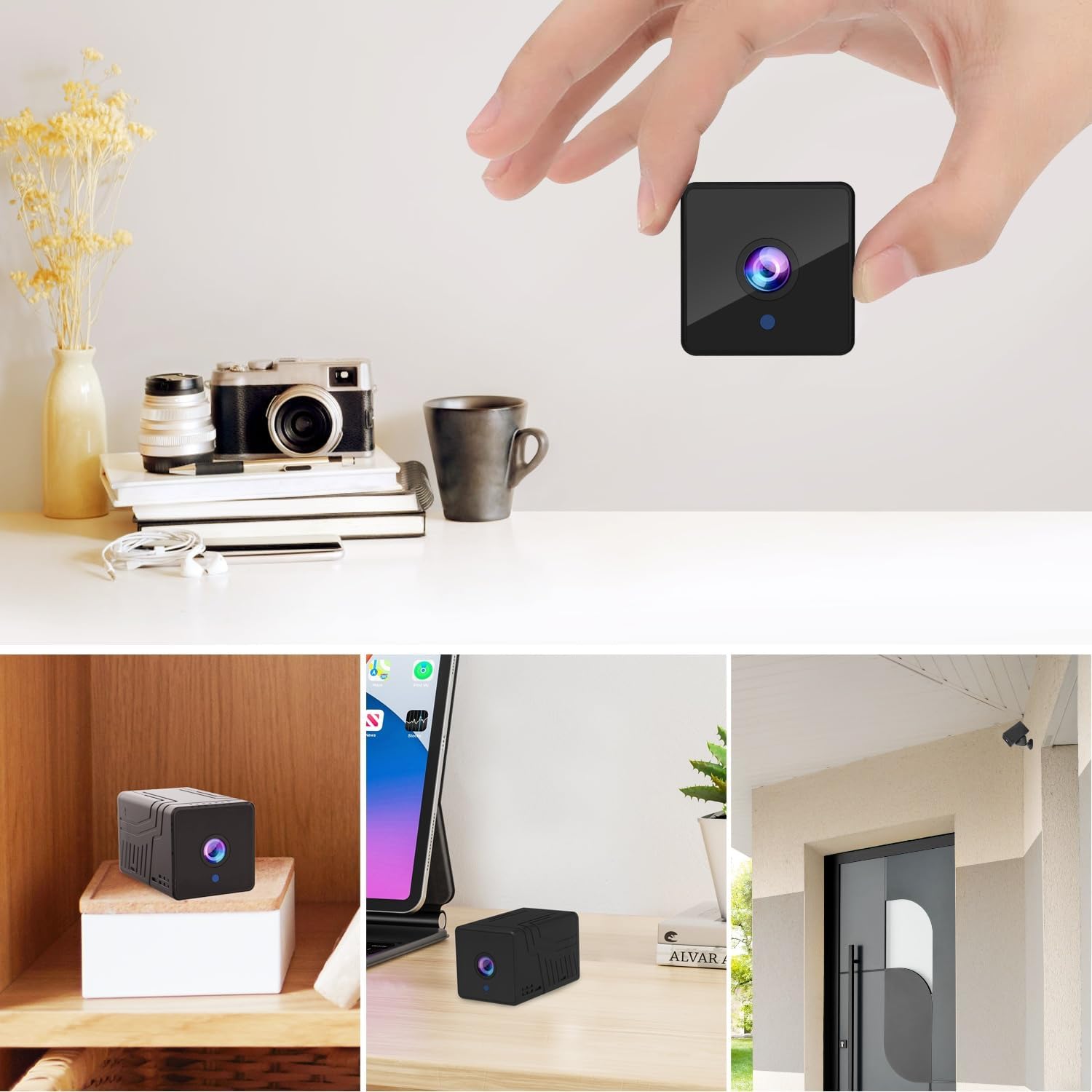
Hình 3.1: Đằng trước view of the Rettru Q18 camera with its magnetic base. This image highlights the compact design and the lens of the camera.

Hình 3.2: The Rettru Q18 camera shown in different indoor and outdoor settings, demonstrating its small size and ease of concealment. The image illustrates its "Super Tiny, Easy to Hide" characteristic.
4. Hướng dẫn thiết lập
4.1 Sạc ban đầu
Before first use, fully charge the camera using the provided USB cable and a standard 5V USB power adapter (not included). The built-in 1800mAh battery provides approximately 6 hours of continuous recording or up to 100 days of standby time.

Hình 4.1: Graphic illustrating the 1800mAh battery capacity of the Rettru Q18 camera, highlighting its 6-hour continuous recording and 100-day ultra-long standby capabilities.
4.2 Tải xuống và kết nối ứng dụng
To operate the camera and access its features, you need to download the "V380 Pro" application on your smartphone.
- Tải ứng dụng: Tìm kiếm "V380 Pro" in your smartphone's app store (Google Play Store for Android or Apple App Store for iOS) and install it.
- Bật nguồn máy ảnh: Turn on the Rettru Q18 camera. Refer to the camera's physical buttons for power control.
- Kết nối với Wi-Fi: Làm theo hướng dẫn trong ứng dụng để kết nối camera với mạng Wi-Fi tại nhà. Ghi chú: The camera only supports 2.4GHz Wi-Fi networks. Ensure your router is configured for 2.4GHz or has a mixed mode enabled.
- Sống View: Once connected, you can access the live video feed and control the camera through the V380 Pro app.
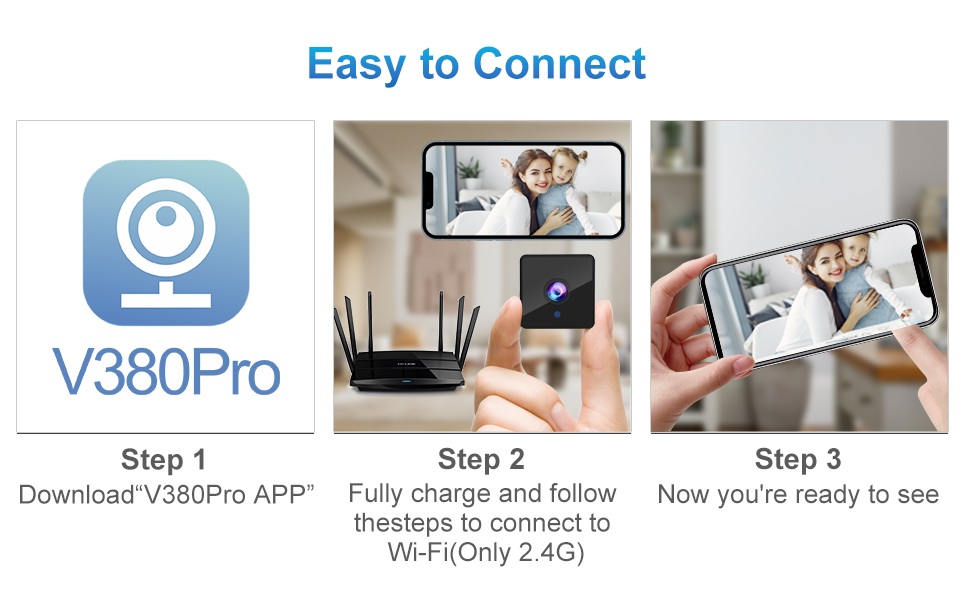
Hình 4.2: Visual guide for connecting the Rettru Q18 camera using the V380 Pro app, showing steps for app download, charging, and Wi-Fi connection.
5. Hướng dẫn vận hành
5.1 Live Video Monitoring
Open the V380 Pro app on your smartphone. Select your camera from the device list to view the live 2K Ultra HD video feed. You can pan, tilt, and zoom digitally within the app if supported by the camera's software.
5.2 Ghi và Lưu trữ
The camera supports local storage via a Micro SD card (up to 128GB). Insert the Micro SD card into the designated slot on the camera. The camera will automatically begin recording based on your settings (e.g., continuous recording, motion-activated recording). Recorded video files are in AVI format. Ghi chú: Due to Amazon's policy, recorded videos do not include audio.
5.3 Tầm nhìn ban đêm
The Rettru Q18 camera is equipped with 8 straw hat 940nm infrared lights for automatic night vision. The IR-CUT feature ensures clear black and white video in low-light conditions, with a night vision range of up to 28 feet. The camera automatically switches between day and night modes.
Hình 5.1: Comparison of day and night vision capabilities of the Rettru Q18 camera, showing automatic IR ON/OFF and enhanced night vision up to 26ft.
5.4 Phát hiện chuyển động và cảnh báo
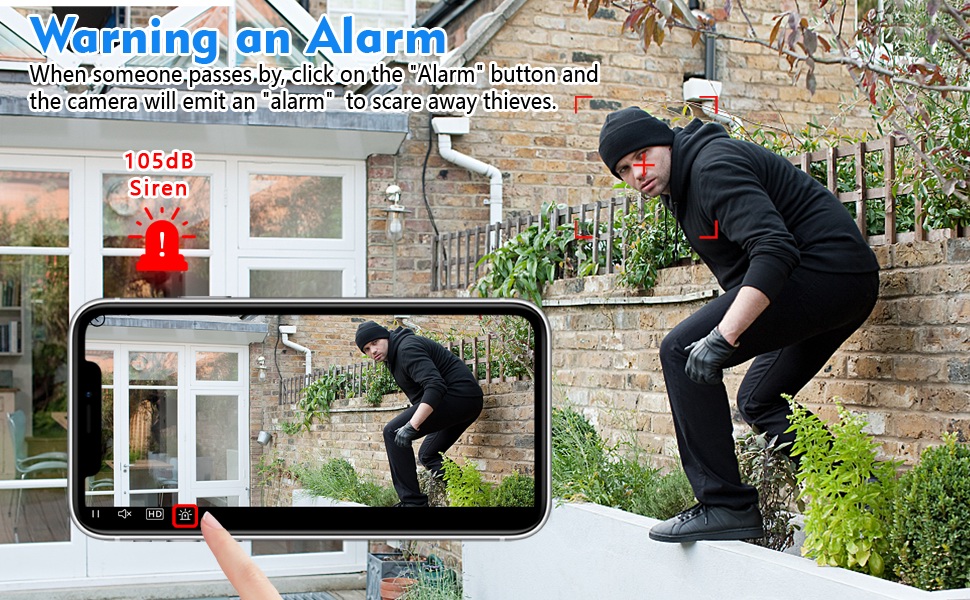
The camera features AI Human Detection, which can distinguish human movement from other motions, reducing false alarms. When motion is detected, the camera can send alert notifications to your smartphone via the V380 Pro app. You can also activate a built-in 105dB siren through the app to deter intruders.
Hình 5.2: Illustration of the camera's alarm function, showing a user activating a 105dB siren via the app to deter a potential intruder.
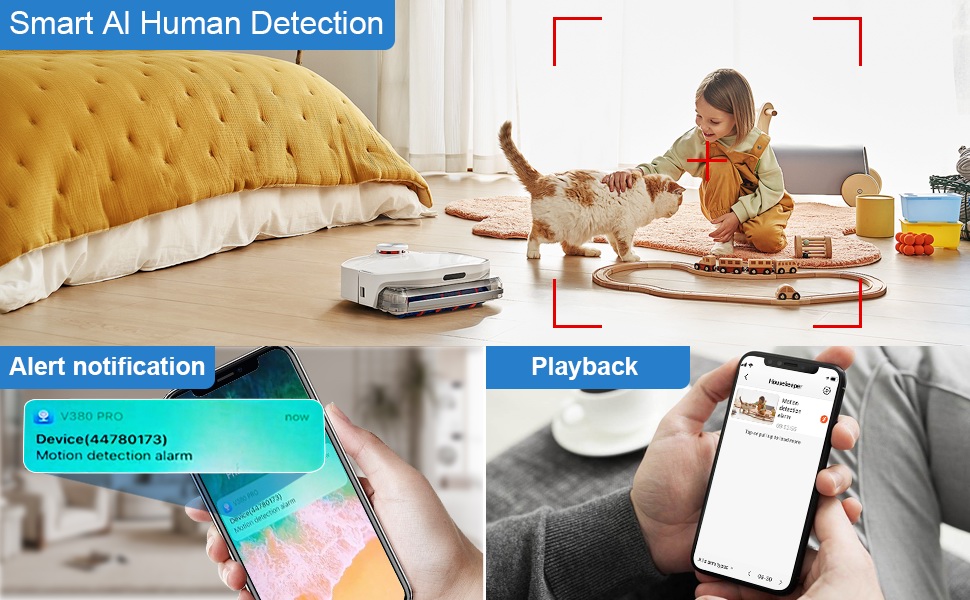
Hình 5.3: Depiction of the Smart AI Human Detection feature, showing how the camera identifies human movement and sends alert notifications to the V380 Pro app.
5.5 Giao tiếp hai chiều
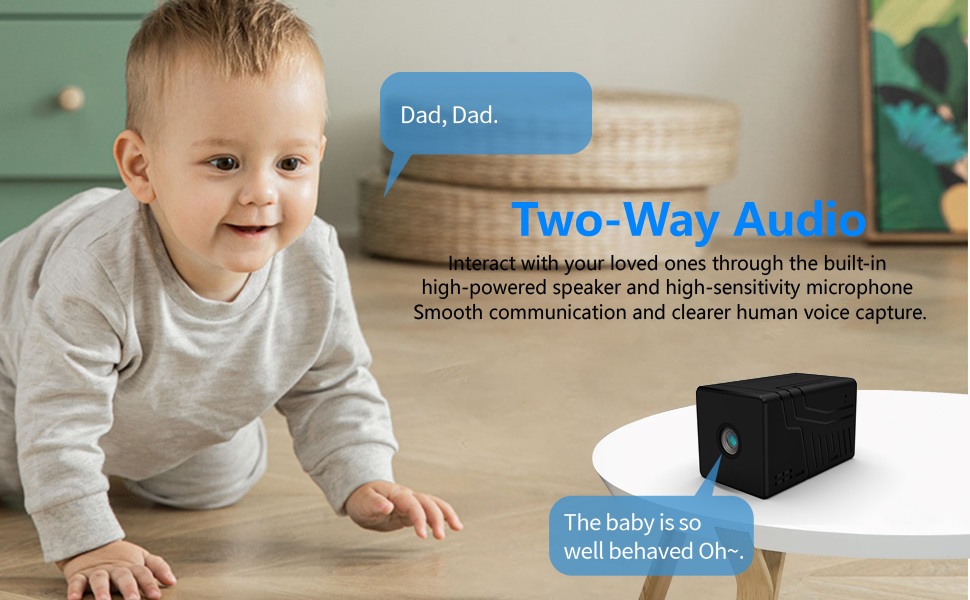
The camera supports two-way communication through its built-in high-powered speaker and high-sensitivity microphone. This allows you to interact with individuals near the camera via the V380 Pro app. Please note that while two-way communication is supported, recorded video files do not contain audio.

Hình 5.4: An image illustrating the two-way audio capability of the Rettru Q18 camera, showing communication between a parent and a child.
6. Các tính năng chính
- Độ phân giải Ultra HD 2K: Records video at 2560x1440 (5 Megapixels) for clear and detailed footage.
- Rộng ViewGóc ing: 160-degree lens captures a broad area.
- Tuổi thọ pin dài: Equipped with an 1800mAh dual lithium battery, offering up to 6 hours of continuous recording or 100 days of standby.
- Nâng cao tầm nhìn ban đêm: Automatic IR-CUT with 940nm infrared lights provides clear night vision up to 28 feet without a visible red glow.
- AI Phát hiện con người: Intelligent motion detection reduces false alarms by focusing on human shapes.
- Instant Alerts & Siren: Receive smartphone notifications upon motion detection and activate a 105dB siren remotely.
- Giao tiếp hai chiều: Speak and listen through the camera via the V380 Pro app (recorded video is without audio).
- Lưu trữ cục bộ: Hỗ trợ thẻ nhớ Micro SD dung lượng lên đến 128GB để lưu trữ video.
- Thiết kế nhỏ gọn: Small and lightweight, suitable for discreet placement indoors or outdoors (IP65 rated).
- Kết nối Wi-Fi: Connects to 2.4GHz Wi-Fi networks for remote access.
7. Bảo trì
7.1 Vệ sinh máy ảnh
To maintain optimal performance, regularly clean the camera lens and body. Use a soft, dry cloth to wipe away dust and smudges. For stubborn dirt on the lens, use a lens cleaning solution specifically designed for optical surfaces. Avoid using harsh chemicals or abrasive materials.
7.2 Chăm sóc pin
To prolong battery life, avoid exposing the camera to extreme temperatures. If storing the camera for an extended period, ensure it is partially charged (around 50%) and recharge it every few months to prevent deep discharge.
7.3 cập nhật chương trình cơ sở
Periodically check the V380 Pro app for available firmware updates. Keeping your camera's firmware up-to-date ensures you have the latest features, security enhancements, and bug fixes.
KHAI THÁC. Xử lý sự cố
| Vấn đề | Giải pháp khả thi |
|---|---|
| Camera không bật được. | Ensure the camera is fully charged. Connect it to a power source using the USB cable and check if the charging indicator light is on. |
| Không thể kết nối với Wi-Fi. |
|
| Chất lượng video kém hoặc bị trễ. |
|
| Không nhận được cảnh báo phát hiện chuyển động. |
|
| Thẻ SD không ghi được. |
|
9. Thông số kỹ thuật
| Tính năng | Chi tiết |
|---|---|
| Số hiệu mẫu | Câu hỏi 18 |
| Độ phân giải quay video | 2K (2560x1440) |
| Độ phân giải tĩnh hiệu quả | 5MP |
| Viewgóc ing | 160 Độ |
| Giao thức kết nối | Wi-Fi (chỉ 2.4 GHz) |
| Loại bộ điều khiển | Ứng dụng V380 Pro |
| Nguồn điện | Sử dụng pin (Lithium Ion 1800mAh) |
| Tuổi thọ pin | Approx. 6 hours continuous recording, 100 days standby |
| Tầm nhìn ban đêm | Lên đến 28 feet |
| Kho | Thẻ Micro SD (tối đa 128GB, không bao gồm) |
| Định dạng quay video | AVI |
| Loại cảnh báo | Chỉ nhận diện chuyển động (Phát hiện người bằng AI) |
| Bảo vệ quốc tế Rating | IP65 |
| Trọng lượng sản phẩm | 75 gam (2.65 ounce) |
| Kích thước sản phẩm | 21.6 x 13.3 x 13.3 inches (packaging dimensions, actual camera is smaller) |
| Nhà sản xuất | Rettru |
10. Thông tin an toàn
- Do not expose the camera to extreme temperatures, direct sunlight for prolonged periods, or excessive moisture.
- Chỉ sử dụng cáp USB được cung cấp để sạc.
- Để máy ảnh và các phụ kiện của máy ảnh ngoài tầm với của trẻ em và vật nuôi.
- Không được tháo rời hoặc sửa đổi máy ảnh. Việc này sẽ làm mất hiệu lực bảo hành và có thể gây hư hỏng.
- Hãy đảm bảo camera được lắp đặt chắc chắn để tránh bị rơi.
- Respect privacy laws and regulations when using surveillance equipment.
11. Bảo hành và Hỗ trợ
For warranty information or technical support, please refer to the contact details provided with your purchase or visit the official Rettru webtrang web. Giữ lại biên lai mua hàng làm bằng chứng mua hàng cho bất kỳ khiếu nại bảo hành nào.