
1. Giới thiệu
Thank you for choosing the Aigo AC SE 360 Rainbow 360mm Water Cooler. This all-in-one liquid cooling solution is designed to provide efficient thermal management for your high-performance CPU, featuring a 360mm triple radiator and vibrant ARGB lighting. This manual provides essential information for proper installation, operation, and maintenance to ensure optimal performance and longevity of your product.

Image 1.1: Aigo AC SE 360 Rainbow 360mm Water Cooler assembled view.
2. Thông tin an toàn
- Luôn ngắt nguồn điện khỏi máy tính trước khi cài đặt hoặc bảo trì.
- Xử lý các bộ phận một cách cẩn thận để tránh hư hỏng.
- Đảm bảo nối đất thích hợp để ngăn ngừa các mối nguy hiểm về điện.
- Giữ sản phẩm tránh xa độ ẩm và nhiệt độ khắc nghiệt.
- Do not attempt to open the pump or radiator, as this may void the warranty and cause leaks.
- Để xa tầm tay trẻ em.
3. Nội dung gói hàng
Xác minh rằng tất cả các thành phần được liệt kê dưới đây đều có trong gói của bạn:
- 1x Aigo AC SE 360 Water Cooler Unit (Radiator, Pump/CPU Block, Tubing)
- 3 quạt ARGB 120mm
- Mounting Hardware for Intel Sockets (LGA 115X, 1200, 1700, 2011, 2066)
- Mounting Hardware for AMD Sockets (AM2, AM3, AM4, AM5)
- Keo tản nhiệt
- Vít quạt và vít tản nhiệt
- ARGB Controller (if included with your specific model)
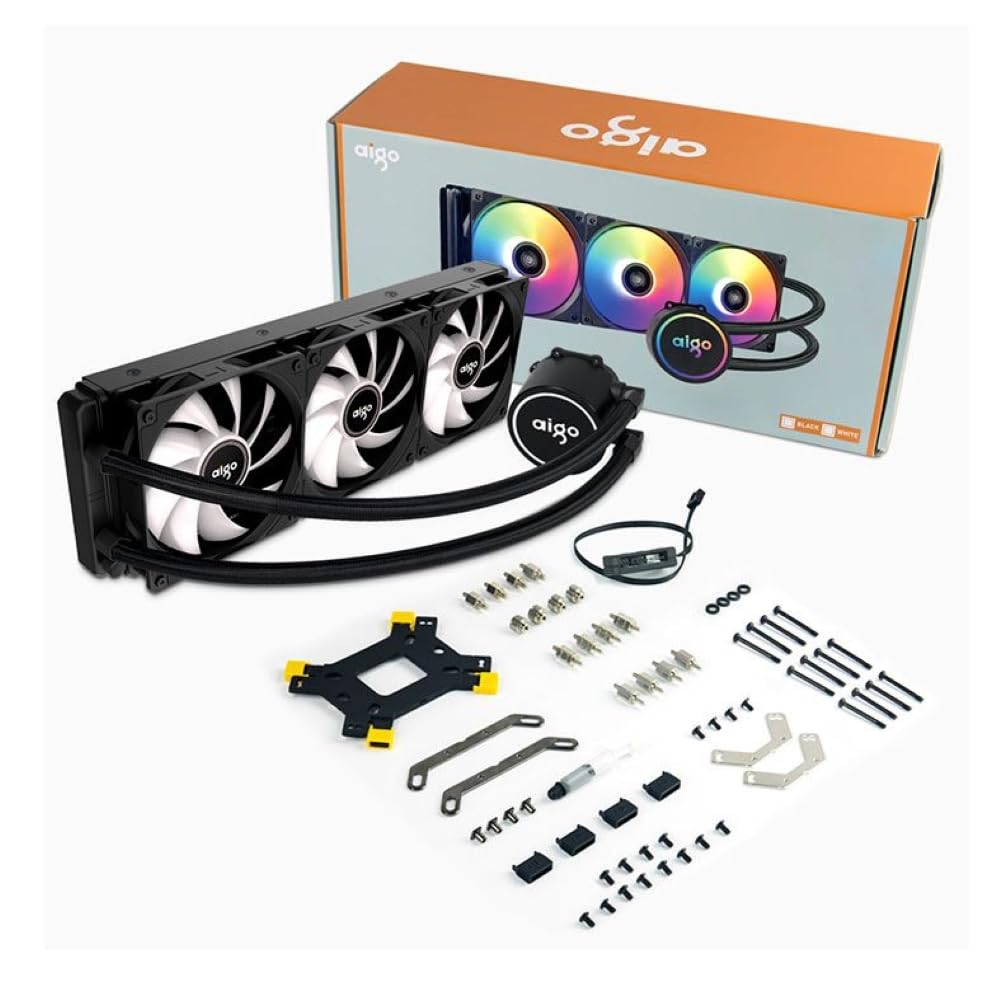
Image 3.1: All components included in the Aigo AC SE 360 package.
4. Thiết lập và Cài đặt
Follow these steps for proper installation of your Aigo AC SE 360 Water Cooler:
- Chuẩn bị bo mạch chủ: Install the appropriate backplate and standoffs for your CPU socket (Intel: 115X, 1200, 1700, 2011, 2066; AMD: AM2, AM3, AM4, AM5). Refer to your motherboard manual for specific instructions.
- Bôi keo tản nhiệt: Clean the CPU surface. Apply a small amount of thermal paste to the center of the CPU IHS (Integrated Heat Spreader).
- Mount the CPU Block/Pump: Carefully place the CPU block onto the CPU, aligning it with the standoffs. Secure it with the provided screws, tightening them in a diagonal pattern until snug. The magnetic block design allows for easy rotation to align the logo or tubing as desired.
- Install Fans to Radiator: Attach the three 120mm ARGB fans to the radiator using the longer screws provided. Ensure the fan airflow direction is correct for your case configuration (typically blowing air through the radiator).
- Lắp bộ tản nhiệt: Install the radiator assembly into your PC case. The 360mm radiator is compatible with most ATX cases that support this size. Secure it with the appropriate screws.
- Connect Fans (Daisy Chain): The fans feature a daisy chain connection system. Connect the fans to each other in series, then connect the final fan's cable to the motherboard's fan header or an ARGB controller. This simplifies cable management by reducing the number of cables.
- Kết nối đèn ARGB: Connect the ARGB cables from the fans and pump to a 3-pin, 5V ARGB header on your motherboard or a dedicated ARGB controller. Ensure the voltage is correct (5V) to prevent damage.
- Connect Pump Power: Connect the pump's 4-pin power connector to a dedicated AIO_PUMP or CPU_FAN header on your motherboard.
- Quản lý cáp: Organize all cables neatly to ensure proper airflow and a clean build.
5. Hướng dẫn vận hành
Once installed, the Aigo AC SE 360 Water Cooler operates automatically to maintain optimal CPU temperatures. Here are key operational aspects:
- Làm mát tự động: The pump and fans will adjust their speed based on CPU temperature, ensuring efficient cooling. The pump operates at 12V with 3200 RPM, and fans operate between 800-1800 RPM.
- Điều khiển ánh sáng ARGB: The Rainbow ARGB lighting can be controlled via your motherboard's ARGB software (if connected to a compatible header) or through an included ARGB controller. This allows for various lighting effects and synchronization with other ARGB components.
- Mức độ tiếng ồn: The cooler is designed for quiet operation, with a noise level of approximately 30 dB.
6. Bảo trì
Regular maintenance helps ensure the longevity and performance of your water cooler:
- Vệ sinh bụi: Thường xuyên vệ sinh các lá tản nhiệt và cánh quạt để ngăn bụi bám vào, vì bụi có thể cản trở luồng khí và hiệu suất làm mát. Sử dụng khí nén hoặc bàn chải mềm.
- Kiểm tra ống: Kiểm tra ống xem có dấu hiệu gấp khúc, rò rỉ hoặc hư hỏng nào không.
- Theo dõi nhiệt độ: Use monitoring software to keep an eye on your CPU temperatures. Significant increases may indicate a need for further inspection or cleaning.
- Keo tản nhiệt: While not frequently required, reapplying thermal paste every few years can help maintain optimal thermal transfer.
KHAI THÁC. Xử lý sự cố
If you encounter issues with your Aigo AC SE 360 Water Cooler, refer to the following common problems and solutions:
| Vấn đề | Nguyên nhân có thể | Giải pháp |
|---|---|---|
| Nhiệt độ CPU cao | Insufficient thermal paste, poor contact, dust buildup, pump failure, fan failure. | Reapply thermal paste, ensure CPU block is securely mounted, clean radiator and fans, check pump/fan connections. |
| Quạt không quay | Loose fan connection, incorrect fan header, faulty fan. | Check fan cables and connections, ensure connected to appropriate motherboard header, test fans individually if possible. |
| No ARGB Lighting | Loose ARGB connection, incorrect ARGB header (e.g., 12V instead of 5V), faulty ARGB component. | Verify ARGB cables are securely connected to a 3-pin, 5V ARGB header. Check motherboard manual for correct header. |
| Tiếng động bất thường | Air bubbles in loop, fan rubbing, pump issue. | Gently tilt the PC case to help dislodge air bubbles. Check for obstructions around fans. If pump noise persists, contact support. |
8. Thông số kỹ thuật
| Tính năng | Chi tiết |
|---|---|
| Người mẫu | AC SE 360 |
| Kích thước bộ tản nhiệt | 360 mm (394 x 120 x 27 mm) |
| Kích thước quạt | 120mm |
| Tốc độ quạt | 800-1800 vòng/phút |
| Luồng không khí | 64.05 CFM |
| Áp suất tĩnh | 1.85 mmH₂O |
| Mức độ tiếng ồn | 30 dB |
| Bơm Voltage | 12 vôn |
| Tốc độ bơm | 3200 vòng/phút |
| Tiêu thụ điện năng | 3.24 Watt |
| Loại vòng bi | Vòng bi gốm |
| TDP Supported | 280W |
| Ổ cắm tương thích | Intel (LGA 115X, 1200, 1700, 2011, 2066), AMD (AM2, AM3, AM4, AM5) |
| Đầu nối nguồn | 4 chân |
| Trình kết nối ARGB | 3 chân, 5V |
9. Bảo hành và Hỗ trợ
The Aigo AC SE 360 Water Cooler comes with a Bảo hành 12 tháng kể từ ngày mua. Bảo hành này bao gồm các lỗi sản xuất trong điều kiện sử dụng bình thường.
For technical support, warranty claims, or any questions not covered in this manual, please contact your retailer or the Aigo customer support team. Please have your proof of purchase and product model number (ACSE360) ready when contacting support.