
1. Giới thiệu
Thank you for choosing the Osee LCM215-HDR+ 21.5 Inch Full HD Field Production Monitor. This monitor is designed for professional video production, offering a 1500-nit ultra-high brightness panel, excellent backlight uniformity, and comprehensive input/output options. This manual provides essential information for the safe and efficient use of your monitor, including setup, operation, maintenance, and troubleshooting.
2. Thông tin an toàn
- Nguồn điện: Use only the specified power adapter. Ensure the power source matches the monitor's requirements.
- Thông gió: Do not block ventilation openings. Ensure adequate airflow around the monitor to prevent overheating.
- Nước và độ ẩm: Keep the monitor away from water, rain, and high humidity. Do not operate with wet hands.
- Vệ sinh: Ngắt nguồn điện trước khi vệ sinh. Sử dụng khăn mềm, khô. Tránh sử dụng chất tẩy rửa dạng lỏng hoặc dạng xịt.
- Xử lý: Cẩn thận khi sử dụng màn hình. Tránh làm rơi hoặc va đập mạnh.
- Sửa chữa: Không nên tự ý sửa chữa màn hình. Hãy giao việc bảo dưỡng cho nhân viên kỹ thuật có chuyên môn.
3. Nội dung gói hàng
Xác minh rằng tất cả các mục đều có trong gói hàng của bạn:
- Osee LCM215-HDR+ 21.5 Inch Full HD Ultra-High Brightness Field Production Monitor
- Tấm pin gắn chữ V
- Mũ trùm đầu
- C-Stand Adapter
- Custom Foam Mold
- Chân đế máy tính để bàn
- Cáp nguồn
- Hướng dẫn sử dụng
- Osee 1-Year Limited Warranty Card
4. Sản phẩm hếtview
The Osee LCM215-HDR+ is an upgraded version of the LCM215-HDR monitor, featuring a new 1500-nit ultra-high brightness panel with excellent backlight uniformity. This super 1500-nit screen is approximately 3-4 times brighter than other field monitors, allowing outdoor shooting in direct sunlight without image washout. It does not require a sun hood during use. The LCM215-HDR+ monitor supports various connectors, including 2Ch 3G/HD/SD-SDI input, 1Ch video input, 1 HDMI input, and 1Ch 3G/HD/SD-SDI output. It supports most audio and video formats. The monitor's compatibility makes it suitable for various application scenarios, whether placed on a table, mounted on a rod using a C-stand adapter, or transmitting signals and images wirelessly. It offers superior software functions, including built-in SDR/HDR 3DLUTs. The LCM215-HDR+ provides 30 SDR 3DLUTs to convert log modes to REC 709 for major camera brands like FUJIFILM, GoPro, JVC, Panasonic, RED, and Sony. Additionally, it offers 14 HDR 3DLUTs to further convert log modes.
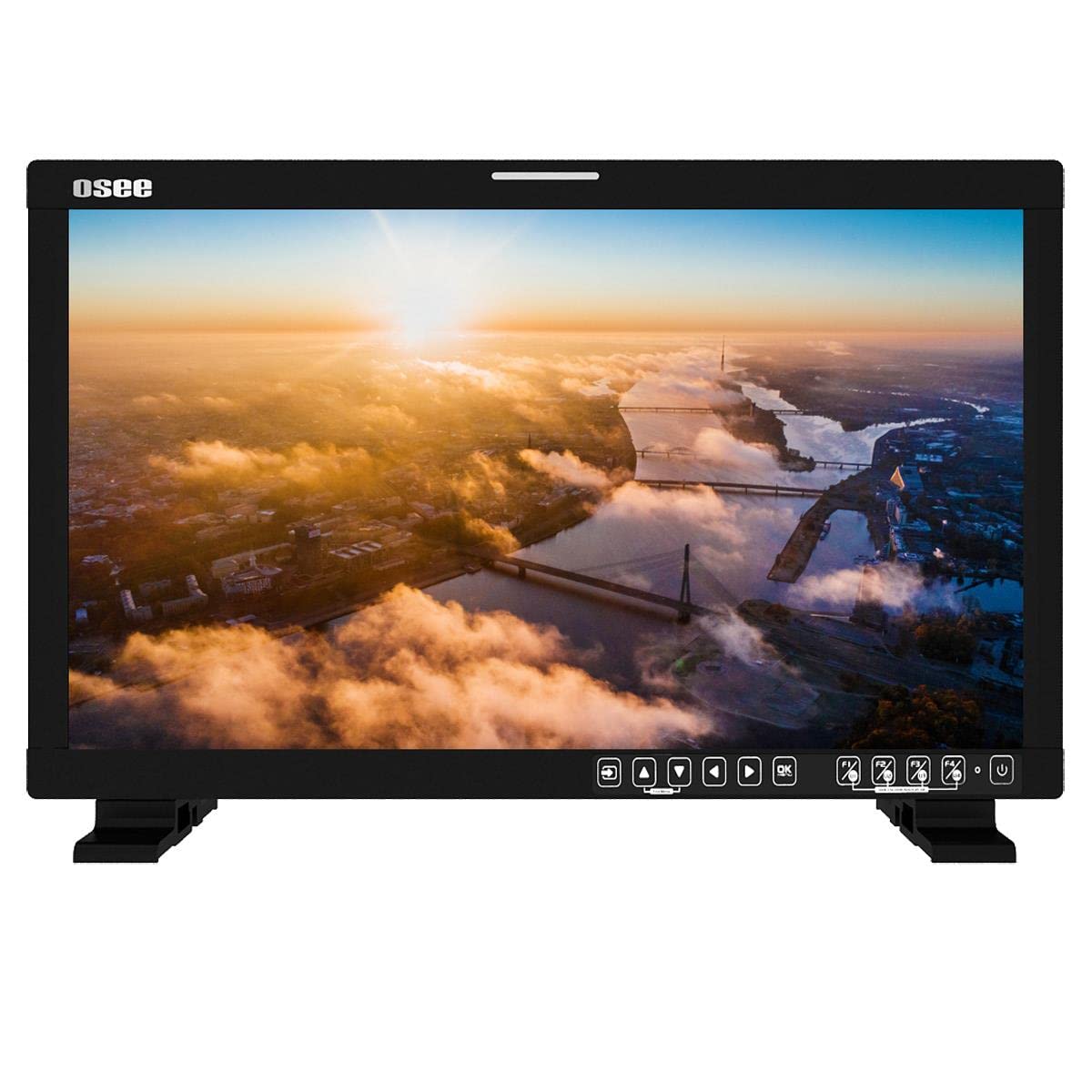
Hình 4.1: Mặt trước view of the Osee LCM215-HDR+ monitor, displaying a vibrant landscape scene.
Hình 4.2: Mặt bên view of the Osee LCM215-HDR+ monitor, showing its slim profile and robust build.

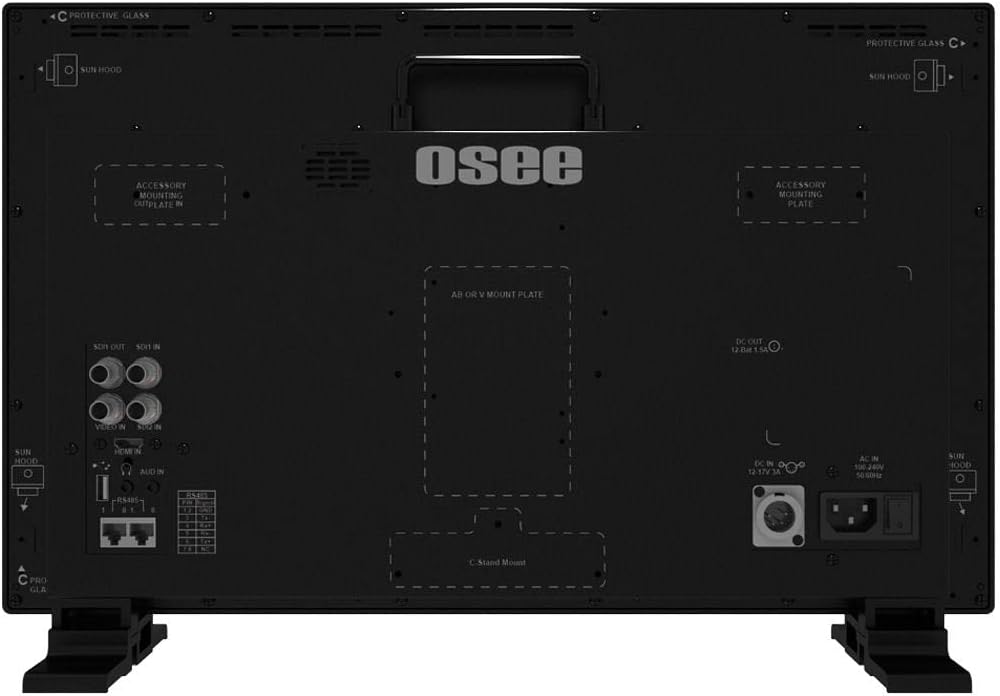
Hình 4.3: Phía sau view of the Osee LCM215-HDR+ monitor, highlighting various input/output ports including SDI, HDMI, and power connections.

Figure 4.4: Osee LCM215-HDR+ monitor displayed with its included accessories: sun hood, C-stand adapter, and V-mount battery plate.

Figure 4.5: Two Osee LCM215-HDR+ monitors in a field production setting, displaying video content from cameras.
5. Thiết lập
5.1 Lắp đặt màn hình
- Sử dụng máy tính để bàn: Attach the provided desktop stand feet to the bottom of the monitor. Ensure they are securely fastened.
- C-Stand Mounting: Use the included C-stand adapter to mount the monitor onto a C-stand or other compatible rod. Secure the adapter firmly to the monitor and the stand.
- Accessory Mounting Plates: The monitor features accessory mounting plates on the rear for additional equipment.
5.2 kết nối nguồn
- Connect the power cable to the AC input port on the rear of the monitor.
- Plug the other end of the power cable into a suitable power outlet (100-240V AC).
- Alternatively, attach a V-mount battery to the V-mount battery plate for portable operation.
5.3 Kết nối đầu vào
The LCM215-HDR+ supports multiple input types:
- SDI: Connect your 3G/HD/SD-SDI sources to the SDI IN ports. The monitor has 2 SDI inputs.
- HDMI: Connect your HDMI source to the HDMI IN port.
- Băng hình: Connect analog video sources to the Video IN port.
The monitor also features 1Ch 3G/HD/SD-SDI output for looping through signals to other devices.
6. Hoạt động
6.1 Bật / Tắt nguồn
Press the power button located on the front panel to turn the monitor on or off. The power indicator light will illuminate when the monitor is on.
6.2 Điều hướng menu
Use the control buttons on the front panel to navigate the on-screen display (OSD) menu. Typically, there are buttons for menu access, navigation (up/down/left/right), and selection (enter).
6.3 Lựa chọn đầu vào
Access the input menu via the OSD to select the desired input source (SDI 1, SDI 2, HDMI, Video).
6.4 Brightness and Picture Settings
Adjust brightness, contrast, saturation, and other picture parameters through the OSD menu. The LCM215-HDR+ offers a super bright 1500-nit display, ideal for outdoor viewđang.
6.5 LUT Functions
The monitor includes built-in 3DLUTs for color management:
- SDR 3DLUTs: Access 30 SDR 3DLUTs to convert log modes from major camera brands (FUJIFILM, GoPro, JVC, Panasonic, RED, Sony) to REC 709.
- HDR 3DLUTs: Utilize 14 HDR 3DLUTs for advanced log mode conversions.
These functions are accessible through the OSD menu, allowing you to apply them to your input signal for accurate monitoring.
6.6 Ngõ ra âm thanh
The monitor features a built-in speaker for audio monitoring. Adjust the volume through the OSD menu.
7. Bảo trì
7.1 Vệ sinh
- Màn hình: Nhẹ nhàng lau màn hình bằng vải mềm, không xơ. Đối với các vết bẩn cứng đầu, hãy lau nhẹampThấm khô khăn bằng nước hoặc dung dịch vệ sinh chuyên dụng cho màn hình (không xịt trực tiếp lên màn hình).
- Thân hình: Lau sạch màn hìnhasinLau sạch bằng khăn mềm, khô. Tránh sử dụng chất tẩy rửa có tính mài mòn hoặc dung môi.
7.2 Lưu trữ
When not in use for extended periods, store the monitor in a cool, dry place, away from direct sunlight and extreme temperatures. Use the custom foam mold and original packaging for protection during transport or storage.
7.3 Battery Care (V-Mount)
If using a V-mount battery, follow the battery manufacturer's guidelines for charging, discharging, and storage to maximize battery life and performance.
KHAI THÁC. Xử lý sự cố
- Không có điện:
- Kiểm tra xem cáp nguồn có được kết nối chắc chắn với cả màn hình và ổ cắm điện hay không.
- If using a V-mount battery, ensure it is charged and properly attached.
- Kiểm tra xem ổ cắm điện có hoạt động không.
- Không có tín hiệu:
- Ensure the input source (camera, video switcher) is powered on and outputting a signal.
- Check that the video cables (SDI, HDMI, Video) are securely connected to both the source and the monitor.
- Hãy kiểm tra xem nguồn đầu vào chính xác đã được chọn trong menu OSD của màn hình chưa.
- Confirm the signal format from your source is supported by the monitor (refer to Specifications).
- Image Problems (Distorted, Flickering, Incorrect Colors):
- Check the video cable for damage or loose connections. Try a different cable if possible.
- Reset the monitor's picture settings to default via the OSD menu.
- Ensure the correct LUT is applied, or disable LUTs to check the raw signal.
- If the issue persists, try connecting a different video source to isolate the problem.
- Không có âm thanh:
- Check the audio settings in the OSD menu and ensure the volume is not muted or set too low.
- Verify that the input source is sending an audio signal.
If you encounter issues not covered here, please contact Osee customer support.
9. Thông số kỹ thuật
| Tính năng | Đặc điểm kỹ thuật |
|---|---|
| Thương hiệu | Osee |
| Số hiệu mẫu | LCM215-HDR+ |
| Kích thước màn hình | 21.5 inch |
| Nghị quyết | FHD 1080p (Native: 1920 x 1080) |
| Kiểu hiển thị | LED-LCD |
| Screen Surface Finish | Bóng loáng |
| Viewgóc ing | 170 độ |
| Đặc trưng | Built-in Speaker, High Dynamic Range |
| Giao diện đầu vào | 2x 3G/HD/SD-SDI, 1x Video, 1x HDMI |
| Giao diện đầu ra | 1x 3G/HD/SD-SDI |
| Đầu vào nguồn điện | AC 100-240V, V-Mount Battery |
| Màu sắc | Đen |
| Sử dụng sản phẩm | Máy tính để bàn |
| Kiểu lắp đặt | Bàn để bàn |
| Mã số UPC | 650971522317 |
| ASIN | B0BZKSSN5D |
10. Bảo hành và Hỗ trợ
The Osee LCM215-HDR+ monitor comes with a 1-year limited warranty. Please refer to the warranty card included in your package for detailed terms and conditions. For technical support, service, or further inquiries, please visit the official Osee webhoặc liên hệ với nhà phân phối địa phương. Giữ lại hóa đơn mua hàng để làm bằng chứng bảo hành.