
Sản phẩm trênview
The Delton S12 Ergonomic Vertical Wireless Mouse is designed for comfort and efficiency, promoting a natural hand and wrist posture. It features a 2.4GHz wireless connection, six buttons, and three adjustable DPI levels for precise control. This manual provides instructions for setup, operation, maintenance, and troubleshooting.

Image: The Delton S12 Ergonomic Vertical Wireless Mouse, showcasing its vertical design.
Cài đặt
1. Tháo dỡ
Carefully remove the mouse and its accessories from the packaging. Ensure all components are present: the Delton S12 Vertical Wireless Mouse and the USB dongle.
2. Lắp đặt pin
The Delton S12 mouse requires two (2) AAA batteries (not included). Follow these steps to install them:
- Xác định vị trí ngăn chứa pin ở mặt dưới của chuột.
- Gently slide open the battery compartment cover.
- Lắp hai pin AAA, đảm bảo lắp đúng cực (+/-).
- Đóng nắp ngăn chứa pin cho đến khi khớp vào đúng vị trí.
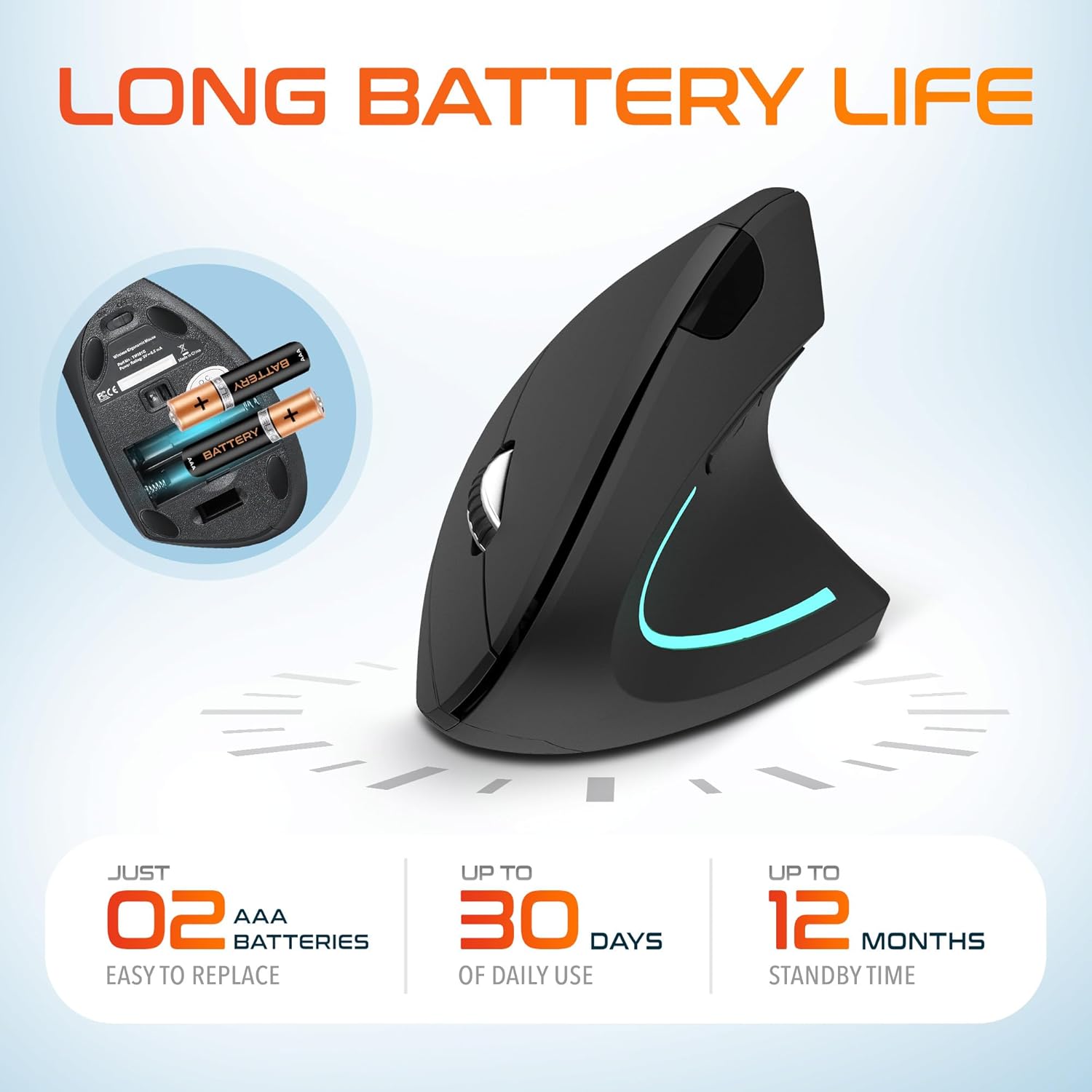
Image: The underside of the Delton S12 mouse with the battery compartment open, showing the correct placement for two AAA batteries.
3. Kết nối USB Dongle
The mouse connects wirelessly via a 2.4GHz USB dongle. No drivers are typically required for most operating systems.
- Remove the USB dongle from its storage slot, usually located near the battery compartment.
- Plug the USB dongle into an available USB port on your computer (PC, Laptop, Mac, Chromebook, etc.).
- The computer should automatically detect and install the necessary drivers. The mouse is ready for use once detected.

Image: The Delton S12 mouse positioned next to its USB dongle, ready for connection to a computer.
Điều khiển chuột của bạn
The Delton S12 mouse features six buttons and a scroll wheel for enhanced functionality.
1. Chức năng nút
- Ấn chuột trái: Primary selection and activation button.
- Nhấp chuột phải: Truy cập các menu ngữ cảnh.
- Bánh xe cuộn: Cuộn dọc qua các tài liệu và web trang. Cũng có thể nhấp vào để sử dụng chức năng nhấp chuột giữa.
- Nút chuyển đổi DPI: Điều chỉnh độ nhạy của con trỏ (DPI).
- Nút chuyển tiếp: Điều hướng về phía trước trong web trình duyệt hoặc file những nhà thám hiểm.
- Nút quay lại: Điều hướng ngược lại trong web trình duyệt hoặc file những nhà thám hiểm.

Image: Diagram illustrating the location and function of the six buttons on the Delton S12 Ergonomic Vertical Wireless Mouse.
2. Điều chỉnh DPI
The mouse offers three adjustable DPI levels (800, 1200, 2400) to suit different tasks and preferences. Press the DPI Switch Button (located behind the scroll wheel) to cycle through the settings. An indicator LED will change color to show the current DPI level:
- Đèn LED xanh: 800 DPI (Lower sensitivity, suitable for precise work)
- Dẫn màu đỏ: 1200 DPI (Medium sensitivity, standard use)
- Đèn LED xanh: 2400 DPI (Higher sensitivity, suitable for faster cursor movement)

Image: Close-up of the Delton S12 mouse showing the DPI indicator LED changing colors (blue, red, green) for different sensitivity settings.
BẢO TRÌ
1. Vệ sinh
Để duy trì hiệu suất tối ưu, hãy thường xuyên vệ sinh chuột. Sử dụng khăn mềm, khô để lau bề mặt. Đối với vết bẩn cứng đầu, có thể dùng khăn hơi ẩm.amp Có thể dùng vải để lau, nhưng đảm bảo không có hơi ẩm nào lọt vào các bộ phận bên trong. Tránh sử dụng hóa chất mạnh hoặc chất tẩy rửa có tính mài mòn.
2. Thay thế pin
When the mouse performance degrades or it stops responding, it's time to replace the batteries. Follow the battery installation steps outlined in the Setup section. Dispose of used batteries responsibly according to local regulations.
Xử lý sự cố
Chuột không phản hồi:
- Đảm bảo chuột đã được bật nguồn.
- Kiểm tra xem pin đã được lắp đúng cách và có đủ điện hay chưa. Thay pin nếu cần thiết.
- Verify the USB dongle is securely plugged into a working USB port on your computer. Try a different USB port.
- Move the mouse closer to the USB dongle to ensure it's within the 30-foot operating range.
- Khởi động lại máy tính của bạn.
Chuyển động con trỏ không ổn định:
- Dùng khăn mềm, khô lau sạch cảm biến quang học ở mặt dưới của chuột.
- Ensure you are using the mouse on a suitable surface. Avoid highly reflective or transparent surfaces. A mouse pad is recommended.
- Kiểm tra sự can thiệp từ các thiết bị không dây khác.
DPI Indicator Light Not Changing:
- Press the DPI switch button firmly. If the issue persists, ensure batteries are fresh.
Thông số kỹ thuật
| Thương hiệu | Delton |
| Số hiệu mẫu | Tập 12 |
| Công nghệ kết nối | Không dây 2.4GHz (USB Dongle) |
| Công nghệ phát hiện chuyển động | Quang học |
| Mức DPI | 800, 1200, 2400 |
| Số lượng nút | 6 |
| Hướng tay | Phải |
| Nguồn điện | Battery Powered (2 x AAA batteries required) |
| Tuổi thọ trung bình của pin | Up to 30 days (daily use) |
| Wireless Dải | Lên đến 30 feet |
| Thiết bị tương thích | PC, Laptop, Mac, Chromebook, iOS devices |
| Hệ điều hành | Windows 11/10/9/8/7/XP, Mac OS 9/8/7, Linux, Chrome OS |
| Vật liệu | Nhựa |
Bảo hành và Hỗ trợ
Thông tin bảo hành:
This Delton S12 Ergonomic Vertical Wireless Mouse comes with a 1-Year Manufacturer Warranty. This warranty covers defects in materials and workmanship under normal use. For warranty claims, please retain your proof of purchase.
Hỗ trợ khách hàng:
For technical assistance, troubleshooting, or any questions regarding your Delton S12 mouse, please contact Delton customer support. Refer to the product packaging or the official Delton webtrang web để biết thông tin liên lạc mới nhất.