
1. Giới thiệu
This manual provides detailed instructions for the installation, operation, and maintenance of the PeakDo Wireless HDMI Transmitter and Receiver P3 S. This device is designed to wirelessly transmit uncompressed 1080P Full HD video and digital audio with zero latency, making it ideal for various applications including gaming, home entertainment, and professional presentations. The P3 S model features a USB-C port on the receiver for compatibility with AR smart glasses and portable monitors, in addition to standard HDMI output.

Figure 1: PeakDo Wireless HDMI Transmitter (left) and Receiver (right).
2. Sản phẩm hếtview
2.1 Các tính năng chính
- Wireless AR Smart Glasses Setup: Features a Type-C port on the Receiver for direct connection to AR smart glasses (e.g., XREAL Air, Rokid Max/Air, RayNeo, VITURE One) and portable monitors, enabling cable-free AR experiences.
- Uncompressed FHD Video & Digital Audio: Transmits 1080P Full HD video and digital audio without compression, ensuring high-quality output.
- Zero Latency Transmission: Provides 0 latency for real-time applications such as live sports, synchronized gaming, and interactive meetings.
- Hoạt động cắm và chạy: Requires no Wi-Fi connection or app installation for setup.
- Khả năng tương thích rộng: Transmitter (TX) connects to PC, Laptop, Xbox, PlayStation, Nintendo Switch, TV Box. Receiver (RX) connects to TVs, monitors, projectors via HDMI, and AR smart glasses/portable monitors via USB-C.
- Phạm vi truyền dẫn: Effective wireless transmission up to 100 feet (approximately 30 meters).
2.2 Nội dung gói
Vui lòng kiểm tra xem tất cả các mục có trong gói hàng không:
- PeakDo Wireless HDMI Transmitter (TX)
- PeakDo Wireless HDMI Receiver (RX)
- Cáp nguồn USB
- Hướng dẫn sử dụng (tài liệu này)
3. Hướng dẫn thiết lập
3.1 Kết nối bộ phát (TX)
- Connect the HDMI end of the Transmitter (TX) to the HDMI output port of your source device (e.g., PC, laptop, game console, TV box).
- Connect the USB power cable to the TX unit and plug the other end into a USB power source (e.g., a USB port on your source device, a USB wall adapter). Ensure the TX receives at least 5V 2A power supply.

Figure 2: Compatible input (TX) and output (RX) devices.
3.2 Kết nối bộ thu (RX)
- Quan trọng: First, connect the USB power cable to the RX unit and plug the other end into a USB power source (e.g., a USB wall adapter). Ensure the RX receives at least 5V 2A power supply. The RX unit requires sufficient power to function correctly.
- For HDMI displays (TV, Monitor, Projector): Connect an HDMI cable from the HDMI output port of the Receiver (RX) to the HDMI input port of your display device.
- For AR Smart Glasses or Portable Monitors: Connect a USB-C cable from the Type-C port on the Receiver (RX) to the USB-C input port of your AR smart glasses or portable monitor.
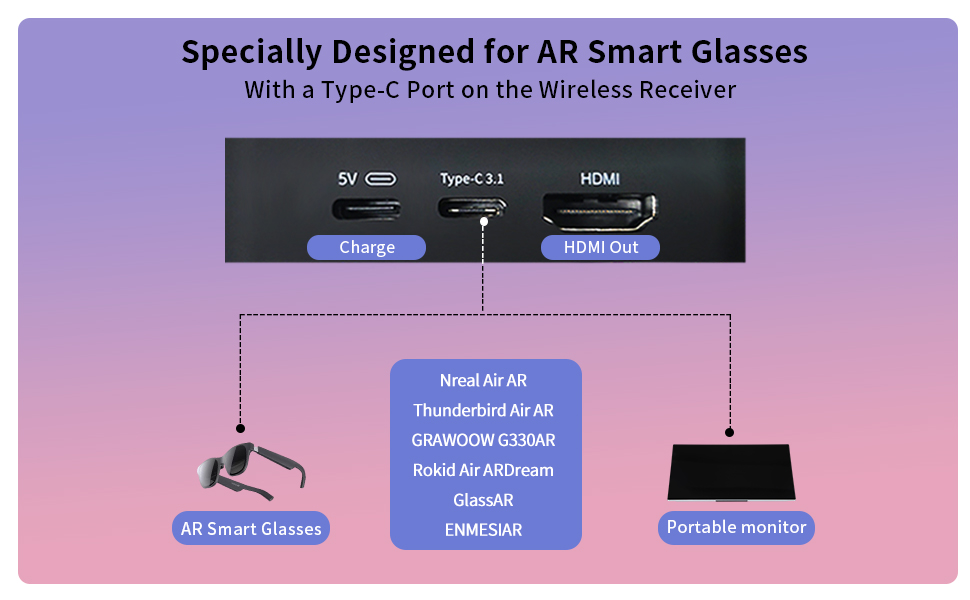
Figure 3: Receiver ports (5V power, Type-C 3.1, HDMI) and AR glasses compatibility.
Ghi chú: For certain AR glasses like Nreal, you may need to upgrade their firmware for optimal compatibility. Refer to your AR glasses manufacturer's instructions for firmware updates.
4. Hướng dẫn vận hành
4.1 Bật nguồn và ghép nối
Once both the Transmitter (TX) and Receiver (RX) units are connected to their respective power sources and devices, they will automatically power on and attempt to pair. The system is designed for plug-and-play operation, requiring no manual pairing steps or software installation.

Figure 4: Plug and Play setup in a meeting environment.
4.2 Các tình huống sử dụng
- Trò chơi: Experience zero-latency gaming on a large screen or through AR glasses.
- Giải trí tại gia: Stream movies, TV shows, or other media from your PC or TV box to any display.
- Presentations/Meetings: Share content wirelessly from your laptop to a projector or large monitor in a conference room.
- AR Experiences: Connect directly to compatible AR smart glasses for immersive gaming or productivity.
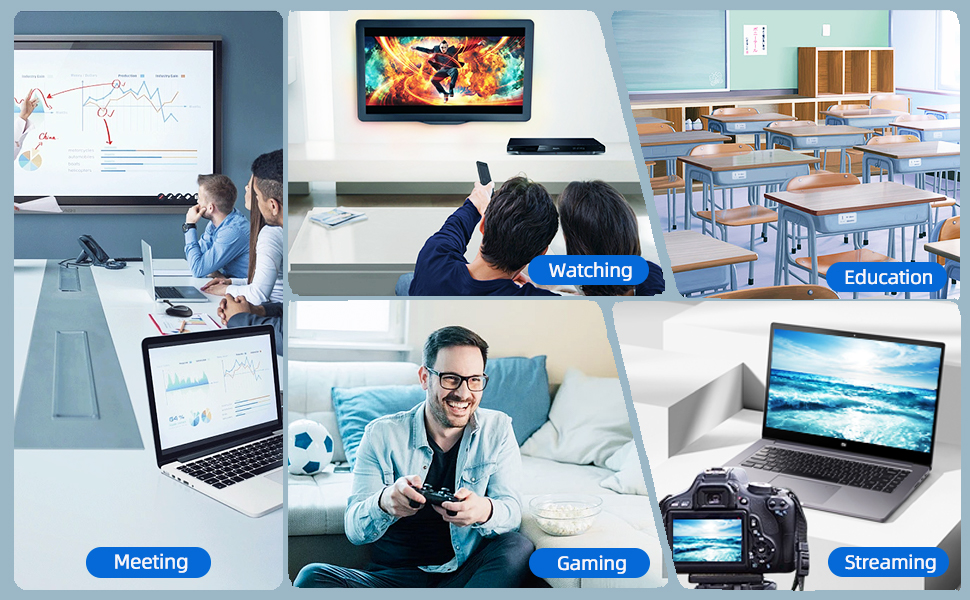
Figure 5: Diverse applications of the PeakDo Wireless HDMI system.

Hình 6: Ví dụample of a wireless AR gaming setup.
5. Bảo trì
The PeakDo Wireless HDMI Transmitter and Receiver P3 S requires minimal maintenance.
- Vệ sinh: Hãy dùng khăn mềm, khô để lau sạch bên ngoài các thiết bị. Không sử dụng chất tẩy rửa dạng lỏng hoặc dạng xịt.
- Kho: Khi không sử dụng trong thời gian dài, hãy bảo quản thiết bị ở nơi khô ráo, thoáng mát, tránh ánh nắng trực tiếp và nhiệt độ cao.
- Nguồn điện: Always ensure both TX and RX units receive adequate power (5V 2A) from a stable power source.
KHAI THÁC. Xử lý sự cố
6.1 Không có tín hiệu / Màn hình đen
- Kiểm tra nguồn điện: Ensure both the Transmitter (TX) and Receiver (RX) units are properly powered. The RX unit specifically requires sufficient power (5V 2A) and should be powered first before connecting the HDMI/USB-C cable to the display.
- Kết nối cáp: Verify that all HDMI and USB-C cables are securely connected to their respective ports on the devices and displays.
- Ngõ ra của thiết bị nguồn: Confirm that your source device (PC, game console) is outputting video correctly. Try connecting the source device directly to the display with a cable to rule out issues with the source.
- Hiển thị đầu vào: Ensure your display (TV, monitor, projector, AR glasses) is set to the correct input source (e.g., HDMI 1, USB-C).
- Khởi động lại thiết bị: Disconnect power from both TX and RX units, then reconnect. Also, restart your source device and display.
6.2 Intermittent Signal / Flickering
- Khoảng cách và chướng ngại vật: Reduce the distance between the TX and RX units. Ensure there are no significant physical obstructions (walls, large furniture) between them that could interfere with the wireless signal.
- Sự can thiệp: Keep the units away from other wireless devices (e.g., Wi-Fi routers, cordless phones, microwave ovens) that operate on similar frequencies.
- Nguồn điện: Ensure stable and sufficient power supply to both units. Fluctuations in power can affect signal stability.
6.3 Không có âm thanh
- Cài đặt âm thanh nguồn: Kiểm tra cài đặt đầu ra âm thanh trên thiết bị nguồn của bạn để đảm bảo âm thanh được truyền qua HDMI.
- Display Audio: Verify that the audio on your display device (TV, monitor, AR glasses) is not muted and the volume is turned up.
- Tính toàn vẹn của cáp: Ensure the HDMI or USB-C cable connecting the RX to the display is not damaged.
6.4 AR Glasses Compatibility Issues
- Cập nhật firmware: As mentioned in the setup, some AR glasses (e.g., Nreal) may require a firmware update to work correctly with external video sources. Consult your AR glasses manufacturer's support.
- Power to RX: Ensure the RX unit is adequately powered, especially when connecting to power-hungry AR glasses.
- Cáp USB-C: Use a high-quality USB-C cable that supports video transmission.
7. Thông số kỹ thuật
| Tính năng | Sự miêu tả |
|---|---|
| Số hiệu mẫu | P3S |
| Mã hóa video | YUV422 or RGB444 (uncompressed 1080P) |
| Hỗ trợ độ phân giải | Lên tới 1080P Full HD |
| Độ trễ | 0 Độ trễ |
| Công nghệ kết nối | Wireless (Millimeter Wave) |
| Phạm vi truyền | Lên đến 100 feet (khoảng 30 mét) |
| Compatible Transmitter Devices | PC, Laptop, Xbox, PS4, PS5, Switch, PS3, TV Box, etc. |
| Compatible Receiver Devices | TV, Monitor, Projector (via HDMI); AR Smart Glasses, Portable Monitor (via USB-C) |
| Tổng số cổng HDMI | 1 (on Receiver) |
| Loại đầu nối | HDMI, Micro USB (for power), USB-C (on Receiver) |
| Chế độ đầu ra âm thanh | Mono (Digital Audio) |
| Cấu hình kênh âm thanh vòm | 2.0 |
| Nguồn điện | 5V 2A (for both TX and RX units) |
| Trọng lượng sản phẩm | 1.08 pound (khoảng 0.49 kg) |
| Kích thước gói hàng | 6.73 x 5.83 x 2.48 inch (khoảng 17.1 x 14.8 x 6.3 cm) |
8. Bảo hành và Hỗ trợ
For warranty information and technical support, please refer to the official PeakDo webtrang web hoặc liên hệ trực tiếp với bộ phận dịch vụ khách hàng của họ. Giữ lại biên lai mua hàng để yêu cầu bảo hành.
- Nhà sản xuất: ĐỉnhDo
- Ngày đầu tiên có sẵn: Ngày 16 tháng 2023 năm XNUMX
- Khách hàng Reviews: 3.3 out of 5 stars (based on 6 ratings at time of data extraction)