
1. Giới thiệu
This manual provides detailed instructions for the setup, operation, maintenance, and troubleshooting of your Cosmic Byte ARES Wired Controller for PC. Designed for an enhanced gaming experience, this controller features Hall Effect joysticks and triggers, dual vibration, and customizable Turbo functions.
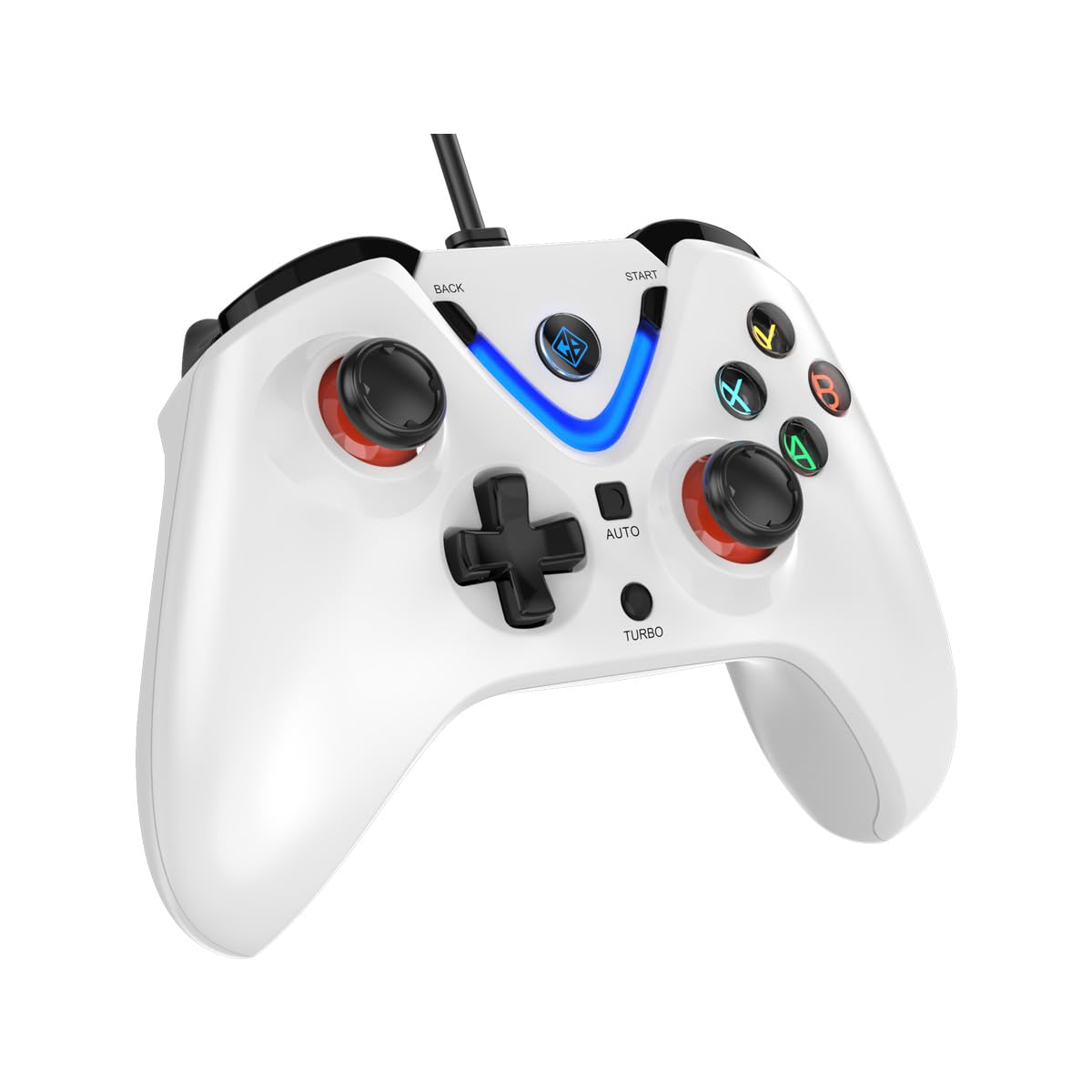
Image 1: The Cosmic Byte ARES Wired Controller in white, showcasing thiết kế tiện dụng.
2. Hướng dẫn thiết lập
2.1 Kết nối với PC
- Đảm bảo máy tính của bạn đã được bật nguồn.
- Xác định vị trí cổng USB khả dụng trên máy tính của bạn.
- Plug the USB connector of the Cosmic Byte ARES Wired Controller into the USB port.
- Hệ điều hành sẽ tự động phát hiện và cài đặt các trình điều khiển cần thiết. Quá trình này có thể mất vài phút.
- Once installation is complete, the controller is ready for use.

Image 2: The controller connected via its wired USB connection, ensuring fast response.
3. Hướng dẫn vận hành
3.1 Điều khiển cơ bản
The Cosmic Byte ARES controller features standard gamepad layouts, including:
- Left and Right Analog Joysticks: Để di chuyển chính xác và điều khiển máy ảnh.
- D-Pad: Dùng để nhập hướng, thường được sử dụng trong menu hoặc cho các hành động cụ thể trong trò chơi.
- Các nút hành động (A, B, X, Y): For primary game interactions.
- Các nút vai (L1, R1) và cò súng (L2, R2): For various in-game functions like shooting, aiming, or accelerating.
- Start and Back Buttons: For pausing games, accessing menus, or specific in-game commands.
- Nút tăng áp: Dùng để kích hoạt các chức năng bắn nhanh.
- Nút tự động: For activating automatic rapid-fire functions.
3.2 Cần điều khiển và cò súng hiệu ứng Hall
The controller is equipped with Hall Effect joysticks and triggers, which use magnetic sensors instead of physical contacts. This technology provides:
- Độ chính xác được cải thiện: More accurate and responsive input.
- Độ bền được tăng cường: Reduces wear and tear, preventing stick drift over time.
- Hoạt động trơn tru: Consistent and linear response for triggers, allowing for nuanced control in games.

Hình ảnh 3: Một vụ nổ view illustrating the Hall Effect joystick mechanism and the Hall Effect triggers.
3.3 Phản hồi rung kép
The controller features dual vibration motors that provide tactile feedback during gameplay, enhancing immersion by simulating in-game events such as impacts, explosions, or engine rumbling.
3.4 Backlit LED Buttons
The action buttons (A, B, X, Y) and the central V-shaped indicator feature LED backlighting, providing visibility in low-light conditions and adding to the controller's aesthetic.

Image 4: The controller with its LED buttons illuminated and visual representation of vibration effects.
3.5 Turbo and Auto Turbo Functions
The Turbo and Auto Turbo functions allow for rapid, repeated input of a button press without continuously pressing the button.
- Kích hoạt Turbo: Press and hold the desired action button (e.g., A) and then press the Turbo button. The button will now rapidly repeat its input as long as you hold it down.
- Activating Auto Turbo: Press and hold the desired action button (e.g., A) and then press the Tự động button. The button will now rapidly repeat its input automatically without needing to be held down.
- Deactivating Turbo/Auto Turbo: To deactivate, repeat the activation steps for the specific button, or press the Thông thoáng button (if available) or disconnect and reconnect the controller.

Image 5: Close-up of the controller showing the Turbo and Auto function buttons.
4. Bảo trì
- Vệ sinh: Sử dụng khăn mềm, khô để lau bộ điều khiển. Đối với vết bẩn cứng đầu, hãy dùng khăn hơi ẩm.amp cloth can be used, ensuring no liquid enters the controller. Avoid harsh chemicals or abrasive cleaners.
- Kho: Bảo quản bộ điều khiển ở nơi khô ráo, thoáng mát, tránh ánh nắng trực tiếp và nhiệt độ quá cao hoặc quá thấp. Tránh đặt vật nặng lên bộ điều khiển.
- Chăm sóc cáp: Do not sharply bend or pull the USB cable. Always grasp the plug when disconnecting from the PC.
KHAI THÁC. Xử lý sự cố
- Bộ điều khiển không được nhận dạng:
- Hãy đảm bảo cáp USB được kết nối chắc chắn với cả bộ điều khiển và máy tính.
- Hãy thử cắm bộ điều khiển vào một cổng USB khác.
- Khởi động lại máy tính của bạn.
- Check Device Manager on Windows to see if the controller is listed and if there are any driver issues.
- Các nút/cần điều khiển không phản hồi:
- Verify the controller is recognized by your PC (see above).
- Test the controller in a different game or a controller testing utility to rule out game-specific issues.
- Hãy đảm bảo không có thiết bị đầu vào nào khác gây nhiễu.
- Rung không hoạt động:
- Kiểm tra cài đặt trong trò chơi để đảm bảo phản hồi rung được bật.
- Some games may not support vibration or may have limited vibration effects.
6. Thông số kỹ thuật
| Tính năng | Chi tiết |
|---|---|
| Thương hiệu | Byte vũ trụ |
| Tên mẫu | Ares |
| Thiết bị tương thích | PC |
| Loại bộ điều khiển | Tay cầm chơi game |
| Công nghệ kết nối | USB |
| Tính năng sản phẩm | Công thái học |
| Số lượng nút | 16 |
| Nền tảng phần cứng | PC |
| Loại nguồn điện | Dây điện, cáp USB |
| Trọng lượng sản phẩm | 220 gam |
| Kích thước mục | 6 x 10 x 4 Centimet |
| Màu sắc | Trắng |
| Nước xuất xứ | Trung Quốc |

Image 6: A comparison table highlighting features of different ARES controller models.
7. Bảo hành và Hỗ trợ
7.1 Thông tin bảo hành
The Cosmic Byte ARES Wired Controller comes with a Bảo hành 1 năm đối với lỗi sản xuất kể từ ngày mua. Vui lòng giữ lại hóa đơn mua hàng để yêu cầu bảo hành.
7.2 Thông tin liên hệ nhà sản xuất
For support, service, or warranty inquiries, please contact:
Byte vũ trụPrakash Warehousing, S. No.163, Hissa No 1-2-3-4-5A-5B/2/1,
Phursungi, Pune 412308, Maharashtra, India
For further assistance, please visit the official Cosmic Byte webtrang web hoặc liên hệ với dịch vụ khách hàng của họ.