
LEVOIT LTF-F422-WUS
Hướng dẫn sử dụng quạt tháp LEVOIT Classic 42 inch
This manual provides essential information for the safe and efficient operation, maintenance, and troubleshooting of your LEVOIT Classic 42-inch Tower Fan.
Hướng dẫn an toàn quan trọng
To reduce the risk of fire, electric shock, or injury, please read and follow all instructions and warnings before using this appliance.
- Always place the fan on a stable, level surface.
- Không vận hành quạt bằng dây hoặc phích cắm bị hỏng.
- Giữ quạt tránh xa nước hoặc damp khu vực.
- Không được cho ngón tay hoặc vật lạ vào bất kỳ khe hở nào.
- Rút phích cắm quạt trước khi vệ sinh hoặc bảo trì.
- Sản phẩm này chứa các hóa chất mà Tiểu bang California biết là có thể gây ung thư, dị tật bẩm sinh hoặc các tác hại sinh sản khác.
Sản phẩm trênview
The LEVOIT Classic 42-inch Tower Fan (Model: LTF-F422-WUS) is designed to provide powerful and quiet air circulation for your home. It features a DC motor for energy efficiency and a user-friendly design.

Hình ảnh: Mặt trước view of the LEVOIT Classic 42-inch Tower Fan in white, showing its sleek design, digital display, and the included remote control. Blue arrows indicate airflow and oscillation.
Các tính năng chính:
- Luồng khí mạnh mẽ: Experience 1252 CFM airflow with speeds up to 25ft/s.
- Hoạt động yên tĩnh: Operates as low as 25dB, ideal for bedrooms and quiet environments.
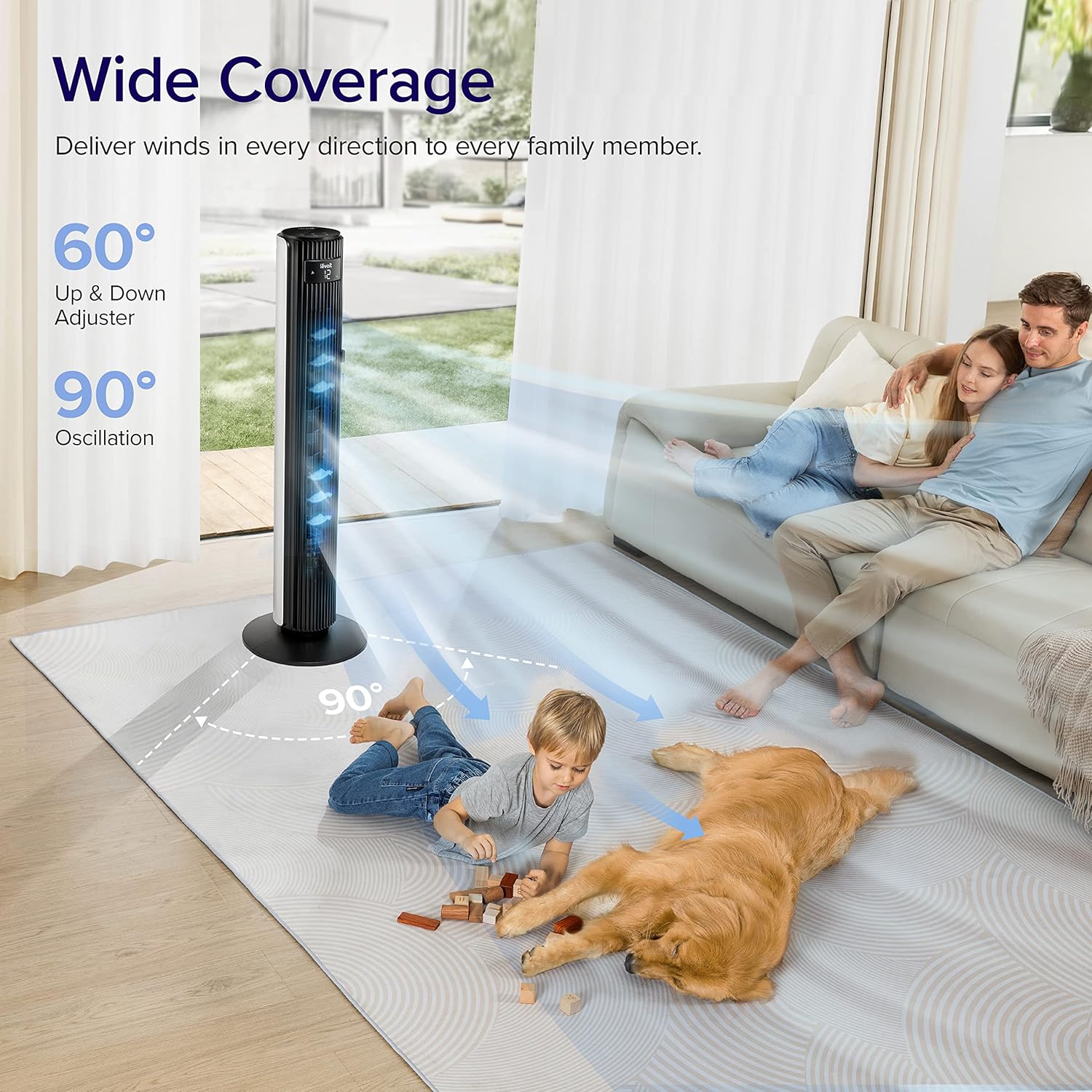
- Dao động rộng: Features 90° horizontal and 60° vertical oscillation for comprehensive air distribution.
- Thoải mái có thể tùy chỉnh: Offers 12 speed settings and 4 modes (Normal, Auto, Turbo, Advanced Sleep).
- Temperature-Responsive: Built-in sensor adjusts fan speed based on room temperature in Auto mode.
- Bảo trì dễ dàng: Detachable back cover and filter for thorough cleaning.
- Thiết kế thân thiện với người dùng: Includes a hidden handle and built-in remote storage.
Hướng dẫn thiết lập
1. Mở hộp và kiểm tra linh kiện
Carefully open the box from the indicated side and remove all components. Ensure all parts are present before proceeding with assembly.
Video: This video demonstrates the unboxing process, base assembly, remote control storage, and fan blade removal for cleaning.
2. Hội cơ sở
The fan base comes in two halves. Align the two pieces and attach them together securely. Unscrew the nut from the bottom of the tower fan, then attach the assembled base to the fan and fasten the nut to secure it.

Image: Diagram illustrating the assembly of the fan base, showing how the two halves connect and attach to the main fan unit.
3. Thiết lập điều khiển từ xa
The remote control comes with an insulating tab to preserve battery life. Pull out this tab before first use. The remote can be stored neatly in a dedicated slot on the back of the fan.
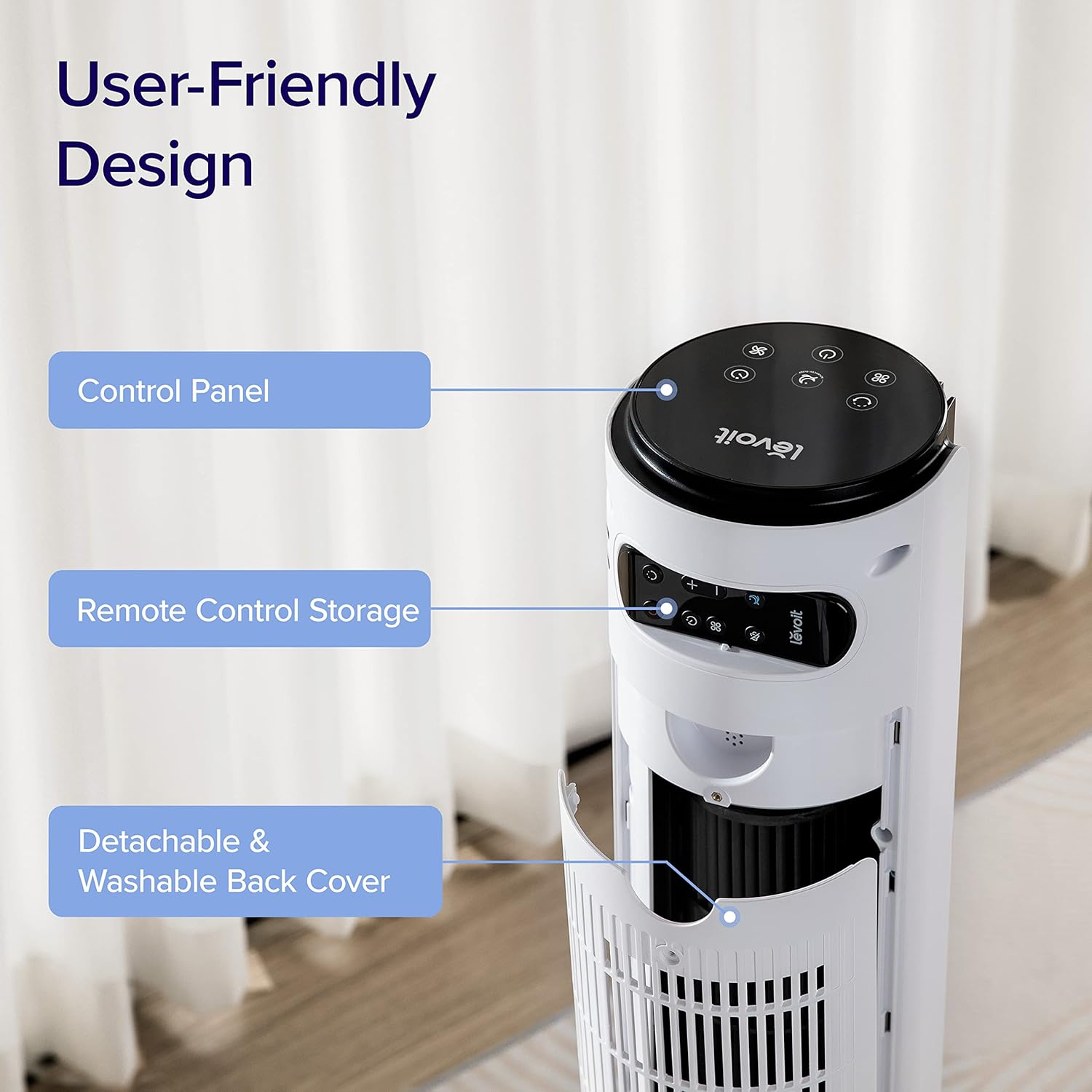
Hình ảnh: Cận cảnh view of the top rear of the LEVOIT Tower Fan, highlighting the integrated storage compartment for the remote control.
Operating Your Tower Fan
Your LEVOIT tower fan offers various settings for personalized comfort.
1. Bảng điều khiển và màn hình
The fan features a touch-sensitive control panel on top and an LED display on the front. The display shows current settings such as speed, mode, and timer.
Hình ảnh: Từ trên xuống view of the LEVOIT Tower Fan's control panel with various touch buttons for power, mode, speed, oscillation, and timer. The front LED display shows the current fan speed.
2. Chế độ hoạt động
- Chế độ bình thường: Default mode allowing manual speed adjustment.
- Chế độ tự động: Fan speed adjusts automatically based on room temperature detected by the built-in sensor.
- Chế độ Turbo: Provides quick cooling and air circulation, starting at the highest speed with oscillation. Speed decreases as room temperature drops.
- Chế độ ngủ nâng cao: Display and sound automatically turn off after 5 seconds. Fan does not oscillate for the first hour, then oscillates and decreases speeds to maintain comfort. Speed then changes by temperature.
3. Speed and Oscillation
- Cài đặt 12 tốc độ: Choose from gentle breezes (1-3) to storm-strength winds (10-12).
- 90° Horizontal Oscillation: Distributes air across a wide area.
- 60° Vertical Oscillation: Adjusts airflow up to 30° up or down for targeted cooling.

Image: A family and a dog enjoying the wide coverage of the LEVOIT Tower Fan's 90-degree horizontal and 60-degree vertical oscillation, illustrating effective air distribution.
4. Chức năng hẹn giờ
Set the fan to automatically turn off after a specified period, up to 12 hours, for energy saving and convenience.
Bảo trì và vệ sinh
Vệ sinh thường xuyên đảm bảo hiệu suất tối ưu và tuổi thọ của quạt.
1. Detachable Back Cover and Filter
Unlike traditional tower fans, the LEVOIT Classic features a detachable back cover and filter for easy and thorough cleaning. This allows access to the wind wheel for maintenance.

Image: Illustration of the LEVOIT Tower Fan's detachable back cover and internal fan blade, submerged in water to demonstrate its washable components for hassle-free cleaning.
2. Hướng dẫn vệ sinh
- Rút phích cắm điện của quạt trước khi vệ sinh.
- Use a soft cloth or brush to clean the exterior surfaces.
- To clean the internal wind wheel, remove the screw under the remote storage slot, then remove the back cover. Locate and remove the screw at the bottom of the fan blade, then carefully pull out the fan blade. Clean with a soft cloth or water.
- Đảm bảo tất cả các bộ phận đều khô hoàn toàn trước khi lắp lại.
Hướng dẫn xử lý sự cố
| Vấn đề | Giải pháp |
|---|---|
| Fan suddenly starts to oscillate. | This is normal in Advanced Sleep Mode. It automatically starts oscillating after one hour of operation. |
| Air output decreased after cleaning the wind wheel. | Ensure screws are aligned with the flat surface of the motor shaft during installation, not the arc surface. Incorrect alignment will reduce air output. |
| Fan suddenly stops. | Check if the timer was accidentally set. Kindly check and try again. |
| Top control panel is not responsive. | Check if the fan is in Advanced Sleep Mode or if the screen is manually turned off. In screen-off state, the operation panel enters a semi-sleep state to prevent accidental touch. Press twice to wake up the panel and then adjust settings. |
Thông số kỹ thuật sản phẩm
- Thương hiệu: LÊN
- Tên mẫu: Classic 42-inch
- Số hiệu mẫu: LTF-F422-WUS
- Màu sắc: Trắng
- Kích thước sản phẩm: 6.3"D x 6.7"W x 42.4"H
- Trọng lượng sản phẩm: 11 Bảng Anh
- Nguồn điện: DC
- Cái gì?tage: 26 watt
- Mức độ tiếng ồn: 25 dB
- Công suất luồng không khí: 1252 feet khối mỗi phút (CFM)
- Số mức công suất: 12
- Dao động: 90 ° Ngang, 60 ° Dọc
- Bộ đếm thời gian: 12 giờ
- Phương pháp kiểm soát: Điều khiển từ xa, cảm ứng
- Các thành phần bao gồm: Xa
- Vật liệu: Nhựa
- Chứng nhận: CA65, FCC, TSCA
Bảo hành và Hỗ trợ
LEVOIT products come with a limited warranty. For detailed warranty information and customer support, please refer to the official LEVOIT webtrang web hoặc liên hệ với dịch vụ khách hàng của họ.
Bộ phận Hỗ trợ Khách hàng của LEVOIT:
- Visit the official LEVOIT Store: Cửa hàng LEVOIT trên Amazon
- For further assistance, refer to the contact information provided in your product packaging or on the LEVOIT webđịa điểm.
Ask a question about this manual
Ask about setup, troubleshooting, compatibility, parts, safety, or missing instructions. Manuals+ will review the question and use this page’s manual context to help answer it.