
PTZOptics PT30X-4K-GY-G3_EDI_1
Hướng dẫn sử dụng camera PTZ tự động theo dõi PTZOptics Move 4K
Model: PT30X-4K-GY-G3_EDI_1
Sản phẩm trênview
The PTZOptics Move 4K 30x Auto-Tracking PTZ Camera is designed for high-quality video production, offering advanced features such as auto-tracking, auto-framing, and 4K resolution at 60 frames per second. It is suitable for various applications including education, conferences, and live broadcasts. This manual provides essential information for setting up, operating, and maintaining your camera.
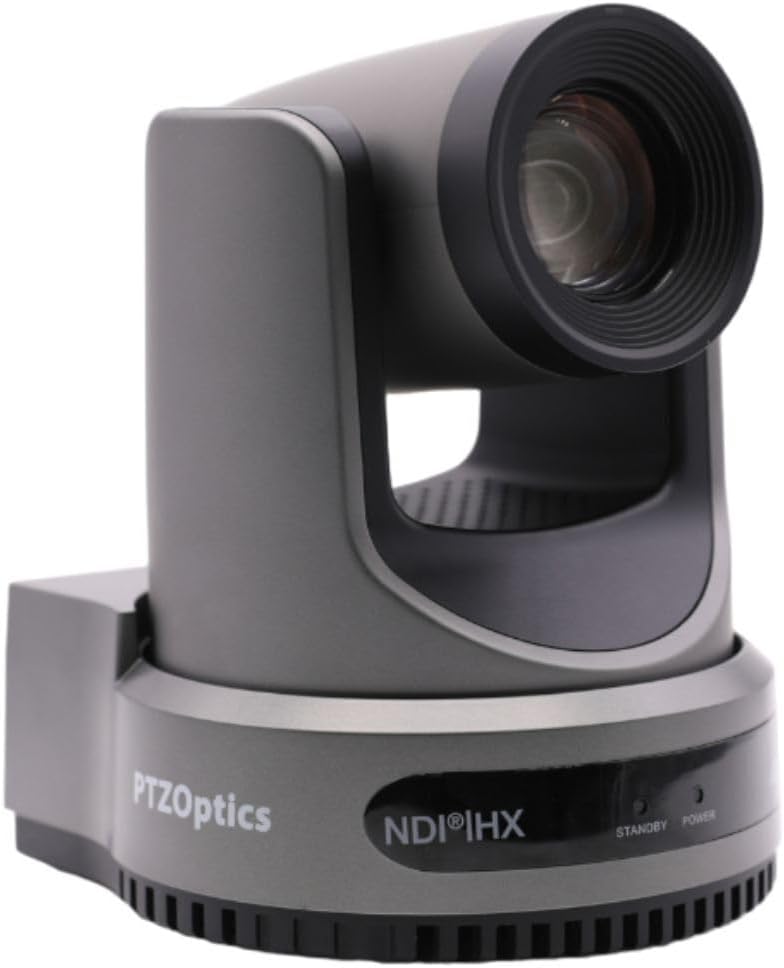
Hình 1: Mặt trước view of the PTZOptics Move 4K Camera.
Mở hộp và nội dung gói
Upon unboxing your PTZOptics Move 4K camera, ensure all components are present. The package typically includes the following items:
- PTZOptics Move 4K Camera (30X model)
- Nguồn điện xoay chiều 12V
- Cáp USB AA
- Cáp RS232
- Hướng dẫn bắt đầu nhanh
- IR từ xa
- (2) Pin AA
Video 1: PTZOptics Move 4K Unboxing. This video demonstrates the unboxing process and highlights the included accessories.

Hình 2: Mặt bên view of the PTZOptics Move 4K Camera, showcasing thiết kế đẹp mắt.
Cài đặt
Follow these steps to set up your PTZOptics Move 4K camera:
- Kết nối nguồn điện: Connect the provided 12V AC Power Supply to the DC 12V port on the back of the camera. Alternatively, if your network supports Power over Ethernet (PoE), you can connect an Ethernet cable to the LAN port for both power and data.
- Resolution and Frame Rate Selection: Before powering on, select your desired video resolution and frame rate using the yellow dial labeled "SYSTEM SELECT" on the back of the camera. Refer to the Quick Start Guide or the table on the bottom of the camera for available options.
- Bật nguồn ban đầu: Once powered, the camera will perform an initial pan and tilt movement. The "POWER" light on the front will illuminate.
- Kết nối: Connect the camera to your live streaming, recording, or conferencing device using the appropriate output ports (USB 2.0, 3G-SDI, or HDMI).

Hình 3: Phía sau view of the camera, highlighting the various input/output ports including DC 12V, LAN (PoE), USB 2.0, 3G-SDI, HDMI, RS232, RS485, and audio line in/out.
Hướng dẫn sử dụng
The PTZOptics Move 4K camera offers multiple control options and features for seamless operation:
- Auto-Tracking and Auto-Framing: Utilize the camera's built-in auto-tracking and auto-framing capabilities to automatically follow a subject or keep multiple subjects framed within the shot.
- Kiểm đếm ánh sáng: A built-in tally light located above the lens indicates whether the camera is live (red) or in preview mode, helping talent stay in sync with the production.
- Tùy chọn điều khiển: The camera can be controlled via the included IR remote, network connection, RS-232, RS-485, Web UI, PTZ Control App, or a Camera Management Platform.
- Đầu ra đồng thời: The camera provides simultaneous video outputs via NDI, USB, and IP, along with either SDI or HDMI, allowing for flexible integration into various production workflows.

Figure 4: This diagram illustrates how the PTZOptics camera can be used for live streaming directly to platforms like YouTube and Facebook Live, with audio input via 3.5mm.
BẢO TRÌ
To ensure the longevity and optimal performance of your PTZOptics Move 4K camera, follow these general maintenance guidelines:
- Vệ sinh: Hãy dùng khăn mềm, khô để lau thân máy ảnh. Đối với ống kính, hãy sử dụng khăn và dung dịch chuyên dụng để vệ sinh ống kính nhằm tránh trầy xước. Không sử dụng hóa chất mạnh hoặc vật liệu mài mòn.
- Chống bụi: Keep the camera in a clean, dust-free environment when not in use. Consider using a dust cover.
- Nhiệt độ và độ ẩm: Operate and store the camera within recommended temperature and humidity ranges to prevent damage to internal components.
- Cập nhật chương trình cơ sở: Periodically check the PTZOptics official website for any available firmware updates. Keeping the firmware updated can improve performance, add new features, and resolve potential issues.
Xử lý sự cố
If you encounter issues with your PTZOptics Move 4K camera, consider the following troubleshooting steps:
- Không có điện: Ensure the power supply is securely connected and the power outlet is functional. If using PoE, verify your network switch provides sufficient power.
- Không có đầu ra video: Check all video cable connections (HDMI, SDI, USB, Ethernet). Verify the selected resolution and frame rate on the camera's system select dial are compatible with your receiving device.
- Vấn đề kiểm soát: Ensure the IR remote batteries are fresh and there are no obstructions between the remote and the camera. For network control, verify the camera's IP address and network settings.
- Vấn đề về chất lượng hình ảnh: Check lighting conditions. Ensure the lens is clean and free from smudges or dust. Adjust white balance and exposure settings as needed.
- Máy ảnh không phản hồi: Try pressing the "RESTORE" button on the back of the camera to reset it to factory defaults. This may resolve software-related glitches.
Thông số kỹ thuật
| Tính năng | Chi tiết |
|---|---|
| Kích thước sản phẩm | 5.6 x 6.6 x 6.5 inch |
| Trọng lượng sản phẩm | 8.33 pound |
| ASIN | B0BSMM3VM3 |
| Số hiệu mẫu sản phẩm | PT30X-4K-GY-G3_EDI_1 |
| Pin | Cần có 2 pin AA. (có kèm theo) |
| Ngày đầu tiên có sẵn | Ngày 18 tháng 2023 năm XNUMX |
| Nhà sản xuất | PTZoptics |
| Thương hiệu | PTZOptics |
| Công nghệ cảm biến ảnh | CMOS |
| Độ phân giải quay video | 4K |
| Tiêu cự Tối đa | 20 milimét |
| Loại bộ nhớ flash | SD |
| Định dạng quay video | MP4 |
| Định dạng âm thanh được hỗ trợ | MP3, WAV, AAC |
| Kích thước màn hình | 1.8 inch |
| Công nghệ kết nối | HDMI, USB |
| Màu sắc | Xám |
Bảo hành và Hỗ trợ
For detailed warranty information, technical support, and additional resources, please visit the official PTZOptics website or refer to the documentation included with your product. You may also find helpful information and protection plans available on the PTZOptics Store on Amazon.
Ask a question about this manual
Ask about setup, troubleshooting, compatibility, parts, safety, or missing instructions. Manuals+ will review the question and use this page’s manual context to help answer it.