
1. Giới thiệu
This manual provides essential instructions for the safe and efficient operation of your Rigol DHO1074 Digital Oscilloscope. The DHO1074 is a 4-channel, 70 MHz digital oscilloscope featuring a 12-bit resolution and a 2 GSa/s real-time sample rate, designed for precise signal analysis in various applications. Please read this manual thoroughly before using the device to ensure proper functionality and to prevent damage.
2. Thông tin an toàn
Hãy tuân thủ các biện pháp phòng ngừa an toàn sau đây để tránh thương tích và hư hỏng thiết bị:
- Use only the power cord specified for this instrument.
- Đảm bảo dụng cụ được nối đất đúng cách để tránh bị điện giật.
- Không vận hành thiết bị trong điều kiện ẩm ướt hoặc bị ướt.amp điều kiện.
- Tránh hoạt động trong môi trường dễ nổ.
- Do not remove the instrument cover. Refer servicing to qualified personnel.
- Use appropriate probes and accessories.
- Ngắt nguồn điện trước khi vệ sinh.
3. Nội dung gói hàng
Xác minh rằng tất cả các mục được liệt kê dưới đây đều có trong gói hàng của bạn:
- Rigol DHO1074 Digital Oscilloscope (1 unit)
- Dây nguồn (1 cái)
- Passive Probes (4 units, one for each channel)
- Cáp USB (1 chiếc)
- Quick Guide (1 unit)
- Resource CD (1 unit)
4. Thiết lập
4.1 Kết nối nguồn điện
- Đảm bảo công tắc nguồn của máy hiện sóng ở vị trí TẮT.
- Kết nối dây nguồn đi kèm với đầu vào nguồn AC ở mặt sau của máy hiện sóng.
- Cắm đầu còn lại của dây nguồn vào ổ cắm điện xoay chiều có nối đất.
4.2 Kết nối đầu dò
- Connect the BNC connector of a passive probe to one of the input channels (CH1, CH2, CH3, or CH4) on the front panel.
- Attach the probe ground clip to a common ground point in your circuit.
- Connect the probe tip to the test point in your circuit.
- For accurate measurements, compensate the probe before use. Refer to the "Probe Compensation" section in the full user manual for detailed instructions.
4.3 Bật nguồn ban đầu
- Nhấn công tắc nguồn ở mặt trước để bật máy hiện sóng.
- The instrument will perform a self-test and display the startup screen.
- Once the main interface appears, the oscilloscope is ready for use.
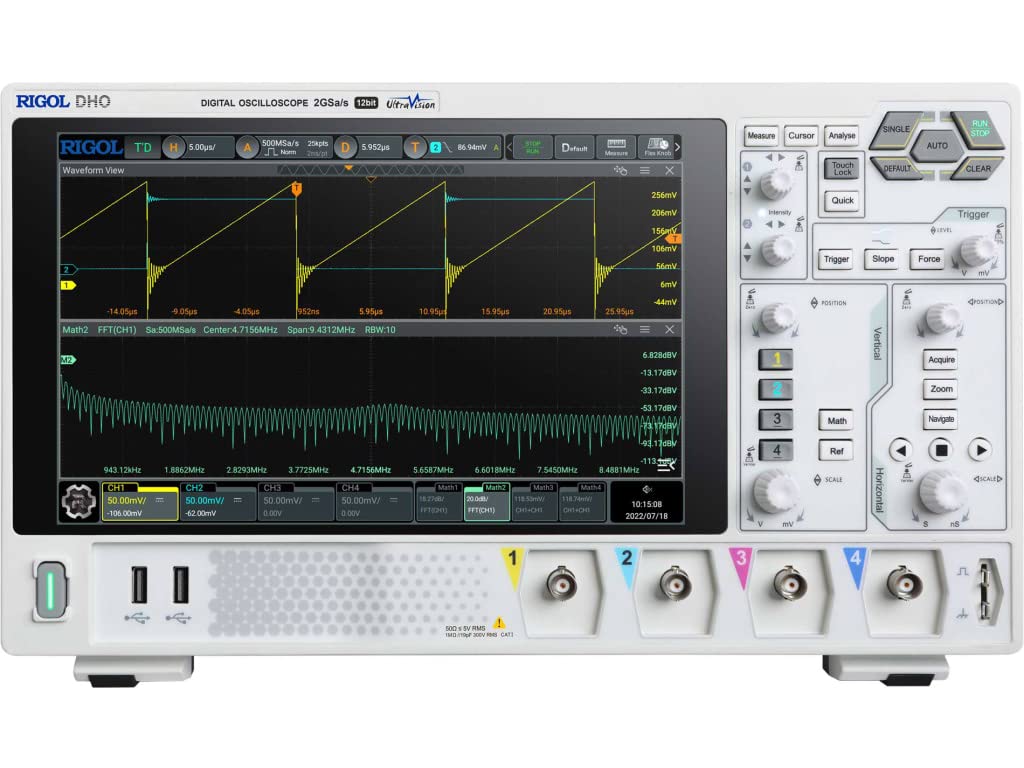
Hình 4.1: Mặt trước view of the Rigol DHO1074 Digital Oscilloscope, showing the display, control panel, and input channels.
5. Vận hành máy hiện sóng
The Rigol DHO1074 offers a user-friendly interface for capturing and analyzing waveforms. Key features include 4 analog channels, 70 MHz bandwidth, and a 12-bit vertical resolution for enhanced signal fidelity.
5.1 Thu thập dạng sóng cơ bản
- Bật nguồn: Ensure the oscilloscope is powered on as described in Section 4.3.
- Connect Signal: Connect your signal source to an input channel using a compensated probe.
- Tự động thiết lập: Nhấn nút TỰ ĐỘNG button on the front panel. The oscilloscope will automatically adjust vertical, horizontal, and trigger settings to display a stable waveform.
- Điều chỉnh thủ công:
- Sử dụng THEO CHIỀU DỌC knobs (VOLTS/DIV) to adjust the vertical scale (voltage per division) for each channel.
- Sử dụng NẰM NGANG knob (SEC/DIV) to adjust the horizontal scale (time per division).
- Sử dụng CÒ SÚNG controls to set the trigger level and mode for stable waveform capture.
5.2 Tính năng nâng cao
- Độ phân giải cao: Benefit from the 12-bit vertical resolution, providing 16 times more quantization levels than standard 8-bit oscilloscopes, which improves measurement accuracy and reduces quantization noise.
- Deep Memory: The DHO1074 features a 50 Mpts maximum memory depth (expandable to 100 Mpts with option DHO1000-RLU-01), allowing for longer waveform captures at high samptỷ lệ le.
- Serial Decoding: Standard serial decoding capabilities include SPI, I2C, RS232/UART, CAN, and LIN, simplifying the analysis of common serial bus communications.
- Chức năng đo lường: Access various automatic measurement functions (e.g., Vpp, Vrms, Frequency, Period) via the ĐO LƯỜNG thực đơn.
- Các hàm toán học: Utilize built-in math functions (e.g., Add, Subtract, Multiply, Divide, FFT) to perform waveform analysis.
6. Bảo trì
6.1 Vệ sinh dụng cụ
- Luôn rút dây nguồn trước khi vệ sinh.
- Sử dụng một miếng vải mềmampened with a mild detergent solution to clean the exterior surfaces.
- Do not use abrasive cleaners or solvents that could damage the plastic parts.
- Avoid spraying liquids directly onto the instrument.
6.2 Lưu trữ
- Bảo quản máy hiện sóng ở nơi sạch sẽ, khô ráo, tránh ánh nắng trực tiếp và nhiệt độ quá cao hoặc quá thấp.
- Bảo vệ màn hình khỏi trầy xước.
6.3 Hiệu chuẩn
For optimal performance and measurement accuracy, periodic calibration by qualified service personnel is recommended. Refer to Rigol's official support channels for calibration services.
KHAI THÁC. Xử lý sự cố
| Vấn đề | Nguyên nhân có thể | Giải pháp |
|---|---|---|
| No power when turned on. | Power cord not connected; power outlet faulty; instrument fuse blown. | Kiểm tra kết nối dây nguồn; kiểm tra ổ cắm điện; liên hệ bộ phận kỹ thuật để thay thế cầu chì. |
| Không hiển thị dạng sóng. | Probe not connected; signal source off; vertical/horizontal scale incorrect; trigger not set correctly. | Verify probe connection; check signal source; adjust VOLTS/DIV and SEC/DIV; adjust trigger level or use AUTO button. |
| Dạng sóng không ổn định. | Trigger settings incorrect; noisy signal. | Adjust trigger mode, source, and level; ensure proper grounding of the probe. |
| Incorrect measurements. | Probe compensation incorrect; wrong measurement settings. | Compensate probes; verify measurement parameters. |
If the problem persists after attempting these solutions, please contact Rigol customer support.
8. Thông số kỹ thuật
| Tham số | Giá trị |
|---|---|
| Người mẫu | DHO1074 |
| Băng thông | 70MHz |
| Kênh Analog | 4 |
| Độ phân giải dọc | 12-bit |
| Tối đa Samptỷ lệ le | 2 GSa/s (real-time) |
| Độ sâu bộ nhớ | 50 Mpts (100 Mpts with DHO1000-RLU-01 option) |
| Serial Decoding | SPI, I2C, RS232/UART, CAN, LIN |
| Kích thước sản phẩm | 18 x 11 x 12 inch |
| Trọng lượng sản phẩm | 12 pound |
| Nhà sản xuất | CÔNG TY TNHH CÔNG NGHỆ RIGOL HOA KỲ |
9. Bảo hành và Hỗ trợ
Rigol products are designed for reliability and performance. This instrument is covered by a standard manufacturer's warranty. For specific warranty terms and conditions, please refer to the warranty card included with your product or visit the official Rigol webđịa điểm.
For technical support, service, or inquiries regarding your Rigol DHO1074 Digital Oscilloscope, please contact Rigol Technologies USA Inc. customer service through their official webtrang web hoặc thông tin liên hệ được cung cấp trong tài liệu sản phẩm của bạn.
Online resources and additional documentation may be available on the Rigol webđịa điểm.