
1. Sản phẩm hếtview
The Phanteks Eclipse G500A DRGB is a high-performance mid-tower chassis designed to accommodate modern PC components with excellent airflow and integrated D-RGB lighting. It features an Ultra-fine Performance Mesh on both the front and top panels, ensuring optimal cooling and dust filtration.

Figure 1: Phanteks Eclipse G500A DRGB Mid Tower Case, Matte White.
Các tính năng chính:
- Thiết kế lưu lượng khí cao: Ultra-fine Performance Mesh on front and top panels for superior cooling and dust filtration.
- Hệ thống chiếu sáng D-RGB tích hợp: Built-in D-RGB lighting on the front and side, controllable via manual buttons or motherboard synchronization.
- Quạt được cài đặt sẵn: Includes three high-performance M25-140 D-RGB fans.
- Hỗ trợ làm mát toàn diện: Supports up to 420mm radiators in the front and 360mm in the top.
- Nội thất rộng rãi: Accommodates full-length GPUs and offers vertical GPU mounting options (with optional bracket).
- Lưu trữ linh hoạt: Multiple HDD and SSD locations, including dedicated SSD brackets and stackable HDD bays.
- Modern Front I/O: Features 10Gbps USB-C, 2x USB 3.0, Microphone/Headphone Combo, Power button, and D-RGB controls.
2. Thiết lập và Cài đặt
This section provides general guidelines for installing components into your Phanteks Eclipse G500A DRGB chassis. Always refer to your component manuals for specific installation instructions.
2.1 Chuẩn bị khung gầm
Before installing components, ensure the chassis is placed on a stable, flat surface. Remove the side panels by gently pulling them open (they are hinged) to access the interior.
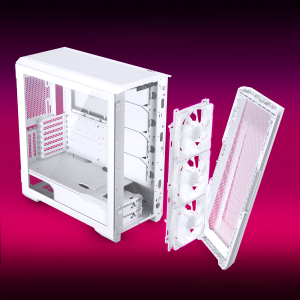
Figure 2: The removable front panel allows for easy installation of fans and radiators.
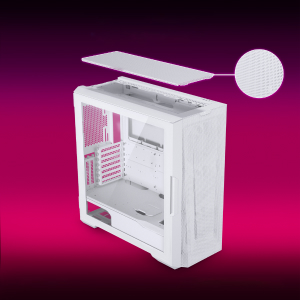
Figure 3: The removable top mesh panel facilitates fan and radiator installation.
2.2 Cài đặt bo mạch chủ
The G500A supports ATX, micro-ATX, mini-ITX, and E-ATX motherboards (up to 280mm wide). Install the necessary standoffs for your motherboard form factor, then secure the motherboard with screws.
2.3 Lắp đặt Bộ cấp nguồn (PSU)
Install the PSU at the bottom rear of the chassis. The G500A supports PSUs up to 250mm in length (195mm if all 4 bottom HDD positions are used).
2.4 Cài đặt thiết bị lưu trữ
The case offers extensive storage options:
- Ổ SSD 2.5": Up to 9 dedicated 2.5" drive bays are included.
- Ổ cứng 3.5": Two stackable 3.5" HDD bays are included, expandable up to a total of 10 HDD bays.

Figure 4: Multiple storage options for 2.5" and 3.5" drives.
2.5 Cài đặt Card đồ họa (GPU)
The G500A supports graphics cards up to 435mm in length. For vertical GPU mounting, an optional bracket (PH-VGPUKT4.0_03) or riser cable is required.
2.6 Lắp đặt hệ thống làm mát
The chassis supports various fan and radiator configurations:
- Hỗ trợ của người hâm mộ:
- Front: 3x 120mm or 3x 140mm (3x 140mm pre-installed)
- Top: 3x 120mm or 3x 140mm
- Phía sau: 1x 120mm hoặc 1x 140mm
- Hỗ trợ bộ tản nhiệt làm mát bằng chất lỏng:
- Front: Up to 360mm (120mm radiator) or 420mm (140mm radiator)
- Top: Up to 360mm (120mm radiator) or 280mm (140mm radiator)
- Phía sau: 120mm
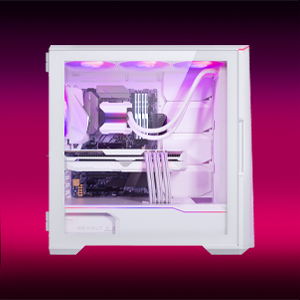
Figure 5: High-end cooling compatibility with various fan and radiator sizes.
2.7 Quản lý cáp
The G500A provides ample space and Velcro ties for efficient cable management, ensuring a clean interior and optimal airflow. Cover doors help to conceal cables on the backside of the motherboard tray.
2.8 Video hướng dẫn cài đặt
Video 1: Detailed PC Build Guide in the Phanteks Eclipse G500A (13:33).
Video 2: Another comprehensive PC assembly guide featuring the Phanteks Eclipse G500A (14:01).
3. Hướng dẫn vận hành
3.1 Bảng điều khiển I/O phía trước
Bảng điều khiển I/O phía trước cung cấp khả năng truy cập thuận tiện vào các cổng và nút điều khiển thiết yếu:
- Nút nguồn: Để bật/tắt hệ thống của bạn.
- Cổng USB 3.0 (x2): Dùng để kết nối các thiết bị USB 3.0.
- USB-C Gen2 Port (x1): For high-speed USB-C connectivity.
- Giắc cắm kết hợp micro/tai nghe: Dùng để nhập và xuất âm thanh.
- D-RGB Mode Button: Cycles through pre-programmed D-RGB lighting effects.
- D-RGB Color Button: Changes the color of the D-RGB lighting.

Figure 6: Front I/O panel with USB-C, USB 3.0, audio, and D-RGB controls.
3.2 D-RGB Lighting Control
The integrated D-RGB lighting can be controlled in two ways:
- Kiểm soát thủ công: Use the D-RGB Mode and Color buttons on the front I/O panel to cycle through effects and colors without software.
- Đồng bộ hóa bo mạch chủ: Connect the D-RGB controller to a compatible motherboard's D-RGB header to enable software control and synchronization with other D-RGB components.

Figure 7: Integrated D-RGB lighting with included M25-140 D-RGB fans.
4. Bảo trì
Bảo trì thường xuyên giúp đảm bảo hiệu suất tối ưu và tuổi thọ của các thành phần máy tính.
- Lọc bụi: The Ultra-fine Performance Mesh on the front and top panels acts as a dust filter. Periodically remove these panels and clean the mesh to maintain optimal airflow.
- Vệ sinh nội thất: Use compressed air to remove dust from inside the chassis, especially from fans, heatsinks, and other components. Ensure the system is powered off and unplugged before cleaning.
- Vệ sinh bên ngoài: Lau các bề mặt bên ngoài bằng giẻ mềm, damp vải. Tránh sử dụng chất tẩy rửa hoặc dung môi có tính mài mòn.
KHAI THÁC. Xử lý sự cố
Phần này đề cập đến những vấn đề thường gặp mà bạn có thể gặp phải với vỏ máy tính của mình.
5.1 Các vấn đề về nguồn điện
- Hệ thống không khởi động:
- Ensure all power cables (24-pin ATX, 8-pin CPU, GPU power) are securely connected to the motherboard and components.
- Hãy kiểm tra xem công tắc nguồn của bộ nguồn có ở vị trí 'BẬT' hay không.
- Check that the front panel power switch cable is correctly connected to the motherboard's F_PANEL header.
5.2 D-RGB Lighting Issues
- D-RGB not lighting up or incorrect colors:
- Ensure the D-RGB cables from the fans and LED strips are correctly connected to the integrated D-RGB controller.
- If using motherboard synchronization, ensure the D-RGB controller is connected to the motherboard's D-RGB header and that the motherboard's lighting software is configured correctly.
- Verify the D-RGB controller is receiving power (e.g., via SATA power connector).
- Try cycling through modes and colors using the front I/O buttons to rule out software issues.
5.3 Fan Noise or Malfunction
- Tiếng ồn của quạt quá mức:
- Check for dust buildup on fan blades and clean if necessary.
- Ensure fans are securely mounted and not vibrating against the chassis.
- Verify fan speeds are controlled appropriately by the motherboard or fan controller.
- Quạt không quay:
- Check fan power connections to the motherboard or fan hub.
- Ensure fan headers are enabled in the BIOS/UEFI settings.
6. Thông số kỹ thuật
Detailed technical specifications for the Phanteks Eclipse G500A DRGB Mid Tower Case.
| Tính năng | Đặc điểm kỹ thuật |
|---|---|
| Tên mẫu | Eclipse G500A DRGB, White |
| Số hiệu mẫu sản phẩm | PH-EC500GA_DMW01A |
| Yếu tố hình thức | Tháp giữa |
| Kích thước (DxRxC) | 19.69 x 9.45 x 20.28 inch (500 x 240 x 515 mm) |
| Trọng lượng sản phẩm | 23.2 pound |
| Vật liệu | Khung thép, kính cường lực |
| Hỗ trợ bo mạch chủ | ATX, micro-ATX, mini-ITX, E-ATX (chiều rộng tối đa 280mm) |
| Khe cắm mở rộng | 7 |
| Hỗ trợ GPU dọc | Yes (with optional bracket PH-VGPUKT4.0_03 or riser cable) |
| Các khoang ổ đĩa 3.5" bên trong | 10 (2x included, expandable) |
| Các khoang ổ đĩa 2.5" bên trong | 9 (bao gồm 9 cái) |
| I/O phía trước | 2x USB 3.0, USB-C Gen2, Microphone/Headphone Combo, Power Button, D-RGB Mode, D-RGB Color |
| Quạt được cài đặt sẵn | 3x M25-140 D-RGB (Front) |
| Độ dài GPU tối đa | 435mm / 17.2in |
| Chiều cao tối đa của bộ làm mát CPU | 185mm |
| Chiều dài PSU tối đa | 195mm (if all 4 bottom HDD positions used) / 250mm (if 2 bottom HDD used) |
| Phương pháp làm mát | Quạt, Nước |
7. Bảo hành và Hỗ trợ
Phanteks products are manufactured with high-quality standards. For warranty information and technical support, please refer to the official Phanteks webtrang web hoặc liên hệ với dịch vụ khách hàng của họ.
Thông tin liên lạc:
- Webđịa điểm: www.phanteks.com
- Phanteks Taiwan Inc.: Tầng 11, Số 150, Đường Jian 1, Quận Zhonghe, Thành phố Tân Bắc 235
- Importer EU (Axpertec Int B.V.): Sydneystraat 33, 3047 BP Rotterdam, The Netherlands
- Importer US (Axpertec Inc.): 20465 E Walnut Dr. N, City of Industry, California 91789, United States

Figure 8: Phanteks company and importer details, along with compliance markings (CE, UKCA, RoHS).