
1. Giới thiệu
This manual provides essential instructions for the setup, operation, maintenance, and troubleshooting of your Shuttle XPC Slim DH610 Barebone PC. The DH610 is a compact and versatile barebone system designed to support Intel 12th and 13th Generation LGA1700 processors, offering robust performance for various applications including office, digital signage, and kiosks.
2. Thông tin an toàn
Vui lòng đọc và làm theo các hướng dẫn an toàn sau để tránh làm hỏng thiết bị hoặc gây thương tích cho bản thân:
- Always disconnect the power cord before performing any installation or maintenance.
- Ensure the system is placed on a stable, flat surface with adequate ventilation.
- Không để thiết bị tiếp xúc với độ ẩm, nhiệt độ quá cao hoặc ánh nắng trực tiếp.
- Only use the power adapter provided or an approved equivalent.
- Refer to qualified service personnel for any repairs not covered in this manual.
3. Nội dung gói hàng
Xác minh rằng tất cả các mục đều có trong gói hàng của bạn:
- Shuttle XPC Slim DH610 Barebone PC Unit
- Bộ giá đỡ VESA
- Bộ đổi nguồn và dây điện
- Accessory Pack (screws, cables, etc.)
- Hướng dẫn bắt đầu nhanh (nếu có)
4. Thiết lập và Cài đặt
The Shuttle DH610 is a barebone system, requiring the installation of a CPU, RAM, and storage devices before operation.
4.1. Opening the Chassis
Carefully remove the chassis cover to access the internal components. Typically, this involves unscrewing a few screws on the rear or sides of the unit and sliding the cover off.

Image: The Shuttle XPC Slim DH610 with its top cover removed, showing the internal layout including cooling fans and the motherboard.
4.2. Cài đặt CPU
The DH610 supports Intel 12th/13th Generation Alder Lake-S LGA1700 processors with a maximum TDP of 65W. Ensure your chosen CPU has integrated graphics, as the system does not support F-series processors without integrated graphics or K-series processors.
- Mở cần gạt khe cắm CPU và tháo nắp bảo vệ.
- Carefully align the CPU with the socket, matching the triangular markers.
- Đặt CPU vào khe cắm một cách nhẹ nhàng, không dùng lực mạnh.
- Đóng cần gạt ổ cắm để cố định CPU.
- Lắp đặt bộ tản nhiệt CPU theo hướng dẫn của nhà sản xuất.
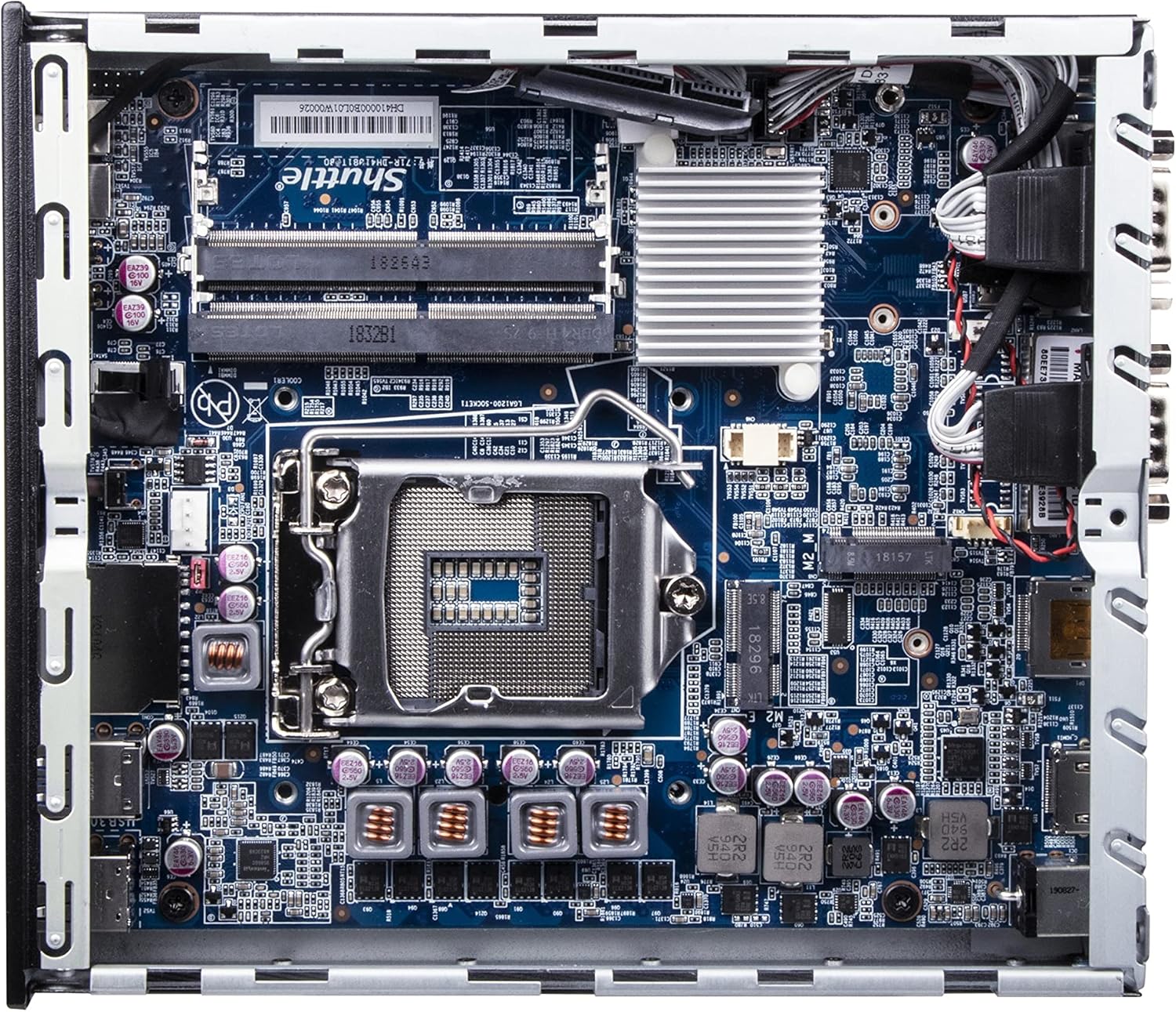
Hình ảnh: Một chi tiết view of the Shuttle DH610 motherboard, highlighting the LGA1700 CPU socket, RAM slots, and other integrated circuits.
Note: For 13th Gen Intel Processors, BIOS Version DH610000.202 or newer is required. Update BIOS if necessary after initial setup with a 12th Gen CPU or via a compatible method.
4.3. Cài đặt RAM
The system features two 260-pin dual-channel DDR4 SODIMM slots, supporting up to 64GB (2x 32GB) at 3200MHz. Dual-channel memory is recommended for optimal performance.
- Locate the SODIMM slots on the motherboard.
- Căn chỉnh rãnh trên mô-đun RAM với chốt trong khe cắm.
- Insert the module at a 45-degree angle and push down until the clips on both sides snap into place.
4.4. Lắp đặt kho lưu trữ
The DH610 supports one 2.5-inch HDD/SSD and one M.2 2280 SSD.
- 2.5" Drive: Mount the 2.5" HDD/SSD into the designated bay using the provided screws and connect the SATA data and power cables.
- SSD M.2: Insert the M.2 2280 SSD into its slot, securing it with the provided screw.
4.5. Kết nối thiết bị ngoại vi
After installing internal components, reattach the chassis cover. Connect your peripherals to the available ports:
- Trưng bày: Connect your monitor(s) to the HDMI 2.0b port or one of the two DisplayPort outputs. The system supports up to three 4K UHD displays.
- Thiết bị USB: Use the four USB 3.2 Gen1 ports (including one Type-C) and four USB 2.0 ports for keyboard, mouse, and other USB devices.
- Mạng: Connect to your network using either of the two Gigabit Ethernet LAN ports (Intel 2.5GbE + Intel 1GbE).
- Thiết bị nối tiếp: Utilize the two RS232 COM ports for compatible devices.
- Âm thanh: Connect headphones or a microphone to the front audio jacks.

Image: The front panel of the Shuttle DH610, featuring the power button, USB 3.2 Gen1 ports (one Type-C), and audio input/output jacks.

Image: The rear panel of the Shuttle DH610, displaying the DC-IN power input, HDMI, two DisplayPort outputs, two LAN ports, USB ports, and two COM ports.
4.6. Kết nối nguồn điện
Connect the power adapter to the DC-IN port on the rear of the unit, then plug the power cord into an electrical outlet.
5. Hướng dẫn vận hành
5.1. Bật / Tắt nguồn
- Bật nguồn: Nhấn nút nguồn nằm ở mặt trước.
- Tắt nguồn: Perform a graceful shutdown through your operating system. Alternatively, press and hold the power button for 4-5 seconds for a forced shutdown (use only when necessary).
5.2. Cài đặt hệ điều hành
The DH610 is compatible with Windows 11/10 (64-bit) and Linux (64-bit) operating systems. Follow the standard installation procedures for your chosen OS. Ensure all necessary drivers are installed for optimal performance, which can typically be found on the Shuttle support webđịa điểm.
5.3. Truy cập BIOS/UEFI
Để truy cập tiện ích thiết lập BIOS/UEFI, hãy nhấn nút Xóa bỏ or F2 key repeatedly during system startup. This allows configuration of boot options, system settings, and hardware parameters.
6. Bảo trì
6.1. Vệ sinh
Regularly clean the exterior of the unit with a soft, dry cloth. Use compressed air to clear dust from ventilation openings to ensure proper airflow and prevent overheating. Do not use liquid cleaners directly on the device.
6.2. Cập nhật BIOS
Periodically check the Shuttle website for BIOS updates. BIOS updates can improve system stability, add support for new hardware (like 13th Gen Intel CPUs), and fix bugs. Follow the instructions provided with the BIOS update package carefully.
KHAI THÁC. Xử lý sự cố
If you encounter issues with your DH610, refer to the following common problems and solutions:
- Không có đầu ra hiển thị:
- Ensure the monitor is powered on and correctly connected to the HDMI or DisplayPort.
- Verify that the CPU has integrated graphics and that the display cable is connected to the motherboard's video output, not a discrete graphics card (if applicable).
- Hãy thử dùng cáp màn hình hoặc màn hình khác.
- Hệ thống không bật nguồn:
- Check that the power adapter is securely connected to both the unit and the electrical outlet.
- Ensure the CPU and RAM are correctly installed and seated.
- Kiểm tra ổ cắm điện bằng thiết bị khác.
- 13th Gen CPU Not Recognized:
- The system requires BIOS Version DH610000.202 or newer for 13th Gen Intel processors. If you have an older BIOS, you may need to install a 12th Gen CPU first to update the BIOS.
- Hệ thống quá nhiệt:
- Ensure the chassis ventilation holes are not obstructed.
- Clean any dust accumulation from the internal fans and heatsinks.
- Verify the CPU cooler is properly installed and making good contact with the CPU.
8. Thông số kỹ thuật
| Tính năng | Đặc điểm kỹ thuật |
|---|---|
| Thương hiệu | Xe đưa đón |
| Tên mẫu | DH610 |
| Ổ cắm CPU | LGA 1700 |
| Bộ xử lý được hỗ trợ | Intel 12th/13th Gen Alder Lake-S (65W max, with integrated graphics) |
| Bộ vi mạch | IntelH610 |
| Loại RAM | DDR4 SODIMM (2x slots) |
| Dung lượng RAM tối đa | 64 GB (2x 32GB) |
| Tốc độ bộ nhớ | Lên đến 3200 MHz |
| Đồ họa | Integrated Intel UHD Graphics (CPU dependent) |
| Đầu ra video | 1x HDMI 2.0b, 2x DisplayPort (Supports triple 4K UHD displays) |
| Kho | 1x 2.5" HDD/SSD bay, 1x M.2 2280 slot |
| Cổng USB | 4x USB 3.2 Gen1 (1x Type-C), 4x USB 2.0 (Total 8) |
| Mạng LAN | 1x Intel 2.5GbE, 1x Intel 1GbE |
| Cổng nối tiếp | 2x RS232 (COM) |
| Khả năng tương thích của hệ điều hành | Windows 11/10 (64-bit), Linux (64-bit) |
| Tiêu thụ điện năng | 65 Watts (CPU) |
| Các thành phần bao gồm | Núi VESA |
9. Bảo hành và Hỗ trợ
9.1. Bảo hành của nhà sản xuất
The Shuttle XPC Slim DH610 Barebone PC comes with a 3-Year Manufacturer's Warranty. This warranty covers defects in materials and workmanship under normal use. Please retain your proof of purchase for warranty claims.
9.2. Hỗ trợ kỹ thuật
For technical assistance, driver downloads, BIOS updates, or further troubleshooting not covered in this manual, please visit the official Shuttle website or contact Shuttle customer support. Free lifetime technical support is typically provided by the manufacturer.
Để biết thêm thông tin, hãy truy cập: www.shuttle.com