
1. Giới thiệu
This manual provides essential information for the safe and efficient operation, installation, and maintenance of your Panasonic 8 Kg Wi-Fi Fully-Automatic Top Load Washing Machine, Model NA-F80V10SRB. Please read these instructions thoroughly before using the appliance and retain them for future reference.
Your washing machine features smart connectivity, an 8 kg capacity suitable for medium-sized families, and a built-in heater for enhanced cleaning. It operates with a fully automatic system and offers 15 wash programs.

Hình ảnh 1.1: Mặt trước view of the Panasonic NA-F80V10SRB washing machine.
2. Thông tin an toàn
Luôn tuân thủ các biện pháp phòng ngừa an toàn cơ bản khi sử dụng các thiết bị điện để giảm nguy cơ hỏa hoạn, điện giật hoặc thương tích cho người.
- Hãy đảm bảo nguồn điện phù hợp với thông số kỹ thuật ghi trên thiết bị.
- Không được vận hành máy nếu dây nguồn hoặc phích cắm bị hỏng.
- Giữ trẻ em và vật nuôi tránh xa thiết bị trong khi vận hành.
- Không giặt những đồ vật dính chất dễ cháy.
- Luôn rút phích cắm của máy trước khi vệ sinh hoặc thực hiện bất kỳ bảo trì nào.
3. Cài đặt và thiết lập
3.1 Tháo dỡ
Carefully remove all packaging materials. Inspect the machine for any damage. Keep packaging materials away from children.
3.2 Vị trí
Đặt máy giặt trên bề mặt chắc chắn, bằng phẳng. Đảm bảo có đủ không gian xung quanh máy để thông gió và dễ dàng di chuyển. Tránh ánh nắng trực tiếp hoặc nhiệt độ quá cao.
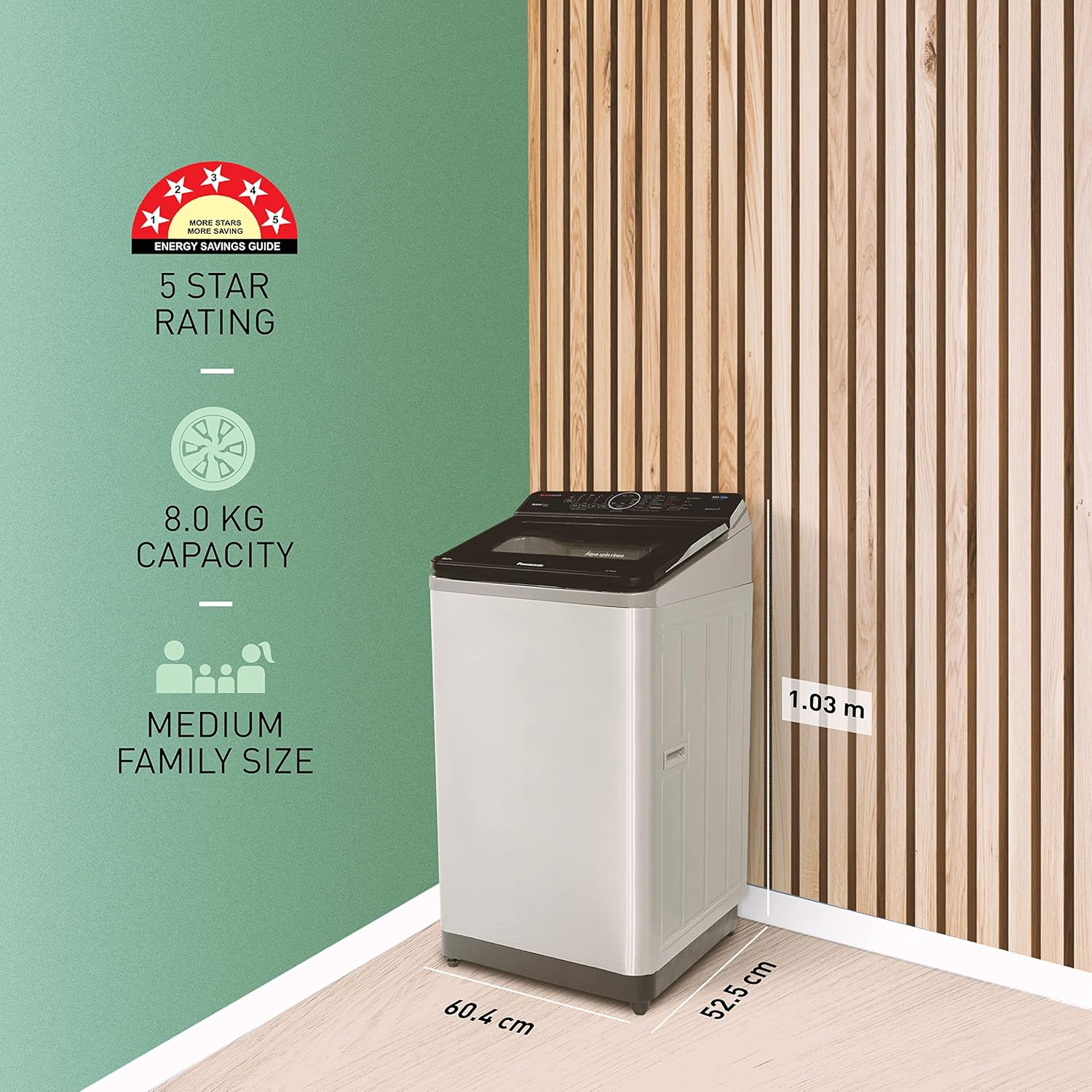
Image 3.1: Dimensions of the Panasonic NA-F80V10SRB washing machine (52.5D x 60.4W x 103H Centimeters).
3.3 Kết nối nước
Connect the inlet hose to a cold water tap with a 3/4-inch thread. Ensure all connections are tight to prevent leaks. The drain hose should be securely placed into a standpipe or laundry tub, ensuring it is not kinked.
3.4 kết nối nguồn
Cắm dây nguồn vào ổ cắm điện có nối đất. Máy hoạt động ở điện áp 230 Volt.
3.5 Thiết lập Wi-Fi
Download the Panasonic MirAie app on your smartphone. Follow the in-app instructions to connect your washing machine to your home Wi-Fi network. This enables smart features and remote control.
4. Hướng dẫn vận hành
Your washing machine is designed for ease of use with a touch control panel and LED display.
4.1 Tải đồ giặt
Open the top lid and load clothes into the drum. Do not overload the machine. For optimal results, ensure clothes are evenly distributed.
4.2 Thêm chất tẩy rửa và chất làm mềm
Cho lượng bột giặt và nước xả vải thích hợp vào ngăn chứa tương ứng. Tham khảo hướng dẫn sử dụng trên bao bì bột giặt để biết liều lượng khuyến nghị.
4.3 Chọn chương trình giặt
The machine offers 15 programs. Use the touch controls to select the desired wash cycle. Common cycles include:
- Dịu dàng: Đối với các loại vải mỏng manh.
- Giặt giũ hàng ngày: Dùng để giặt giũ hàng ngày.
- Chịu lực nặng: Dành cho đồ vật bị bẩn nhiều.
- Rửa nhanh: Dành cho những đồ vật ít bẩn cần giặt nhanh.
Các Wash Wizard feature in the MirAie app can help you choose the most suitable wash cycle from over 600 programs based on your clothes and soil level.
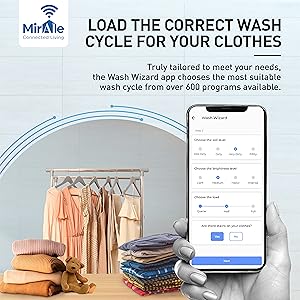
Image 4.1: The MirAie app's Wash Wizard feature guiding cycle selection.
4.4 Smart Features (MirAie App)
Leverage the MirAie app for enhanced control and convenience:
- Điều khiển từ xa: Start, pause, or end wash cycles from anywhere.
- Stain Genius: Get pre-treatment guides and recommendations for over 50 types of stains.
- Lên lịch thông minh: Schedule wash cycles to run at your convenience.
- Energy & Water Tracking: Monitor your machine's real-time consumption.
- Cảnh báo thời tiết: Receive recommendations to plan your laundry based on weather forecasts.
- Lệnh bằng giọng nói: Control your washing machine using voice commands (compatible with Alexa).

Hình 4.2: Hếtview of smart features available through the MirAie app.
4.5 Built-in Heater and EcoNavi Sensors
The built-in heater assists in better stain dissolution, providing a cleaner and more hygienic wash. EcoNavi sensors intelligently detect the load and water temperature, optimizing water and energy usage.

Image 4.3: Illustration of the built-in heater for enhanced cleaning.

Image 4.4: Visual representation of EcoNavi sensors at work.
5. Bảo trì
Bảo trì thường xuyên sẽ đảm bảo độ bền và hiệu suất tối ưu cho máy giặt của bạn.
5.1 Vệ sinh bộ lọc xơ vải
The machine is equipped with a big lint filter. Regularly clean the lint filter to prevent lint buildup and ensure efficient drainage. Refer to the diagram below for location and removal instructions.

Image 5.1: The large lint filter designed for effective lint removal.
5.2 Vệ sinh bên ngoài
Lau bên ngoài máy bằng vải mềm, damp vải. Không sử dụng chất tẩy rửa có tính mài mòn hoặc dung môi.
5.3 Vệ sinh lồng giặt
Periodically run a drum clean cycle (if available) or a hot wash with a washing machine cleaner to remove detergent residue and odors.
5.4 Maintenance Alerts
The MirAie app provides timely maintenance alerts and allows you to schedule service visits with ease.
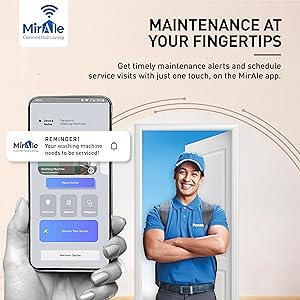
Image 5.2: MirAie app interface showing maintenance alerts and service scheduling.
KHAI THÁC. Xử lý sự cố
Trước khi liên hệ với bộ phận chăm sóc khách hàng, vui lòng tham khảo các vấn đề và giải pháp thường gặp sau đây:
| Vấn đề | Nguyên nhân có thể | Giải pháp |
|---|---|---|
| Máy không khởi động | Dây nguồn bị rút ra; Nắp không được đóng kín; Nguồn điện bị ngắt.tage. | Check power connection; Ensure lid is fully closed; Check household power. |
| Không đổ nước | Water tap closed; Water inlet hose kinked; Water supply issue. | Mở vòi nước; Duỗi thẳng ống dẫn nước; Kiểm tra nguồn nước sinh hoạt trong nhà. |
| Rung / ồn quá mức | Máy không cân bằng; Tải không cân bằng; Bu lông vận chuyển chưa được tháo. | Adjust leveling feet; Redistribute laundry; Ensure all shipping bolts are removed. |
| Kết quả rửa kém | Overloading; Incorrect detergent dosage; Wrong wash program. | Giảm khối lượng đồ giặt; Sử dụng lượng chất tẩy rửa phù hợp; Chọn chương trình giặt phù hợp. |
Nếu sự cố vẫn tiếp diễn sau khi đã thử các giải pháp này, vui lòng liên hệ với bộ phận hỗ trợ khách hàng của Panasonic.
7. Thông số kỹ thuật
| Tính năng | Đặc điểm kỹ thuật |
|---|---|
| Tên mẫu | NA-F80V10SRB |
| Thương hiệu | Panasonic |
| Dung tích | 8kg |
| Chế độ hoạt động | Hoàn toàn tự động |
| Truy cập vị trí | Lượng tải cao nhất |
| Kích thước sản phẩm (D x R x C) | 52.5D x 60.4W x 103H Centimet |
| Trọng lượng sản phẩm | 32 Kilôgam |
| Loại vật liệu | Thép không gỉ (Thùng) |
| Tính năng đặc biệt | Smart Connectivity, Built-in Heater |
| Loại điều khiển | Cảm ứng, Nút bấm |
| Số lượng chương trình | 15 |
| Tốc độ quay tối đa | 702 vòng/phút |
| Tậptage | 230 vôn |
| Trưng bày | DẪN ĐẾN |
8. Bảo hành và Hỗ trợ
8.1 Thông tin bảo hành
Your Panasonic washing machine comes with a Sản phẩm được bảo hành 2 năm. và một Bảo hành 12 năm cho động cơ from the date of purchase. Please refer to the warranty card included with your product for detailed terms and conditions.
8.2 Các thành phần bao gồm
The product package includes the Washing Machine and a Warranty Card.
8.3 Hỗ trợ khách hàng
For any service requests, technical assistance, or warranty claims, please contact Panasonic customer support. Contact information can be found on your warranty card or the official Panasonic webđịa điểm.


