
1. Sản phẩm hếtview
The Khadas VIM4 is a high-performance single board computer featuring the Amlogic A311D2 SoC. It supports 4K UI, HDMI input, and offers multiple display interfaces, along with integrated Wi-Fi 6 and Bluetooth 5.1. This kit includes an active cooling solution to ensure optimal performance.
Có gì trong hộp:
- VIM4 Single Board Computer
- Ăng-ten x2
- New VIM Heatsink
- 3705 Quạt làm mát
- Hướng dẫn sử dụng
- Hướng dẫn nhanh
2. Hướng dẫn cài đặt
2.1 Bố trí bảng
Familiarize yourself with the various ports and components on your Khadas VIM4 board.
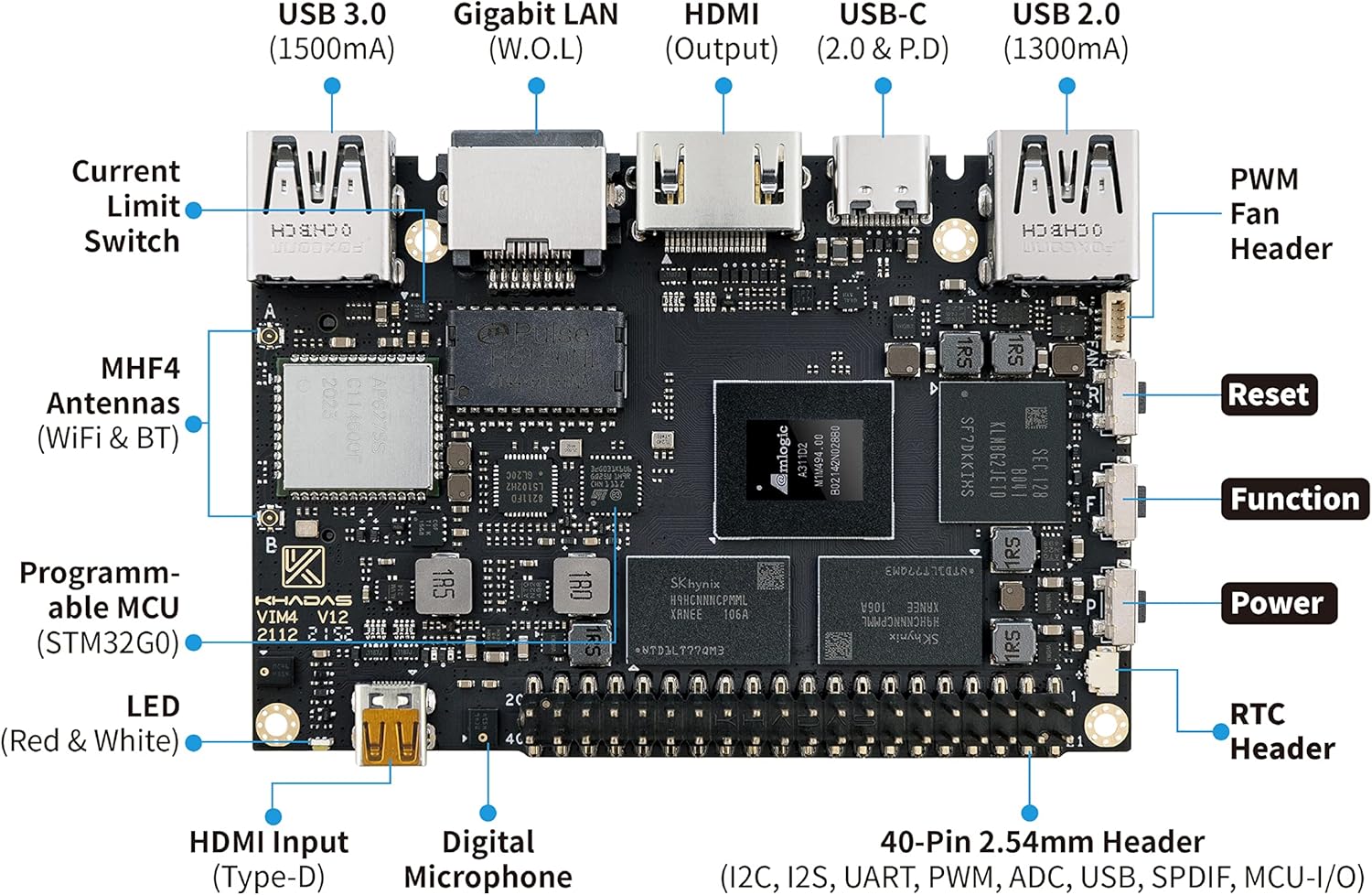
Mô tả hình ảnh: Đứng đầu view of the Khadas VIM4 board, highlighting various ports and headers including USB 3.0, Gigabit LAN, HDMI Output, USB-C, USB 2.0, PWM Fan Header, MHF4 Antennas (WiFi & BT), Programmable MCU, LED, HDMI Input (Type-D), Digital Microphone, 40-Pin 2.54mm Header, Reset, Function, Power, and RTC Header.

Mô tả hình ảnh: Đáy view of the Khadas VIM4 board, showing components such as G-Sensor, VIN Input (9-20V), Micro-SD (SDXC) slot, Current Limit Switch, SPI Flash, XPWR Pads, V-by-One (eDP), MIPI-DSI & TP, MIPI-CSI, and M.2 Slot (PCI-Ex1 Lane, USB 2.0, I2S, I2C, GPIO, MCU-I/O).
2.2 Anten kết nối
Proper installation of the Wi-Fi and Bluetooth antennas is crucial for wireless connectivity.
Mô tả video: This video demonstrates the step-by-step process of installing the Wi-Fi and Bluetooth antennas onto the Khadas VIM4 board. It shows how to carefully connect the small antenna connectors to the designated ports on the board.
2.3 Initial Power-Up and Peripherals
- Connect a compatible power supply (DC 5.5x2.1mm or USB-C PD) to the VIM4.
- Connect a display to one of the available display interfaces (HDMI, MIPI-DSI, V-by-One, or eDP).
- Kết nối bàn phím và chuột với các cổng USB.
- The VIM4 will typically power on automatically or can be powered on using the dedicated power button.
3. Hướng dẫn vận hành
3.1 Operating System Installation (OOWOW)
The VIM4 features OOWOW, an embedded service for seamless online OS delivery. If the device storage is empty, OOWOW will start automatically, allowing you to download and install your preferred operating system (e.g., Android 11, Ubuntu, CoreELEC) directly from the Cloud.
3.2 Key Features and Usage
- 4K UI Support: Enjoy a high-resolution user interface for various applications.
- Nhiều giao diện hiển thị: Utilize HDMI, MIPI-DSI, V-by-One, and eDP to connect up to 3 independent displays simultaneously.
- Đầu vào HDMI: The onboard micro HDMI input port is ideal for smart display and video conferencing applications.
- High-Performance Computing: The Amlogic A311D2 SoC with 8GB LPDDR4X RAM provides robust performance for memory-intensive software.
- Kết nối không dây: Integrated AP6275S Wi-Fi 6 module with 802.11a/b/g/n/ac/ax, 2X2 MIMO, and RSDB, along with Bluetooth 5.1.
Mô tả video: This video showcases the process of building a mini PC using the Khadas VIM4, demonstrating its versatility and potential applications as a compact computing solution.
Mô tả video: This video illustrates how to integrate and use a 5G module with the Khadas VIM4, expanding its connectivity options for various projects and applications.
4. Bảo trì
4.1 Active Cooling Kit
The VIM4 Active Cooling Kit includes a heatsink and a 3705 cooling fan to manage thermal performance, especially during demanding tasks. Ensure the fan is clear of obstructions for efficient cooling.

Mô tả hình ảnh: The Khadas VIM4 single board computer with the active cooling kit installed, showing the heatsink and fan assembly on top of the main board.
4.2 Cập nhật phần mềm và chương trình cơ sở
Regularly update the VIM4's software and firmware to ensure optimal performance, stability, and access to new features. Updates for the operating system, BIOS, and EC (Embedded Controller) firmware are available via the OOWOW service or the Khadas webđịa điểm.
Mô tả video: This video provides instructions on the first-time setup for graphics, which often includes driver installation and configuration, essential for maintaining the VIM4's display capabilities.
KHAI THÁC. Xử lý sự cố
- HDMI Audio Issues (Ubuntu): Ensure you have the latest Ubuntu image (220620 or later) installed via OOWOW, as this issue has been fixed in recent updates.
- CSI Camera Compatibility: The Khadas CSI camera OS08A10 MIPI camera is supported. Third-party CSI cameras may not be compatible due to hardware and software limitations.
- Display Resolution Limitations: Official software releases may have limitations on supported monitor resolutions (e.g., primarily 1080p and 4K). Check for updated drivers or community support for specific resolutions.
- Bootloader Issues: If the device fails to boot the installed OS after a power cycle, verify the OS installation via OOWOW.
6. Thông số kỹ thuật
| Tính năng | Chi tiết |
|---|---|
| Bộ vi xử lý | Amlogic A311D2 (2.2GHz quad-core ARM Cortex-A73, 2.0GHz quad-core Cortex-A53) |
| Bộ xử lý đồ họa | Mali G52MP8 (8EE) 800Mhz, supports 4K UI, H.264/H.265 encoding at 4K 50fps |
| ĐẬP | 8GB 64bit LPDDR4X 2016MHz |
| Giao diện hiển thị | HDMI, MIPI-DSI, V-by-One, eDP (supports 3 independent displays) |
| Đầu vào HDMI | Yes, for smart display & video conferencing |
| Kết nối không dây | AP6275S Wi-Fi 6 (802.11a/b/g/n/ac/ax, 2X2 MIMO, RSDB), Bluetooth 5.1 |
| Cổng USB | 3 Total USB Ports (Type-A, Type-C) |
| Mạng Ethernet | 1 Gigabit LAN port |
| Kích thước | Dài 3.23" x Rộng 2.28" x Cao 0.45" |
7. Bảo hành và Hỗ trợ
7.1 Thông tin bảo hành
The Khadas VIM4 comes with a manufacturer's warranty. Please refer to the warranty card included in your package for specific terms and conditions.
7.2 Hỗ trợ kỹ thuật
For further assistance, technical support, and the latest software/firmware updates, please visit the official Khadas website or refer to the OOWOW embedded service on your device. You can also find helpful resources and community forums on the Khadas support pages.
Official Khadas Store: Visit the Khadas Store