
KICKASS KASTSP300
KickAss 12V 300W Super Thin Portable Solar Panel User Manual
Model: KASTSP300
1. Giới thiệu
This manual provides detailed instructions for the safe and efficient use of your KickAss 12V 300W Super Thin Portable Solar Panel. Designed for portability and high efficiency, this solar panel is ideal for charging 12V battery systems in various outdoor and off-grid applications.
Thông tin an toàn
- Always read and understand all instructions before operating the solar panel.
- Do not attempt to disassemble or modify the solar panel or its integrated controller.
- Ensure all connections are secure and correct polarity is observed to prevent damage to the panel, controller, or battery.
- Avoid exposing the panel to extreme physical impact or sharp objects.
- Keep the panel clean and free from debris for optimal performance.
- Handle with care, especially when unfolding and folding, to avoid pinching or damaging cables.
XUẤT KHẨU. Các thành phần
Your KickAss 12V 300W Super Thin Portable Solar Panel package typically includes:
- KickAss 300W Super Thin Portable Solar Panel with integrated PWM Controller
- Attached cables for connection to a 12V battery system
- Integrated adjustable support legs
- Carry bag (may be included depending on package)

Image: The KickAss 300W Super Thin Portable Solar Panel fully unfolded, showcasing its slim design and multiple panels.
3. Thiết lập
3.1 Mở ra và định vị
- Place the folded solar panel on a flat, stable surface.
- Carefully unfold the panels completely until they lie flat.
- Extend the integrated support legs from the back of the panel. Adjust the angle of the legs to position the panel directly towards the sun for maximum efficiency.
- Ensure the panel is in an area free from shade throughout the day. Even partial shading can significantly reduce power output.
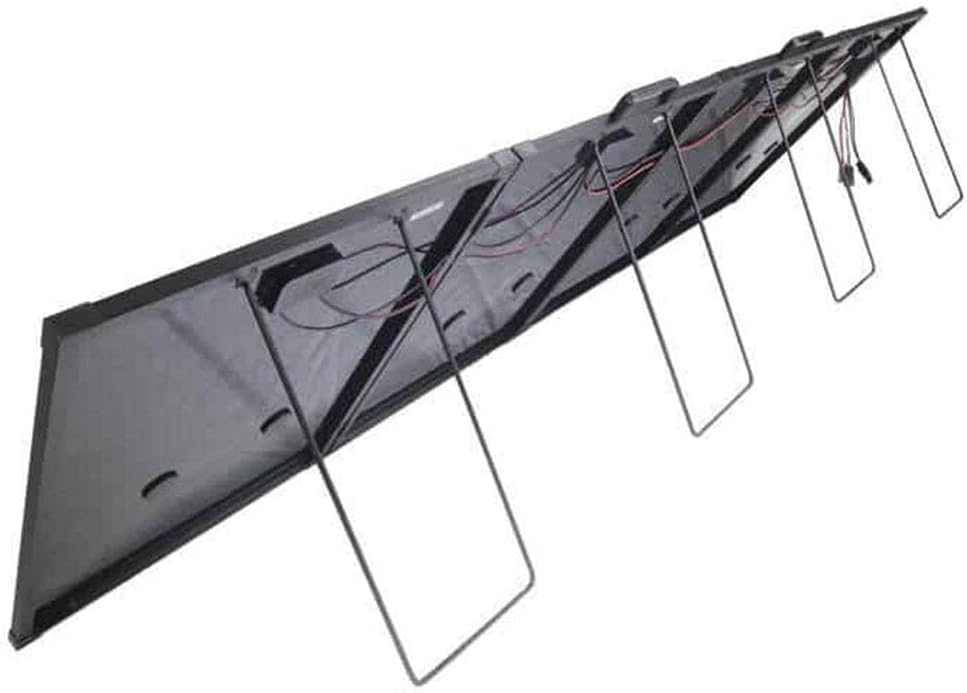
Hình ảnh: Phía sau view of the solar panel showing the integrated support legs extended, allowing for angled positioning.

Image: The solar panel deployed on a sandy surface next to a vehicle, demonstrating a typical outdoor setup.
3.2 Kết nối điện
The KickAss 300W Super Thin Portable Solar Panel features an integrated PWM (Pulse Width Modulation) controller, simplifying the connection process.
- Locate the output cables from the integrated PWM controller. These typically have Anderson-style connectors or similar.
- Connect these cables directly to your 12V battery system. Ensure correct polarity: positive to positive, negative to negative. Incorrect polarity can damage the controller or battery.
- The PWM controller will automatically regulate the charging process, protecting your battery from overcharging and optimizing the charge cycle.
- Once connected, the controller's display (if present) will show charging status and battery voltage.

Hình ảnh: Một chi tiết view of the integrated PWM controller and its various connection terminals, including the input from the solar panel and output to the battery.
4. Hoạt động
4.1 Monitoring Charge
The integrated PWM controller typically features a display that provides real-time information. Monitor the following:
- Pin Voltage: Indicates the current charge level of your battery.
- Dòng điện sạc: Shows how much current is being supplied to the battery from the solar panel.
- Trạng thái sạc: The controller will indicate if the battery is charging, fully charged, or in float mode.
4.2 Hiệu suất tối ưu
- Tiếp xúc với ánh sáng mặt trời: Always ensure the panel receives direct, unobstructed sunlight. Reposition the panel throughout the day as the sun moves to maximize energy harvest.
- Góc: Adjust the panel's angle to be perpendicular to the sun's rays. In most cases, this means a steeper angle in winter and a flatter angle in summer.
- Nhiệt độ: Solar panels perform best in cooler temperatures with strong sunlight. High temperatures can slightly reduce efficiency.
- Độ sạch sẽ: Keep the panel surface clean from dust, dirt, leaves, and bird droppings.
5. Bảo trì
5.1 Vệ sinh
Regular cleaning ensures maximum power output.
- Clean the solar panel surface with a soft, damp Dùng khăn mềm và chất tẩy rửa nhẹ, không gây mài mòn.
- Rửa kỹ bằng nước sạch để loại bỏ cặn xà phòng.
- Do not use harsh chemicals, abrasive cleaners, or sharp objects that could scratch the panel surface.
- Clean connections periodically to ensure good electrical contact.

Hình ảnh: Cận cảnh view of the solar panel's surface, highlighting the individual monocrystalline silicon cells and their arrangement.
5.2 Lưu trữ
When not in use, proper storage will prolong the life of your solar panel.
- Fold the panel carefully, ensuring cables are not pinched.
- Store the panel in its protective carry bag (if supplied) to prevent scratches and damage.
- Bảo quản ở nơi khô ráo, thoáng mát, tránh ánh nắng trực tiếp và nhiệt độ khắc nghiệt.

Image: The KickAss branded carry bag designed for the super thin portable solar panel, providing protection during transport and storage.
KHAI THÁC. Xử lý sự cố
| Vấn đề | Nguyên nhân có thể | Giải pháp |
|---|---|---|
| No power output from panel | No sunlight or insufficient sunlight Kết nối lỏng lẻo hoặc không chính xác Damaged panel or controller | Ensure panel is in direct sunlight and free of shade. Check all cable connections for security and correct polarity. Inspect panel and controller for visible damage. Contact support if damaged. |
| Công suất đầu ra thấp | Bóng đổ một phần Bề mặt bảng điều khiển bị bẩn Góc tấm không đúng Thời tiết u ám | Relocate panel to a completely unshaded area. Làm sạch kỹ bề mặt bảng điều khiển. Adjust panel angle to face the sun directly. Lower output is normal during cloudy conditions. |
| Màn hình điều khiển không hoạt động | No power input from panel No battery connected or low battery voltage Sự cố bộ điều khiển | Ensure panel is in sunlight and connected. Connect to a battery with sufficient voltage (typically >8V). Contact support if the controller remains unresponsive. |
7. Thông số kỹ thuật
| Tính năng | Chi tiết |
|---|---|
| Người mẫu | KASTSP300 |
| Công suất đầu ra | 300W |
| Vol tối đatage | 12 vôn |
| Loại bảng điều khiển | Silic đơn tinh thể |
| Hiệu quả | Hiệu quả cao |
| Kích thước sản phẩm (khi gấp lại) | 8.7 x 7.25 x 1.7 cm (This seems incorrect for a 300W panel, likely package dimensions. Actual unfolded dimensions will be significantly larger.) |
| Trọng lượng sản phẩm | 16.8 kg (16800 gram) |
| Loại bộ điều khiển | Integrated PWM Controller |
| Nhà sản xuất | ĐÁ VÀO MÔNG |
| Nước xuất xứ | Thụy Sĩ |
Note: Product dimensions provided may refer to packaging or a component, not the full unfolded panel. Refer to product packaging for precise unfolded dimensions.
8. Bảo hành và Hỗ trợ
For specific warranty terms and conditions, please refer to the documentation provided with your purchase or visit the official KickAss website. KickAss products are designed for durability and performance, and support is available for any operational queries or issues.
You can find more information and contact support via the official KickAss store page: Visit the KICKASS Store on Amazon
Ask a question about this manual
Ask about setup, troubleshooting, compatibility, parts, safety, or missing instructions. Manuals+ will review the question and use this page’s manual context to help answer it.