
1. Giới thiệu
This manual provides essential information for the safe and efficient use of your OPPO F21 Pro (5G) smartphone. Please read this manual thoroughly before using your device to ensure optimal performance and longevity.
The OPPO F21 Pro (5G) is a high-performance smartphone featuring a 2.2 GHz Octa-core processor, 8GB of RAM, and 128GB of internal storage, expandable via microSDXC. It operates on Android 12 and is powered by a non-removable 4500 mAh Li-Po battery. Key features include a 6.43-inch AMOLED display, a 64 MP AI Triple Camera system, and 5G connectivity.
2. Thiết lập thiết bị
2.1 Nội dung gói
- OPPO F21 Pro (5G) Smartphone
- Cáp USB
- Hướng dẫn bắt đầu nhanh (có thể khác nhau tùy theo khu vực)
- Thông tin an toàn (có thể khác nhau tùy khu vực)
2.2 Lắp thẻ SIM và thẻ MicroSD
Your OPPO F21 Pro (5G) supports Dual-SIM functionality and a microSDXC card for expanded storage. The device uses Nano-SIM cards.
- Xác định vị trí khay thẻ SIM ở bên cạnh điện thoại.
- Cắm dụng cụ đẩy SIM (nếu có) vào lỗ nhỏ bên cạnh khay và đẩy nhẹ cho đến khi khay bật ra.
- Đặt thẻ Nano-SIM và/hoặc thẻ nhớ microSDXC vào các khe cắm được chỉ định trên khay. Đảm bảo các điểm tiếp xúc màu vàng hướng xuống dưới.
- Cẩn thận đẩy khay trở lại điện thoại cho đến khi nó ngang bằng với cạnh điện thoại.
Important Network Compatibility Note for USA Buyers:
This smartphone is not compatible with CDMA networks, including VERIZON, SPRINT, and US CELLULAR. Please verify 3G or 4G/LTE compatibility with your network provider before purchase.
2.3 Bật / Tắt nguồn
- Để bật nguồn: Nhấn và giữ nút Nguồn (nằm ở bên phải) cho đến khi logo OPPO xuất hiện.
- Để Tắt Nguồn: Nhấn và giữ nút Nguồn, sau đó chọn 'Tắt nguồn' từ các tùy chọn trên màn hình.
- Khởi động lại: Nhấn và giữ nút Nguồn, sau đó chọn 'Khởi động lại' từ các tùy chọn.
2.4 Thiết lập ban đầu
Upon first power-on, follow the on-screen instructions to complete the initial setup process. This includes selecting your language, connecting to Wi-Fi, setting up your Google account, and configuring security features like Face Recognition.
3. Vận hành thiết bị của bạn
3.1 Điều hướng cơ bản
Your OPPO F21 Pro (5G) runs on Android 12, offering an intuitive user interface. Use gestures or navigation buttons (configurable in settings) to move between apps, return to the home screen, and access recent applications.
3.2 Tính năng hiển thị

The front of the OPPO F21 Pro (5G) features a vibrant AMOLED display with a punch-hole cutout for the front camera.

Một chi tiết view of the punch-hole front camera, integrated seamlessly into the display.
The device features a 6.43-inch AMOLED display with a resolution of 1080 x 2400 pixels, protected by Schott Xensation glass. This display provides vivid colors and deep blacks for an enhanced viewkinh nghiệm.
3.3 Sử dụng máy ảnh
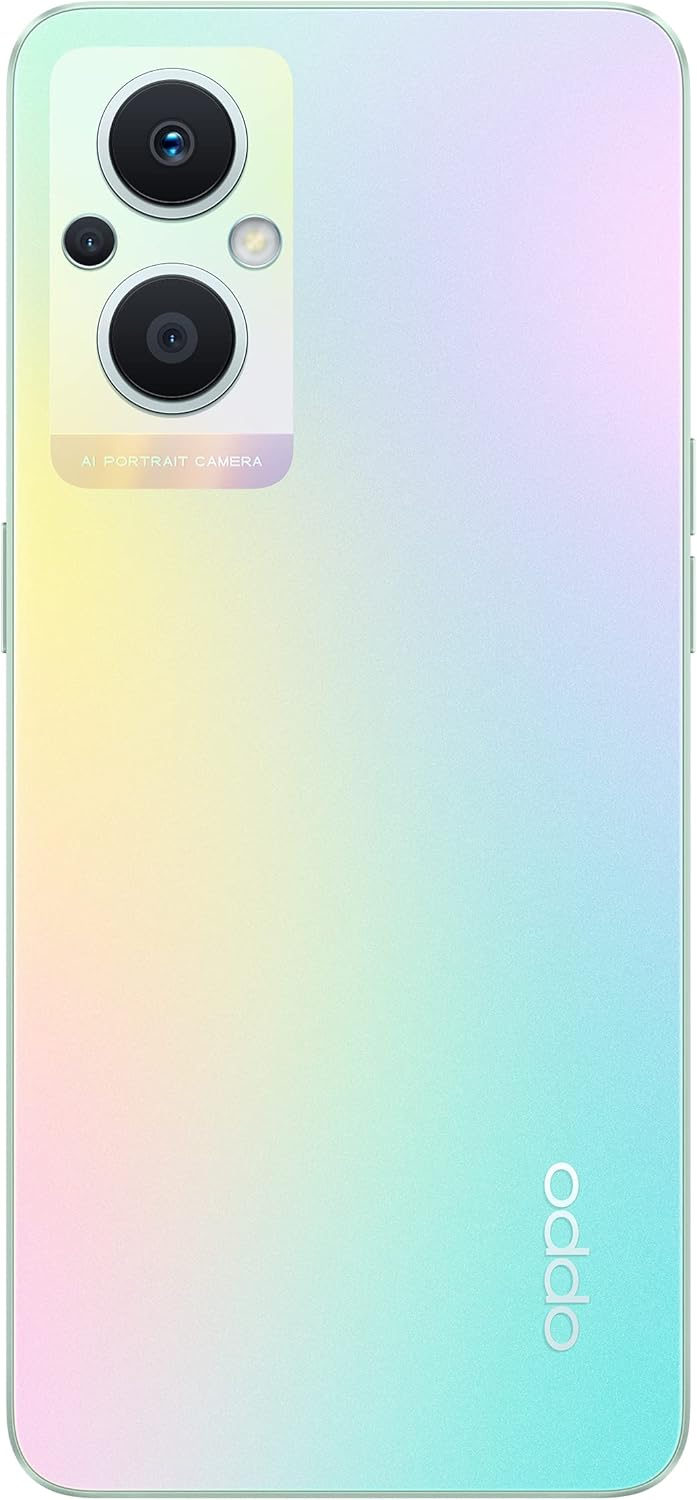
The back of the OPPO F21 Pro (5G) showcases its triple camera system and sleek design.

Một chi tiết view of the AI Portrait Camera module on the rear, highlighting the lenses and flash.
The OPPO F21 Pro (5G) is equipped with a versatile camera system:
- Camera sau: 64 MP (rộng, f/1.7, PDAF), 2 MP (macro, f/2.4), 2 MP (sâu, f/2.4).
- Camera trước: 16 MP (rộng, f/2.4).
Access the Camera app from your home screen or app drawer. Select various shooting modes such as Photo, Video, Portrait, Macro, and more. Tap the screen to focus and press the shutter button to capture images or start/stop video recording.
3.4 Kết nối
- Mạng 5G: Supports N1/ N8/ N28/ N41/ N77/ N78 SA/NSA bands.
- Wi-Fi: Kết nối với mạng không dây để truy cập Internet.
- Bluetooth: Kết hợp với các phụ kiện không dây như tai nghe và loa.
- USB loại C: Để sạc và truyền dữ liệu.
3.5 Tính năng bảo mật
The device includes Face Recognition for convenient and secure unlocking. You can set this up in the Security settings menu.
4. Bảo trì
4.1 Chăm sóc pin
Your OPPO F21 Pro (5G) is equipped with a 4500 mAh Lithium-Polymer battery. To maximize battery life:
- Tránh nhiệt độ quá cao.
- Use the original charger and USB cable provided.
- Tránh xả hết pin thường xuyên.
- Tối ưu hóa cài đặt pin trong menu cài đặt của thiết bị.
4.2 Vệ sinh thiết bị của bạn
The device is rated as Water Resistant. To clean your phone:
- Tắt nguồn thiết bị trước khi vệ sinh.
- Sử dụng vải mềm, không xơ.
- Tránh sử dụng hóa chất mạnh, chất tẩy rửa có tính mài mòn hoặc khí nén.
- Không ngâm thiết bị trong nước.
4.3 Cập nhật phần mềm
Regularly check for and install software updates to ensure your device has the latest features, security patches, and performance improvements. You can check for updates in the device's Settings menu under 'About phone' or 'Software update'.
KHAI THÁC. Xử lý sự cố
If you encounter issues with your OPPO F21 Pro (5G), try the following basic troubleshooting steps:
- Thiết bị không phản hồi: Nhấn và giữ nút Nguồn trong khoảng 10-15 giây để buộc khởi động lại.
- Các vấn đề về mạng: Ensure your SIM card is correctly inserted. Check your network settings and ensure mobile data or Wi-Fi is enabled. Restart your device.
- Ứng dụng bị sập: Đóng và mở lại ứng dụng. Xóa bộ nhớ đệm và dữ liệu của ứng dụng trong Cài đặt > Ứng dụng. Nếu sự cố vẫn tiếp diễn, hãy gỡ cài đặt và cài đặt lại ứng dụng.
- Pin cạn kiệt nhanh chóng: Review battery usage in Settings to identify power-hungry apps. Reduce screen brightness, disable unnecessary features (GPS, Bluetooth, Wi-Fi) when not in use.
- Bộ nhớ đầy: Xóa không cần thiết files, photos, and videos. Move media to a microSD card if installed. Clear app caches.
Đối với các vấn đề phức tạp hơn, vui lòng tham khảo bộ phận hỗ trợ chính thức của OPPO. webtrang web hoặc liên hệ với dịch vụ khách hàng.
6. Thông số kỹ thuật

Một quaview of the OPPO F21 Pro (5G) showcasing its main features including the 64MP AI Triple Camera, AMOLED screen, and Qualcomm Snapdragon 5G SoC.

The OPPO F21 Pro (5G) in Rainbow Spectrum, displaying both its front and rear aesthetics.
| Tính năng | Đặc điểm kỹ thuật |
|---|---|
| Thương hiệu | OPPO |
| Tên mẫu | OPPO F21 Pro (5G) |
| Hệ điều hành | Android 12.0 |
| Bộ xử lý | Qualcomm SM6375 Snapdragon 695 5G (6 nm), bộ xử lý tám nhân (2x2.2 GHz Kryo 660 Gold & 6x1.7 GHz Kryo 660 Silver) |
| ĐẬP | 8GB |
| Bộ nhớ trong | 128GB |
| Lưu trữ mở rộng | Thẻ nhớ microSDXC |
| Kích thước màn hình | 6.43 inch (16.33 cm) |
| Kiểu hiển thị | AMOLED |
| Nghị quyết | 1080 x 2400 pixel |
| Camera sau | 64 MP (rộng), 2 MP (macro), 2 MP (sâu) |
| Camera trước | 16 MP (rộng) |
| Dung lượng pin | 4500 mAh (Lithium-Polymer, non-removable) |
| Công nghệ di động | 5G (Hai SIM) |
| Công nghệ không dây | Wi-Fi, Bluetooth |
| Loại đầu nối | USB Loại C |
| Bảo mật sinh trắc học | Nhận dạng khuôn mặt |
| Mức độ chống nước | Chống nước |
| Kích thước | 6.3 x 2.87 x 0.31 inch |
| Trọng lượng sản phẩm | 173 gam |
7. Thông tin bảo hành
Your OPPO F21 Pro (5G) smartphone comes with a Bảo hành 1 năm của nhà sản xuấtBảo hành này bao gồm các lỗi về vật liệu và tay nghề trong điều kiện sử dụng bình thường. Vui lòng giữ lại hóa đơn mua hàng để yêu cầu bảo hành.
The warranty does not cover damage caused by misuse, accidents, unauthorized modifications, or normal wear and tear. For full terms and conditions, please refer to the warranty card included in your product packaging or visit the official OPPO webđịa điểm.
8. Hỗ trợ
For further assistance, technical support, or to find service centers, please visit the official OPPO support webđịa điểm:
You may also find helpful FAQs and community forums on the support webđịa điểm.