
1. Giới thiệu
This manual provides detailed instructions for the safe installation, operation, and maintenance of your Lucci Air Peregrine 56-inch White Ceiling Fan with Remote, Model 21328001. The Peregrine fan features a modern design with three blades, energy-efficient direct current (DC) technology, six speeds, and high airflow. It is rated for both indoor and outdoor use in covered areas. The fan includes a 6-inch warm white GX53 light kit with 3-step dimming functionality and comes with a remote control and wall mount bracket.

Hình ảnh 1.1: Mặt trước view of the Lucci Air Peregrine 56-inch White Ceiling Fan.
2. Thông tin an toàn
Please read all instructions carefully before beginning installation and retain this manual for future reference. Improper installation or use can lead to electric shock, fire, or personal injury.
- An toàn điện: Ensure the power supply is disconnected at the circuit breaker before installation or maintenance. All electrical wiring must be performed by a qualified electrician and comply with local codes and regulations.
- Lắp đặt: The ceiling fan must be mounted to a structurally sound ceiling joist or outlet box capable of supporting the fan's weight (15.92 lbs).
- Khoảng cách lưỡi dao: Maintain a minimum clearance of 7 feet from the floor to the fan blades and 18 inches from the fan blades to any walls or obstructions.
- Bộ đèn: Use only the specified GX53 12W 3000K bulb. Do not exceed the maximum wattage.
- Sử dụng ngoài trời: This fan is rated for indoor and outdoor use in covered areas. Do not expose to direct water spray.
- Điều khiển từ xa: Tránh để điều khiển từ xa tiếp xúc với nước và nhiệt độ quá cao hoặc quá thấp. Thay pin khi cần thiết.
3. Nội dung gói hàng
Hãy kiểm tra kỹ xem tất cả các bộ phận có đầy đủ và không bị hư hỏng trước khi tiến hành lắp đặt. Nếu thiếu hoặc hư hỏng bất kỳ bộ phận nào, vui lòng liên hệ bộ phận hỗ trợ khách hàng.
- Ceiling Fan Motor Housing with Downrod
- Cánh quạt (3)
- Điều khiển từ xa
- Wall Mount Bracket for Remote
- GX53 12W 3000K Light Kit (pre-installed or separate)
- Optional Metal Cap (for non-light use)
- Phần cứng lắp đặt
- Hướng dẫn sử dụng

Hình 3.1: Hếtview of the remote control and its features, including 6 fan speeds, reverse switch, light on/off/dimming, fan on/off, and wall mount holster. A CP2032 battery is included.
4. Thiết lập & Cài đặt
Professional installation is recommended for this ceiling fan. Ensure all power is disconnected at the main circuit breaker before beginning installation.
- Chuẩn bị vị trí lắp đặt: Securely attach the mounting bracket to a suitable ceiling joist or fan-rated outlet box. Ensure the structure can support the fan's weight.
- Lắp ráp thanh nối và động cơ: Gắn thanh nối dài vào vỏ động cơ quạt. Cẩn thận luồn dây điện qua thanh nối dài.
- Lắp ráp quạt treo: Lift the fan assembly and hang it from the mounting bracket.
- Kết nối điện: Connect the fan's electrical wires to the household wiring according to the wiring diagram provided in the separate installation guide (not included in this manual). Ensure all connections are secure.
- Gắn lưỡi dao: Cố định chắc chắn ba cánh quạt vào vỏ động cơ bằng các vít được cung cấp.
- Install Light Kit (Optional): If using the light, install the GX53 12W 3000K bulb into the light kit socket. Attach the light kit to the bottom of the fan motor housing. If not using the light, install the optional metal cap.
- Mái che an toàn: Slide the canopy up to the ceiling and secure it to the mounting bracket, covering all wiring.
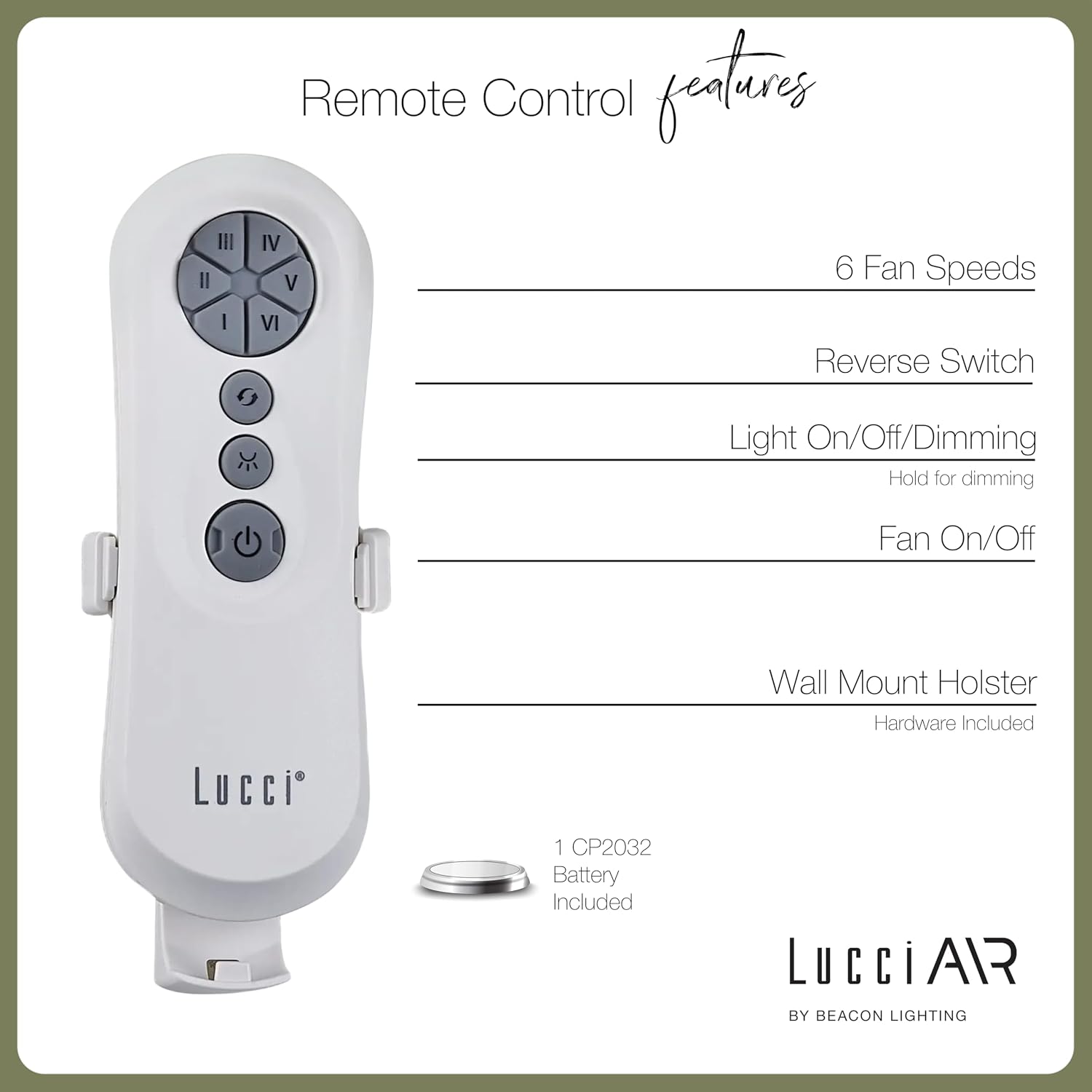
Image 4.1: Dimensional diagram of the Lucci Air Peregrine 56-inch Ceiling Fan, showing overall height, width, and blade length measurements.

Hình ảnh 4.2: Phía dưới view of the Lucci Air Peregrine fan, highlighting the integrated light kit.
5. Hoạt động
The Lucci Air Peregrine fan is operated using the included remote control. Ensure the remote has a working CP2032 battery installed.
5.1 Chức năng điều khiển từ xa
- Bật / Tắt quạt: Press the power button (ⓘ) to turn the fan on or off.
- Tốc độ quạt: Use buttons I, II, III, IV, V, VI to select one of the six available fan speeds. I is the lowest speed, VI is the highest.
- Chuyển đổi ngược: Press the reverse button (↻) to change the direction of the fan blades. This function is typically used to switch between summer (downward airflow) and winter (upward airflow) modes. Note: Some models may have a manual switch on the motor housing for this function.
- Bật/Tắt/Làm mờ đèn: Press the light button (☀) to turn the light on or off. Hold the light button to dim or brighten the light through its 3-step dimming range.
5.2 Chế độ mùa đông/mùa hè
The fan features a manual switch on the motor housing to change between winter and summer modes. For summer operation, the blades should rotate counter-clockwise to push air downwards, creating a cooling breeze. For winter operation, the blades should rotate clockwise to draw cool air up, circulating warm air trapped near the ceiling. Adjust the switch accordingly.
6. Bảo trì
Bảo trì thường xuyên đảm bảo hiệu suất tối ưu và kéo dài tuổi thọ của quạt trần.
- Vệ sinh: Lau bụi cánh quạt và vỏ động cơ định kỳ bằng khăn mềm,amp Lau sạch bằng vải. Không sử dụng chất tẩy rửa có tính mài mòn hoặc dung môi, vì chúng có thể làm hỏng lớp hoàn thiện.
- Độ chặt của lưỡi dao: Check all blade screws annually to ensure they are tight. Loose blades can cause wobbling and noise.
- Thay thế bóng đèn: Disconnect power before replacing the GX53 light bulb. Allow the bulb to cool completely before handling.
- Pin từ xa: Replace the CP2032 battery in the remote control when its range decreases or it stops responding.
KHAI THÁC. Xử lý sự cố
Tham khảo bảng sau để biết các vấn đề thường gặp và giải pháp.
| Vấn đề | Nguyên nhân có thể | Giải pháp |
|---|---|---|
| Quạt không khởi động | Không có điện cho quạt Kết nối dây lỏng lẻo Pin điều khiển từ xa hết | Kiểm tra bộ ngắt mạch Kiểm tra xem tất cả các kết nối dây có chắc chắn không (tắt nguồn). Thay pin điều khiển từ xa |
| Quạt chao đảo | Vít lưỡi dao lỏng Lưỡi dao không cân bằng Giá đỡ lỏng lẻo | Siết chặt tất cả các vít lưỡi dao Ensure blades are installed correctly and balanced Verify mounting bracket is securely fastened |
| Ánh sáng không hoạt động | Bóng đèn bị hỏng Loose wire connection to light kit | Thay bóng đèn Check light kit wiring (power off) |
| Điều khiển từ xa không hoạt động | Pin chết Điều khiển từ xa chưa được ghép nối (nếu có) | Thay pin Refer to separate remote pairing instructions (if provided with fan) |
8. Thông số kỹ thuật
Key technical details for the Lucci Air Peregrine 56-inch White Ceiling Fan (Model 21328001).
| Tính năng | Chi tiết |
|---|---|
| Tên mẫu | Peregrine |
| Số hiệu mẫu | 21328001 |
| Thương hiệu | Lucci Air |
| Màu sắc | Trắng |
| Thiết kế quạt | Quạt trần |
| Nguồn điện | DC (Dòng điện một chiều) |
| Kích thước sản phẩm | 56"D x 56"W x 15"H |
| Số lượng lưỡi dao | 3 |
| Chiều dài lưỡi dao | 31.1 inch |
| Công suất dòng khí | 6363 feet khối mỗi phút (CFM) |
| Số lượng tốc độ | 6 |
| Mức tiêu thụ nguồn (Trung bình) | 38W |
| Tậptage | 120Vac, 60Hz |
| Bộ đèn đi kèm | 1x GX53 12W 3000K bulb, 1100 Lumens, 3-step dimmable |
| Phương pháp kiểm soát | Điều khiển từ xa |
| Sử dụng trong nhà/ngoài trời | Indoor, Outdoor (covered areas) |
| Trọng lượng sản phẩm | 15.92 pound |
| Mã số UPC | 811769032344 |
9. Bảo hành & Hỗ trợ
The Lucci Air Peregrine 56-inch White Ceiling Fan comes with a bảo hành trọn đời có giới hạn. For warranty claims, technical support, or replacement parts, please contact Lucci Air customer service. Keep your proof of purchase for warranty validation.
Để được hỗ trợ thêm, vui lòng truy cập Lucci Air Store on Amazon Hoặc liên hệ với nhà bán lẻ của bạn.