
1. Giới thiệu
Thank you for choosing the DELLA Umbra Series 9000 BTU WiFi Mini Split AC with Heat Pump. This manual provides essential information for the safe and efficient operation, installation, and maintenance of your unit. Please read this manual thoroughly before installation and use, and retain it for future reference.
Thông tin an toàn quan trọng
This appliance is designed for professional installation only. Attempting DIY installation without proper qualifications may result in injury, property damage, or voiding the warranty. Always consult a qualified HVAC technician for installation and complex maintenance tasks.
- Đảm bảo nguồn điện phù hợp với thông số kỹ thuật của thiết bị.
- Không chặn các cửa vào hoặc ra của không khí.
- Giữ trẻ em và vật nuôi tránh xa thiết bị ngoài trời.
- Turn off power before any maintenance or cleaning.
- Use only specified refrigerants (R32).
2. Sản phẩm hếtview
The DELLA Umbra Series Mini Split AC is an energy-efficient system designed for cooling and heating spaces up to 450 sq.ft. It features WiFi connectivity, Alexa compatibility, and a heat pump for year-round comfort.
Các tính năng chính:
- Hiệu quả năng lượng: 19 SEER2 rating with DC Inverter technology for up to 30% power savings.
- Chức năng thông minh: 4D airflow (up-down, left-right), I Feel mode, 24-hour timer, sleep mode, eco energy-saving mode, multiple fan speeds, turbo function.
- Cảm biến thông minh: Remote control senses room temperature for optimal comfort and energy savings.
- Hoạt động yên tĩnh: Hoạt động cực kỳ yên tĩnh với độ ồn chỉ 42 dBa.
- Phạm vi phủ sóng rộng: Cools and heats up to 450 sq.ft, operating in temperatures as low as 19°F.
- Môi chất lạnh R32: Uses environmentally friendly R32 refrigerant.
Sơ đồ thành phần:

Figure 2.1: Main components included with the DELLA Umbra Series Mini Split AC.
Sản phẩm View:

Figure 2.2: DELLA Umbra Series 9000 BTU WiFi Mini Split AC.
3. Thiết lập và Cài đặt
Professional installation is mandatory for this system. This is not a DIY mini split AC. Line-set vacuuming is required during installation. Any alteration of line-set length requires adjusting freon levels. Please consult a qualified HVAC professional for proper installation to ensure safety and optimal performance.
Cài đặt xongview Băng hình:
Video 3.1: General guidance on installing your DELLA Mini Split AC unit. This video is for informational purposes only; professional installation is required.
Các bước cài đặt chính (Tóm tắt):
- Vị trí đánh dấu: Use the provided template to mark the locations for the line set wall hole and the mini split bracket.
- Lắp khung: Securely attach the mini split bracket to the wall using the provided screws. Ensure the bracket is properly leveled.
- Đường dây định tuyến: Luồn đường ống nước, ống thoát nước và dây điện qua lỗ trên tường.
- Lắp đặt dàn lạnh: Securely mount the indoor mini split unit onto the bracket.
- Đường băng ghi hình: Dùng băng dính cố định ống thoát nước và đường ống lại với nhau để việc lắp đặt gọn gàng và ngăn nắp.
- Bảo vệ dây điện: Sử dụng dây buộc nhựa để cố định các dây điện xung quanh các đường ống đã được quấn băng keo và ống thoát nước.
- Định vị dàn ngưng tụ ngoài trời: Đặt dàn ngưng tụ ngoài trời vào vị trí đã được chỉ định.
- Bộ dây kết nối: Connect the unit line set to the condenser line set and tighten down firmly. Use a digital torque wrench if available to ensure proper tightening according to specifications.
- Kết nối điện: Connect the electrical wires (red, black, green ground) to their corresponding terminals on the condenser unit. Each wire is designated with a specific letter and number.
- Hút chân không hệ thống: Connect a vacuum pump to the system via a gauge. Open the valves on the gauge and activate the vacuum. Monitor the micron reading closely and close the valves once it reaches 350 microns. Turn off the vacuum pump.
- Phục hồi năng lượng: Restore power to the outdoor unit.
- Initiating Cooling: Turn on the mini split unit and set it to the lowest cold setting. Allow a few minutes for the outdoor condenser fan to initiate.
- Mở van: Gradually open the high side (top) valve using a service wrench. Monitor the gauge as readings will decrease into the negative range. After the high side valve is open, promptly open the low side (bottom) valve. Monitor the gauge closely as the readings will increase, which is expected.
Your DELLA mini split unit installation is complete once these steps are followed and the unit is operating correctly.
Cài đặt trướcview Băng hình:
Video 3.2: Một đoạn giới thiệu ngắnview of the DELLA Mini Split AC installation process, highlighting key steps.
4. Hướng dẫn vận hành
Your DELLA Umbra Series Mini Split AC can be controlled via the included remote control, the Della+ mobile app, or voice commands through Alexa.
Điều khiển từ xa:

Figure 4.1: DELLA Mini Split AC Remote Control.
Use the remote control to adjust temperature, select operating modes, set fan speed, and activate special functions like Sleep Mode or Turbo. Refer to the remote control's specific instructions for detailed button functions.
Della+ Mobile App:
The Della+ app allows you to control your unit remotely, set schedules, and utilize smart features like Geo-Location.
Video 4.2: Learn how to set up and customize Geo-Location using the Della+ App for smart AC controls.
Video 4.3: Một đoạn giới thiệu ngắnview demonstrating the features and interface of the Della+ App.

Figure 4.2: Della+ App Interface.
- Tải xuống: Tìm kiếm "Della+" in your mobile app store.
- Ghép nối: Follow the in-app instructions to pair your device with the AC unit.
- Chế độ: Select from Cool, Heat, Dry (dehumidify), Fan Only, or ECO mode.
- Tốc độ quạt: Adjust fan speed from Quiet, Low, Mid, High, to Turbo.
- Luồng không khí: Control vertical and horizontal oscillation for optimal air distribution.
- Lên lịch & Hẹn giờ: Set weekly schedules or countdown timers for automatic operation.
- Định vị địa lý: Configure automatic AC control based on your location.
Điều khiển bằng giọng nói (Alexa):
The unit seamlessly integrates with Amazon Alexa for convenient voice control. Ensure your Della+ app is linked to your Alexa account.

Figure 4.3: Voice Control Compatibility with Alexa.
5. Bảo trì
Regular maintenance ensures optimal performance and longevity of your DELLA Mini Split AC unit. Always disconnect power before performing any maintenance.
Làm sạch bộ lọc:
The indoor unit features washable air filters. Clean them every two weeks or more frequently depending on usage and air quality.
- Mở mặt trước của dàn lạnh.
- Tháo bộ lọc khí.
- Rửa sạch các bộ lọc bằng nước ấm và chất tẩy rửa nhẹ.
- Rửa sạch và để khô hoàn toàn trước khi lắp lại.
- Đóng mặt trước.
Vệ sinh dàn lạnh trong nhà:
Lau sạch bề mặt dàn lạnh bằng khăn mềm.amp cloth. Do not use harsh chemicals or abrasive cleaners. The unit also features PureClean tech to prevent dust buildup and defrost the indoor unit, contributing to cleaner air.
Hình 5.1: Nội bộ view of the indoor unit highlighting PureClean technology.
Vệ sinh dàn nóng:
Periodically clean the outdoor unit's coils and fins to remove dirt, leaves, and debris. Use a soft brush or vacuum cleaner. Ensure the area around the outdoor unit is clear of obstructions for proper airflow.

Figure 5.2: Outdoor unit with gold-plated fins for corrosion prevention.
KHAI THÁC. Xử lý sự cố
Trước khi liên hệ với bộ phận hỗ trợ khách hàng, vui lòng kiểm tra lại.view các vấn đề phổ biến và giải pháp sau đây:
| Vấn đề | Nguyên nhân có thể | Giải pháp |
|---|---|---|
| Đơn vị không bắt đầu. | Mất điện, cầu dao bị ngắt, pin điều khiển từ xa yếu. | Kiểm tra nguồn điện, đặt lại cầu dao, thay pin điều khiển từ xa. |
| Làm mát/sưởi ấm không đủ. | Bộ lọc không khí bẩn, dàn nóng bị tắc nghẽn, cài đặt chế độ không chính xác, thiếu chất làm lạnh. | Clean air filters, clear obstructions from outdoor unit, select correct mode, contact professional for refrigerant check. |
| Tiếng ồn bất thường từ thiết bị. | Các bộ phận bị lỏng, quạt bị tắc nghẽn, âm thanh hoạt động bình thường (ví dụ: tiếng gió lạnh). | Check for loose parts or obstructions. If noise persists or is unusual, contact support. |
| Rò rỉ nước từ dàn lạnh. | Blocked drain hose, improper installation angle. | Kiểm tra và làm sạch ống thoát nước. Nếu vấn đề vẫn tiếp diễn, có thể cần đến sự lắp đặt lại chuyên nghiệp. |
| Điều khiển từ xa không hoạt động. | Batteries dead, remote out of range, signal obstruction. | Replace batteries, ensure clear line of sight to indoor unit, operate within range. |
Đối với các vấn đề không được liệt kê ở đây hoặc nếu các giải pháp không giải quyết được vấn đề, vui lòng liên hệ với bộ phận hỗ trợ khách hàng của DELLA.
7. Thông số kỹ thuật
| Tính năng | Chi tiết |
|---|---|
| Số hiệu mẫu | 9K1VR-19S-JPB-I+O |
| Kích cỡ | 9,000 BTU - 115V -- 19 SEER2 |
| Công suất làm mát | 9000 BTU/giờ |
| Công suất sưởi ấm | 10000 BTU/giờ |
| Nguồn điện | 115V~/60Hz/1PH |
| Công suất đầu vào tối đa | 1200W |
| Khối lượng dòng khí | 560 m³/giờ |
| tối đa. Kích thước cầu chì | 20A |
| Mức độ âm thanh | 42 Decibel |
| Kích thước sản phẩm | 31.18 x 7.91 x 11.5 inch |
| Trọng lượng sản phẩm | 58.6 pound |
| Tính năng đặc biệt | Alexa and WiFi Enabled, DeHumidifier, Fast Cooling and Heating, Remote Control |
| Loại môi chất lạnh | R32 |

Hình 7.1: Kích thước sản phẩm.
8. Bảo hành và Hỗ trợ
DELLA is committed to providing high-quality products and excellent customer service.
Bảo hành trọn đời có giới hạn:
Your DELLA Umbra Series Mini Split AC comes with a limited lifetime warranty, offering peace of mind against manufacturing defects. This warranty is designed to cover the product for its expected lifespan under normal use and service. Please refer to the warranty card included with your product for full terms and conditions.

Figure 8.1: DELLA Lifetime Coverage.
Hỗ trợ khách hàng:
Our dedicated customer support team is available to assist you with any questions or concerns regarding your DELLA product.
- Hỗ trợ qua điện thoại: Có sẵn từ thứ Hai đến thứ Sáu, 6 giờ sáng đến 4 giờ chiều theo giờ PST.
- Trò chuyện trực tiếp: 24/7 support for immediate assistance.
Please have your model number (9K1VR-19S-JPB-I+O) and purchase information ready when contacting support.
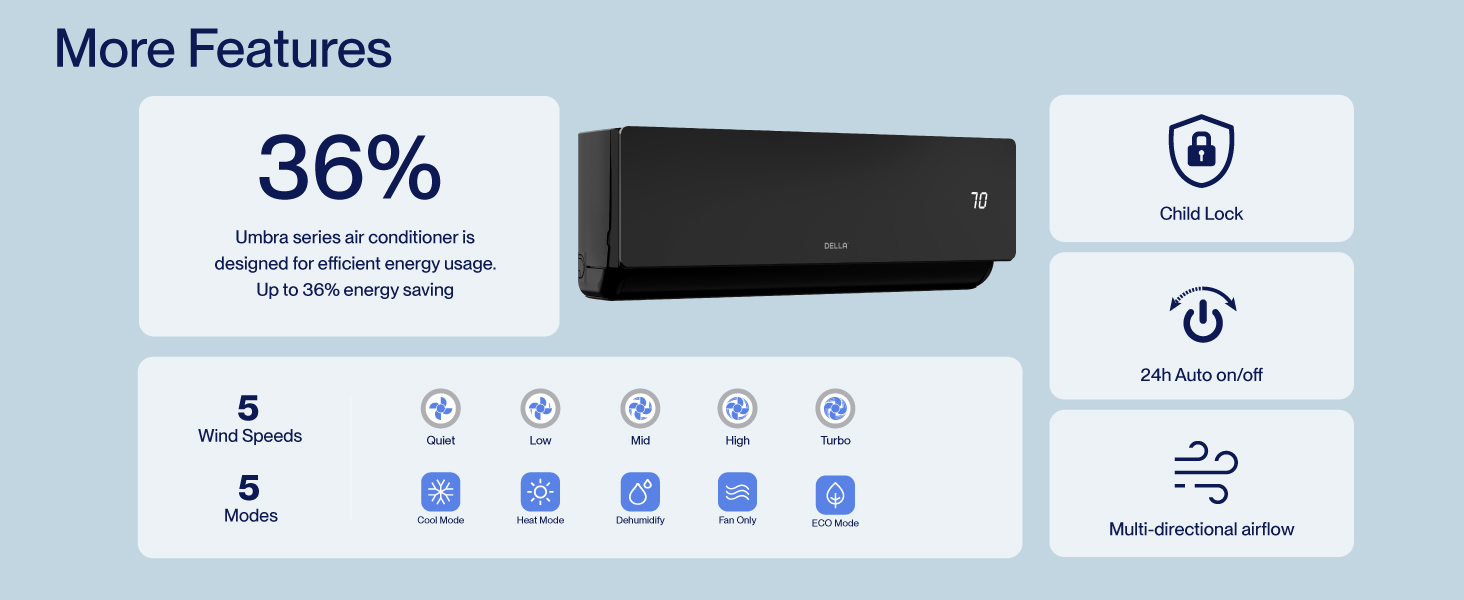
Figure 8.2: DELLA Customer Support Options.