
AOLION WGXB004005
Hướng dẫn sử dụng bộ chuyển đổi tai nghe âm thanh nổi AOLION
Model: WGXB004005
Giới thiệu
The AOLION Stereo Headset Adapter is designed to enhance your gaming experience on Xbox One controllers. This adapter allows you to connect most wired stereo gaming headsets with a 3.5mm audio jack (CTIA plug standard) directly to your Xbox controller, providing convenient control over game sound and voice chat.
Nội dung gói
- 1 × AOLION Stereo Headset Adapter
- 1 × User's Manual
Sản phẩm trênview
The adapter features intuitive controls for managing your audio experience during gameplay.

Hình 1: Mặt trước view of the headset adapter showing control buttons.
- Game Balance Button: Adjusts the balance towards game audio.
- Chat Balance Button: Adjusts the balance towards voice chat audio.
- Nút tắt tiếng micrô: Bật/tắt micro.
- Nút tăng âm lượng: Increases overall volume.
- Nút Giảm âm lượng: Decreases overall volume.
- Giắc cắm âm thanh 3.5 mm: For connecting your stereo gaming headset.
- Thiết bị kết nối USB: For connecting to the Xbox controller.
Khả năng tương thích
This headset adapter is compatible with a wide range of Xbox One controllers and stereo gaming headsets:
- Xbox Controllers: Xbox One, Xbox One S, Xbox One X, Xbox Elite Wireless Controller Series 1, Xbox Elite Wireless Controller Series 2, Xbox Series S, and Xbox Series X Controllers.
- Tai nghe: Most wired stereo gaming headsets featuring a 3.5mm audio jack (using the CTIA plug standard).

Figure 2: The adapter is compatible with multiple Xbox controller models.

Figure 3: The adapter supports standard 3.5mm CTIA headsets.
Cài đặt
Setting up your AOLION Stereo Headset Adapter is a simple plug-and-play process.
- Connect the Adapter to the Controller: Align the USB connector of the headset adapter with the expansion port at the bottom of your Xbox controller. Gently push until it clicks securely into place.
- Kết nối tai nghe của bạn: Plug your wired stereo gaming headset's 3.5mm audio jack into the corresponding port on the bottom of the headset adapter.
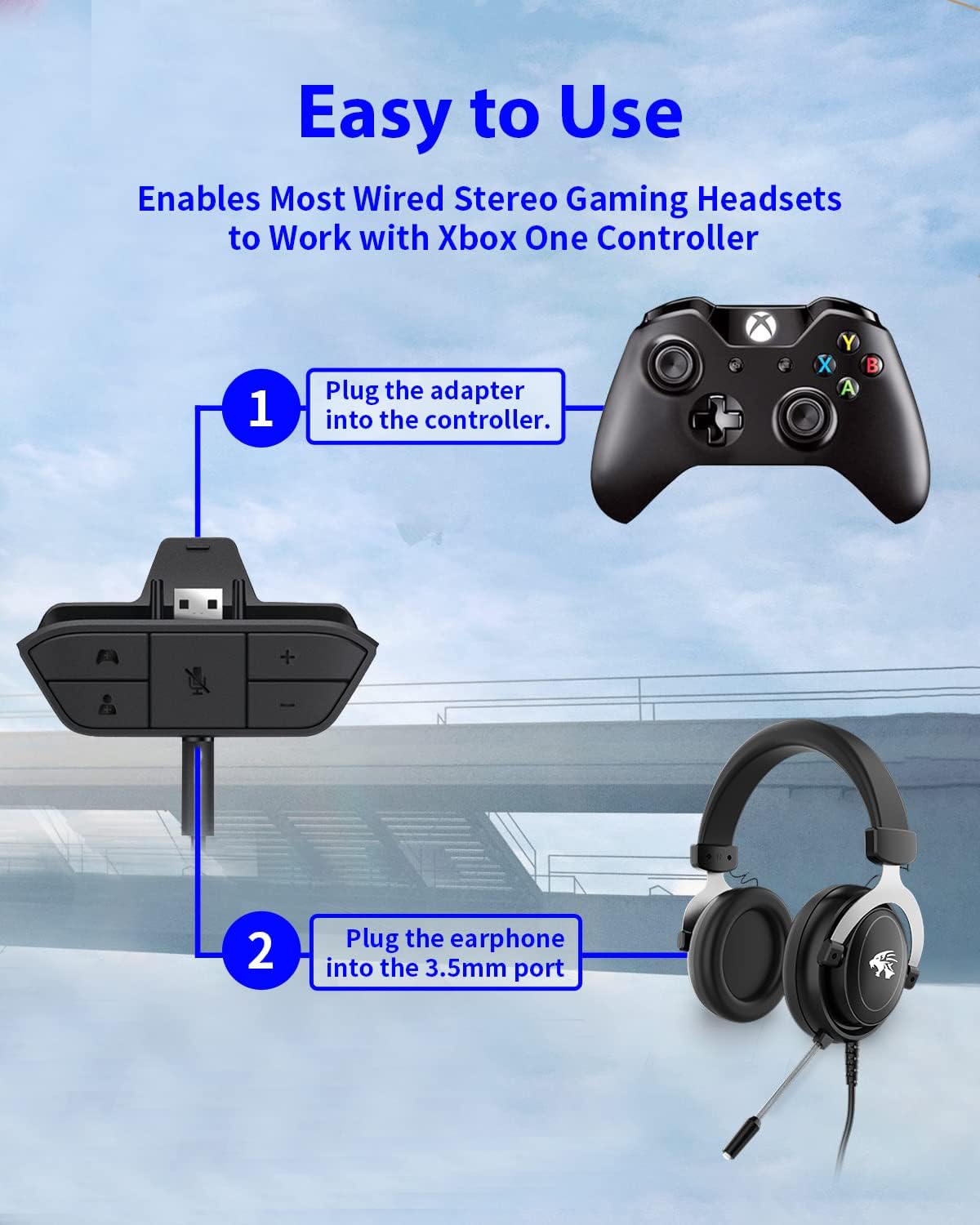
Figure 4: Step-by-step connection guide for the headset adapter.
Video 1: Demonstration of connecting the headset adapter to an Xbox controller.
Lưu ý quan trọng: For optimal performance and to resolve potential audio issues, it is recommended to update your Xbox controller's firmware after connecting the adapter. This can typically be done through your Xbox console's settings (Settings > Devices & connections > Accessories > Select your controller > ... > Controller settings > Update firmware).
Hướng dẫn sử dụng
Once connected, use the buttons on the adapter to control your audio:
- Tăng / Giảm âm lượng (+/-): Press the '+' button to increase the overall volume of both game and chat audio. Press the '-' button to decrease it.
- Microphone Mute (Microphone Icon): Press this button to mute or unmute your microphone. An indicator light (if present) or on-screen notification may confirm the mute status.
- Game/Chat Balance (Controller Icon / Person Icon):
- Nhấn nút Biểu tượng bộ điều khiển button to increase game audio volume and decrease chat audio volume.
- Nhấn nút Biểu tượng người button to increase chat audio volume and decrease game audio volume.
Hình 5: Chi tiết view of the adapter's control buttons.
BẢO TRÌ
To ensure the longevity and optimal performance of your headset adapter, follow these simple maintenance guidelines:
- Hãy giữ cho bộ chuyển đổi luôn sạch sẽ và không bị bám bụi bẩn. Sử dụng khăn mềm, khô để lau chùi.
- Tránh để bộ chuyển đổi ở nơi có nhiệt độ, độ ẩm quá cao hoặc ánh nắng trực tiếp.
- Không được tự ý tháo rời hoặc sửa chữa bộ chuyển đổi vì điều này sẽ làm mất hiệu lực bảo hành.
- Khi không sử dụng, hãy cất giữ bộ chuyển đổi ở nơi an toàn để tránh hư hỏng.
Xử lý sự cố
If you encounter issues with your AOLION Stereo Headset Adapter, please refer to the following common solutions:
| Vấn đề | Nguyên nhân có thể / Giải pháp |
|---|---|
| No audio or poor audio quality (buzzing, peaking) |
|
| Micrô không hoạt động |
|
| Game/Chat balance not working |
|
Nếu sự cố vẫn tiếp diễn sau khi đã thử các bước này, vui lòng liên hệ với bộ phận hỗ trợ khách hàng.
Thông số kỹ thuật
| Tính năng | Chi tiết |
|---|---|
| Số hiệu mẫu | WGXB004005 |
| Thương hiệu | AOLION |
| Kích thước sản phẩm (D x R x C) | 3.15 x 1.57 x 0.79 inch (8 x 4 x 2 cm) |
| Màu sắc | Đen |
| Loại đầu nối | Auxiliary (3.5mm CTIA standard) |
| Thiết bị tương thích | Xbox One, One S, One X, Elite 1, Elite 2, Series S, Series X Controllers; 3.5mm CTIA Stereo Headsets |
Bảo hành và Hỗ trợ
AOLION stands behind the quality of its products. This Stereo Headset Adapter comes with:
- Đảm bảo hoàn tiền trong vòng 60 ngày: If you are not entirely satisfied with your purchase within 60 days, you may be eligible for a full refund.
- Bảo hành 24 tháng: We provide a 24-month warranty against manufacturing defects from the date of purchase.
For any questions, concerns, or warranty claims, please contact us through Amazon. We are committed to responding to your inquiries within 12 hours to ensure your complete satisfaction.
Ask a question about this manual
Ask about setup, troubleshooting, compatibility, parts, safety, or missing instructions. Manuals+ will review the question and use this page’s manual context to help answer it.