
Giới thiệu
This manual provides detailed instructions for the setup, operation, and maintenance of your Monkey Loop WS-10 Wireless Guitar System. This system is designed to offer musicians a cable-free solution for their instruments, maintaining sound quality and signal integrity.
Sản phẩm trênview
The Monkey Loop WS-10 system consists of a transmitter and a receiver unit. Both units are compact, lightweight, and feature a rotatable design for compatibility with various instruments.
Text description: An image showing the Monkey Loop WS-10 wireless guitar system, featuring both the transmitter and receiver units side-by-side, highlighting their compact design and the 'Monkey Loop WS-10' branding.

Các tính năng chính:
- Wireless UHF System: Utilizes UHF technology for clear audio transmission and reduced interference.
- Kéo dài tuổi thọ pin: Integrated rechargeable battery provides approximately 5 to 6 hours of operation.
- Nhỏ gọn và di động: Lightweight design for easy transport and use.
- Phích cắm xoay: Ensures compatibility with most electric guitars and basses.
- Khả năng tương thích rộng: Suitable for various 6.35mm audio devices.
Hướng dẫn thiết lập
1. Sạc pin cho các thiết bị
Before initial use, fully charge both the transmitter and receiver units. Use the included dual USB charging cable to connect both units to a USB power source (e.g., computer USB port, USB wall adapter).
Text description: An image showing the transmitter and receiver units connected to a dual USB charging cable, with a charging LED indicator visible on each unit, illustrating the charging process.

The charging indicator light will illuminate during charging and turn off or change color when fully charged (refer to the specific LED behavior in the operating section).
2. Kết nối máy phát
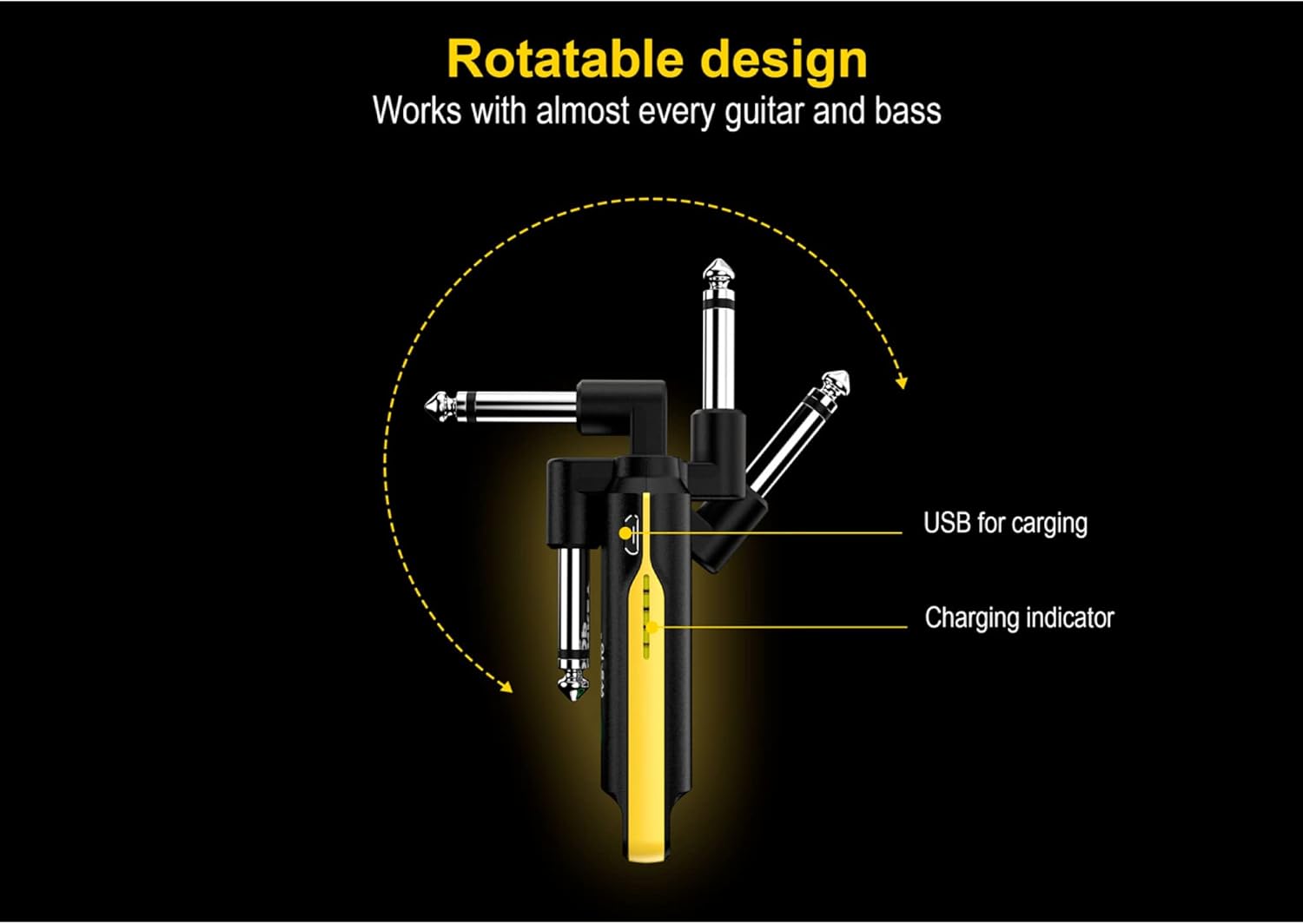
Plug the transmitter unit into your instrument's 6.35mm output jack. The rotatable plug allows for optimal positioning on various guitar and bass body types.
Text description: An image illustrating the rotatable design of the Monkey Loop WS-10 unit, showing how the 6.35mm jack can pivot to different angles for flexible connection to an instrument, ensuring compatibility.
3. Kết nối đầu thu
Cắm bộ thu vào giắc cắm đầu vào của thiết bị. amplifier, audio interface, or other audio device.
Text description: An image showing the Monkey Loop WS-10 receiver connected to an amplifier, with a guitar connected to the transmitter, demonstrating a typical wireless setup for an instrument.

Hướng dẫn sử dụng
1. Bật / Tắt nguồn
Press and hold the power button on both the transmitter and receiver units to turn them on. Repeat the action to power them off.
2. Ghép đôi
The units are typically pre-paired from the factory. If they do not connect automatically, ensure both units are powered on and within range. If issues persist, consult the troubleshooting section.
3. Sử dụng
Once both units are powered on and paired, your instrument's signal will be transmitted wirelessly to your audio device. The system offers a maximum transmission range of 50 meters (approximately 164 feet) in an open environment.
Text description: An image displaying the Monkey Loop WS-10 transmitter and receiver units side-by-side, highlighting their compact form factor and indicating their roles as transmitter and receiver.
4. Multi-Unit Operation
Up to 99 sets of Monkey Loop WS-10 systems can be used simultaneously in the same environment without interference, provided they are on different channels (if channel selection is available, refer to advanced settings, otherwise, they should auto-select).
BẢO TRÌ
- Vệ sinh: Lau sạch các thiết bị bằng khăn mềm, khô. Không sử dụng chất tẩy rửa có tính ăn mòn hoặc dung môi.
- Kho: Bảo quản thiết bị ở nơi khô ráo, thoáng mát, tránh ánh nắng trực tiếp và nhiệt độ quá cao hoặc quá thấp.
- Chăm sóc pin: Để kéo dài tuổi thọ pin, tránh xả hết pin thiết bị thường xuyên. Hãy sạc pin thường xuyên, ngay cả khi không sử dụng trong thời gian dài.
Xử lý sự cố
- No Sound or Intermittent Signal:
- Hãy đảm bảo cả bộ phát và bộ thu đều được sạc đầy và bật nguồn.
- Verify that both units are within the operational range (up to 50 meters).
- Kiểm tra các nguồn gây nhiễu tiềm ẩn (ví dụ: bộ định tuyến Wi-Fi, các thiết bị không dây khác).
- Confirm that the transmitter is securely plugged into the instrument and the receiver into the audio input.
- Test with a standard cable to rule out issues with the instrument or ampchất lót.
- Poor Sound Quality or Noise:
- Hãy tránh xa các nguồn gây nhiễu điện từ tiềm tàng.
- Ensure the units are not too close to other electronic devices.
- Check the instrument's output and amplifier's input for proper function.
- The UHF system is designed for clarity; if noise persists, it might indicate environmental interference or a faulty unit.
- Các đơn vị không ghép cặp:
- Power off and then power on both units.
- Ensure they are close to each other during the pairing process.
- If there's a reset function (not explicitly mentioned, but common), perform a factory reset.
Thông số kỹ thuật
| Tính năng | Chi tiết |
|---|---|
| Thương hiệu | VÒI KHỈ |
| Số hiệu mẫu | 10194525 (WS-10) |
| Công nghệ không dây | UHF |
| Tuổi thọ pin | Khoảng 5-6 giờ |
| Sạc | USB (dual USB charging cable included) |
| Phạm vi truyền | Lên đến 50 mét (môi trường mở) |
| Kích thước (xấp xỉ) | 120 x 29 x 18mm |
| Khả năng tương thích | Most electric guitars, basses, and 6.35mm audio devices |
Text description: An image detailing the physical dimensions of the Monkey Loop WS-10 unit, showing measurements for length, width, and thickness in millimeters for precise understanding of its size.

Bảo hành và Hỗ trợ
Information regarding specific warranty terms and support contacts is not available in the provided product data. Please refer to the product packaging or the manufacturer's official webTruy cập trang web để biết thông tin chi tiết về bảo hành và các tùy chọn hỗ trợ khách hàng.