
1. Giới thiệu
Thank you for choosing the iPega PG-P4008 Wireless Game Controller. This manual provides detailed instructions on how to set up, operate, and maintain your controller. The PG-P4008 offers broad compatibility with PS4, PS3, Android (10.0+), iOS (13.0+), and Windows PC, connecting wirelessly via Bluetooth for an enhanced gaming experience.
2. Sản phẩm hếtview
The iPega PG-P4008 is designed for versatile gaming across multiple platforms. It features a comfortable ergonomic design, responsive controls, and several advanced functionalities to immerse you in your games.
Các tính năng chính:
- Wireless Bluetooth connectivity (BT2.1+EDR) with up to 8 meters range.
- No driver installation required for connection.
- Integrated colored LED light indicator for operational status.
- Dual motors for realistic vibration feedback during gameplay.
- Built-in three-dimensional acceleration sensor and gyroscope sensor with six-axis induction.
- Integrated speaker and 3.5mm earphone jack for game audio.
- Dual-point capacitive touchpad for enhanced control.
- Compatible with PS4, PS3, Android (10.0+), iOS (13.0+), and Windows PC.
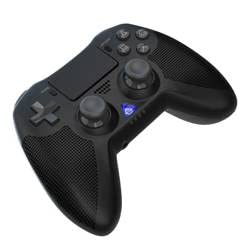
Hình ảnh 1: Đằng trước view of the iPega PG-P4008 Wireless Game Controller. This image displays the controller's ergonomic design, dual analog sticks, D-pad, action buttons, touchpad, and the central LED indicator.
3. Thiết lập và kết nối
The PG-P4008 controller connects wirelessly via Bluetooth. Follow these steps to pair your controller with your device:
- Bật nguồn: Ensure the controller is charged. Press and hold the Nút PS (or equivalent power button) to turn on the controller.
- Chế độ ghép nối:
- For PS4/PS3: Connect the controller to the console using a USB cable. Once recognized, you can disconnect the cable for wireless play. The connection method is similar to the official P4 controller.
- For Android/iOS: Activate Bluetooth on your mobile device. On the controller, press and hold the SHARE button + PS button simultaneously until the LED indicator flashes rapidly, indicating pairing mode. Select "PG-P4008" (or similar) from your device's Bluetooth list to connect.
- For Windows PC: Ensure your PC has Bluetooth capability. On the controller, press and hold the PS button + OPTIONS button simultaneously until the LED indicator flashes rapidly. On your PC, go to Bluetooth settings, add a new device, and select "PG-P4008" (or similar) to pair.
- Kết nối thành công: Once connected, the LED indicator on the controller will change to a solid color, indicating a successful pairing.
Ghi chú: No additional driver software is required for operation. The controller supports a stable connection up to 8 meters.
4. Hướng dẫn vận hành
Đèn báo LED:
The built-in colored LED light indicates the controller's operational status and player assignment, similar to the official PS4 controller. Different colors will signify different stages or player numbers.
Phản hồi rung:
The controller features dual motors embedded in the handles, providing tactile vibration feedback to enhance your gaming immersion. This feedback will vary based on in-game events.
Bàn di chuột:
The dual-point capacitive touchpad allows for intuitive control in games that support touch input, offering an additional layer of interaction.
Chức năng âm thanh:
Connect your 3.5mm earphones to the integrated jack on the controller to experience game audio directly, providing a private and immersive sound experience.
5. Bảo trì
- Keep the controller dry and away from moisture to prevent damage to internal components.
- Hãy thường xuyên vệ sinh bộ điều khiển bằng vải mềm, khô. Tránh sử dụng hóa chất mạnh hoặc vật liệu mài mòn.
- Bảo quản bộ điều khiển ở nơi khô ráo, thoáng mát khi không sử dụng.
- Tránh để bộ điều khiển tiếp xúc với nhiệt độ quá cao hoặc quá thấp hoặc ánh nắng trực tiếp.
- Do not attempt to disassemble or modify the controller, as this will void any potential warranty and may cause damage.
KHAI THÁC. Xử lý sự cố
- Bộ điều khiển không kết nối:
- Đảm bảo bộ điều khiển được sạc đầy.
- Kiểm tra xem Bluetooth đã được bật trên thiết bị của bạn chưa.
- Make sure the controller is in the correct pairing mode for your device (refer to Section 3).
- Hãy thử khởi động lại cả bộ điều khiển và thiết bị của bạn.
- Hãy xóa các thiết bị đã ghép nối trước đó khỏi danh sách Bluetooth trên thiết bị của bạn và thử ghép nối lại.
- Độ trễ đầu vào hoặc ngắt kết nối:
- Hãy đảm bảo bạn đang ở trong phạm vi hoạt động 8 mét.
- Giảm thiểu nhiễu từ các thiết bị không dây khác.
- Check for any physical obstructions between the controller and the device.
- Rung không hoạt động:
- Hãy đảm bảo trò chơi bạn đang chơi hỗ trợ phản hồi rung.
- Kiểm tra cài đặt trong trò chơi để đảm bảo chế độ rung được bật.
- Audio not working via 3.5mm jack:
- Ensure your earphones are properly plugged in.
- Check the volume settings on your device and in-game.
- Test with another pair of earphones to rule out earphone issues.
7. Thông số kỹ thuật
| Số hiệu mẫu | PG-P4008 |
| Thương hiệu | iPega |
| Kết nối | Bluetooth (BT2.1+EDR) |
| Wireless Dải | Lên đến 8 mét |
| Thiết bị tương thích | PS4, PS3, Android (10.0+), iOS (13.0+), Windows PC |
| Tính năng đặc biệt | Wireless, Touchpad, Vibration, 6-axis Gyroscope, Built-in Speaker, 3.5mm Audio Jack |
| Số lượng nút | 17 |
| Nguồn điện | Pin chạy bằng |
8. Bảo hành và Hỗ trợ
Sách hướng dẫn này không cung cấp thông tin về bảo hành sản phẩm và hỗ trợ khách hàng. Vui lòng tham khảo bao bì sản phẩm hoặc thông tin từ nhà bán lẻ. webVui lòng truy cập trang web để biết chi tiết về phạm vi bảo hành và cách liên hệ với bộ phận hỗ trợ khách hàng để được trợ giúp.