
Giới thiệu
This manual provides essential information for the safe installation, operation, and maintenance of your Eglo connect.z Smart Home LED Ceiling Light Totari-Z. Please read these instructions carefully before installation and retain them for future reference.
The Eglo connect.z Totari-Z is a smart home LED ceiling light with a white metal body and a round illuminated surface made of white plastic with a sparkling crystal effect. It offers adjustable light color, dimmable functionality, and can be controlled via Bluetooth, app, and compatible voice assistants using ZigBee 3.0 technology.

Image: The Eglo connect.z Totari-Z LED Ceiling Light, showcasing its round design and illuminated surface.
Thông tin an toàn
For detailed safety instructions, please refer to the official safety document provided by Eglo. It is crucial to follow all safety guidelines during installation and operation to prevent accidents or damage.
Nội dung gói
Bộ sản phẩm bao gồm:
- Eglo connect.z Smart Home LED Ceiling Light Totari-Z
- Hướng dẫn sử dụng
Vui lòng đảm bảo tất cả các bộ phận đều có đủ và không bị hư hỏng trước khi tiến hành lắp đặt.
Thiết lập và cài đặt
The Eglo connect.z Totari-Z ceiling light requires assembly and ceiling mounting. Professional installation is recommended for electrical connections.
Cài đặt vật lý
- Sự chuẩn bị: Đảm bảo nguồn điện cung cấp cho khu vực lắp đặt đã được ngắt tại cầu dao chính.
- Lắp đặt: Securely attach the light fixture to the ceiling using appropriate hardware.
- Dây điện: Connect the electrical wires according to local electrical codes and the wiring diagram provided in the full safety manual.
- Cuộc họp: Attach the light diffuser and any decorative elements to the main fixture.
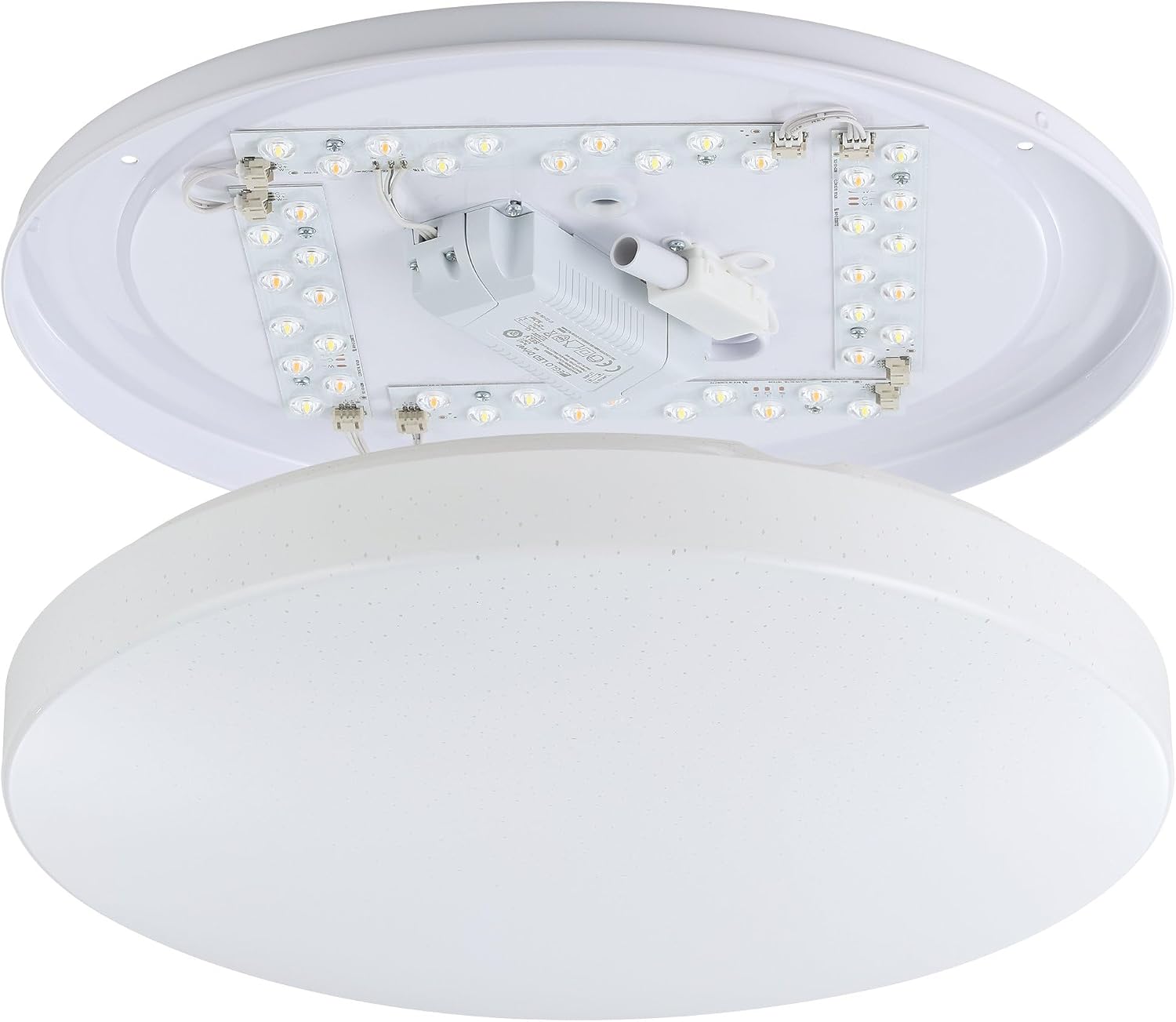
Hình ảnh: Nội bộ view of the Eglo connect.z Totari-Z ceiling light, showing LED strips and wiring components. This illustrates the internal structure for installation.

Image: Visual guide illustrating easy installation and setup steps for Eglo connect.z smart lighting, including app integration.
Tích hợp nhà thông minh
The light can be controlled via the AwoX Home Control app, a separate connect.z remote control (EGLO 99099, sold separately), or compatible voice assistants through ZigBee 3.0.
For App Control:
- Download the free AwoX Home Control app (available for iOS 13+ and Android 8+).
- Follow the in-app instructions to pair your Totari-Z light.
For Voice Control (e.g., Amazon Alexa):
- Ensure you have a compatible voice assistant device with an integrated ZigBee bridge (e.g., Amazon Echo or Echo Plus).
- Follow the instructions provided by your voice assistant platform to discover and connect new devices.
- The Eglo connect.z products are compatible with other ZigBee products.

Image: A compatibility chart showing various Amazon Alexa (Echo 4th Gen, Echo 1st-3rd Gen, Echo Flex, Echo Dot, Echo Show) and Google Home (Nest Audio, Home mini, Nest mini, Nest Hub) devices and their compatibility with Eglo connect.z lights, indicating whether a WiFi + Zigbee Gateway is required.
Hướng dẫn sử dụng
The Eglo connect.z Totari-Z offers a range of lighting options and smart features.
Basic Functions (via App or Remote Control)
- Làm mờ: Điều chỉnh độ sáng của đèn.
- Điều chỉnh nhiệt độ màu: Change the light color from warm white (2700 Kelvin) to neutral white and cool white (up to 6500 Kelvin).
- Lựa chọn màu RGB: Choose from a wide selection of RGB colors to set the mood.
- Lưu mục yêu thích: Save your preferred light settings for quick access.
- Grouping Lights: Create groups of lights for synchronized control.

Image: A diagram illustrating the various functionalities of Eglo connect.z smart lights, including timer, dimming, color temperature change, RGB selection, night light, favorite modes, disco function, light alarm, presence simulation, and light group creation. It also shows the AwoX APP interface and the optional connect.z remote control (EGLO 99099).
Advanced App Features (AwoX Home Control App)
- Bộ đếm thời gian: Lập trình để đèn tự bật hoặc tắt vào những thời điểm cụ thể.
- Đèn ngủ: Activate a soft, low-intensity light for nighttime.
- Twilight Simulation: Mimic the natural progression of light from dusk to dawn.
- Báo động ánh sáng: Use light to gently wake you up.
- Presence Simulation: Make it appear as if someone is home by turning lights on and off randomly.
- Chế độ vũ trường: Dynamic light effects for entertainment.
Điều khiển bằng giọng nói
Once integrated with a compatible voice assistant (e.g., Amazon Alexa), you can control the light using voice commands. Exampbao gồm:
- "Alexa, turn on the ceiling light."
- "Alexa, set the ceiling light to warm white."
- "Alexa, dim the ceiling light to 50%."
- "Alexa, change the ceiling light to blue."

Image: This image displays various smart home devices like Amazon Echo, Google Nest, and a tablet, illustrating the voice control capabilities of Eglo connect.z smart lights. It highlights voice commands and remote control options for smart home integration.
BẢO TRÌ
To maintain the appearance and functionality of your Eglo connect.z Totari-Z ceiling light:
- Vệ sinh: Disconnect power before cleaning. Use a soft, dry cloth to wipe the surface. Do not use abrasive cleaners or solvents.
- Đèn LED: The integrated LED light source is not user-replaceable. If the LEDs fail, the entire fixture may need to be replaced.
Xử lý sự cố
| Vấn đề | Nguyên nhân có thể | Giải pháp |
|---|---|---|
| Đèn không bật. | Không có điện, kết nối lỏng lẻo, công tắc bị hỏng. | Check power supply, ensure connections are secure, test the switch. |
| Cannot connect to AwoX Home Control app. | Bluetooth/Wi-Fi off, light not in pairing mode, app issues. | Ensure Bluetooth/Wi-Fi is enabled on your device. Power cycle the light. Restart the app. Refer to the app's help section for pairing instructions. |
| Chức năng điều khiển bằng giọng nói (Alexa/Google Home) không hoạt động. | No ZigBee bridge, incorrect setup, network issues. | Verify your voice assistant device has an integrated ZigBee bridge or is connected to one. Re-run device discovery in your voice assistant app. Check your home Wi-Fi network. |
| Light color/dimming not responding. | Connectivity issue, remote battery low, app glitch. | Check app/remote connection. Replace remote batteries if applicable. Power cycle the light. |
If problems persist, please contact Eglo customer support.
Thông số kỹ thuật
| Tính năng | Chi tiết |
|---|---|
| Thương hiệu | bản ngã |
| Tên mẫu | TOTARI-Z |
| Số hiệu mẫu | 900001 |
| Kích thước (D x R x C) | 38L x 38W x 7H cm (Ø 38 cm) |
| Màu sắc | Trắng |
| Vật liệu | Crystal, Metal, Plastic |
| Phong cách | Hiện đại |
| Loại nguồn sáng | DẪN ĐẾN |
| Số lượng đèn | 4 |
| Quyền lực | 4 x 4.8 Watt (Tổng cộng 19.2W) |
| Thông lượng sáng | 1900 lumens (2160 lm max) |
| Nhiệt độ màu | 2700-6500 Kelvin (Warm White to Cool White) |
| Tính năng màu sắc | Lựa chọn màu RGB |
| Có thể làm mờ | Đúng |
| Giao thức kết nối | Zigbee 3.0, Bluetooth |
| Phương pháp kiểm soát | Voice (Amazon Alexa), App (AwoX Home Control), Remote Control (optional) |
| Lớp học về hiệu quả năng lượng | F |
| Loại cài đặt | Gắn trần nhà |
| Sử dụng trong nhà/ngoài trời | Trong nhà |
| Yêu cầu lắp ráp | Đúng |
| Nước xuất xứ | Trung Quốc |

Image: Diagram showing the dimensions of the Eglo connect.z Totari-Z ceiling light: 38 cm (14.96 inches) diameter and 7 cm (2.76 inches) height.
Bảo hành
Sản phẩm này đi kèm với một Bảo hành 2 năm của nhà sản xuấtVui lòng giữ lại hóa đơn mua hàng để yêu cầu bảo hành. Chế độ bảo hành bao gồm các lỗi về vật liệu và tay nghề trong điều kiện sử dụng bình thường.
Hỗ trợ và Liên hệ
For further assistance, technical support, or warranty inquiries, please contact Eglo customer service or visit their official webđịa điểm.
- Eglo Official Store: Visit Eglo Store on Amazon
- Thông tin an toàn: Tải xuống Thông tin An toàn (PDF)