
1. Giới thiệu
This manual provides essential information for the safe and efficient use of your HP Envy x360 13.3-inch 2-in-1 laptop. Please read this manual thoroughly before operating your device to ensure optimal performance and longevity. This device combines the functionality of a traditional laptop with the versatility of a tablet, featuring a responsive touchscreen and a 360-degree hinge.
2. Tính năng sản phẩm
- 13.3-inch Full HD IPS Touch-Screen Display: Experience vibrant visuals and intuitive interaction with the responsive touch display.
- 11th Generation Intel Core i5-1135G7 Processor: Delivers efficient performance for multitasking, productivity, and entertainment.
- RAM DDR4 8GB: Provides substantial memory for smooth operation of multiple applications.
- 256GB PCIe NVMe SSD: Offers fast boot-up times and quick data access with solid-state storage.
- Bàn phím có đèn nền: Enables comfortable typing in various lighting conditions.
- Đầu đọc vân tay: Enhances security and provides quick, convenient login.
- Windows 10 Home Operating System: Pre-installed for a familiar and productive user experience.
- Bản lề 360 độ: Allows the device to transform between laptop, tent, stand, and tablet modes.
- Intel Iris Xe Graphics: Integrated graphics for clear visuals and light creative tasks.
- Bang & Olufsen Audio with Three Speakers: Delivers rich and immersive sound.
- HP Wide Vision HD Camera with Camera Shutter: For video calls and privacy.
3. Vật lý trênview
Familiarize yourself with the various components and ports of your HP Envy x360 laptop.

Hình 3.1: Góc cạnh view of the HP Envy x360 laptop in traditional laptop mode, displaying the keyboard and screen.
Cổng và kết nối:
- Cổng USB 3.0 Type-A (x2): For connecting external devices such as USB drives, mice, or keyboards.
- Cổng HDMI (x1): Để kết nối với màn hình ngoài hoặc máy chiếu.
- Micro SD Card Reader (x1): For reading and writing data to Micro SD cards.
- Headphone/Microphone Combo Jack (x1): Dùng để kết nối tai nghe hoặc micro ngoài.
- Cổng USB-C (x1): For data transfer, charging, and display output (Thunderbolt compatible).
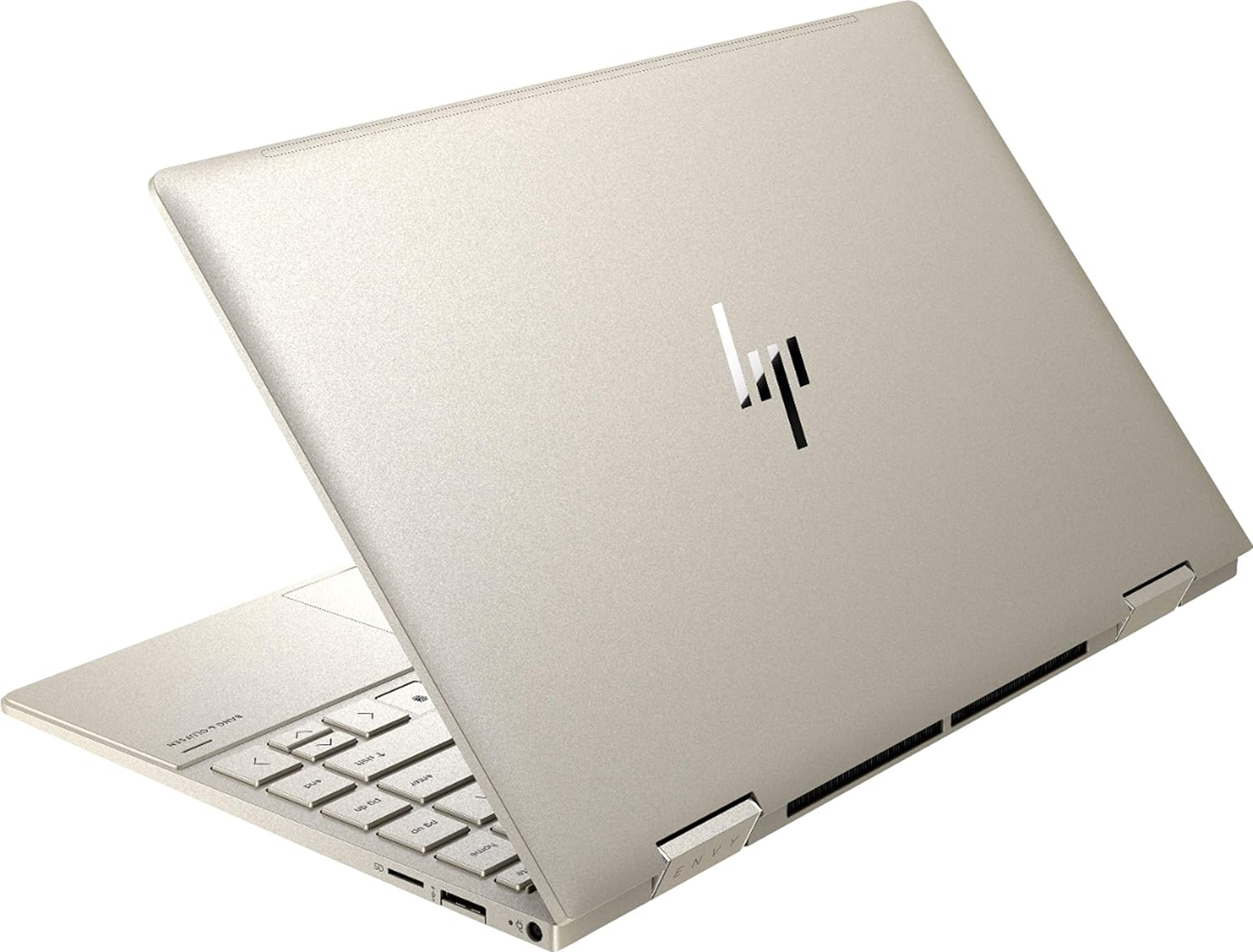
Hình 3.2: Phía sau view of the HP Envy x360 laptop, highlighting the sleek design and port placement on the sides.
4. Thiết lập
4.1 Bật nguồn ban đầu
- Unpack your HP Envy x360 laptop and included accessories.
- Kết nối bộ chuyển đổi nguồn với cổng sạc của máy tính xách tay, sau đó kết nối với ổ cắm điện.
- Press the power button, typically located on the side or keyboard deck, to turn on the laptop.
- Hãy làm theo hướng dẫn trên màn hình để hoàn tất quá trình cài đặt Windows 10 Home, bao gồm chọn ngôn ngữ, kết nối mạng và tạo tài khoản người dùng.
4.2 Kết nối thiết bị ngoại vi
Connect your mouse, external display, or other USB devices to the available ports as described in Section 3. For wireless devices, enable Bluetooth in Windows settings and pair your devices.
5. Hướng dẫn vận hành
5.1 Using the 2-in-1 Modes
Your HP Envy x360 features a versatile 360-degree hinge, allowing for multiple usage modes:
- Chế độ máy tính xách tay: Traditional laptop orientation for typing and productivity.
- Chế độ lều: Fold the screen back to form an inverted 'V' shape, ideal for watching videos or presentations in confined spaces.
- Chế độ đứng: Fold the screen back further, resting the keyboard face down, to use the display for media consumption or touch-based applications.
- Chế độ máy tính bảng: Fold the screen completely back against the base, transforming the device into a tablet for touch interaction.

Figure 5.1: The HP Envy x360 laptop configured in tent mode, suitable for media viewđang.

Figure 5.2: The HP Envy x360 laptop fully folded into tablet mode, ready for touch input.
5.2 Touchscreen and Keyboard Usage
- Màn hình cảm ứng: Use gestures similar to a smartphone or tablet for navigation, zooming, and interaction with applications.
- Bàn phím có đèn nền: Press the function key (Fn) and the appropriate F-key (usually F5 or F4, check keyboard icons) to toggle the keyboard backlight on/off or adjust brightness.
- Đầu đọc vân tay: Enroll your fingerprint through Windows Hello settings for secure and fast login.
6. Bảo trì
Regular maintenance helps prolong the life of your laptop.
- Vệ sinh: Use a soft, lint-free cloth to clean the screen and chassis. For stubborn smudges, dampLau khăn bằng nước hoặc chất tẩy rửa an toàn cho màn hình. Tránh sử dụng hóa chất mạnh.
- Cập nhật phần mềm: Regularly update Windows and HP drivers to ensure optimal performance and security.
- Chăm sóc pin: Tránh xả pin quá mức thường xuyên. Để bảo quản lâu dài, hãy sạc pin đến khoảng 50-70%.
- Thông gió: Ensure the laptop's vents are not obstructed to prevent overheating. Use on a hard, flat surface when possible.
KHAI THÁC. Xử lý sự cố
Phần này giải quyết những vấn đề phổ biến mà bạn có thể gặp phải.
7.1 Các vấn đề về nguồn điện
- Máy tính xách tay không bật nguồn: Ensure the power adapter is securely connected and the outlet is functional. Try a different outlet or power adapter if available.
- Pin không sạc: Verify the power adapter connection. Check for any damage to the cable or port.
7.2 Sự cố hiển thị
- Màn hình trống: Kết nối màn hình ngoài để kiểm tra xem vấn đề có phải do màn hình của máy tính xách tay hay không. Thử khởi động lại máy tính xách tay.
- Màn hình cảm ứng không phản hồi: Restart the laptop. Ensure all drivers are up to date via Windows Update or HP Support Assistant.
7.3 Các vấn đề về hiệu suất
- Hiệu suất chậm: Đóng các ứng dụng không cần thiết. Kiểm tra Trình quản lý tác vụ để xem có tiến trình nào tiêu tốn nhiều tài nguyên không. Đảm bảo có đủ dung lượng trống trên ổ SSD.
- Quá nhiệt: Clean vents. Ensure proper airflow. Reduce workload if consistently hot.
8. Thông số kỹ thuật
| Tính năng | Chi tiết |
|---|---|
| Thương hiệu | HP |
| Tên mẫu | HP Envy x360 |
| Kích thước màn hình | 13.3 inch |
| Độ phân giải màn hình | 1920 x 1080 (Full HD) |
| Kiểu hiển thị | LED IPS Touch Screen |
| Bộ xử lý | 11th Generation Intel Core i5-1135G7 (2.4 GHz, up to 4.2 GHz with Turbo Boost) |
| Bộ nhớ RAM | 8GB DDR4 |
| Kho | Ổ cứng thể rắn 256 GB |
| Hệ điều hành | Windows 10 Trang chủ |
| Đồ họa | Đồ họa Intel Iris Xe (Tích hợp) |
| Tính năng đặc biệt | Bàn phím có đèn nền, đầu đọc dấu vân tay |
| Âm thanh | Bang & Olufsen Audio with Three speakers |
| Kết nối | Wireless-AX, Bluetooth, USB, HDMI |
| Cổng | 2x USB 3.0 Type-A, 1x HDMI, 1x Micro SD Card Reader, 1x Headphone/Microphone Combo, 1x USB-C |
| Kích thước (D x R x C) | 12.07" x 7.66" x 0.65" |
| Cân nặng | 2.92 pound |
| Màu sắc | Vàng nhạt |
9. Có gì trong hộp
The following items are included with your HP Envy x360 laptop:
- HP Envy x360 13.3-inch 2-in-1 Laptop
- Bộ đổi nguồn
- Bàn di chuột

Figure 9.1: The HP Envy x360 laptop shown alongside the included mouse pad.
10. Bảo hành và Hỗ trợ
Your HP Envy x360 laptop comes with a standard manufacturer's warranty. For detailed warranty information, please refer to the warranty card included in your product packaging or visit the official HP support website. For technical assistance, driver downloads, or service requests, please contact HP Customer Support.
Hỗ trợ HP Webđịa điểm: support.hp.com