
Giới thiệu
This manual provides essential information for setting up, operating, maintaining, and troubleshooting your HP 2021 15.6-inch Full HD Laptop. This device is equipped with an Intel Celeron N4020 Processor, 8GB DDR4 RAM, and a 256GB Solid State Drive, designed for everyday computing tasks.
Có gì trong hộp
Carefully unpack your new HP laptop and ensure all components are present.
- Máy tính xách tay HP 15 inch
- Bộ đổi nguồn AC thông minh 45 W
- Documentation (Setup poster)

Image: Contents of the HP laptop box, showing the laptop, AC adapter, and setup poster.
Cài đặt
1. Bật nguồn và sạc ban đầu
Before first use, connect the AC power adapter to the laptop's power port and then to a wall outlet. Allow the battery to charge sufficiently before disconnecting the power adapter.
2. Windows 10 S Mode Setup
Follow the on-screen prompts to complete the initial Windows 10 S mode setup. This includes selecting your region, keyboard layout, connecting to a Wi-Fi network, and signing in with or creating a Microsoft account.
3. Activating Microsoft Office 365
Your laptop includes a 1-year subscription to Microsoft Office 365. To activate:
- Launch any Office application (e.g., Word, Excel).
- Start activation by signing in with your Microsoft account. Create one if you do not have one.
- Click "Activate Office."
- Sign in to your account and follow the prompts.
- Complete steps 1, 2, and 3 as indicated.
- Click "Refresh" once Office is ready.
- Open a document and accept the license agreement.
4. Switching Out of Windows 10 S Mode (Optional)
Windows 10 S mode is designed for security and performance, limiting app installations to the Microsoft Store. If you need to install apps from outside the Microsoft Store, you can switch to regular Windows 10 Home or Pro. This process is irreversible.
- On your PC running Windows 10 in S mode, open Cài đặt > Cập nhật & Bảo mật > Kích hoạt.
- Trong phần "Chuyển sang Windows 10 Home" hoặc "Chuyển sang Windows 10 Pro", hãy chọn Đi đến Cửa hàng. (Ensure you do not click a "Go to the Store" link in an "Upgrade your edition of Windows" section if present.)
- On the "Switch out of S mode" (or similar) page that appears in the Microsoft Store, select the Lấy cái nút.
- After you see a confirmation message on the page, you will be able to install apps from outside of the Microsoft Store.
Hình ảnh: Bên view of the HP laptop highlighting the SuperSpeed USB Type-C, SuperSpeed USB Type-A, HDMI 1.4b, RJ-45 Ethernet port, headphone/microphone combo, and media card reader.
Hướng dẫn sử dụng
Bàn phím và Touchpad
The laptop features a full-size keyboard with an integrated numeric keypad for enhanced productivity. The precision touchpad supports multi-touch gestures for intuitive navigation.
Kết nối thiết bị ngoại vi
- Thiết bị USB: Connect USB devices such as external drives, mice, or keyboards to the SuperSpeed USB Type-A or Type-C ports.
- Màn hình bên ngoài: Sử dụng cổng HDMI 1.4b để kết nối màn hình hoặc máy chiếu ngoài.
- Mạng: Connect an Ethernet cable to the RJ-45 port for a wired network connection.
- Âm thanh: Plug headphones or an external microphone into the headphone/microphone combo jack.
Webcam và micro
The integrated HP True Vision 720p HD camera and dual array digital microphones are ready for online meetings and video calls. Ensure appropriate privacy settings are configured in Windows.
Đầu đọc thẻ nhớ
Insert compatible SD media cards into the multi-format SD media card reader to access photos and files.

Image: The HP laptop's display area, highlighting the HP True Vision 720p HD Camera, rich 6.5 mm micro-edge Full HD IPS display, Intel UHD Graphics, and tuned stereo speakers.
BẢO TRÌ
Chăm sóc pin
To prolong battery life, avoid fully discharging the battery frequently. For optimal performance, use the provided HP 45W Smart AC power adapter. The laptop supports HP Fast Charge, allowing it to charge up to 50% in approximately 45 minutes when powered off.
Vệ sinh máy tính xách tay
Sử dụng một miếng vải mềm, không xơ vải lau nhẹampDùng nước hoặc chất tẩy rửa màn hình để vệ sinh màn hình. Đối với bàn phím và khung máy, hãy dùng vải mềm, khô. Tránh sử dụng hóa chất mạnh hoặc vật liệu mài mòn.
Cập nhật phần mềm
Regularly check for and install Windows updates to ensure your system has the latest security patches and performance improvements. You can find these in Cài đặt > Cập nhật & Bảo mật > Cập nhật Windows.
Xử lý sự cố
Máy tính xách tay không bật nguồn
- Đảm bảo bộ đổi nguồn AC được kết nối chắc chắn với cả máy tính xách tay và ổ cắm điện đang hoạt động.
- Kiểm tra ổ cắm điện có hoạt động không bằng cách cắm thiết bị khác.
- Nếu pin đã cạn kiệt hoàn toàn, có thể cần vài phút sạc trước khi máy tính xách tay có thể khởi động.
Battery Not Holding Charge / Only Works When Plugged In
- Check the battery health status in Windows settings.
- Ensure all drivers, especially power management drivers, are up to date.
- If the issue persists, the battery may require service or replacement. Contact HP Support for assistance.
Không có kết nối Wi-Fi
- Kiểm tra xem Wi-Fi có được bật trong cài đặt Windows không.
- Khởi động lại bộ định tuyến và modem của bạn.
- Đảm bảo trình điều khiển Wi-Fi được cài đặt và cập nhật.
Sự cố hiển thị
- If the screen is blank, try connecting an external monitor to determine if the issue is with the laptop's display or graphics card.
- Adjust display brightness using the function keys.
Đối với các vấn đề phức tạp hơn, vui lòng liên hệ bộ phận hỗ trợ của HP. webtrang web hoặc liên hệ với dịch vụ khách hàng của họ.
Thông số kỹ thuật
Below are the key technical specifications for your HP 2021 15.6" FHD Laptop:
| Tính năng | Đặc điểm kỹ thuật |
|---|---|
| Thương hiệu | HP |
| Tên mẫu | Máy in HP 2021 |
| Kích thước màn hình | 15.6 inch |
| Độ phân giải màn hình | FHD (1920 x 1080) IPS, Anti-Glare |
| Bộ xử lý | Intel Celeron N4020 (up to 2.8 GHz, 2 Cores, 4MB Cache) |
| Bộ nhớ RAM | Bộ nhớ RAM DDR8 4GB |
| Kho | Ổ cứng SSD 256GB (ổ cứng thể rắn) |
| Đồ họa | Đồ họa Intel UHD |
| Hệ điều hành | Windows 10 S |
| Cổng | 1x SuperSpeed USB Type-C, 2x SuperSpeed USB Type-A, 1x HDMI 1.4b, 1x RJ-45, 1x Headphone/Microphone Combo, 1x AC Smart Pin |
| Kết nối không dây | Wi-Fi 802.11a/b/g/n/ac, Bluetooth |
| Webcam | Camera HP True Vision 720p HD tích hợp micrô kỹ thuật số mảng kép |
| Ắc quy | 3-Cell, 41 WHr, Integrated Lithium Ion |
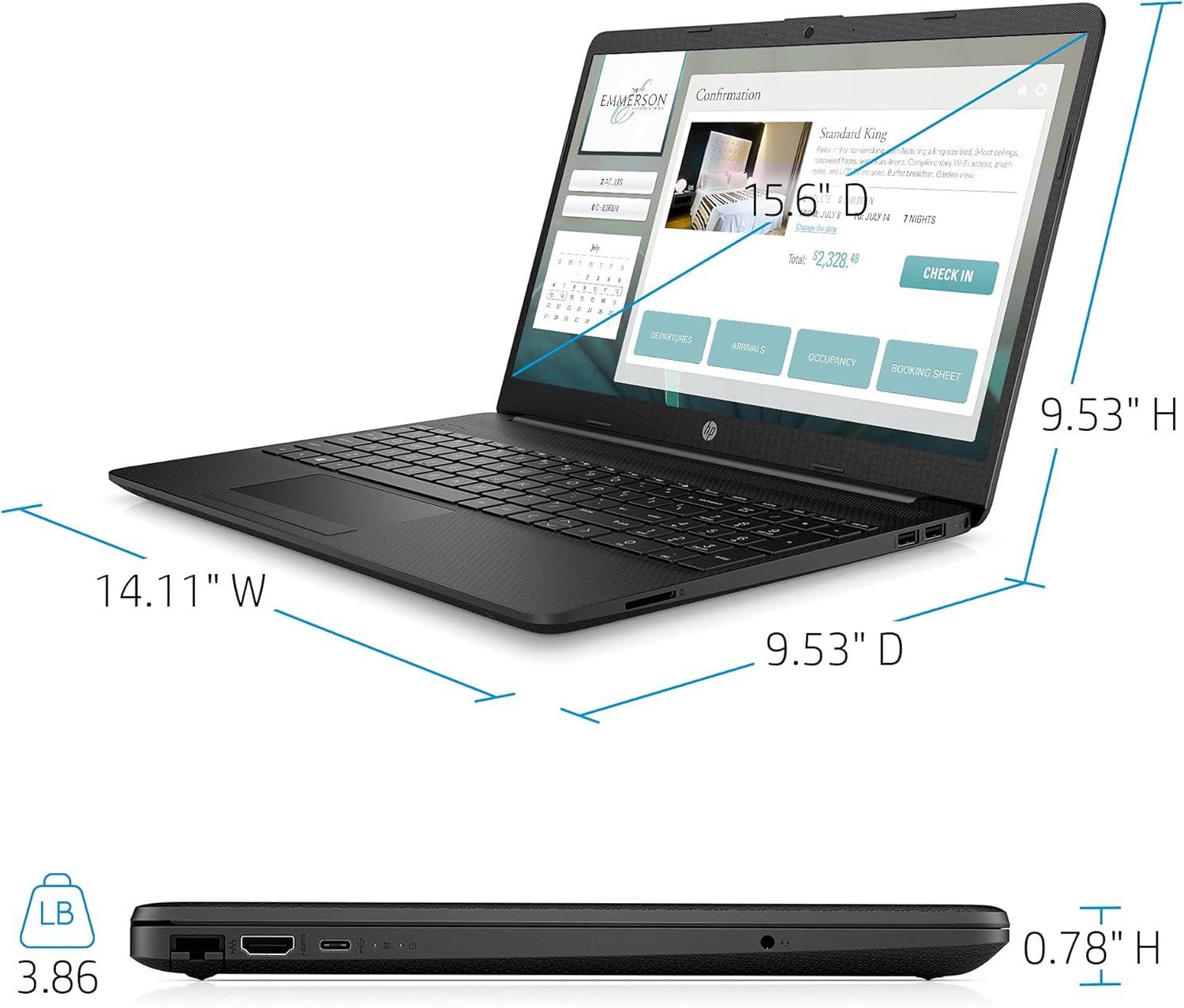
| Cân nặng | 3.86 Bảng Anh |
| Màu sắc | Đen |

Image: Physical dimensions of the HP laptop (14.11" W x 9.53" D x 0.78" H) and weight (3.86 lbs).
Thông tin bảo hành
Your HP 2021 15.6" FHD Laptop comes with a limited manufacturer's warranty. Please refer to the documentation included in the box for specific terms, conditions, and duration of your warranty. Keep your proof of purchase for warranty claims.
Ủng hộ
Để được hỗ trợ thêm, hỗ trợ kỹ thuật hoặc yêu cầu dịch vụ, vui lòng truy cập trang hỗ trợ chính thức của HP website or contact HP customer service directly. You can find contact information and resources on the HP webđịa điểm: