
Giới thiệu
The ikbc CD108 V2 is a full-size mechanical keyboard designed for both Windows and Mac users, featuring Cherry MX Red switches and durable Mistel PBT double-shot keycaps. This manual provides essential information for setting up, operating, maintaining, and troubleshooting your keyboard to ensure optimal performance and longevity.
Nội dung gói

Image: Contents of the ikbc CD108 V2 keyboard package, including the keyboard, keycap puller, USB cable, and user manual.
Vui lòng xác minh rằng tất cả các mục được liệt kê dưới đây đều có trong gói hàng của bạn:
- ikbc CD108 V2 Mechanical Keyboard
- Dụng cụ kéo bàn phím
- Cáp USB
- Hướng dẫn sử dụng
- Free Keyset of RGBY modifiers (12 pieces)
Cài đặt

Hình ảnh: Từ trên xuống view of the ikbc CD108 V2 keyboard, showcasing its full layout and retro color scheme.
- Tháo hộp bàn phím: Cẩn thận lấy bàn phím và tất cả các phụ kiện ra khỏi bao bì.
- Kết nối với máy tính: Plug the USB cable from the keyboard into an available USB port on your computer (desktop or laptop). The keyboard is wired and does not require batteries.
- Điều chỉnh chân đế bàn phím: The ikbc CD108 V2 features 3 levels of adjustable feet. Extend the feet at the rear of the keyboard to your preferred typing angle for ergonomic comfort.
- Cài đặt trình điều khiển ban đầu: Your operating system (Windows or macOS) should automatically detect and install the necessary drivers. No additional software is typically required for basic functionality.
- Mac Compatibility Note: While fully compatible with Windows, the CD108 V2 is partially compatible with Mac. To optimize functionality on macOS, you may need to go to System Settings > Keyboard > Modifier Keys and switch the "Option" key to "Command" and vice-versa to match standard Mac keyboard layouts.
Vận hành bàn phím

Hình ảnh: Góc cạnh view of the ikbc CD108 V2 keyboard, highlighting its ergonomic design and keycap profile.
Các tính năng chính
- Công tắc Cherry MX Red: This keyboard is equipped with Cherry MX Red mechanical switches. These are linear switches, meaning they have a smooth, consistent keystroke without a tactile bump or audible click. They are favored for gaming due to their light actuation force and rapid response, allowing for quick, successive key presses.
- Mistel PBT Double-Shot Keycaps: The keycaps are made from durable PBT plastic using a double-shot molding process. This ensures that the legends will not fade over time and provides excellent touch, abrasion resistance, and oil resistance. The retro color scheme combines beige and dark grey-green tones.
- Full N-Key Rollover (NKRO) and Anti-Ghosting: The keyboard supports 100% anti-ghosting with full key rollover via USB, ensuring that every key press is registered accurately, even during rapid typing or complex gaming sequences.
- Lockable Win Key: A dedicated function allows you to disable the Windows key to prevent accidental presses during gaming sessions.
- Các phím đa phương tiện: Convenient multimedia functions are integrated, including volume up, volume down, mute, and a dedicated calculator key. These are typically accessed via the Fn key combined with specific function keys.
- Quản lý cáp: The keyboard features a 3-way direction management system for the USB cable, allowing you to route the cable neatly to the left, right, or center.
Using the RGBY Modifier Keyset
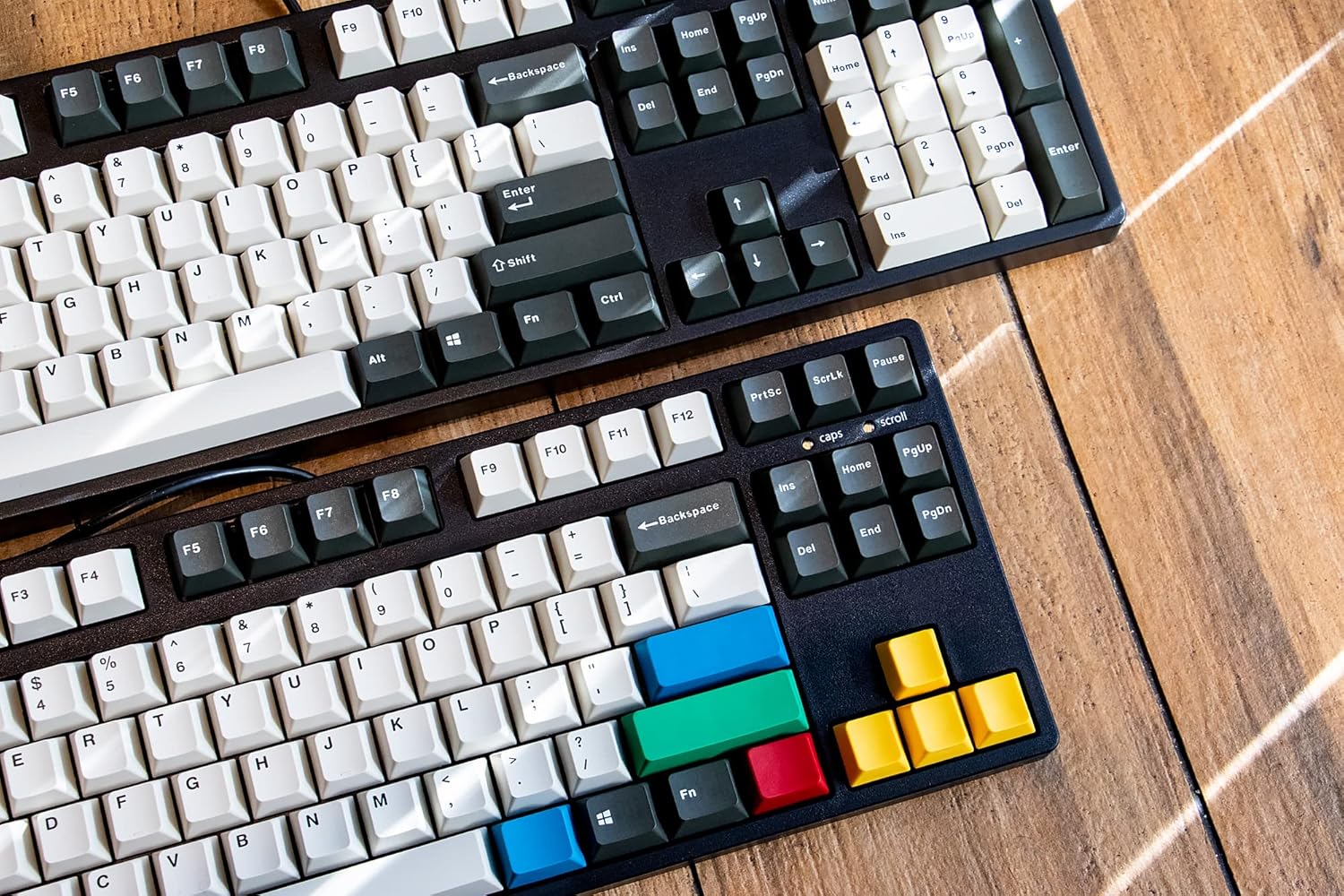
Image: Two ikbc keyboards, one showcasing the standard keycaps and the other with the included RGBY modifier keycaps installed.
Your keyboard comes with a free set of RGBY (Red, Green, Blue, Yellow) modifier keycaps. You can use the included keycap puller to replace certain keys (e.g., Esc, Enter, arrow keys, etc.) with these colorful alternatives to personalize your keyboard's appearance.
- Gently use the keycap puller to remove the desired keycap from the keyboard.
- Align the new RGBY keycap with the switch stem and press down firmly until it clicks into place.
BẢO TRÌ
Proper maintenance will extend the life and preserve the appearance of your ikbc CD108 V2 keyboard.
- Vệ sinh thường xuyên: Use a can of compressed air to blow out dust and debris from between the keycaps. For surface cleaning, wipe the keycaps and case with a soft, slightly damp vải. Tránh sử dụng hóa chất mạnh hoặc vật liệu mài mòn.
- Vệ sinh nắp phím: For deeper cleaning of keycaps, you can remove them using the provided keycap puller and wash them gently with mild soap and water. Ensure they are completely dry before reattaching them to the keyboard.
- Chăm sóc cáp: Avoid sharp bends or excessive pulling on the USB cable to prevent damage. Utilize the integrated cable management channels to keep the cable tidy and protected.
Xử lý sự cố
This section addresses common issues you might encounter with your ikbc CD108 V2 keyboard.
- Bàn phím không phản hồi:
- Đảm bảo cáp USB được cắm chắc chắn vào cả bàn phím và máy tính.
- Hãy thử cắm bàn phím vào một cổng USB khác trên máy tính của bạn.
- Khởi động lại máy tính của bạn.
- Một số phím cụ thể không hoạt động:
- The switches on this keyboard are soldered and not hot-swappable. If a specific key is not registering, ensure no debris is lodged under the keycap. Carefully remove the keycap with the puller and inspect the switch. If the issue persists, it may indicate a hardware fault.
- Spacebar or Other Large Keys Feel Stuck/Wobbly:
- This can sometimes be due to stabilizer issues. Ensure the keycap is properly seated on both the switch stem and the stabilizer stems.
- Minor variations in stabilizer performance can occur. If it significantly impacts usability, contact customer support.
- Metallic "Springy" Echo Sound:
- Some mechanical keyboards, especially those with linear switches, can exhibit a subtle metallic
Ask a question about this manual
Ask about setup, troubleshooting, compatibility, parts, safety, or missing instructions. Manuals+ will review the question and use this page’s manual context to help answer it.
- Some mechanical keyboards, especially those with linear switches, can exhibit a subtle metallic