
1. Giới thiệu
This manual provides detailed instructions for the setup, operation, and maintenance of your WISE TIGER LED Digital Alarm Clock (Model CK-LED1302). Please read this manual thoroughly before use to ensure proper functionality and to maximize your product experience.

Image 1.1: WISE TIGER LED Digital Alarm Clock and its remote control.
2. Nội dung gói hàng
Vui lòng kiểm tra xem có đầy đủ các mục trong gói hàng của bạn không:
- WISE TIGER LED Digital Alarm Clock (Model CK-LED1302)
- Điều khiển từ xa
- Cáp nguồn USB
- Hướng dẫn sử dụng (tài liệu này)
- Fixed Bracket (for desk placement)
3. Sản phẩm hếtview
The WISE TIGER LED Digital Alarm Clock features a modern 3D design, offering clear time display and multiple functions for various environments.
3.1 Các tính năng chính
- Hiển thị thời gian: Định dạng 12 giờ hoặc 24 giờ.
- Hiển thị lịch: Shows date.
- Đồng hồ báo thức: With snooze function.
- Hiển thị nhiệt độ: Shows ambient temperature.
- Độ sáng có thể điều chỉnh: Automatic brightness sensor and manual adjustment via remote control.
- Chức năng ánh sáng ban đêm: Cung cấp ánh sáng dịu nhẹ.
- Chức năng bộ nhớ: Built-in battery retains time settings for 4-8 hours during power disconnection.
- Vị trí linh hoạt: Suitable for desk or wall mounting.

Image 3.1: Visual representation of the clock's main functions.
3.2 Thành phần
Tham khảo sơ đồ dưới đây để biết thêmview of the clock's components and connection points.
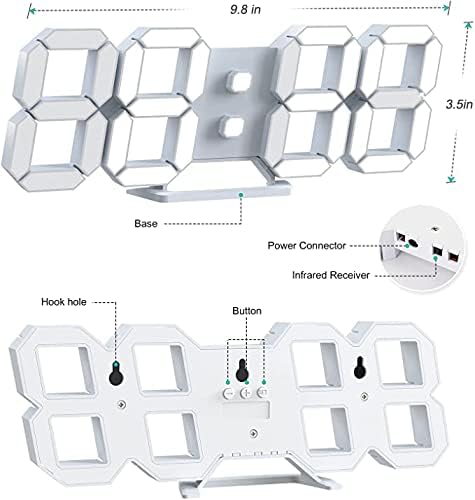
Hình ảnh 3.2: Trở lại view and dimensions of the clock, highlighting the power connector, infrared receiver, and mounting options.
- Trưng bày: Large 3D LED digits for time, date, and temperature.
- Căn cứ: Removable stand for desk placement.
- Bộ nối nguồn: USB port for power input.
- Bộ thu hồng ngoại: Dùng cho tín hiệu điều khiển từ xa.
- Hook Holes: Để gắn tường.
- Các nút điều khiển: Located on the back for basic settings (Power, Up, Down, Set).
4. Thiết lập
4.1 kết nối nguồn
- Connect the provided USB power cable to the power connector on the back of the clock.
- Cắm đầu còn lại của cáp USB vào bộ chuyển đổi nguồn USB tiêu chuẩn (không kèm theo) hoặc cổng USB của máy tính.
- The clock will power on and display the time.
The clock is powered by the USB cable only. A built-in battery serves to record time settings when power is disconnected, ensuring settings are retained for 4-8 hours.

Image 4.1: Explanation of the clock's power and memory function.
4.2 Tùy chọn vị trí
The clock can be used as a desk clock or a wall clock.
- Vị trí bàn: Attach the fixed bracket to the bottom of the clock. The angle of the bracket can be adjusted for optimal viewđang.
- Lắp trên tường: Remove the fixed bracket if attached. Use the installation slots (hook holes) on the back of the clock to hang it securely on a wall using appropriate fasteners (not included).

Image 4.2: The clock configured for wall mounting and desk placement.
5. Hướng dẫn vận hành
The clock's functions are primarily controlled using the included remote control. Basic settings can also be adjusted via the buttons on the back of the clock.
5.1 Cài đặt ngày và giờ
- Nhấn nút THỜI GIAN Nhấn nút trên điều khiển từ xa để vào chế độ cài đặt thời gian.
- Sử dụng UP Và XUỐNG Các mũi tên để điều chỉnh giờ.
- Nhấn THỜI GIAN again to move to minute setting, then use UP Và XUỐNG để điều chỉnh.
- Tiếp tục nhấn THỜI GIAN để chuyển đổi qua lại giữa các cài đặt năm, tháng và ngày, điều chỉnh từng cài đặt bằng UP Và XUỐNG.
- Nhấn THỜI GIAN one last time or wait a few seconds for the settings to save automatically.
5.2 Định dạng giờ 12/24
Để chuyển đổi giữa định dạng giờ 12 giờ và 24 giờ, hãy nhấn nút. 12/24H nút trên điều khiển từ xa.

Hình ảnh 5.1: Ví dụample of 12-hour and 24-hour time display.
5.3 Đặt báo thức
- Nhấn nút BÁO THỨC Nhấn nút trên điều khiển từ xa để vào chế độ cài đặt báo động.
- Sử dụng UP Và XUỐNG arrows to set the desired alarm hour.
- Nhấn BÁO THỨC again to move to minute setting, then use UP Và XUỐNG để điều chỉnh.
- Nhấn BÁO THỨC one last time or wait for the settings to save.
- Để kích hoạt/hủy kích hoạt báo thức, hãy nhấn nút BÁO THỨC button briefly outside of setting mode. An alarm icon will appear/disappear on the display.
5.4 Chức năng báo lại
Khi báo thức kêu, hãy bấm GIẤC NGŨ NGẮN button on the remote control to temporarily silence the alarm. The alarm will sound again after a set interval (typically 5-10 minutes).

Image 5.2: The snooze alarm function in use.
5.5 Điều chỉnh độ sáng
The clock features both automatic and manual brightness control.
- Độ sáng tự động: Cảm biến tích hợp tự động điều chỉnh độ sáng màn hình dựa trên điều kiện ánh sáng xung quanh.
- Điều chỉnh độ sáng thủ công: Nhấn nút SÁNG button on the remote control to cycle through different brightness levels (e.g., high, medium, low).

Image 5.3: Automatic brightness adjustment based on ambient light.

Image 5.4: Manual adjustment through three brightness levels.
5.6 Hiển thị nhiệt độ
The clock automatically displays the ambient temperature. No manual adjustment is typically required for this function.
6. Bảo trì
To ensure the longevity and optimal performance of your WISE TIGER LED Digital Alarm Clock, follow these maintenance guidelines:
- Vệ sinh: Use a soft, dry cloth to wipe the display and casing. Avoid abrasive cleaners, solvents, or spray cleaners directly on the clock.
- Quyền lực: Always use the provided USB cable for power. Ensure the power source is stable.
- Môi trường: Keep the clock away from extreme temperatures, direct sunlight, and high humidity.
- Điều khiển từ xa: Store the remote control in a safe place to prevent loss or damage. Ensure batteries are replaced when needed (typically 2 Lithium Ion batteries, included).
KHAI THÁC. Xử lý sự cố
Nếu bạn gặp sự cố với đồng hồ của mình, hãy tham khảo các vấn đề và giải pháp thường gặp sau đây:
| Vấn đề | Nguyên nhân có thể | Giải pháp |
|---|---|---|
| Đồng hồ không bật | Không có điện hoặc kết nối lỏng lẻo | Ensure USB cable is securely connected and power source is active. Try a different USB port or adapter. |
| Điều khiển từ xa không hoạt động | Remote batteries are dead or remote is out of range/blocked | Replace remote control batteries. Ensure remote is pointed at the clock's infrared receiver (refer to Image 3.2) and within 8 meters. Remove any obstructions. |
| Thời gian không chính xác | Time was not set precisely | Reset the time carefully, ensuring you set it at the exact second of the desired time. |
| Màn hình quá mờ hoặc quá sáng | Cần điều chỉnh cài đặt độ sáng. | Nhấn nút SÁNG button on the remote to cycle through manual brightness levels. Check if automatic brightness is functioning correctly in different light conditions. |
| Báo thức không kêu | Alarm is not activated or set incorrectly | Ensure the alarm is set and activated (alarm icon visible). Verify the alarm time is correct. |
8. Thông số kỹ thuật
| Tính năng | Chi tiết |
|---|---|
| Thương hiệu | HỔ khôn ngoan |
| Số hiệu mẫu | CK-LED1302 |
| Kiểu hiển thị | Điện tử |
| Màu sắc | Trắng |
| Kích thước sản phẩm | Rộng 9.7" x Cao 3.5" |
| Nguồn điện | Dây điện (USB) |
| Pin bộ nhớ | 2 Lithium Ion batteries (included), retains settings for 4-8 hours |
| Kiểu lắp đặt | Wall Mount, Desk Mount |
| Tính năng đặc biệt | Adjustable Brightness, Alarm Clock, Temperature Display, Date Display, 12/24 Hour Format |
| Vật liệu | Acrylonitrile Butadiene Styren |
| Trọng lượng sản phẩm | 0.317 ounce (khoảng 9 gram) |
| Mã số UPC | 728990655931 |
9. Bảo hành và Hỗ trợ
For warranty information or technical support, please refer to the product packaging or contact the retailer where the product was purchased. Keep your purchase receipt as proof of purchase.