
Giới thiệu
The KZ ZAS In-Ear Monitor (IEM) headphones are designed to deliver high-fidelity audio with a hybrid driver configuration. This manual provides essential information for the proper setup, operation, maintenance, and troubleshooting of your KZ ZAS IEMs to ensure optimal performance and longevity.
Có gì trong hộp
Xác minh rằng tất cả các mục đều có sẵn khi mở hộp:
- KZ ZAS In-Ear Monitor Headphones (Left and Right units)
- Detachable 2-pin Audio Cable (3.5mm jack)
- Nút tai bằng silicon (nhiều kích cỡ)
- Hướng dẫn sử dụng (tài liệu này)
Cài đặt
1. Gắn cáp
The KZ ZAS IEMs feature a 2-pin detachable cable design. Carefully align the pins on the cable connector with the receptacles on each earphone unit. Ensure the correct orientation (left and right, usually marked on the cable and units) and push firmly until the connectors are secure. Do not force the connection to avoid damaging the pins.

Hình ảnh: Nổ tung view of the KZ ZAS IEM, illustrating the internal components and the 2-pin cable connection.
2. Lựa chọn và lắp đặt nút tai
Choose the eartips that provide the best seal and comfort for your ears. A proper seal is crucial for optimal sound quality and bass response. Gently push the selected eartip onto the nozzle of the earphone unit until it is securely seated.
3. Đeo tai nghe
Insert the earphones into your ear canals. The cable is designed to loop over the top of your ear for a secure and comfortable fit, reducing microphonics (cable noise). Adjust the earphones until they sit snugly and comfortably in your ears.
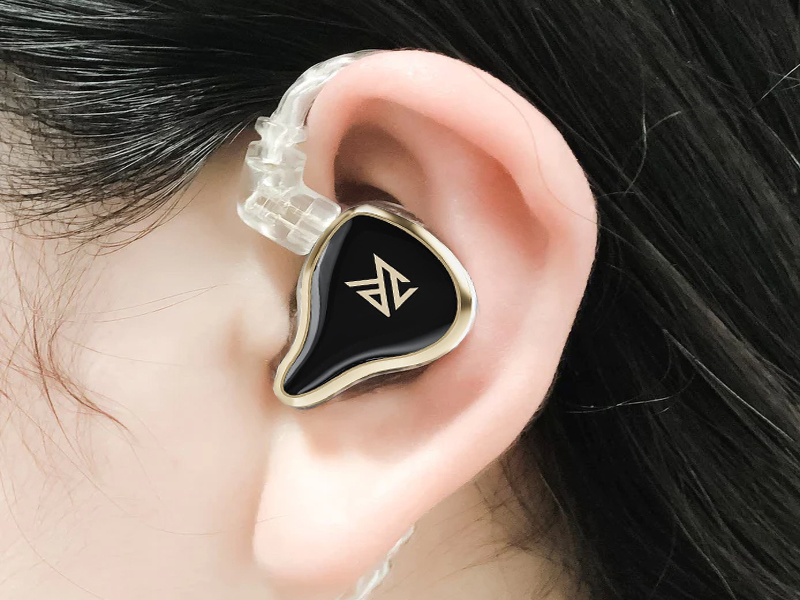
Image: Proper wearing technique for the KZ ZAS IEM, showing the cable routed over the ear.
Hướng dẫn sử dụng
1. Kết nối với nguồn âm thanh
Plug the 3.5mm jack of the audio cable into your desired audio source (e.g., smartphone, digital audio player, computer, audio interface). Ensure the connection is firm.
2. Phát lại âm thanh
Begin audio playback from your source device. Adjust the volume to a comfortable listening level. The KZ ZAS IEMs feature a 7BA+1DD hybrid driver configuration designed for detailed and balanced sound reproduction across various frequency ranges.
Video: Sản phẩm chính thức đã ra mắtview of the KZ ZAS In-Ear Monitor Headphones, showcasing design and internal technology.
BẢO TRÌ
1. Cleaning Eartips
Regularly remove and clean the silicone eartips with mild soap and water. Ensure they are completely dry before reattaching them to the earphones. This prevents wax buildup and maintains hygiene.
2. Chăm sóc cáp
The detachable cable is designed for durability but should be handled with care. Avoid sharp bends, excessive pulling, or tangling. When not in use, coil the cable loosely. The silver-plated cable is designed to reduce distortion and maintain signal integrity.
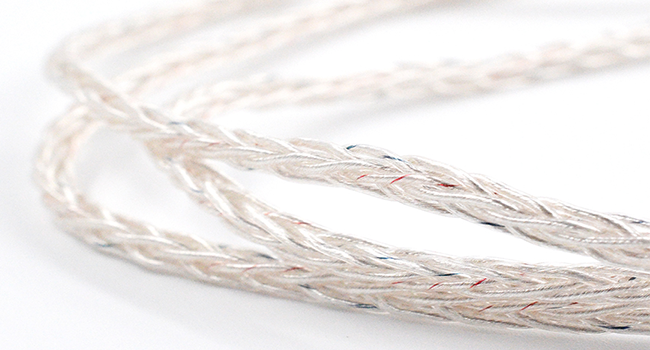
Hình ảnh: Chi tiết view of the high-purity silver-plated upgrade cable.
3. Lưu trữ
Store your KZ ZAS IEMs in a clean, dry place, preferably in a protective case, to prevent dust accumulation and physical damage. Avoid exposing them to extreme temperatures or humidity.
Xử lý sự cố
| Vấn đề | Nguyên nhân có thể | Giải pháp |
|---|---|---|
| No sound from one or both earphones | Loose cable connection; incorrect audio source settings; faulty cable; damaged earphone unit. | Ensure cable is securely attached to both earphones and audio source. Check audio settings on your device. Try a different audio source or cable if available. |
| Poor sound quality (e.g., weak bass, distorted audio) | Improper eartip seal; dirty eartips/nozzles; low-quality audio source; damaged cable. | Adjust eartips for a better seal. Clean eartips and earphone nozzles. Test with a high-quality audio file. Inspect cable for damage. |
| Earphones feel uncomfortable or fall out easily | Incorrect eartip size; improper wearing technique. | Experiment with different eartip sizes to find the best fit. Ensure the cable is looped over your ear for stability. |
Thông số kỹ thuật
The following are the technical specifications for the KZ ZAS In-Ear Monitor Headphones:
- Thương hiệu: KZ
- Tên mẫu: KZ ZAS
- Số hiệu mẫu: ZAS-White
- Màu sắc: ZAS White, No Mic
- Vị trí Tai: Trong tai
- Yếu tố hình thức: Trong tai
- Trở kháng: 24 ôm
- Độ nhạy: 109 dB
- Dải tần số: 10 Hz - 40 kHz
- Loại trình điều khiển âm thanh: Hybrid Driver (7 Balanced Armature + 1 Dynamic Driver per side)
- Công nghệ kết nối: Có dây
- Giắc cắm tai nghe: Giắc cắm 3.5 mm
- Tính năng của cáp: Detachable, High-purity silver-plated upgrade cable
- Kiểm soát tiếng ồn: Khử tiếng ồn thụ động
- Trọng lượng sản phẩm: 27 gam
- Vật liệu bao bọc: NHIỀU

Image: KZ ZAS In-Ear Monitor Headphones (White variant).

Hình ảnh: Chi tiết view of the reconstructed acoustic cavity and dynamic driver.
Bảo hành và Hỗ trợ
Thông tin bảo hành
The KZ ZAS In-Ear Monitor Headphones come with a limited warranty. For specific details regarding warranty coverage, duration, and terms, please refer to the official KZ webtrang web hoặc liên hệ với điểm mua hàng của bạn. Giữ lại bằng chứng mua hàng để yêu cầu bảo hành.
Hỗ trợ khách hàng
If you encounter any issues not covered in this manual or require further assistance, please contact KZ customer support through their official website or the retailer from whom you purchased the product. Provide your model number (ZAS) and a detailed description of the issue for efficient support.