
1. Giới thiệu
This user manual provides essential information for the safe and efficient operation of your Qoltec 51758 Mains & Inverter Adapter. This power adapter is designed to provide reliable power to compatible HP notebooks, featuring advanced protection mechanisms against overvoltage, overload, short circuit, and overheating. Please read this manual thoroughly before using the product to ensure proper functionality and longevity.
2. Hướng dẫn an toàn
Để tránh bị thương hoặc hư hỏng thiết bị, hãy luôn tuân thủ các biện pháp an toàn sau:
- Không để bộ chuyển đổi tiếp xúc với nước, hơi ẩm hoặc độ ẩm cao.
- Không được tháo rời, sửa đổi hoặc cố gắng sửa chữa bộ chuyển đổi. Hãy giao việc bảo dưỡng cho nhân viên có chuyên môn.
- Đảm bảo ổ cắm điện có âm lượngtage is compatible with the adapter's specifications.
- Avoid placing the adapter in direct sunlight or near heat sources.
- Do not use the adapter if the cable or connector is damaged.
- Để xa tầm tay trẻ em.
- Hãy rút phích cắm bộ chuyển đổi khỏi ổ cắm điện khi không sử dụng trong thời gian dài.
3. Sản phẩm hếtview
The Qoltec 51758 adapter is a compact and efficient power solution. It includes the main adapter unit and various interchangeable tips to ensure compatibility with a range of HP notebooks.
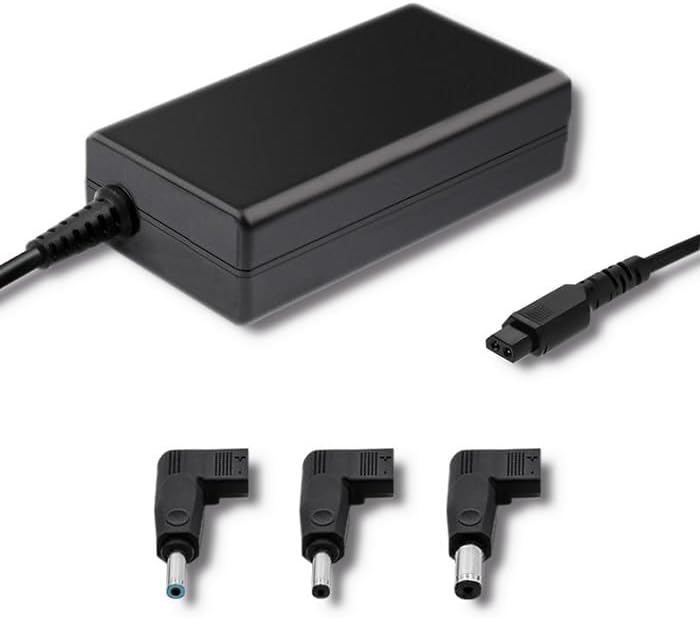
Hình 3.1: Mặt trước view of the Qoltec 51758 power adapter showing the main unit and three common interchangeable tips.

Hình 3.2: Phía sau view of the Qoltec 51758 power adapter, highlighting the AC input port and the three interchangeable tips.
The adapter features a robust design with a standard AC input port and a DC output cable that connects to the interchangeable tips. These tips ensure a secure and correct fit for various HP notebook models.
4. Thiết lập
- Identify the Correct Tip: Select the interchangeable tip that matches the power input port of your HP notebook. Ensure it fits snugly and securely.
- Connect the Tip: Attach the selected tip to the DC output cable of the Qoltec 51758 adapter.
- Kết nối với Notebook: Insert the connected tip into the power input port of your HP notebook.
- Kết nối với ổ cắm điện: Plug the AC input cable of the adapter into a standard wall power outlet.
- Xác minh kết nối: Confirm that the power indicator light (if present on your notebook or adapter) illuminates, indicating a successful power connection.
5. Hoạt động
Once properly set up, the Qoltec 51758 adapter operates automatically to provide power to your connected HP notebook. It will charge the notebook's battery and/or power the notebook directly.
- Sạc: When connected, the adapter will charge your notebook's battery until it reaches full capacity.
- Nguồn điện trực tiếp: The adapter can also power your notebook directly, even if the battery is fully charged or removed (if supported by the notebook).
- Tính năng bảo vệ: The adapter is equipped with built-in protections against overvoltage, overload, short circuit, and overheating. In case of an anomaly, the adapter may temporarily cease operation to protect itself and the connected device. Disconnect and reconnect to reset if this occurs.
6. Bảo trì
Proper maintenance ensures the longevity and optimal performance of your adapter.
- Vệ sinh: Ngắt kết nối bộ chuyển đổi khỏi tất cả các nguồn điện và thiết bị trước khi vệ sinh. Sử dụng khăn mềm, khô để lau bề mặt. Không sử dụng chất tẩy rửa dạng lỏng hoặc dạng xịt.
- Kho: When not in use, store the adapter in a cool, dry place away from direct sunlight and extreme temperatures. Avoid tightly winding the cables to prevent damage.
- Chăm sóc cáp: Regularly inspect the power cables and connectors for any signs of wear, cuts, or damage. Replace if necessary.
KHAI THÁC. Xử lý sự cố
| Vấn đề | Nguyên nhân có thể | Giải pháp |
|---|---|---|
| Adapter not providing power. | No power from outlet; loose connection; damaged cable/adapter. | Check outlet with another device. Ensure all connections are secure. Inspect cables for damage. |
| Notebook not charging. | Incorrect tip used; notebook power port issue; adapter fault. | Verify the correct tip is used and fully inserted. Test with another compatible adapter if possible. |
| Bộ chuyển đổi nguồn bị nóng. | Normal operation under load; poor ventilation; overload. | Ensure adequate ventilation around the adapter. If excessively hot, disconnect and allow to cool. Reduce load if possible. |
If the problem persists after attempting these solutions, please contact Qoltec customer support.
8. Thông số kỹ thuật
| Tính năng | Chi tiết |
|---|---|
| Thương hiệu | Tiếng Việt |
| Người mẫu | 51758 |
| Cái gì?tage | 65 watt |
| Kích thước sản phẩm | 2.79 x 24.64 x 16.51cm |
| Trọng lượng sản phẩm | 214 gam |
| Thiết bị tương thích | HP Notebooks |
| Tính năng bảo vệ | quá mứctage, Overload, Short Circuit, Overheat Protection |
| Loại đầu nối | Interchangeable DC Power Tips |
| Công nghệ kết nối | Wired Power Adapter |
| Ngày đầu tiên có sẵn | Ngày 29 tháng 2022 năm XNUMX |
Lưu ý: Thông số kỹ thuật có thể thay đổi mà không cần báo trước.
9. Bảo hành và Hỗ trợ
Qoltec products are manufactured to high quality standards. For information regarding warranty coverage, terms, and conditions, please refer to the warranty card included with your product or visit the official Qoltec webđịa điểm.
For technical support, troubleshooting assistance, or inquiries about replacement parts, please contact Qoltec customer service through their official channels. Have your product model number (51758) and purchase details ready when contacting support.
Qoltec Official Webđịa điểm: www.qoltec.com (Lưu ý: Đây là chỗ giữ chỗ URL, please refer to actual Qoltec webtrang web hỗ trợ.)