
CDIYTOOL 4yhujuyj
CDIYTOOL 100A MPPT Solar Charge Controller User Manual
Model: 4yhujuyj
Giới thiệu
This manual provides essential information for the safe and efficient operation of your CDIYTOOL 100A MPPT Solar Charge Controller. This controller is designed for 36V, 48V, and 60V battery systems and features an LCD display, multiple load control modes, and dual USB outputs. Please read this manual thoroughly before installation and use.
The controller automatically adapts to 36V/48V/60V systems and is not suitable for 12V/24V systems. It utilizes innovative MPPT technology for high tracking efficiency, detecting the maximum charging current.
Hướng dẫn an toàn
Always adhere to the following safety guidelines to prevent injury and damage to the controller or other components.
- Đảm bảo pin có đủ dung lượngtage for the controller to recognize the correct battery type upon first use.
- Connect the battery to the controller first, then connect the solar panels. Reversing this order can damage the controller.
- Vol đầu vào tối đatage is 50V. Ensure your solar panel configuration does not exceed this limit. For example, a 19V photovoltaic panel matches a 12V battery, and a 38V photovoltaic panel matches a 24V battery. When a 38V panel is connected, the maximum voltage may reach 42V.
- The controller is suitable for various battery types (including open, lead-acid, gel, and lithium batteries). Refer to the controller's settings for specific battery types.
- The controller provides protection against overvoltage, short circuit, overload, overcharge, and over-discharge.
- Không nên tự ý tháo rời hoặc sửa chữa bộ điều khiển. Hãy liên hệ với nhân viên kỹ thuật có chuyên môn để được hỗ trợ.

Image: Excerpt from the user manual detailing safety instructions and a connection diagram.
Tính năng sản phẩm
- Màn hình LCD đa chức năng: Provides real-time display of charging current, discharge current, and power generation.
- Công nghệ MPPT: Innovative Maximum Power Point Tracking with high efficiency (up to 99%) for optimal solar energy harvesting.
- Bảo vệ đáng tin cậy: Bao gồm quá mứctage, short circuit, overload, overcharge, and over-discharge protection.
- Automatic Focusing MPPT Tracking: Ensures high charging efficiency and bidirectional focusing tracking.
- Bù nhiệt độ: Automatically adjusts charging voltage based on ambient temperature changes.
- Đầu ra USB kép: Provides 5V/2A output for charging mobile devices.

Hình ảnh: Mặt trước view of the CDIYTOOL 100A MPPT Solar Charge Controller, highlighting the LCD display and dual USB ports.
Thiết lập và cài đặt
Follow these steps for proper installation of the solar charge controller:
- Chuẩn bị dây điện: Ensure all wires are correctly sized for the expected current and are properly insulated.
- Kết nối pin: Connect the battery to the charge controller first. Ensure correct polarity (+ to + and - to -). The controller requires sufficient battery voltage to recognize the system type.
- Kết nối tấm pin mặt trời: Connect the solar panel(s) to the charge controller. Ensure correct polarity. Do not exceed the maximum input voltage của 50V.
- Connect Load (Optional): Connect your DC load to the load terminals of the controller. The controller can manage load output based on settings.
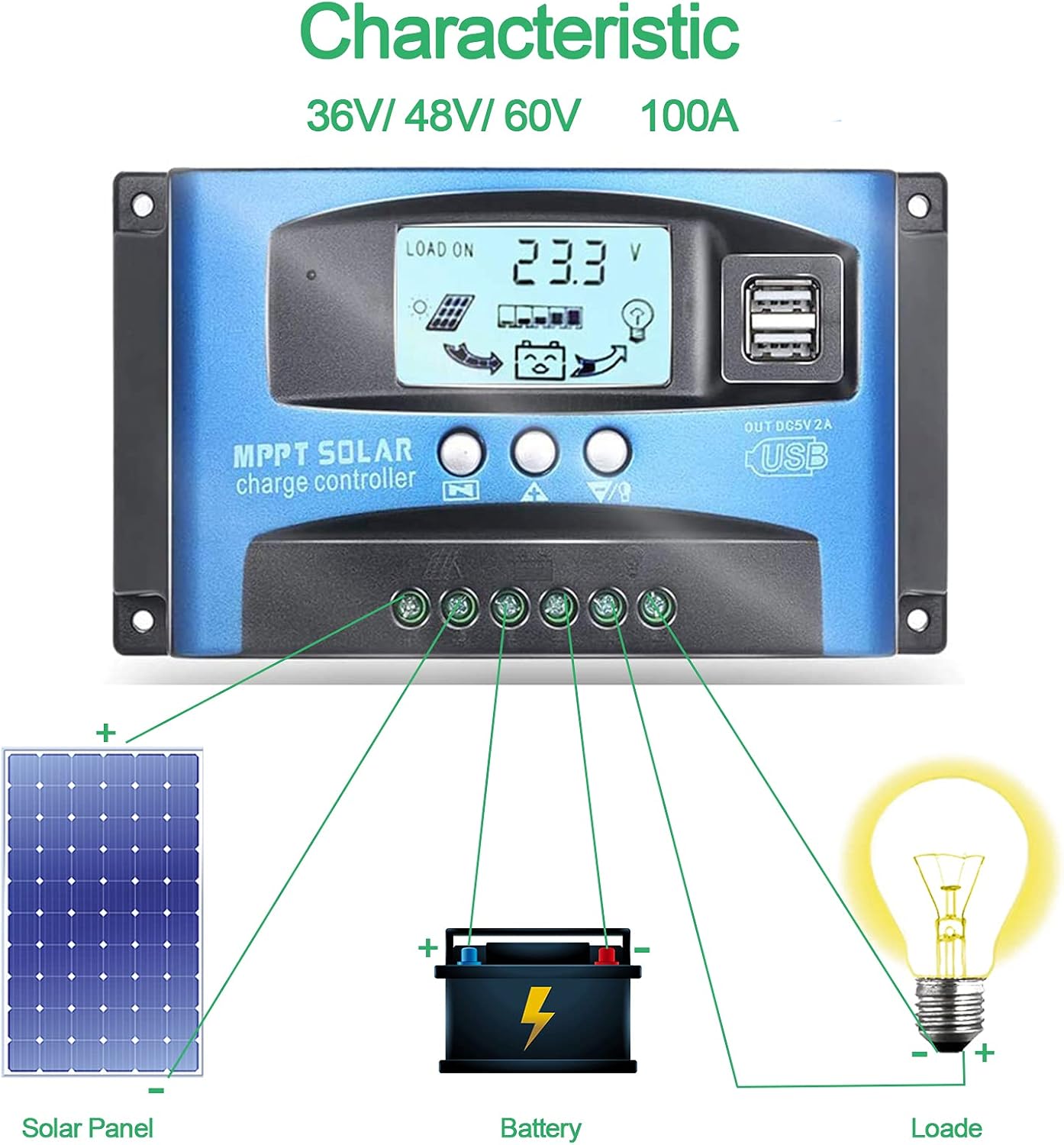
Image: Connection diagram illustrating how to connect solar panels, battery, and load to the charge controller.

Hình ảnh: Chi tiết view of the controller with labels for its components, including buttons, LCD, USB ports, and connection points.
Hướng dẫn sử dụng
The controller features an LCD display and three buttons for operation: Menu, Page Up, and Page Down/Manual.
Màn hình LCD
Màn hình LCD hiển thị nhiều thông số khác nhau, bao gồm cả dung lượng pin.tage, charging current, discharge current, and system status. The icons on the display indicate solar panel activity, battery charge level, and load status.
Chức năng nút
- Nút Menu: Press to enter the menu interface and cycle through different settings. Long press to modify parameters.
- Nút Trang Lên: Used to increase values or navigate upwards in menus.
- Page Down/Manual Button: Used to decrease values or navigate downwards in menus. Also functions as a manual load control switch (on/off) when on the main interface.
Sạc USB
The controller is equipped with dual USB ports providing 5V/2A output for charging compatible devices such as mobile phones and tablets.

Image: Demonstration of the controller's dual USB ports being used to charge a mobile phone.
BẢO TRÌ
Bảo trì thường xuyên sẽ đảm bảo tuổi thọ và hiệu suất tối ưu cho bộ điều khiển sạc năng lượng mặt trời của bạn.
- Kiểm tra kết nối: Thường xuyên kiểm tra độ chắc chắn và tình trạng ăn mòn của tất cả các mối nối dây điện. Các mối nối lỏng lẻo có thể dẫn đến mất điện hoặc quá nhiệt.
- Làm sạch bộ điều khiển: Giữ cho bộ điều khiển luôn sạch sẽ và không bị bám bụi bẩn. Dùng khăn khô để lau bề mặt. Không sử dụng chất tẩy rửa dạng lỏng.
- Giám sát hiệu suất: Thường xuyên kiểm tra màn hình LCD để đảm bảo hoạt động bình thường và âm lượng mong muốn.tage/các chỉ số hiện tại.
- Tình trạng pin: Ensure your battery is well-maintained and within its recommended operating parameters.
Xử lý sự cố
Phần này cung cấp giải pháp cho những vấn đề thường gặp mà bạn có thể gặp phải.
| Tình huống | Nguyên nhân có thể xảy ra | Giải pháp |
|---|---|---|
| Không hiển thị trên màn hình | Pin không được kết nối hoặc âm lượng thấptage | Connect battery, check battery voltage |
| No charge when sunny | Solar panel reversed or open circuit | Reconnect solar panel, check wiring |
| Tải không hoạt động | Load short circuit, overload, or over-discharge protection | Check load wiring, reduce load, or charge battery |
| Bộ điều khiển không sạc | bảng điều khiển năng lượng mặt trời voltage too low or battery full | Ensure sufficient solar input, check battery status |
The controller includes built-in protections for reverse polarity, overvoltage, short circuit, overload, overcharge, and over-discharge. If an issue persists after troubleshooting, contact customer support.
Thông số kỹ thuật
| Tham số | Giá trị |
|---|---|
| Người mẫu | 4yhujuyj |
| Thương hiệu | CDIYTOOL |
| Dòng điện định mức | 100A |
| Hệ thống Voltage | 36V/48V/60V Auto Adapt (Not for 12V/24V) |
| Đầu vào năng lượng mặt trời tối đa Voltage | 50V |
| Đầu ra USB | 5V/2A kép |
| Kiểu hiển thị | Màn hình tinh thể lỏng |
| Trọng lượng sản phẩm | 14.4 ounce |
| Kích thước gói hàng | 6.81 x 3.98 x 2.01 inch |

Image: Diagram showing the physical dimensions of the solar charge controller.
Tài nguyên bổ sung và hỗ trợ
For further assistance or to access the mobile application for monitoring, please refer to the following:
Ứng dụng di động
The BL-912V APP can be installed on your Android phone to monitor and control the solar charge controller. Scan the QR code below or visit the provided link to download and install the application.
Liên kết tải xuống: http://fir.sdhzwl.cn/5w4b
The mobile phone app allows for remote monitoring of charging and discharging data, daily power generation, and other functions.
Image: Section of the user manual detailing the BL-912V APP installation process, including a QR code.
Bảo hành và dịch vụ khách hàng
For warranty information or technical support, please contact CDIYTOOL customer service through the platform where you purchased the product. Keep your purchase receipt for warranty claims.
Ứng dụng tiêu biểu
The CDIYTOOL MPPT Solar Charge Controller is suitable for a variety of off-grid solar power applications, including:
- Residential solar power systems
- RV and marine solar setups
- Solar street lighting
- Remote monitoring stations
- Agricultural irrigation systems

Hình ảnh: Examples of typical applications for the solar charge controller in various settings.
Ask a question about this manual
Ask about setup, troubleshooting, compatibility, parts, safety, or missing instructions. Manuals+ will review the question and use this page’s manual context to help answer it.