
1. Giới thiệu
This manual provides comprehensive instructions for the installation, programming, and operation of the Finder 12.A4.8.230.0010 NFC Weekly Time Clock. This electronic astronomical time switch features a weekly program, an analog output, and can be programmed via a joystick or an NFC-enabled smartphone using the Finder Toolbox app.
2. Thông tin an toàn
Please read these safety instructions carefully before installation and operation. Failure to follow these instructions may result in electric shock, fire, or damage to the device.
- Việc lắp đặt phải được thực hiện bởi thợ điện có trình độ chuyên môn theo quy định về hệ thống điện địa phương.
- Hãy đảm bảo ngắt nguồn điện trước khi tiến hành bất kỳ công việc lắp đặt hoặc bảo trì nào.
- Không để thiết bị tiếp xúc với hơi ẩm, nhiệt độ quá cao hoặc môi trường ăn mòn.
- Thiết bị chỉ được thiết kế để sử dụng trong nhà.
3. Sản phẩm hếtview
The Finder 12.A4.8.230.0010 is an electronic time switch designed for DIN rail mounting. It offers precise time control with a weekly program and astronomical function.

Hình 1: Mặt trước view of the Finder 12.A4.8.230.0010 Time Clock, showing the LCD display, joystick, and NFC symbol.
Các tính năng chính:
- Weekly program for flexible scheduling.
- 1 analog output: 0-10 V or PWM.
- 1 changeover contact for 16 A / 250 V AC (AC1).
- Cung cấp voltage: 110-230 V AC/DC.
- LCD display for clear information.
- Programming via joystick or NFC-enabled smartphone with Finder Toolbox app (Android and iOS).
- Astronomical time control: automatic switching at sunrise and sunset based on postcode or coordinates.
- Adjustable time offset for sunrise/sunset.
4. Thiết lập và Cài đặt
This device is designed for DIN rail mounting. Follow these steps for proper installation:
- Ngắt kết nối nguồn: Ensure the main power supply to the installation area is completely disconnected before proceeding.
- Lắp đặt: Mount the time switch securely onto a standard DIN rail.
- Dây điện: Connect the power supply (110-230 V AC/DC) to terminals A1 and A2. Connect the load to the changeover contact terminals (NO, NC, COM) and the analog output (W, O, Y) as required. Refer to the wiring diagram below.
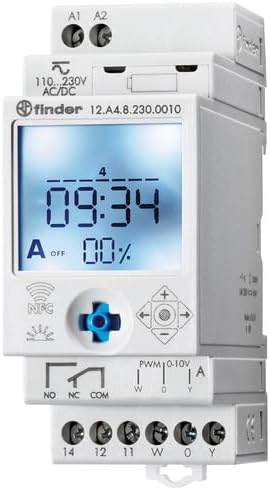
Hình 2: Chi tiết view of the wiring terminals for power input (A1, A2), relay output (NO, NC, COM), and analog output (W, O, Y).
Ghi chú: The device features safe separation between the power supply and contacts.
5. Hướng dẫn vận hành
5.1 Khởi động ban đầu
Once wired, restore power. The LCD display will illuminate. You may need to set the current date and time if it's the first use or after a prolonged power outage.
5.2 Programming via Joystick
The integrated joystick allows for direct programming on the device:
- Điều hướng: Use the joystick to move through menu options (up, down, left, right).
- Lựa chọn/Xác nhận: Press the joystick inwards to select an option or confirm a setting.
- Follow the on-screen prompts to set the current time, date, weekly program, and astronomical functions.
5.3 Programming via NFC (Finder Toolbox App)
For maximum flexibility, program the time switch using an NFC-enabled smartphone and the Finder Toolbox app:
- Tải ứng dụng: Download the "Finder Toolbox" app from the Google Play Store (Android) or Apple App Store (iOS).
- Create/Load Program: Open the app and create a new program or load an existing one. The app allows for detailed configuration of weekly schedules, astronomical settings, and special functions.
- Truyền tải dữ liệu: To transfer the program, hold your smartphone close to the NFC symbol on the time switch. The app will guide you through the data transfer process.
- Read Program: You can also read an existing program from the time switch to your smartphone for editing or backup.
5.4 Astronomical Time Control
The device can automatically switch based on sunrise and sunset times:
- Cài đặt vị trí: Set your location by entering a postcode or geographical coordinates in the programming menu (via joystick or app).
- Bù lại: You can set a selectable time offset for both sunrise and sunset times to adjust switching points.
- Astro ON/OFF: Configure specific ON/OFF times during the astronomical ON period if needed.
6. Bảo trì
The Finder 12.A4.8.230.0010 is designed for maintenance-free operation. However, periodic checks are recommended:
- Vệ sinh: Clean the device with a dry, soft cloth. Do not use abrasive cleaners or solvents.
- Kết nối: Periodically check terminal connections to ensure they are secure.
- Cập nhật chương trình cơ sở: Check the Finder website or app for any available firmware updates for improved functionality or bug fixes.
KHAI THÁC. Xử lý sự cố
| Vấn đề | Nguyên nhân có thể | Giải pháp |
|---|---|---|
| Thiết bị không bật nguồn. | Không có nguồn điện hoặc hệ thống dây điện không đúng. | Check power connections (A1, A2) and ensure power is supplied. Verify wiring against the diagram. |
| Program not executing. | Incorrect program settings or manual override active. | Review program settings via joystick or app. Check for any active manual override functions. Ensure current date/time is correct. |
| NFC transfer fails. | Smartphone not NFC-enabled, app not open, or poor contact. | Ensure your smartphone has NFC enabled. Open the Finder Toolbox app. Hold the phone directly over the NFC symbol on the device. |
| Astronomical function inaccurate. | Incorrect location (postcode/coordinates) or time zone setting. | Verify the entered postcode or coordinates. Check the time zone setting. |
If the problem persists, please contact Finder technical support.
8. Thông số kỹ thuật
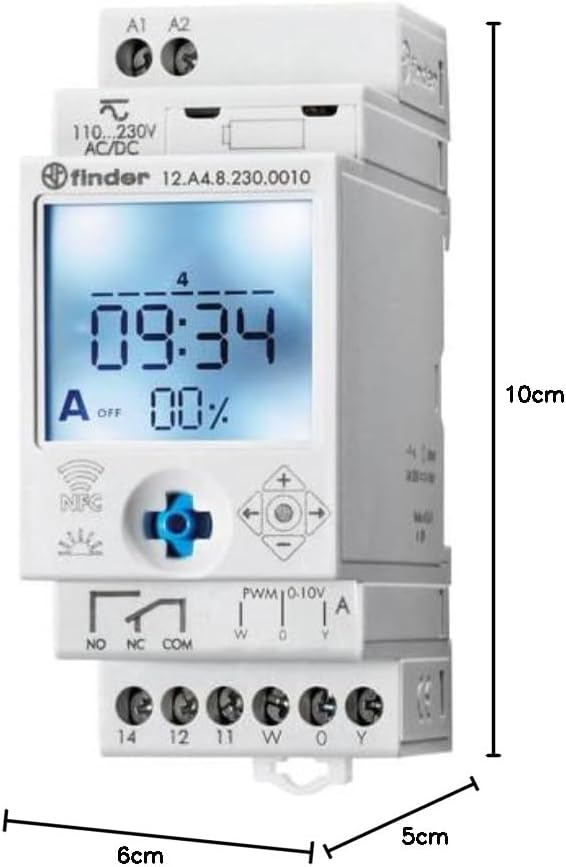
Figure 3: Dimensions of the Finder 12.A4.8.230.0010 Time Clock, showing approximate measurements of 10cm height, 6cm width, and 5cm depth.
| Tính năng | Chi tiết |
|---|---|
| Thương hiệu | Công cụ tìm kiếm |
| Số hiệu mẫu | 12.A4.8.230.0010 |
| Kích thước (C x R x S) | 10 x 6 x 5cm |
| Cân nặng | 70 gam |
| Cung cấp Voltage | 110-230V AC/DC |
| Liên hệ đầu ra | 1 changeover contact, 16 A / 250 V AC (AC1) |
| Đầu ra tương tự | 0-10 V or PWM |
| Vật liệu liên hệ | AgSnO2 |
| Tối đa Inrush hiện tại | 120 A trong 5 ms |
| Min. Switching Time | 1 phút |
| Max. Switching Power (230 V AC1) | 4000VA |
| Đầu vào giao diện con người | Buttons (Joystick) |
| Pin cần thiết | KHÔNG |
| Tương thích với | Power supplies/ballasts with 0-10 V or PWM inputs, or Slave dimmers Type 15.11 |
9. Bảo hành và Hỗ trợ
For warranty information and technical support, please refer to the official Finder webhoặc liên hệ với nhà phân phối địa phương của bạn. Giữ lại hóa đơn mua hàng để làm bằng chứng mua hàng.
Nhà sản xuất: Công cụ tìm kiếm
Product on Amazon.es since: Ngày 24 tháng 2021 năm XNUMX


