
1. Giới thiệu và kết thúcview
The Poly Savi 8210 UC is a professional-grade wireless DECT single-ear headset designed for secure and clear communication across multiple devices. It offers robust security features, including military-grade 256-bit AES encryption, making it suitable for environments requiring high privacy. The headset features Poly Acoustic Fence technology for noise cancellation and provides extensive wireless range and talk time.

Image: Poly Savi 8210 UC Monaural Headset. This image displays the single-ear headset with its microphone boom, designed for comfortable and clear audio communication.
2. Có gì trong hộp
Xác minh rằng tất cả các mục đều có trong gói hàng:
- Poly Savi 8210 UC Bluetooth Wireless DECT Headset
- Đế tai nghe
- Global Teck Microfiber Cloth

Image: Contents of the box. This image shows the Poly Savi 8210 UC headset, its charging base, and a Global Teck microfiber cleaning cloth, indicating the complete product package.
3. Thiết lập
3.1 Kết nối phần đế
The Savi 8210 UC base connects to your desk phone, PC/Mac via USB-A, and can also pair with mobile phones via Bluetooth. Ensure the base is placed near your communication devices.
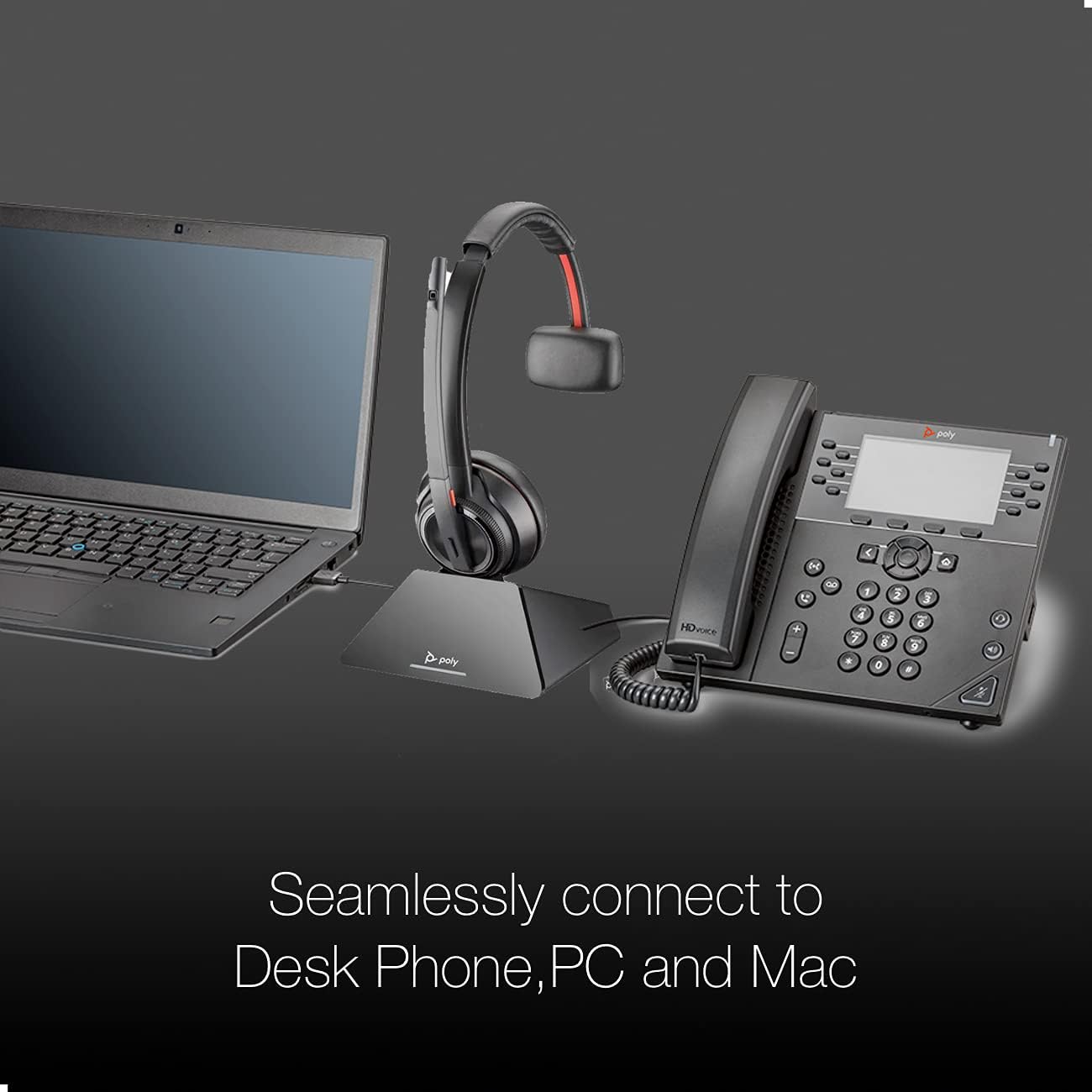
Image: Seamless connectivity. This image illustrates the Poly Savi 8210 UC headset base connected to both a laptop (PC/Mac) via USB and a desk phone, demonstrating its multi-device compatibility.
3.2 Base Controls and Indicators
Familiarize yourself with the buttons and LED indicators on the headset base:

Image: Headset base controls. This image highlights various buttons and indicators on the headset base, including the computer button, mobile phone button, desk phone button, incoming call ringer, Bluetooth pairing button/LED, subscription button/LED, and charging LED.
- Computer Button: Selects the PC/Mac as the audio source.
- Mobile Phone Button: Selects a paired mobile phone as the audio source.
- Desk Phone Button: Selects the desk phone as the audio source.
- Incoming Call Ringer: Indicates an incoming call.
- Bluetooth Pairing Button/LED: Initiates Bluetooth pairing mode and indicates connection status.
- Subscription Button/LED: Used for subscribing the headset to the base and indicates subscription status.
- Đèn LED sạc: Indicates the charging status of the headset.
3.3 Sạc ban đầu
Before first use, place the headset on the base to charge. A full charge takes approximately three hours. The charging LED on the base will indicate charging status.
4. Hướng dẫn vận hành
4.1 Powering On/Off and Talk Time
The headset automatically powers on when removed from the base and powers off when placed back on the base. The headset provides up to 13 hours of talk time on a full charge.

Image: Talk Time: 13 Hours. This image highlights the impressive 13-hour talk time capability of the Poly Savi 8210 UC headset, ensuring extended use.
4.2 Quản lý cuộc gọi
- Trả lời / Kết thúc cuộc gọi: Press the Call Control button on the headset or the active device button on the base.
- Điều chỉnh âm lượng: Sử dụng các nút tăng/giảm âm lượng trên tai nghe.
- Tắt tiếng: Nhấn nút Tắt tiếng trên tai nghe để tắt hoặc bật tiếng micrô.
4.3 Khả năng tương thích
The Poly Savi 8210 UC is designed for broad compatibility with various communication platforms and VoIP softphones, including:

Image: Compatible Platforms. This image displays logos of various communication platforms such as Skype, Lync, Mitel, RingCentral, Avaya, GoToMeeting, Google Meet, Amazon Chime, Unify, Cisco, Zoom, Vonage, Microsoft Teams, Fuze, 8x8, and BlueJeans, indicating broad software compatibility for the headset.
- Phóng
- RingCentral
- 8x8
- Vonage
- Nhóm Microsoft
- Skype
- Gặp gỡ Google
- Đi đến cuộc họp
- Thống nhất
- Cisco
- And more business applications.
5. Bảo trì
5.1 Vệ sinh
Regularly clean the headset and base with a soft, dry cloth. For the ear cushion, use the provided Global Teck Microfiber Cloth. Avoid using harsh chemicals or abrasive materials.
5.2 Lưu trữ
When not in use, store the headset on its charging base to ensure it is always ready. Store in a cool, dry place away from extreme temperatures.
KHAI THÁC. Xử lý sự cố
6.1 Không có âm thanh/Chất lượng âm thanh kém
- Ensure the headset is charged and properly seated on the base.
- Verify the correct audio source (PC, mobile, or desk phone) is selected on the base.
- Kiểm tra mức âm lượng trên cả tai nghe và thiết bị được kết nối.
- Confirm the headset is subscribed to the base. If not, re-subscribe using the subscription button.
6.2 Tai nghe không kết nối
- For PC/Mac: Ensure the USB-A cable is securely connected.
- For Mobile: Ensure Bluetooth is enabled on your mobile device and the headset is in pairing mode (press and hold the Bluetooth pairing button on the base).
- Restart the base by unplugging and re-plugging the power adapter.
6.3 Vấn đề về micro
- Hãy đảm bảo cần micro được đặt đúng vị trí gần miệng bạn.
- Kiểm tra xem micrô có bị tắt tiếng không.
- Verify microphone settings in your computer's sound preferences or communication software.
7. Thông số kỹ thuật
| Tên mẫu | Savi 8210 UC |
| Thương hiệu | Poly (Global Teck Worldwide) |
| Công nghệ kết nối | Không dây (DECT, Bluetooth) |
| Công nghệ không dây | Bluetooth |
| Vị trí tai | Trên tai |
| Yếu tố hình thức | Trên tai |
| Kiểm soát tiếng ồn | Chống ồn chủ động |
| Micrô | Included, Noise Cancellation (Poly Acoustic Fence) |
| Thời gian nói chuyện | Lên đến 13 giờ |
| Thời gian sạc | 3 giờ (sạc đầy) |
| Wireless Dải | Up to 590 ft / 180 m (line-of-sight) |
| Bảo vệ | DECT Security Step C, 256-bit AES encryption |
| Thiết bị tương thích | Laptop, Tablets, Cellphone, Computer, Macbook, PC, Android, iOS |
| Trọng lượng sản phẩm | 0.5 Kilôgam |
| Vật liệu | Da (đệm tai) |
8. Bảo hành
The Poly Savi 8210 UC headset comes with a Poly/Plantronics warranty against any manufacturing defects. Please refer to the official Poly webXem trang web hoặc tài liệu mua hàng của bạn để biết các điều khoản và thời hạn bảo hành cụ thể.
9. Hỗ trợ
For technical assistance, troubleshooting, or warranty claims, please contact Global Teck Worldwide, the seller/distributor of this product. You can find their contact information on your purchase receipt or by visiting their official webđịa điểm.
For additional product information and resources, visit the official Poly webđịa điểm.