
SPRT POS58 IVU
Hướng dẫn sử dụng máy in nhiệt hóa đơn SPRT POS58 IVU
Model: POS58 IVU
Giới thiệu
This manual provides essential information for the proper setup, operation, and maintenance of your SPRT POS58 IVU Receipt Thermal Printer. Please read this manual thoroughly before using the printer to ensure optimal performance and longevity.
The SPRT POS58 IVU is a compact and efficient thermal receipt printer designed for various point-of-sale applications. It features USB connectivity and is compatible with 5.7 cm wide thermal paper.
Cài đặt
1. Mở hộp và kiểm tra
- Cẩn thận lấy máy in và tất cả các phụ kiện ra khỏi bao bì.
- Verify that all components are present: printer unit, power adapter, USB cable.
- Inspect the printer for any visible damage. If damaged, contact your supplier immediately.
2. Kết nối máy in
- Kết nối nguồn: Insert the power adapter cable into the printer's power port and plug the other end into a suitable power outlet.
- Kết nối USB: Kết nối một đầu cáp USB với cổng USB của máy in và đầu kia với một cổng USB khả dụng trên máy tính hoặc hệ thống POS của bạn.
- Bật nguồn: Locate the power switch on the printer (typically on the side or front) and turn it to the 'ON' position.
3. Nạp giấy in nhiệt
The SPRT POS58 IVU printer uses standard 5.7 cm wide thermal paper rolls.
- Open the paper cover by pressing the release button or lifting the latch (location may vary slightly).
- Insert the thermal paper roll with the printing surface facing the thermal head. Ensure the roll is seated correctly in the paper compartment.
- Kéo một lượng giấy nhỏ ra khỏi máy cắt.
- Đóng chặt nắp giấy cho đến khi nghe tiếng "tách".
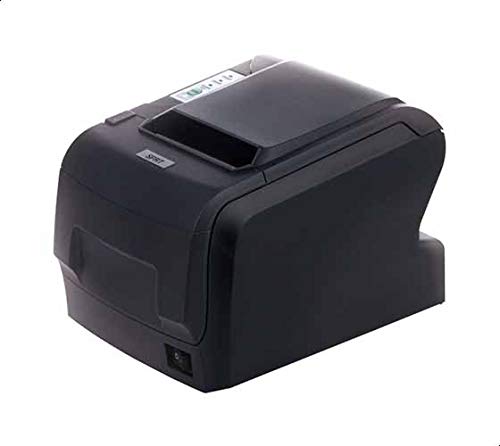
Figure 1: SPRT POS58 IVU Receipt Thermal Printer. This image displays the compact black thermal printer from an angled view, highlighting its paper output slot and the power switch located on the side.
Hướng dẫn sử dụng
In cơ bản
- Ensure the printer is powered on and connected to your computer/POS system.
- Install the necessary printer drivers on your operating system if not already installed. Refer to the driver installation guide provided separately or available from the manufacturer's webđịa điểm.
- From your application (e.g., POS software, word processor), select the SPRT POS58 IVU as your printer.
- Initiate the print command. The printer will automatically feed and print the receipt.
- Tear off the receipt against the serrated edge of the paper output slot.
Đèn báo
The printer typically has indicator lights to show its status:
- Đèn nguồn: Cho biết máy in đang được bật nguồn.
- Đèn báo lỗi: Illuminates or blinks to indicate an error condition (e.g., paper out, print head overheat).
- Đèn chiếu sáng giấy: Indicates that the paper roll is empty or incorrectly loaded.
BẢO TRÌ
Vệ sinh đầu nhiệt
Regular cleaning of the thermal head ensures clear print quality and extends printer life. Clean the thermal head after every 50-100 km of printing or if print quality degrades.
- Tắt máy in và ngắt kết nối cáp nguồn.
- Mở nắp giấy.
- Wait a few minutes for the thermal head to cool down if the printer has been recently used.
- Gently wipe the thermal head surface with a cotton swab lightly moistened with absolute alcohol (ethanol).
- Allow the alcohol to evaporate completely before closing the cover and reconnecting power.
Vệ sinh bên ngoài
Lau sạch bên ngoài máy in bằng vải mềm,amp vải. Không sử dụng dung môi mạnh hoặc chất tẩy rửa có tính mài mòn.
Xử lý giấy
- Use only high-quality thermal paper to prevent damage to the thermal head and ensure optimal print quality.
- Store thermal paper in a cool, dry place away from direct sunlight and heat.
Xử lý sự cố
| Vấn đề | Nguyên nhân có thể | Giải pháp |
|---|---|---|
| Máy in không bật được. | Power cable not connected; power outlet faulty; printer switch off. | Kiểm tra kết nối dây nguồn; thử cắm vào ổ cắm khác; đảm bảo công tắc nguồn đã được bật. |
| No printing / Blank output. | Paper loaded incorrectly (upside down); paper out; driver not installed/configured; printer not selected. | Reload paper correctly (printing side facing thermal head); replace paper roll; install/reinstall drivers; select printer in application. |
| Chất lượng in kém. | Thermal head dirty; low-quality paper; paper stored improperly. | Clean thermal head; use recommended thermal paper; store paper correctly. |
| Kẹt giấy. | Paper not loaded straight; foreign object in paper path. | Open cover, remove jammed paper carefully, reload paper straight; inspect for obstructions. |
Thông số kỹ thuật
| Tính năng | Chi tiết |
|---|---|
| Thương hiệu | SPRT |
| Số hiệu mẫu | POS58 IVU |
| Loại máy in | Máy in hóa đơn nhiệt |
| Công nghệ kết nối | USB |
| Phương tiện in ấn | Labels (commonly used for receipts) |
| Chiều rộng giấy | 5.7cm |
| Màu sắc | Đen |
| Trọng lượng sản phẩm | 1.82 Kilôgam |
| Kích thước gói hàng | 28 x 21.4 x 17.8cm |
Bảo hành và Hỗ trợ
Specific warranty terms and detailed support contact information are not provided within the available product data. For warranty claims, technical support, or service inquiries, please refer to the documentation included with your purchase or contact your point of sale or the manufacturer directly.
You may find additional resources and contact details on the official SPRT webđịa điểm.
Ask a question about this manual
Ask about setup, troubleshooting, compatibility, parts, safety, or missing instructions. Manuals+ will review the question and use this page’s manual context to help answer it.