
8000 TIẾP THEO
Hướng dẫn sử dụng đầu thu vệ tinh Full HD NEXT 8000
Mẫu: 8000
Giới thiệu
Thank you for choosing the NEXT 8000 Full HD Satellite Receiver. This manual provides detailed instructions for the proper installation, operation, and maintenance of your device. Please read this manual thoroughly before using the receiver to ensure optimal performance and safety.
The NEXT 8000 is designed to deliver a high-quality viewing experience with its Full HD capabilities, multi-satellite search, and media playback features. It supports various languages and offers convenient software upgrades via USB.
Nội dung gói
Vui lòng kiểm tra xem tất cả các mục có trong gói hàng không:
- NEXT 8000 Satellite Receiver Unit
- Điều khiển từ xa
- Cáp HDMI
- Cáp USB
- Bộ đổi nguồn

Image: The NEXT 8000 Full HD Satellite Receiver unit shown alongside its remote control.
Hướng dẫn thiết lập
1. Kết nối đầu thu
Follow these steps to connect your satellite receiver to your television and satellite dish:
- Vệ tinh VÀO: Connect the coaxial cable from your satellite dish to the 'LNB IN' port on the back of the receiver.
- Kết nối HDMI: Use the provided HDMI cable to connect the 'HD OUT' port on the receiver to an available HDMI input on your television. Note the HDMI input number on your TV (e.g., HDMI 1, HDMI 2).
- AV Connection (Optional): If your TV does not have an HDMI input, use an AV cable (not included) to connect the 'AV' port on the receiver to the corresponding AV inputs on your television.
- Kết nối nguồn điện: Connect the power adapter to the 'DC 12V' input on the receiver, then plug the adapter into a power outlet.
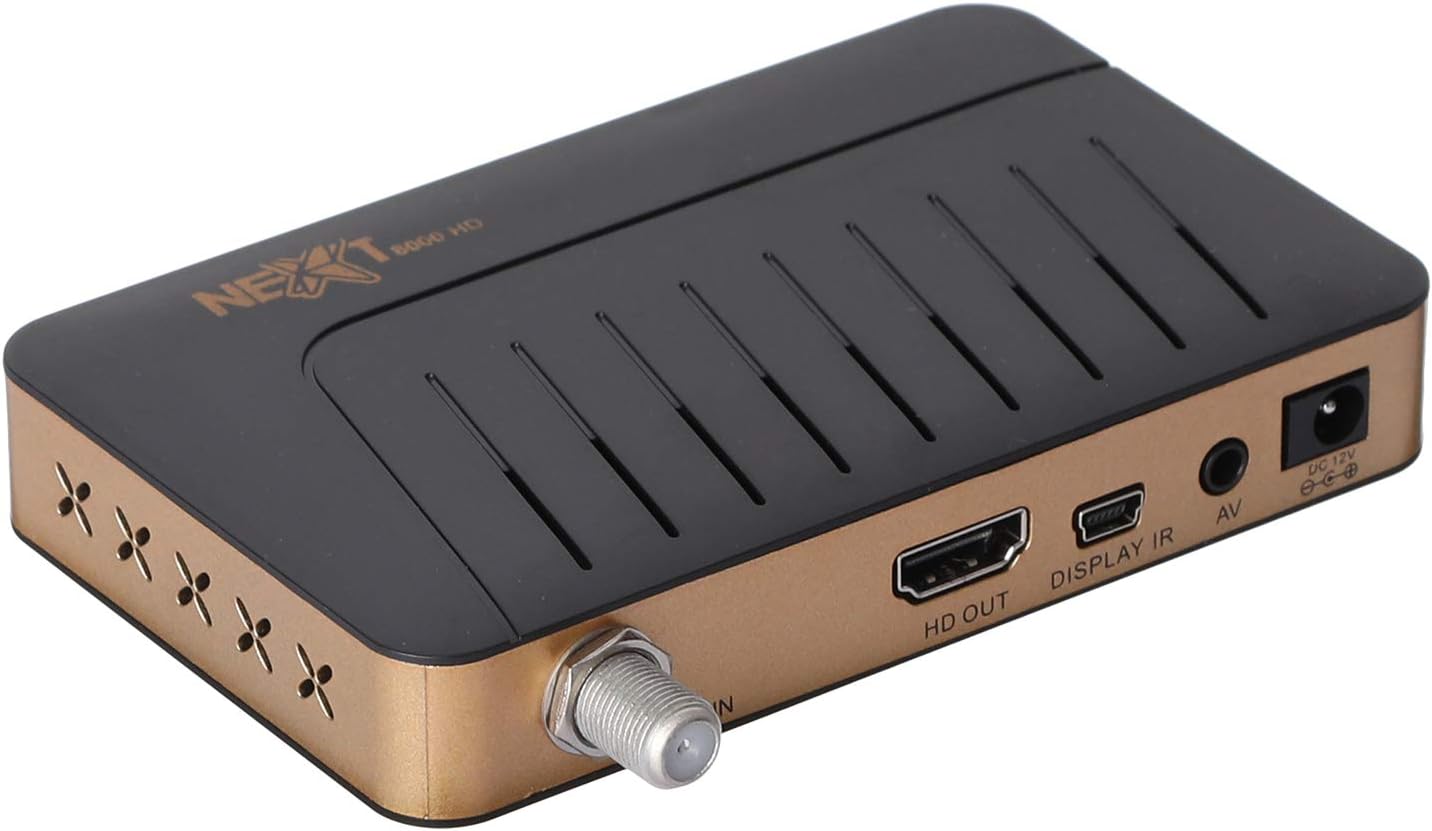
Hình ảnh: Phía sau view of the NEXT 8000 receiver, highlighting the LNB IN, HD OUT (HDMI), AV, and DC 12V power input ports.
2. Bật nguồn và thiết lập ban đầu
Sau khi kết nối tất cả các dây cáp:
- Turn on your television and select the correct HDMI or AV input source.
- The receiver will power on automatically. The initial setup wizard should appear on your screen.
- Follow the on-screen instructions to select your preferred language, time zone, and perform a channel scan. Refer to the 'Operating Instructions' section for details on channel scanning.
3. Điều khiển từ xaview
Familiarize yourself with the functions of the remote control:

Image: The remote control for the NEXT 8000 satellite receiver, showing various buttons for power, navigation, volume, channel, and special functions.
- Nút nguồn: Turns the receiver on/off or to standby mode.
- THỰC ĐƠN: Truy cập vào menu chính để cài đặt và các tính năng.
- OK: Xác nhận lựa chọn hoặc hiển thị danh sách kênh.
- Các nút mũi tên (Lên/Xuống/Trái/Phải): Điều hướng thông qua các menu và tùy chọn.
- LỐI RA: Trở lại màn hình trước đó hoặc thoát khỏi menu.
- VÒNG +/-: Điều chỉnh âm lượng.
- CH +/-: Thay đổi kênh.
- EPG: Hiển thị Hướng dẫn Chương trình Điện tử.
- ĐÃ NGỒI: Selects satellite.
- USB: Truy cập trình phát đa phương tiện USB.
- Dịch chuyển thời gian: Activates the Timeshift function (requires USB storage).
Hướng dẫn sử dụng
1. Channel Search and Management
To find and organize channels:
- Nhấn nút THỰC ĐƠN nút trên điều khiển từ xa.
- Navigate to 'Installation' or 'Channel Search' using the arrow buttons and press OK.
- Select 'Multi-satellite search' or 'Network search' based on your setup.
- Follow the on-screen prompts to initiate the scan. The receiver will automatically detect available channels.
- After the scan, you can access options to 'Program lock', 'Delete', 'Move', or 'Rename' channels within the channel management menu.
2. Phát lại đa phương tiện qua USB
The receiver supports media playback from a USB flash drive.
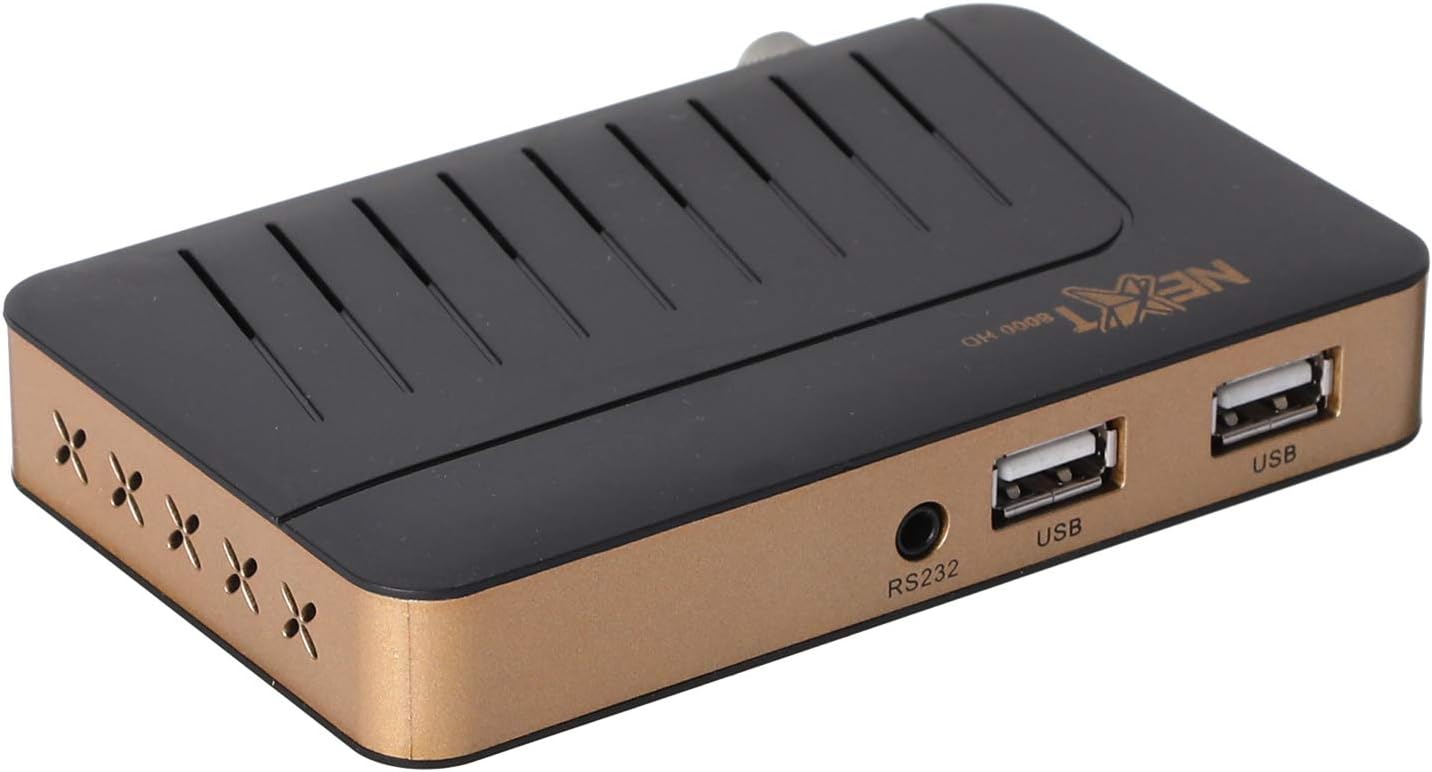
Hình ảnh: Mặt trước view of the NEXT 8000 receiver, showing the two USB ports available for connecting external storage devices.
- Insert a USB flash drive into one of the USB ports on the receiver.
- Nhấn nút USB button on the remote control or navigate to the 'Media' menu.
- Chọn loại phương tiện bạn muốn phát (ví dụ: Video, Nhạc, Ảnh).
- Browse your USB drive content and select the desired file. The receiver supports AVI, MKV, TS, TP, TRP, MPG, and MP4 files.
3. Ghi âm và dịch chuyển thời gian
To record programs or use the Timeshift function, a USB storage device must be connected.
- Ghi âm: Trong khi xem chương trình, hãy nhấn nút Ghi button (usually a red circle) on the remote control to start recording. Press it again to stop. Recorded content will be saved to the connected USB drive.
- Dịch chuyển thời gian: Nhấn nút Chuyển thời gian button on the remote control to pause live TV. You can then fast-forward or rewind within the buffered content.
4. Hướng dẫn chương trình điện tử (EPG)
Nhấn nút EPG nút trên điều khiển từ xa để view the 7-day electronic program guide. This allows you to see upcoming programs and set reminders or recordings.
5. Parental Lock
To restrict access to certain channels or menus, navigate to the 'System Settings' or 'Parental Control' menu. You can set a password to lock programs or specific functions.
BẢO TRÌ
1. Software Upgrade via USB
To ensure your receiver has the latest features and bug fixes, you can upgrade its software:
- Tải phần mềm mới nhất file from the official NEXT website to a USB flash drive. Ensure the file is placed in the root directory of the USB drive.
- Cắm ổ USB vào cổng USB của thiết bị thu.
- Đi đến THỰC ĐƠN > 'System Settings' > 'Software Upgrade' (or similar option).
- Select 'Upgrade by USB' and choose the software file.
- Confirm the upgrade. The receiver will restart automatically after the upgrade is complete. Do not power off the receiver during the upgrade process.
2. Vệ sinh
To clean the receiver, disconnect it from the power supply. Use a soft, dry cloth to wipe the exterior surfaces. Do not use liquid cleaners or abrasive materials.
Xử lý sự cố
If you encounter issues with your NEXT 8000 receiver, refer to the following table:
| Vấn đề | Nguyên nhân có thể | Giải pháp |
|---|---|---|
| Không có hình ảnh hoặc âm thanh | Incorrect TV input selected; Loose HDMI/AV cable; Receiver not powered on. | Select correct TV input; Check all cable connections; Ensure receiver is powered on. |
| Không tìm thấy kênh nào | Satellite dish not aligned; Incorrect LNB settings; Channel scan not performed. | Check satellite dish alignment; Verify LNB settings in menu; Perform a channel scan. |
| Điều khiển từ xa không hoạt động | Dead batteries; Obstruction between remote and receiver; Remote sensor blocked. | Replace batteries; Remove obstructions; Ensure receiver's IR sensor is clear. |
| Không phát được dữ liệu từ USB. | Không được hỗ trợ file format; USB drive not properly inserted; Corrupted file. | Kiểm tra file format compatibility; Re-insert USB drive; Try a different USB drive or file. |
Nếu sự cố vẫn tiếp diễn sau khi đã thử các giải pháp này, vui lòng liên hệ với bộ phận hỗ trợ khách hàng.
Thông số kỹ thuật
Key technical specifications for the NEXT 8000 Full HD Satellite Receiver:
- Người mẫu: 8000
- Độ phân giải đầu ra video: 576i, 576p, 720p, 1080i, 1080p (50/60 Hz)
- Kết nối: HDMI, USB (2 ports), RS232, AV
- Định dạng âm thanh được hỗ trợ: Dolby Digital, DTS, AAC, PCM
- Supported Video/Media Formats: AVI, MKV, TS, TP, TRP, MPG, MP4
- Bộ nhớ lưu trữ: 100 satellites, 4000 frequencies, 8000 channels
- Bộ xử lý: Sunplus
- Đặc trưng: Recording by USB flash, Screen enlargement, Multi-satellite search, Network search, Media playback, 7-day Electronic Program Guide (EPG), Teletex, Timeshift, Parental lock.
- Kích thước: 19.6 x 17.4 x 6.6cm
- Cân nặng: 396 gam
Bảo hành và Hỗ trợ
For warranty information and technical support, please refer to the documentation provided with your purchase or visit the official NEXT product support webtrang web. Giữ lại biên lai mua hàng làm bằng chứng mua hàng khi yêu cầu bảo hành.
Ask a question about this manual
Ask about setup, troubleshooting, compatibility, parts, safety, or missing instructions. Manuals+ will review the question and use this page’s manual context to help answer it.