
1. Giới thiệu
1.1 Sản phẩm trênview
The Renkforce RF-HC-100 is a compact 16-megapixel trail camera designed for outdoor monitoring. It features a time-lapse function, night vision capabilities, and a durable, camouflage brown housing. This camera is suitable for wildlife observation, property surveillance, and other outdoor recording needs.
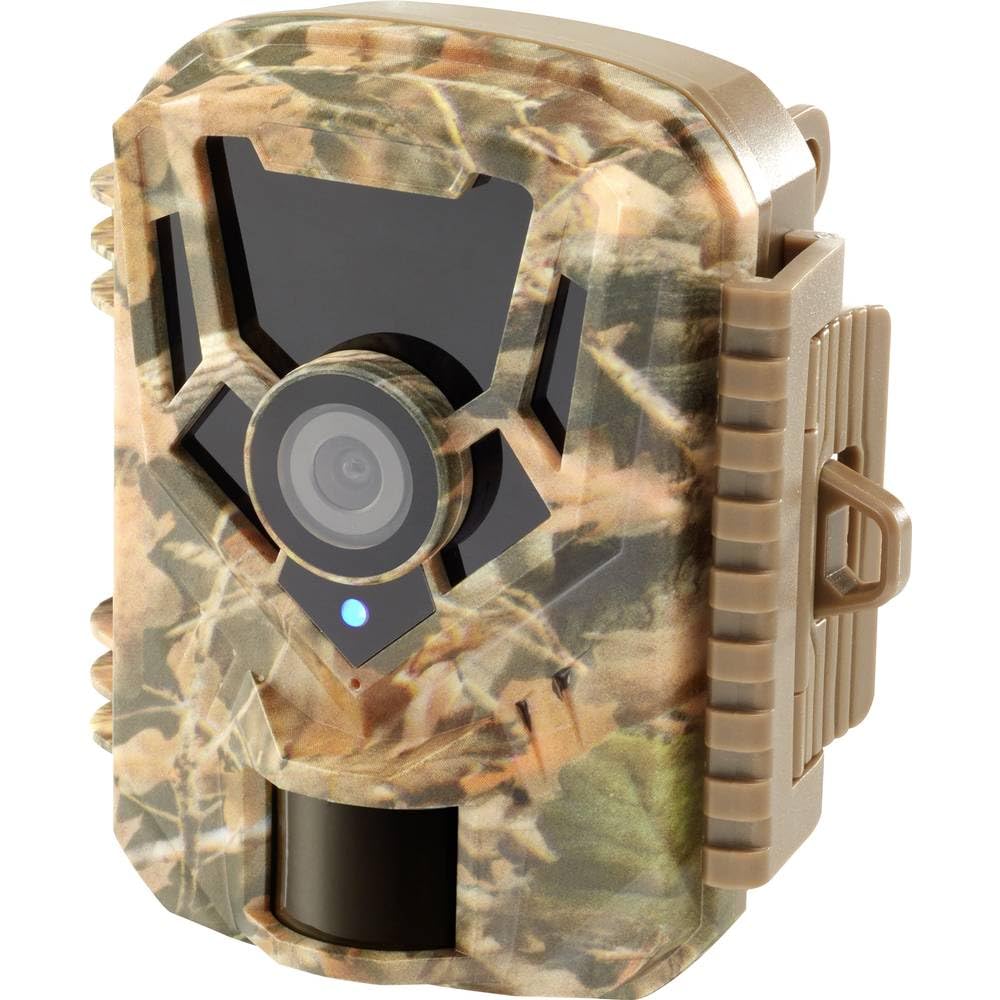
Hình ảnh: Mặt trước view of the Renkforce RF-HC-100 Trail Camera, showcasing its compact design and camouflage pattern.

Hình ảnh: Mặt trước view of the Renkforce RF-HC-100 Trail Camera, highlighting the main lens and motion sensor.
1.2 Nội dung gói
- 1 x Renkforce RF-HC-100 Trail Camera Unit
- Note: Additional accessories such as mounting straps, USB cables, or user manuals may be included depending on the specific package.
2. Thông tin an toàn
- Đọc kỹ mọi hướng dẫn trước khi vận hành thiết bị.
- Do not expose the camera to extreme temperatures, direct sunlight for prolonged periods, or corrosive liquids.
- Ensure the battery compartment is properly sealed to maintain the IP65 weather resistance.
- Vứt bỏ pin theo quy định của địa phương. Không trộn lẫn pin cũ và pin mới hoặc các loại pin khác nhau.
- Để thiết bị xa tầm tay trẻ em.
- Không được tự ý tháo rời hoặc sửa đổi máy ảnh, vì điều này sẽ làm mất hiệu lực bảo hành và có thể gây hư hỏng.
3. Tính năng sản phẩm
The Renkforce RF-HC-100 Trail Camera offers the following key features:
- Hình ảnh độ phân giải cao: 16 Megapixel effective capture resolution for clear photos and 1080p video recording.
- Tầm nhìn ban đêm: Equipped with color night vision for monitoring in low-light conditions.
- Chức năng quay phim tua nhanh: Capture images at set intervals to observe long-term events.
- Khe cắm thẻ SD: Supports external SD cards for ample storage of photos and videos.
- Khả năng chống chịu thời tiết: IP65 international protection rating ensures durability in various outdoor environments.
- Thiết kế nhỏ gọn: Miniature form factor with a camouflage brown finish for discreet placement.
- Góc rộng View: 90-degree angle of view to cover a broad area.
- Kết nối: Features wired connectivity (USB, AV ports) and Wi-Fi protocol for data transfer and control via application.
- Tùy chọn lắp đặt: Includes support for wall mounting.
4. Thiết lập
4.1 Lắp đặt pin
- Mở vỏ máy ảnh bằng cách mở chốt kẹp bên hông.
- Xác định vị trí ngăn chứa pin.
- Insert the required number of AA batteries (not included) according to the polarity markings (+/-).
- Đóng chặt ngăn chứa pin.
4.2 Cài đặt thẻ SD
- Mở vỏ máy ảnh, tìm khe cắm thẻ SD.
- Insert a compatible SD card (up to 32GB, Class 10 recommended) into the slot with the metal contacts facing down until it clicks into place.
- Để tháo ra, hãy ấn thẻ SD vào lại cho đến khi nó bật ra.

Image: The Renkforce RF-HC-100 Trail Camera with its housing open, revealing the control panel, USB, AV, and DC ports, and the ON/SETUP/OFF switch.
4.3 Gắn máy ảnh
The camera can be mounted using a strap or a wall mount bracket (if included or purchased separately).
- Lắp đặt bằng dây đeo: Thread a mounting strap through the slots on the back of the camera and secure it to a tree or pole.
- Lắp trên tường: Use the integrated mounting points or a compatible wall mount bracket to attach the camera to a flat surface. Ensure the camera is stable and pointed in the desired direction.
5. Hướng dẫn vận hành
5.1 Bật/Tắt nguồn và Chọn chế độ
Locate the ON/SETUP/OFF switch inside the camera housing.
- TẮT: Powers off the camera.
- THIẾT LẬP: Enters setup mode, allowing you to configure settings via the internal display.
- TRÊN, BẬT: Activates the camera for recording based on the configured settings.
5.2 Configuring Settings
In SETUP mode, use the navigation buttons (if available) to access the menu and adjust parameters such as:
- Độ phân giải ảnh / video
- Độ nhạy cảm biến PIR
- Độ trễ phát hiện
- Khoảng thời gian trôi đi
- Ngày và giờ
- Recording Mode (Photo, Video, Photo+Video, Time-Lapse)
5.3 Truy xuất dữ liệu
Để truy cập được ghi lại files:
- Qua USB: Connect the camera to a computer using a USB cable. The camera will appear as a removable disk.
- Qua thẻ SD: Remove the SD card from the camera and insert it into a computer's card reader.
6. Bảo trì
- Vệ sinh: Use a soft, dry cloth to clean the camera lens and housing. For stubborn dirt, a slightly damp có thể sử dụng vải, nhưng đảm bảo không có hơi ẩm lọt vào thiết bị.
- Thay thế pin: Hãy thay pin khi đèn báo pin yếu bật sáng hoặc khi hiệu năng giảm sút.
- Quản lý thẻ SD: Regularly format the SD card (after backing up important data) to maintain optimal performance and prevent errors.
- Kho: Khi không sử dụng trong thời gian dài, hãy tháo pin và cất giữ máy ảnh ở nơi khô ráo, thoáng mát, tránh ánh nắng trực tiếp.
KHAI THÁC. Xử lý sự cố
| Vấn đề | Nguyên nhân có thể | Giải pháp |
|---|---|---|
| Máy ảnh không bật được. | Low or dead batteries; incorrect battery installation; power switch in OFF position. | Replace batteries; ensure correct polarity; set switch to ON or SETUP. |
| Chất lượng hình ảnh/video kém. | Ống kính bẩn; điều kiện ánh sáng yếu; cài đặt độ phân giải không chính xác. | Clean the lens; ensure adequate lighting or use night vision; adjust resolution settings. |
| Camera không ghi hình. | SD card full or faulty; incorrect mode selected; PIR sensor blocked. | Format or replace SD card; select appropriate recording mode; clear sensor path. |
| Không thể kết nối với máy tính. | Faulty USB cable; camera not in correct mode; driver issues. | Try a different USB cable; ensure camera is in connection mode (if applicable); try another computer or card reader. |
8. Thông số kỹ thuật
| Tên mẫu | RF-HC-100 (RF-4466574) |
| Effective Capture Resolution | 16 Megapixel |
| Độ phân giải video | 1080p |
| Kích thước (D x R x C) | 21 x 12 x 9 cm (8.27 x 4.72 x 3.54 inch) |
| Cân nặng | 186 gram (0.41 pound) |
| Công nghệ kết nối | Wired (USB, AV), Wi-Fi Protocol (for control/transfer) |
| Tính năng đặc biệt | Local Recording, Night Vision (Color Night Vision) |
| Môi trường sử dụng | Ngoài trời |
| Bảo vệ quốc tế Rating | IP65 |
| Nguồn điện | Manual Operation (Battery-powered, batteries not included) |
| Cái gì?tage | 1.5 Watt |
| View Góc | 90 Độ |
| Màu sắc | Camouflage Brown |
| Vật liệu | Metal (internal) |
| Kiểu gắn kết | Hỗ trợ treo tường |
9. Bảo hành và Hỗ trợ
Renkforce provides support for its products. Spare parts availability is indicated for 1 year from the date of purchase. For technical assistance, troubleshooting beyond this manual, or warranty claims, please refer to the contact information provided with your product packaging or visit the official Renkforce webđịa điểm.