
1. Hướng dẫn an toàn quan trọng
Please read all instructions carefully before using the Taurus Rapidissimo Clean Pro steam cleaner. Failure to follow these instructions may result in electric shock, fire, or serious injury.
- Always ensure the appliance is unplugged from the power outlet before filling with water, cleaning, or performing maintenance.
- Không nhúng thiết bị, dây nguồn hoặc phích cắm vào nước hoặc các chất lỏng khác.
- Keep the steam cleaner out of reach of children and pets.
- Exercise extreme caution when using steam. Steam is hot and can cause burns. Keep hands, face, and other body parts away from the steam nozzle.
- Do not open the water tank cap while the appliance is pressurized or hot. Allow it to cool down completely before refilling.
- Use only tap water. Do not add cleaning solutions, perfumes, or other chemicals to the water tank, as this can damage the appliance and void the warranty.
- Do not direct steam at electrical appliances, power outlets, or other electrical components.
- Nếu dây nguồn bị hỏng, nó phải được thay thế bởi nhà sản xuất, đại lý dịch vụ của nhà sản xuất hoặc những người có trình độ tương đương để tránh nguy hiểm.
2. Sản phẩm hếtview và các thành phần
The Taurus Rapidissimo Clean Pro is a powerful handheld steam cleaner designed for effective, chemical-free cleaning. It operates at 1050W and generates 3 bar pressure for thorough sanitization.

Image: The Taurus Rapidissimo Clean Pro steam cleaner shown with its full set of accessories, including various nozzles, brushes, and cloths.
Phụ kiện đi kèm:
- Ống mở rộng
- Glass Accessory (Window Squeegee)
- vòi hình nón
- Vòi phun góc
- Bàn chải tròn
- Mop Pad / Cloth
- Cốc đong
- Phễu
- Upholstery Cloth
- Steam Head Attachment
- Người thợ cạo
- Vòi phun khe hở
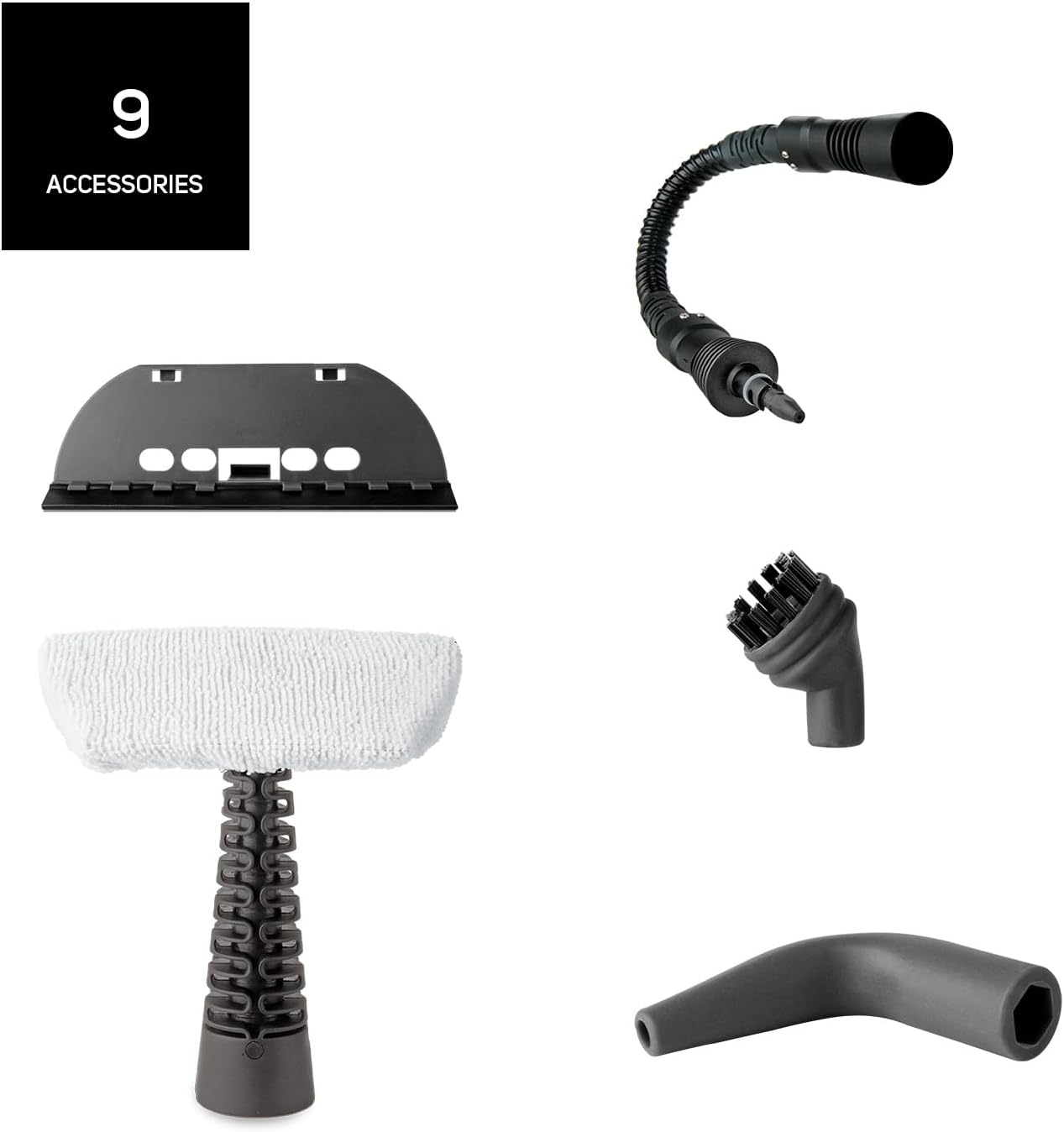
Hình ảnh: Một chi tiết view of the nine distinct accessories provided with the steam cleaner, designed for various cleaning tasks.
3. Thiết lập
- Mở hộp thiết bị: Carefully remove the steam cleaner and all accessories from the packaging.
- Đổ đầy bể nước: Unscrew the safety cap of the water tank. Using the provided measuring cup and funnel, fill the tank with up to 350 ml of clean tap water. Do not overfill. Screw the safety cap back on tightly.
- Gắn phụ kiện mong muốn: Select the appropriate nozzle or brush for your cleaning task and securely attach it to the steam cleaner. For extended reach, connect the extendable hose first, then the desired accessory.
- Kết nối với nguồn điện: Plug the power cord into a suitable grounded electrical outlet. The indicator light will illuminate, signaling that the unit is heating up.
- Thời gian làm nóng: The steam cleaner will be ready for use in approximately 3 minutes. The indicator light will change or turn off when the optimal pressure is reached.
4. Hướng dẫn vận hành
Once the steam cleaner is heated and ready, you can begin cleaning. The unit provides 3 bar pressure and a steam flow of 30 g/min for effective cleaning.
- Initiate Steam: Nhấn và giữ nút phun hơi nước để xả hơi. Để phun hơi nước liên tục, một số mẫu máy có thể có nút khóa trên nút phun.
- Làm sạch bề mặt: Direct the steam nozzle towards the surface you wish to clean. Move the nozzle slowly over the area to allow the steam to penetrate and loosen dirt.
- Sử dụng Phụ kiện:
- Bàn chải tròn: Ideal for scrubbing stubborn dirt on tiles, grout, and oven racks.
- Conical/Angled Nozzle: Perfect for reaching tight corners, crevices, and detailed cleaning.
- Glass Accessory: Use for streak-free cleaning of windows, mirrors, and other glass surfaces.
- Mop Pad/Upholstery Cloth: Attach to the steam head for cleaning larger flat surfaces like floors, countertops, upholstery, and car seats.
- Lau sạch: After steaming, wipe the treated surface with a clean, dry cloth to remove loosened dirt and moisture.
- Nạp lại: If the steam output decreases significantly or stops, the water tank may be empty. Unplug the appliance and allow it to cool down for several minutes before carefully unscrewing the safety cap and refilling.

Image: A collage demonstrating the versatility of the steam cleaner, showing it cleaning oven racks, upholstery, and wall tiles.

Image: The steam cleaner being used on a sofa, illustrating its effectiveness against bacteria and viruses through steam.
5. Bảo trì
Bảo trì thường xuyên đảm bảo tuổi thọ và hiệu suất tối ưu của máy làm sạch bằng hơi nước.
- Vệ sinh bên ngoài: After each use, ensure the appliance is unplugged and cooled. Wipe the exterior with a soft, damp vải. Không sử dụng chất tẩy rửa có tính mài mòn hoặc dung môi.
- Làm trống ngăn chứa nước: After each use, unplug the appliance and allow it to cool completely. Carefully unscrew the safety cap and empty any remaining water from the tank. This helps prevent mineral buildup.
- Phụ kiện vệ sinh: Wash removable accessories (brushes, cloths) with warm, soapy water and rinse thoroughly. Allow them to air dry completely before storing.
- Tẩy cặn: Depending on your water hardness, mineral deposits may build up inside the tank over time. If you notice reduced steam output, descaling may be necessary. Consult the manufacturer's full manual for specific descaling instructions, typically involving a diluted vinegar solution.
- Kho: Bảo quản máy làm sạch bằng hơi nước và các phụ kiện ở nơi khô ráo, thoáng mát, tránh ánh nắng trực tiếp và xa tầm tay trẻ em.
KHAI THÁC. Xử lý sự cố
Nếu bạn gặp sự cố với máy làm sạch bằng hơi nước, hãy tham khảo các sự cố và giải pháp phổ biến sau đây:
| Vấn đề | Nguyên nhân có thể | Giải pháp |
|---|---|---|
| Không có hơi nước hoặc rất ít hơi nước | Thùng nước trống Thiết bị không được làm nóng đủ Mineral buildup (scale) | Refill water tank (after cooling) Wait for 3 minutes until indicator light signals readiness Perform descaling procedure (refer to full manual) |
| Nước rò rỉ từ vòi phun | Accessory not securely attached Đổ quá đầy bình chứa nước Thiết bị chưa được làm nóng hoàn toàn | Ensure accessory is firmly clicked into place Do not exceed the MAX fill line Wait for the appliance to reach full operating temperature |
| Đèn báo không sáng | Thiết bị không được cắm vào Sự cố về ổ cắm điện Trục trặc thiết bị | Kiểm tra kết nối nguồn điện Kiểm tra ổ cắm bằng một thiết bị khác Liên hệ bộ phận hỗ trợ khách hàng |
If the problem persists after attempting these solutions, please contact Taurus customer support.
7. Thông số kỹ thuật
- Tên mẫu: Rapidissimo Clean Pro
- Thương hiệu: KIM NGƯU
- Cái gì?tage: 1050W
- Áp suất hơi: 3 thanh
- Steam Flow: 30 g/phút
- Dung tích bình chứa nước: 350ml
- Thời gian làm nóng: Khoảng 3 phút
- Trọng lượng sản phẩm: 1.6 Kilôgam
- Yếu tố hình thức: Cầm tay
- Chiều dài cáp: 3 meters (extra long)
- Màu sắc: Màu xanh da trời
- Tính năng đặc biệt: Quick heating, improved performance, high steam flow

Image: A close-up of the steam cleaner's nozzle releasing powerful steam, highlighting its 3.5 bar pressure capability.
8. Bảo hành và Hỗ trợ
For detailed warranty information, please refer to the warranty card included with your product or visit the official Taurus webtrang web. Giữ lại bằng chứng mua hàng để yêu cầu bảo hành.
If you require technical assistance, spare parts, or have any questions not covered in this manual, please contact Taurus customer support through their official channels. Contact information can typically be found on the product packaging or the manufacturer's webđịa điểm.