
Giới thiệu
Thank you for choosing the Columbia 300 Lumen Rechargeable Multi-Color Headlamp. This manual provides essential information for the safe and efficient operation, maintenance, and troubleshooting of your headlamp. Vui lòng đọc kỹ trước khi sử dụng và giữ lại để tham khảo sau này.
Cái đầu nàyamp features super bright LEDs, an integrated motion sensor for hands-free operation, and 5 versatile lighting modes, powered by an ultra-lightweight rechargeable lithium polymer battery.
Sản phẩm trênview
Familiarize yourself with the components of your Columbia headlamp.

Hình 1: Đằng trước view of the Columbia 300 Lumen Headlamp, showing the main LED lights and adjustable strap.

Hình 2: Đứng đầu view của cái đầuamp, highlighting the power button and motion sensor activation button.
- Main LED Array: Provides primary illumination.
- Flood LED Array: Offers wider area illumination.
- Red Safety LED: Để bảo vệ thị lực ban đêm hoặc phát tín hiệu.
- Nút nguồn: Controls power and cycles through modes.
- Nút cảm biến chuyển động: Activates/deactivates motion sensor function.
- Băng đô có thể điều chỉnh: Mang lại sự thoải mái và vừa vặn an toàn.
- Cổng sạc: Micro USB port for recharging the battery.
Cài đặt
1. Sạc ban đầu
Trước khi sử dụng lần đầu, hãy sạc đầy đầu đènamp battery. The headlamp comes with a pre-installed rechargeable lithium polymer battery.
- Locate the charging port cover on the side of the headlamp.
- Open the cover to expose the micro USB charging port.
- Kết nối cáp micro USB đi kèm với đèn pha.amp's charging port and the other end to a USB power source (e.g., computer, wall adapter, portable power bank).
- A charging indicator light will illuminate (typically red) during charging and change color (typically green) when fully charged.
- Once fully charged, disconnect the cable and securely close the charging port cover to maintain water resistance.

Hình 3: cái đầuamp with charging port open and micro USB cable connected.
2. Điều chỉnh băng đeo đầu
The elastic headband is adjustable to ensure a comfortable and secure fit on your head or over a helmet.
- Đặt đầuamp trên đầu bạn.
- Use the adjustable buckle on the strap to tighten or loosen the headband until it fits snugly without being too tight.

Hình 4: Adjustable headband for a secure fit.
Hướng dẫn sử dụng
1. Bật/Tắt nguồn và Chọn chế độ
Người đứng đầuamp features 5 versatile lighting modes.
- Bật: Press the Power Button (usually marked with a power symbol). The headlamp will turn on in the last used mode or a default mode.
- Để chuyển đổi chế độ: Trong khi cái đầuamp is on, press the Power Button repeatedly to cycle through the available lighting modes:
- Điểm cao
- Điểm thấp
- Lụt
- Combo Spot + Flood
- Flashing Red Safety
- Để tắt: Press and hold the Power Button for approximately 2 seconds, or cycle through all modes until the light turns off.

Hình 5: cái đầuamp with flood illumination active.
2. Motion Sensor Function
The motion sensor allows you to turn the headlamp on or off with a wave of your hand, ideal for hands-free operation.
- To Activate Motion Sensor: Với cái đầuamp on, press the Motion Sensor Button (usually marked with a hand wave symbol). A small indicator light (often green) will illuminate to confirm the motion sensor is active.
- To Use Motion Sensor: Wave your hand approximately 5-10 cm (2-4 inches) in front of the headlamp's sensor to turn the light on or off.
- To Deactivate Motion Sensor: Press the Motion Sensor Button again. The indicator light will turn off.
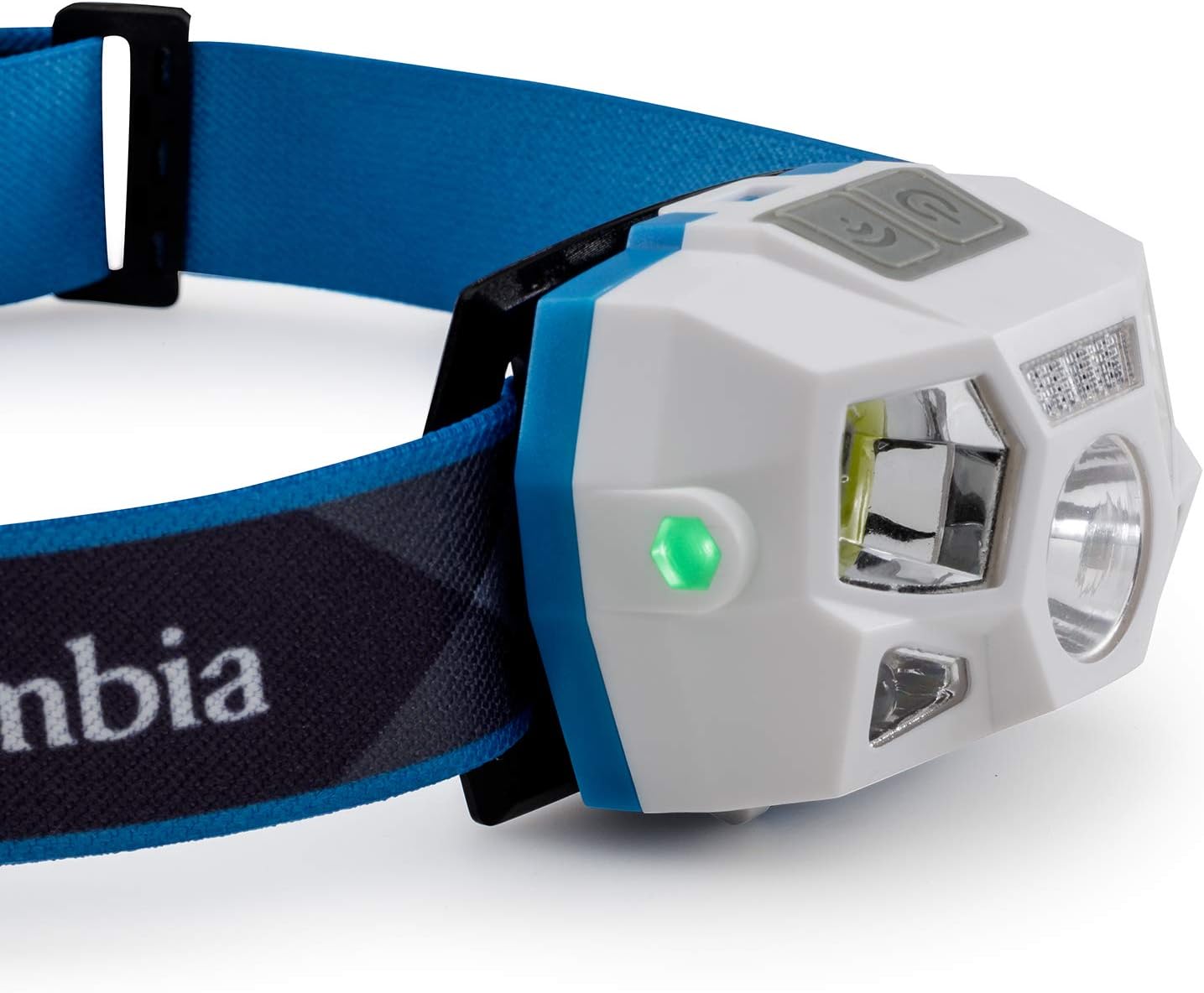
Hình 6: Green indicator light showing motion sensor is active.
BẢO TRÌ
1. Vệ sinh
- Lau đầuamp thân hình mềm mại, damp vải. Không sử dụng chất tẩy rửa có tính mài mòn hoặc dung môi.
- Ensure the charging port cover is securely closed before cleaning to prevent water ingress.
- Bạn có thể giặt băng đô bằng tay với xà phòng nhẹ và nước, sau đó phơi khô.
2. Chăm sóc pin
- Để kéo dài tuổi thọ pin, tránh xả pin hoàn toàn thường xuyên.
- Recharge the battery regularly, even if not in use, at least once every 3-6 months.
- Lưu trữ tiêu đềamp ở nơi khô ráo, thoáng mát, tránh ánh nắng trực tiếp và nhiệt độ cao.
3. Lưu trữ
Khi lưu trữ tiêu đềamp for extended periods, ensure it is fully charged and stored in a protective case or bag to prevent damage.
Xử lý sự cố
| Vấn đề | Nguyên nhân có thể | Giải pháp |
|---|---|---|
| cái đầuamp không bật. | Pin đã hết. | Sạc đầuamp fully using the provided micro USB cable. |
| Độ sáng yếu. | Sạc pin yếu. | Sạc lại pin. |
| Cảm biến chuyển động không phản hồi. | Cảm biến chuyển động không được kích hoạt hoặc có vật cản. | Ensure the motion sensor is activated (green indicator light on). Clear any obstructions in front of the sensor. Try waving your hand closer to the sensor. |
| cái đầuamp không sạc. | Cáp hoặc nguồn điện bị lỗi. | Try a different micro USB cable or a different USB power source. Ensure the cable is securely connected. |
Thông số kỹ thuật
- Số hiệu mẫu: 50019
- Công suất phát sáng: 300 Lumen
- Khoảng cách chùm tia: Lên đến 81 mét
- Loại pin: Rechargeable Lithium Polymer (1 included)
- Sạc: MicroUSB
- Thời gian chạy: Up to 2 hours (on high setting)
- Chế độ chiếu sáng: Spot High, Spot Low, Flood, Spot + Flood Combo, Flashing Red Safety
- Tính năng đặc biệt: Motion Sensor, 1m Impact Resistance, IPX4 Weather Resistance
- Vật liệu: Nhựa
- Cân nặng: 110 gam
- Kích thước: 35 x 15 x 10 cm (xấp xỉ)
Thông tin an toàn
- Không nên nhìn trực tiếp vào đèn LED khi đèn đang bật, vì có thể gây suy giảm thị lực tạm thời.
- Để xa tầm tay trẻ em.
- Không được tự ý tháo rời hoặc sửa đổi đầu máy.ampViệc này sẽ làm mất hiệu lực bảo hành và có thể gây hư hỏng hoặc thương tích.
- Use only the provided or a certified micro USB cable for charging.
- Tránh để lộ phần đầuamp với nhiệt độ khắc nghiệt hoặc ánh sáng mặt trời trực tiếp trong thời gian dài.
- Vứt bỏ pin theo quy định của địa phương. Không được vứt pin vào lửa.
Bảo hành và Hỗ trợ
For warranty information or technical support, please refer to the official Columbia webtrang web hoặc liên hệ với bộ phận chăm sóc khách hàng của họ. Giữ lại hóa đơn mua hàng để làm bằng chứng mua hàng.
Hỗ trợ trực tuyến: Visit Columbia Customer Service