
Giới thiệu
This manual provides instructions for the iMICE AK-600 Backlit USB Wired Gaming Keyboard. It covers setup, operation, maintenance, and troubleshooting to ensure optimal performance and longevity of your device. Please read this manual thoroughly before using the keyboard.
Cài đặt
Có gì trong hộp
The iMICE AK-600 keyboard package includes:
- iMICE AK-600 Backlit USB Wired Gaming Keyboard (with integrated USB cable)
Kết nối bàn phím
To connect your iMICE AK-600 keyboard:
- Xác định vị trí cổng USB khả dụng trên máy tính của bạn.
- Plug the integrated USB cable from the keyboard into the USB port.
- The keyboard is plug-and-play and should be automatically recognized by your operating system without requiring additional drivers for basic functionality.
Hướng dẫn sử dụng
Các chức năng cơ bản của bàn phím
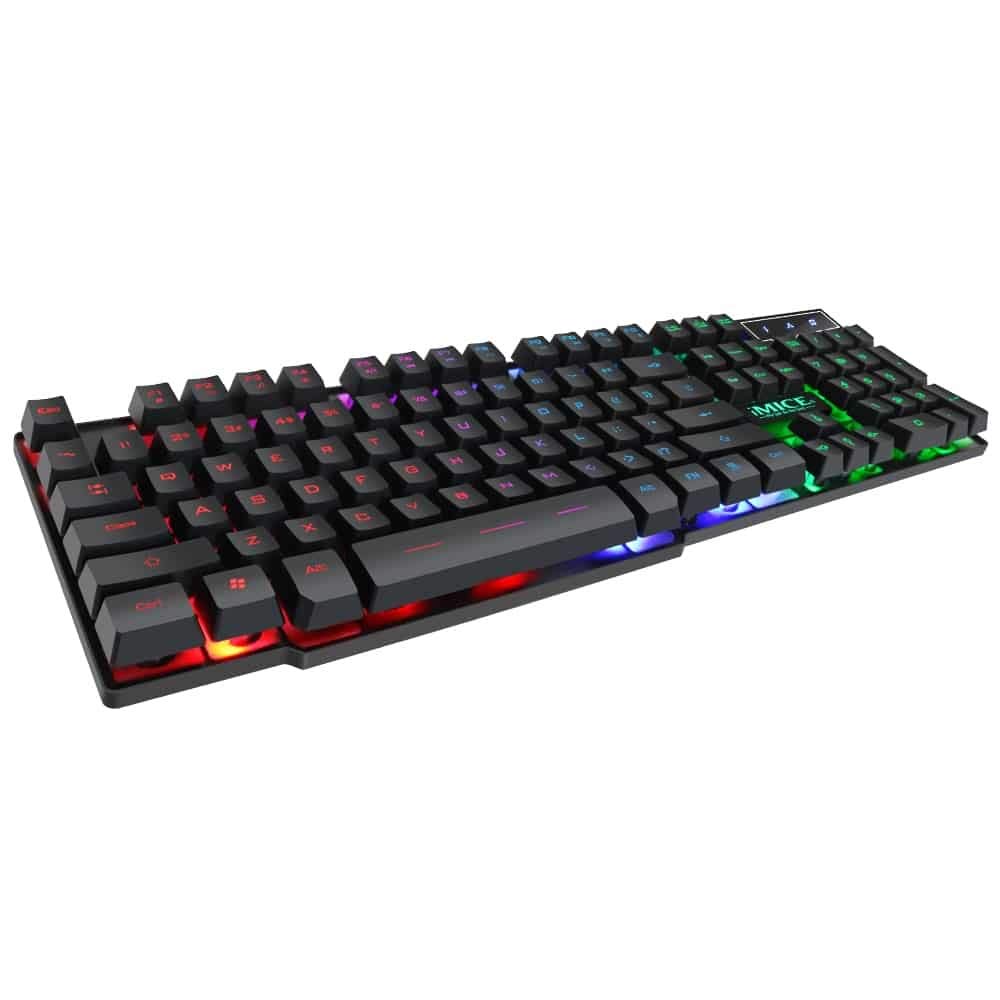
The iMICE AK-600 features a standard 104-button layout, providing all essential keys for typing and gaming.
Điều khiển đèn nền
The keyboard is equipped with a three-color backlight system (red, blue, green). The key characters are illuminated for visibility in low-light conditions.
- To change the backlight color or cycle through modes, use the dedicated backlight control key (often labeled with a light bulb icon or similar).
- Pressing the key repeatedly will switch between red, blue, green, and off modes.
Phím đa phương tiện
The keyboard includes 12 groups of multimedia function keys, typically accessed by pressing the Fn key in combination with the F1-F12 keys. These provide quick access to functions such as volume control, media playback, and more.
Chống bóng mờ
The iMICE AK-600 supports 19-key anti-ghosting. This feature ensures that multiple key presses are registered simultaneously and accurately, preventing input conflicts during fast-paced gaming or typing.
Bảo trì và chăm sóc
Proper maintenance will extend the life of your keyboard:
- Vệ sinh: Regularly wipe the keyboard surface with a soft, dry, lint-free cloth to remove dust and debris. For deeper cleaning, use a slightly damp Dùng khăn lau với xà phòng nhẹ, đảm bảo không có chất lỏng nào lọt vào bàn phím.
- Tràn chất lỏng: The keyboard features an integrated liquid guide hole design to help with minor spills. However, it is not fully waterproof. In case of a spill, immediately disconnect the keyboard from your computer and allow it to dry completely before reconnecting.
- Tránh các hóa chất mạnh: Do not use abrasive cleaners, solvents, or strong detergents, as these can damage the keyboard's finish and key legends.
- Chăm sóc cáp: Ensure the USB cable is not excessively bent, twisted, or placed under heavy objects, which could damage the internal wires.
Xử lý sự cố
Bàn phím không phản hồi
- Hãy đảm bảo cáp USB được kết nối chắc chắn với cả bàn phím và cổng USB đang hoạt động trên máy tính của bạn.
- Hãy thử kết nối bàn phím với một cổng USB khác trên máy tính của bạn.
- Khởi động lại máy tính của bạn.
- Hãy thử cắm bàn phím vào một máy tính khác để xác định xem vấn đề nằm ở bàn phím hay cổng USB/trình điều khiển của máy tính đó.
Đèn nền không hoạt động
- Hãy kiểm tra xem bàn phím đã được kết nối đúng cách và nhận được nguồn điện chưa.
- Press the backlight control key (often labeled with a light bulb icon) to cycle through backlight modes and ensure it is not turned off.
Specific Keys Not Registering
- Gently clean around the affected keys to remove any dust or debris that might be obstructing the key mechanism.
- Nếu sự cố vẫn tiếp diễn, hãy liên hệ với bộ phận hỗ trợ khách hàng để được trợ giúp thêm.
Thông số kỹ thuật
| Tính năng | Chi tiết |
|---|---|
| Thương hiệu | OEM (iMICE) |
| Người mẫu | AK-600 |
| Công nghệ kết nối | USB (Có dây) |
| Mô tả bàn phím | Trò chơi |
| Tính năng đặc biệt | Backlit (Red, Blue, Green) |
| Vật liệu | Nhựa |
| Các thành phần bao gồm | Cáp USB tích hợp |
| Loại công tắc | xúc giác |
| Hướng tay | thuận cả hai tay |
| Number of Buttons/Keys | 104 |
| Hệ điều hành tương thích | Windows (XP/2000/Vista/7/8/10), Android, Linux |
| Chiều dài cáp | 1.3 mét |
| Tuổi thọ chính | Up to 5 million presses |
Bảo hành và Hỗ trợ
For information regarding product warranty, returns, or technical support, please refer to the retailer's policy where the product was purchased. It is recommended to retain your purchase receipt as proof of purchase for any warranty claims. For direct manufacturer support, please visit the official OEM or iMICE webđịa điểm.