
1. Giới thiệu
Thank you for choosing the ipega PG-9083S Wireless Gamepad. This device is designed to enhance your mobile gaming experience on both iOS and Android smartphones and tablets. Please read this manual carefully before use to ensure proper operation and to maximize your enjoyment of the product.
2. Tính năng sản phẩm và tổng quanview
The ipega PG-9083S offers a range of features for an immersive gaming experience:
- Kết nối không dây 4.0: Provides a stable and efficient connection to your mobile devices.
- Telescopic Holder: Adjustable holder accommodates devices from 5 to 10 inches, with a maximum extension of 28cm (11 inches).
- Khả năng tương thích rộng: Supports iOS (iPhone 8/XR/XS and newer) and Android mobile phones and tablets.
- Thiết kế công thái học: Engineered for comfortable grip during extended gaming sessions.
- Ánh xạ nút có thể tùy chỉnh: Allows for personalized control settings to suit various game types and player preferences.
- High-Precision Joysticks: Designed for accurate control and smooth operation in games.

Figure 2.1: The ipega PG-9083S Wireless Gamepad, showcasing its design with a tablet inserted. This image highlights the sleek feel and how it holds a device.

Figure 2.2: The gamepad's telescopic function, illustrating its ability to hold various devices including smartphones and tablets, with a maximum length of 28cm (11 inches).

Figure 2.3: Illustration of the gamepad's ergonomic design for comfort and its support for both vertical and horizontal screen orientations for tablets.

Figure 2.4: Depiction of the customizable button mapping feature, allowing users to set function keys according to personal habits for various game control needs.
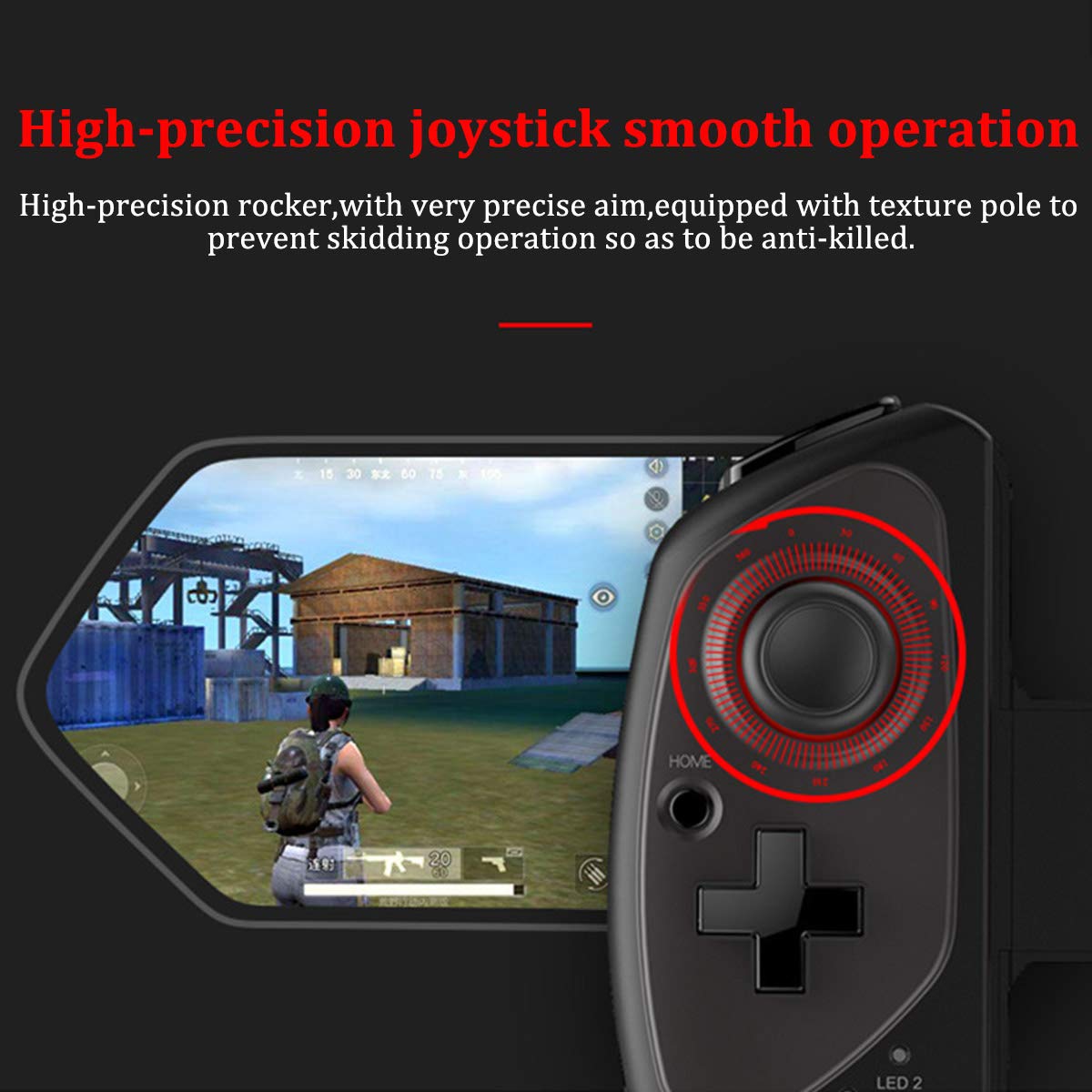
Figure 2.5: Close-up of the high-precision joystick, emphasizing its smooth operation and textured pole designed to prevent slipping during intense gameplay.
3. Hướng dẫn cài đặt
3.1 Sạc tay cầm chơi game
Before initial use, fully charge the gamepad. Connect the provided USB charging cable to the gamepad's charging port and to a USB power source (e.g., computer, USB wall adapter). The LED indicator will show charging status and turn off or change color when fully charged.
3.2 Inserting Your Device
- Pull the telescopic arm outwards to unlock and extend it.
- Carefully place your smartphone or tablet into the holder, ensuring it is centered and securely seated.
- Release the telescopic arm to allow it to retract and firmly grip your device. Ensure the device is locked in place before gaming.

Hình 3.1: Chi tiết view of the security lock mechanism for the telescopic arm, illustrating how to extend and secure your device.
3.3 Ghép nối Bluetooth
To connect the gamepad to your device:
- Bật nguồn: Press and hold the Power button (usually the HOME button) for a few seconds until the LED indicator starts flashing, indicating it's in pairing mode.
- Kích hoạt Bluetooth: On your smartphone or tablet, go to your Bluetooth settings and turn on Bluetooth.
- Tìm kiếm Thiết bị: Your device will scan for available Bluetooth devices. Look for "PG-9083S" or a similar name in the list.
- Đôi: Select the gamepad from the list to initiate pairing. Once connected, the LED indicator on the gamepad will typically become solid.
- Lựa chọn chế độ (nếu có): Some games or operating systems may require specific modes. Refer to your game's settings or the gamepad's quick start guide for specific mode switching instructions (e.g., Android Standard, iOS Direct Play).
4. Hướng dẫn vận hành
4.1 Bật/Tắt nguồn
- Bật nguồn: Nhấn và giữ TRANG CHỦ button for approximately 3 seconds. The indicator light will flash.
- Tắt nguồn: Nhấn và giữ TRANG CHỦ button for approximately 5 seconds until the indicator light turns off. The gamepad will automatically power off after a period of inactivity to save battery.
4.2 Gamepad Modes
The PG-9083S supports different operating modes for optimal compatibility with various platforms. Typically, these modes are activated by holding a specific button combination while powering on the gamepad.
- Chế độ tiêu chuẩn của Android: Often activated by holding X + NHÀ. For general Android gaming.
- iOS Direct Play Mode: Often activated by holding Y + NHÀ. For iOS games that support direct gamepad input.
- Các chế độ khác: Consult the quick start guide included with your product for any additional specific modes or button combinations for advanced functionality or specific game titles.
4.3 Điều khiển trong trò chơi
Once connected, the gamepad will function as your primary input device for compatible games. The layout includes:
- Hai cần điều khiển analog: Để di chuyển chính xác và điều khiển máy ảnh.
- D-Pad: For directional input, often used in retro games or menu navigation.
- Các nút hành động (A, B, X, Y): Dành cho các hành động trong trò chơi.
- Các nút vai (L1, R1) và cò súng (L2, R2): For additional actions, often firing or accelerating.
- SELECT/BACK, START/MENU, HOME Buttons: For system functions and game menus.
Refer to individual game settings for specific button assignments and customization options.
5. Bảo trì
- Vệ sinh: Use a soft, dry cloth to wipe the surface of the gamepad. Do not use harsh chemicals or abrasive cleaners.
- Kho: Bảo quản tay cầm chơi game ở nơi khô ráo, thoáng mát, tránh ánh nắng trực tiếp và nhiệt độ cao.
- Chăm sóc pin: Để kéo dài tuổi thọ pin, hãy tránh xả hết pin thường xuyên. Sạc tay cầm chơi game thường xuyên, ngay cả khi không sử dụng trong thời gian dài.
- Tránh rơi: Hãy bảo vệ thiết bị khỏi rơi vỡ và va đập, vì điều này có thể làm hỏng các linh kiện bên trong.
KHAI THÁC. Xử lý sự cố
6.1 Tay cầm chơi game không kết nối/ghép nối
- Hãy đảm bảo tay cầm chơi game đã được sạc đầy.
- Đảm bảo Bluetooth đã được bật trên thiết bị của bạn.
- Hãy thử quên thiết bị trong cài đặt Bluetooth của điện thoại và ghép nối lại.
- Ensure the gamepad is in the correct pairing mode for your operating system (Android/iOS).
- Khởi động lại cả thiết bị di động và tay cầm chơi game.
6.2 Buttons or Joysticks Unresponsive/Inaccurate
- Verify the gamepad is properly connected and in the correct operating mode for the game.
- Some games may require specific controller configurations or do not fully support external gamepads. Check the game's settings.
- Hãy đảm bảo không có vật cản nào ngăn cản việc nhấn nút hoặc di chuyển cần điều khiển.
- If experiencing issues with joystick sensitivity or "dead zones," check if the game offers in-game calibration or sensitivity adjustments.
6.3 Tay cầm chơi game không sạc được
- Kiểm tra cáp sạc và nguồn điện USB. Hãy thử cáp hoặc bộ chuyển đổi khác.
- Ensure the charging port on the gamepad is clean and free of debris.
6.4 Device Not Fitting Securely
- Ensure your device's dimensions are within the specified telescopic holder range (5-10 inches, up to 28cm/11 inches).
- Remove any bulky cases from your device that might prevent a secure fit.
7. Thông số kỹ thuật
| Số hiệu mẫu: | PG-9083S |
| Kết nối: | Không dây 4.0 |
| Telescopic Holder Range: | 5 - 10 inches (up to 28 cm / 11 inches) |
| Khả năng tương thích: | iOS (iPhone 8/XR/XS and newer), Android (Mobile Phones, Tablets) |
| Trọng lượng sản phẩm: | 13.1 ounce (khoảng 371 gram) |
| Kích thước gói hàng: | 9.53 x 6.81 x 2.44 inch |
8. Thông tin an toàn
- Do not expose the gamepad to extreme temperatures, humidity, or direct sunlight.
- Do not attempt to disassemble or modify the gamepad. This will void any potential warranty and may cause damage.
- Để thiết bị tránh xa nước và các chất lỏng khác.
- Dispose of the battery according to local regulations. Do not dispose of batteries in household waste.
- Để xa tầm tay trẻ em.