
Giới thiệu
Cảm ơn bạn đã muaasing the eKids Harry Potter Bluetooth Speaker. This portable wireless speaker is designed to provide clear audio from your Bluetooth-enabled devices. This manual provides essential information for setting up, operating, and maintaining your speaker.

Hình ảnh: Mặt trước view of the eKids Harry Potter Bluetooth Speaker, featuring the Harry Potter character design.
Thông tin an toàn
Please read and follow all safety instructions before using this product to prevent injury or damage.
- Do not expose the unit to extreme temperatures, direct sunlight, or moisture.
- Do not immerse the unit in water. This product is not waterproof.
- Chỉ sử dụng cáp sạc được cung cấp.
- Không cố tháo rời hoặc sửa đổi thiết bị.
- Để xa tầm tay trẻ em.
- Vứt bỏ pin đúng cách theo quy định của địa phương.
Nội dung gói
Xác minh rằng tất cả các mục đều có trong gói hàng:
- Harry Potter Bluetooth Speaker
- Cáp sạc Micro USB
- Dây đeo cổ tay
Sản phẩm trênview
Familiarize yourself with the components of your speaker:

Image: Diagram showing the speaker's dimensions (2.2 inches / 56mm height, 1.8 inches / 46mm width) and labeled parts including the speaker grille, slot to attach wrist strap, port for charging (Micro USB), and Power/Pairing Button.
- Lưới tản nhiệt của loa: Located at the top for audio output.
- Nút Nguồn/Ghép nối: Controls power and initiates Bluetooth pairing.
- Cổng sạc: Micro USB port for connecting the charging cable.
- Wrist Strap Slot: For attaching the included wrist strap.
Sạc loa
The speaker is powered by a built-in rechargeable Lithium-Ion battery. Before first use, fully charge the speaker.
- Connect the small end of the Micro USB charging cable to the Charging Port on the speaker.
- Connect the large end of the Micro USB charging cable to a powered USB port (e.g., computer, USB wall adapter).
- The charging indicator light (if present, refer to product for exact location) will illuminate during charging and turn off when fully charged.
- Thời gian sạc có thể khác nhau. Hãy ngắt kết nối cáp sau khi quá trình sạc hoàn tất.
Ghép nối Bluetooth
Follow these steps to connect your speaker to a Bluetooth-enabled device:
- Đảm bảo loa được sạc đầy.
- Nhấn và giữ Nút Nguồn / Ghép nối on the speaker until you hear an audible prompt or see an indicator light flashing, indicating it is in pairing mode.
- On your Bluetooth-enabled device (smartphone, tablet, computer, etc.), go to the Bluetooth settings menu.
- Kích hoạt Bluetooth và tìm kiếm các thiết bị có sẵn.
- Select "Harry Potter Speaker" (or similar name) from the list of devices.
- Once paired, you will hear a confirmation tone, and the indicator light will stop flashing.
- The speaker can wirelessly stream audio up to 30 feet from your device.
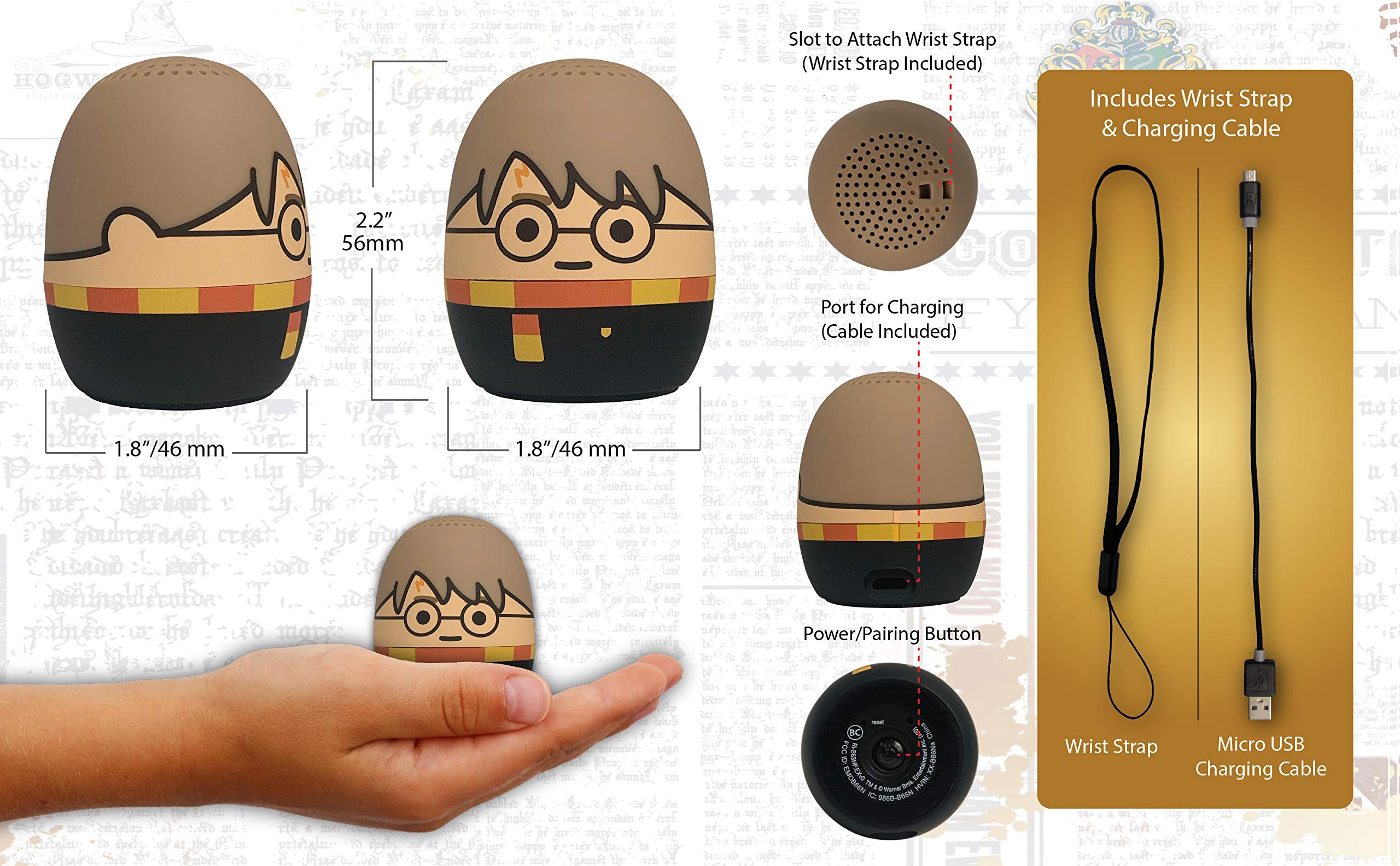
Image: The Harry Potter Bluetooth Speaker shown with icons representing compatible devices: mobile phone, tablet, notebook, PC, smart watch, and game device.
Hoạt động
After successful pairing, you can begin playing audio:
- Phát âm thanh: Start playing music or other audio content on your paired device. The sound will be transmitted to the speaker.
- Kiểm soát âm lượng: Adjust the volume directly from your paired device.
- Bật/Tắt nguồn: Nhấn và giữ Nút Nguồn / Ghép nối to turn the speaker on or off.
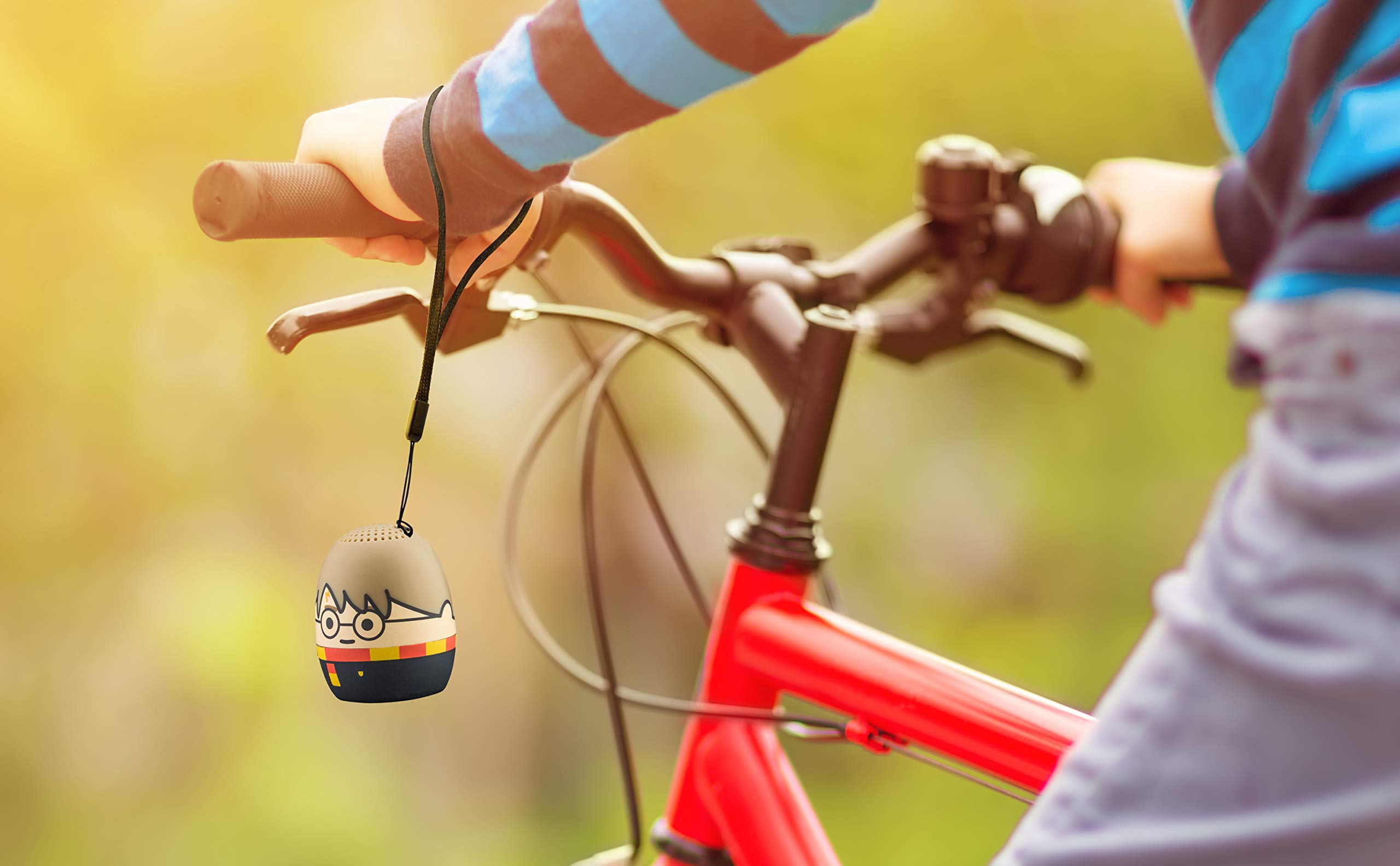
Image: The Harry Potter Bluetooth Speaker, with its wrist strap, attached to the handlebar of a bicycle, demonstrating its portability for outdoor use.
BẢO TRÌ
To ensure the longevity of your speaker, follow these maintenance guidelines:
- Vệ sinh: Wipe the speaker with a soft, dry cloth. Do not use liquid cleaners or abrasive materials.
- Kho: Bảo quản loa ở nơi khô ráo, thoáng mát, tránh ánh nắng trực tiếp và nhiệt độ cao khi không sử dụng trong thời gian dài.
- Chăm sóc pin: For optimal battery life, avoid fully discharging the battery frequently. Charge it regularly, even if not used often.
Xử lý sự cố
If you encounter issues with your speaker, refer to the following table:
| Vấn đề | Giải pháp |
|---|---|
| Loa không bật. | Hãy đảm bảo pin đã được sạc đầy. Kết nối loa với nguồn điện bằng cáp Micro USB. |
| Không thể ghép nối với thiết bị Bluetooth. |
|
| Không có âm thanh hoặc âm lượng thấp. |
|
| Chất lượng âm thanh kém. |
|
Thông số kỹ thuật
| Tính năng | Chi tiết |
|---|---|
| Thương hiệu | eKids |
| Tên mẫu | Harry Potter |
| Công nghệ kết nối | Bluetooth, USB |
| Công suất đầu ra tối đa của loa | 10 Watt |
| Chế độ đầu ra âm thanh | Âm thanh nổi |
| Loại loa | Cầm tay |
| Phương pháp kiểm soát | Cái nút |
| Kích thước loa | 40 milimét |
| Nguồn điện | Chạy bằng pin (bao gồm 1 pin Lithium Ion) |
| Thiết bị tương thích | Personal Computer, Smartphone, Tablet, Television |
| Không thấm nước | SAI |
| Mã số UPC | 092298948775 |
| ASIN | B087NFC293 |
Bảo hành và Hỗ trợ
This product comes with a Limited Warranty. For specific warranty details, please refer to the documentation included with your purchase or contact eKids customer support.
For technical support or further assistance, please visit the eKids official webtrang web hoặc liên hệ với bộ phận chăm sóc khách hàng của họ. Giữ lại hóa đơn mua hàng để yêu cầu bảo hành.