
1. Sản phẩm hếtview
The Alecto WS-1560 is a wireless weather station designed to provide accurate indoor and outdoor environmental data. Featuring a clear color display and a remote outdoor sensor, it offers comprehensive weather information and additional useful functions for your home.
Các tính năng chính:
- Measures indoor and outdoor temperature and humidity.
- Long-range wireless outdoor sensor (up to 100 meters).
- 5.7-inch well-lit color display with animated weather forecast icons.
- Temperature and ice alarm functions.
- Đồng hồ báo thức với chức năng báo lại.
- Memory function for latest and highest readings.
- Moon phase indicator, date, day, and time display.
- Battery-operated main unit and outdoor sensor with backup batteries.

Figure 1.1: Alecto WS-1560 Main Unit and Wireless Outdoor Sensor.
2. Nội dung gói hàng
Hãy đảm bảo tất cả các bộ phận đều đầy đủ và trong tình trạng tốt khi mở hộp:
- Bộ điều khiển chính Alecto WS-1560 (Màn hình trong nhà)
- Cảm biến ngoài trời không dây
- Hướng dẫn sử dụng
- (Power adapter and batteries may be included depending on package)
Video 2.1: Illustrative video showing typical weather station components and basic setup. (Note: This video is for a related product and may not show the exact Alecto WS-1560 model.)
3. Thiết lập và Cài đặt
3.1. Lắp đặt pin
Both the main unit and the outdoor sensor require batteries for operation. Ensure you use the correct type and polarity.
- Cảm biến ngoài trời:
- Mở ngăn chứa pin ở phía sau cảm biến ngoài trời không dây.
- Lắp 2 pin AA (không kèm theo) theo đúng cực tính (+/-).
- Đóng chặt ngăn chứa pin.
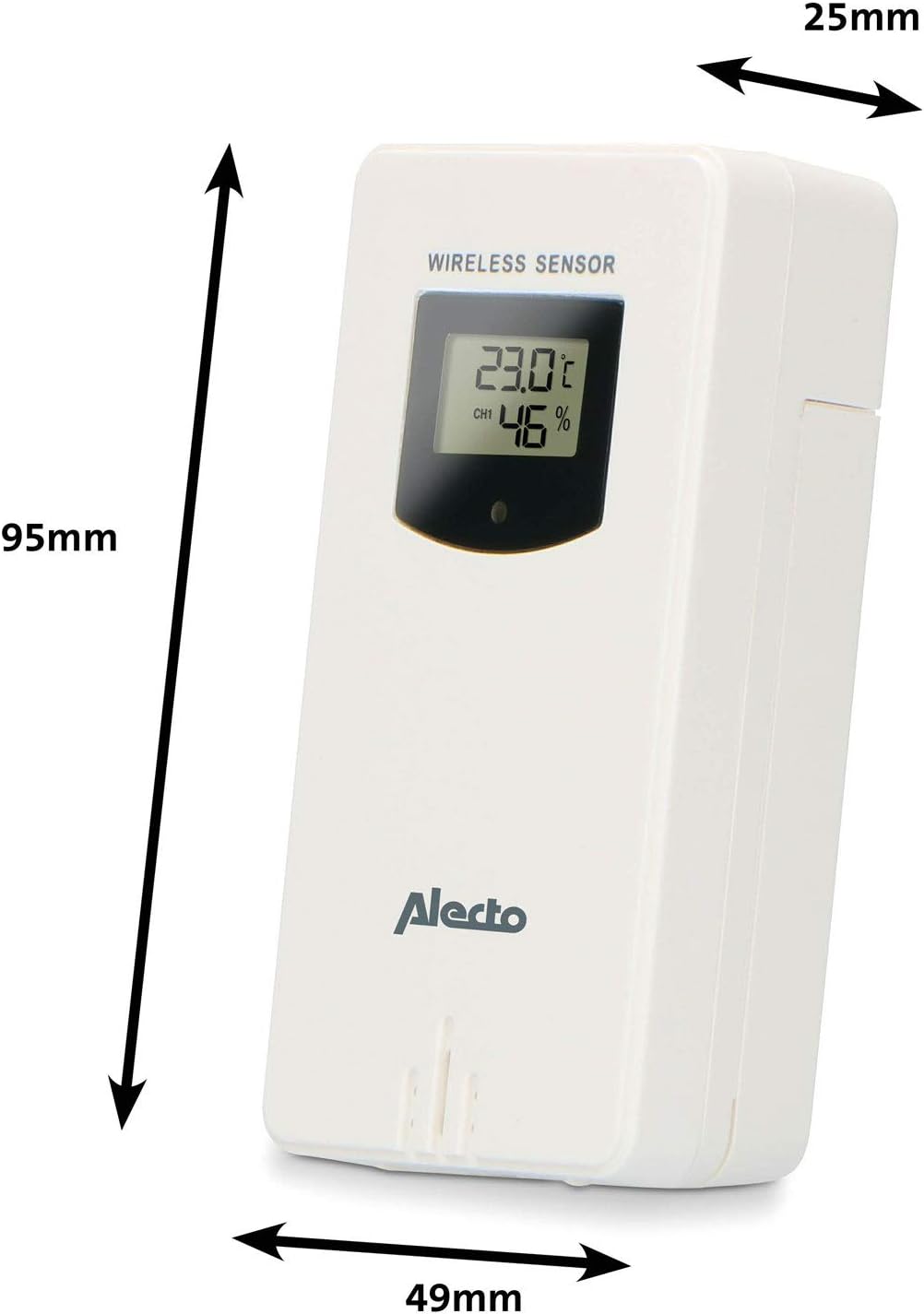
Figure 3.1: Wireless Outdoor Sensor dimensions and battery compartment location.
- Đơn vị chính:
- Mở ngăn chứa pin ở phía sau thân máy chính.
- Insert 2x AA batteries (not included) according to the polarity markings (+/-). These serve as backup batteries.
- Đóng chặt ngăn chứa pin.
- Connect the main unit to a power outlet using the provided power adapter (if included).

Figure 3.2: Main Unit dimensions and power input.
3.2. Vị trí cảm biến
For accurate outdoor readings, proper placement of the wireless sensor is crucial:
- Place the sensor in a shaded area, away from direct sunlight, to prevent inaccurate temperature readings.
- Ensure good air circulation around the sensor.
- Mount the sensor vertically, approximately 1.5 to 2.5 meters (5 to 8 feet) above the ground.
- Avoid placing the sensor near heat sources (e.g., vents, windows) or moisture sources.
- The maximum transmission range is 100 meters (328 feet) in open air. Walls and other obstacles will reduce this range.

Hình 3.3: Ví dụample of outdoor sensor placement on a wall.
3.3. Ghép nối cảm biến với thiết bị chính
The main unit and sensor should automatically pair once both are powered on. If pairing does not occur:
- Hãy đảm bảo cả hai thiết bị đều có pin mới và nằm trong phạm vi hoạt động.
- Press the "TX" button inside the outdoor sensor's battery compartment to manually send a signal.
- On the main unit, you may need to initiate a search for the outdoor sensor (refer to the "Operation" section for specific button functions).
4. Hoạt động
4.1. Bố cục hiển thị
The 5.7-inch color display provides a clear overview of all measured data. Key areas include:
- Nhiệt độ và độ ẩm ngoài trời: Displays current outdoor conditions.
- Nhiệt độ và độ ẩm trong nhà: Displays current indoor conditions.
- Animated Weather Forecast: Icons predict upcoming weather (sunny, partly cloudy, cloudy, rainy, snowy).
- Thời gian & Ngày: Current time, day, and date.
- Áp suất khí quyển: Áp suất khí quyển hiện tại.
- Chu kỳ mặt trăng: Hình ảnh minh họa pha hiện tại của mặt trăng.
- Temperature/Ice Alarm Indicators: Alerts for specific temperature thresholds or potential ice conditions.

Hình 4.1: Chi tiết view of the main unit's color display.
4.2. Chức năng nút
The main unit features several buttons for setting and adjusting functions. Common buttons include:
- BỘ: Enters setup mode for time, date, and other settings.
- HƯỚNG: Switches between display modes or confirms settings.
- LÊN/XUỐNG (hoặc +/-): Adjusts values during setup or cycles through channels.
- BÁO THỨC: Cài đặt hoặc kích hoạt chức năng báo động.
- MEM: Displays maximum/minimum temperature and humidity records. Long press to clear records.
- TUYỆT ĐỐI / ÁNH SÁNG: Activates snooze during an alarm or adjusts backlight brightness.
Video 4.2: Illustrative video demonstrating various features and settings of a weather station. (Note: This video is for a related product and may not show the exact Alecto WS-1560 model.)
4.3. Thiết lập thời gian và ngày tháng
- Press and hold the "SET" button until the time display starts flashing.
- Use the "UP" or "DOWN" buttons to adjust the hour, then press "SET" to confirm and move to minutes.
- Lặp lại cho số phút, năm, tháng và ngày.
- Press "SET" again to exit the setting mode.
4.4. Cài đặt báo thức
- Press the "ALARM" button once to view thời gian báo thức.
- Press and hold the "ALARM" button until the alarm time starts flashing.
- Use the "UP" or "DOWN" buttons to set the desired alarm hour and minute.
- Press "ALARM" to confirm.
- To activate/deactivate the alarm, press the "ALARM" button briefly when the alarm time is displayed. An alarm icon will appear/disappear.
4.5. Bản ghi tối đa/tối thiểu
The weather station automatically records the maximum and minimum temperature and humidity values over a 24-hour period.
- Press the "MEM" button briefly to view giá trị ghi lại tối đa.
- Press "MEM" again to view giá trị ghi lại tối thiểu.
- Nhấn phím "MEM" lần thứ ba để quay lại các chỉ số hiện tại.
- To clear the records, press and hold the "MEM" button for a few seconds.
5. Bảo trì
- Vệ sinh: Lau sạch màn hình và bề mặt thiết bị bằng khăn mềm.amp vải. Không sử dụng chất tẩy rửa có tính mài mòn hoặc dung môi.
- Thay thế pin: Replace batteries in both the main unit and the outdoor sensor when the low battery indicator appears on the display. Always replace all batteries at the same time with new ones of the same type.
- Chăm sóc cảm biến: Periodically check the outdoor sensor for debris or obstructions that might affect its readings. Ensure it remains in a shaded, well-ventilated area.
KHAI THÁC. Xử lý sự cố
| Vấn đề | Nguyên nhân có thể | Giải pháp |
|---|---|---|
| No outdoor temperature/humidity reading (or "---" displayed) |
|
|
| Kết quả đo nhiệt độ/độ ẩm không chính xác. |
|
|
| Màn hình mờ hoặc trống |
|
|
7. Thông số kỹ thuật
| Số hiệu mẫu | WS-1560 |
| Thương hiệu | Alecto |
| Nguồn điện (Đơn vị chính) | Power Adapter (if included) + 2x AA batteries (backup) |
| Nguồn điện (Cảm biến ngoài trời) | 2 pin AA |
| Kích thước sản phẩm (Đơn vị chính) | 5.1 x 16.5 x 12.3cm |
| Trọng lượng sản phẩm | 440 gam |
| Phạm vi cảm biến không dây | Cao tối đa 100 mét (ngoài trời) |
| Kích thước hiển thị | 5.7 inch / 14.5 cm |
| Nguồn gốc | Trung Quốc |
8. Bảo hành và Hỗ trợ
For warranty information, technical support, or service inquiries, please refer to the warranty card included with your product or visit the official Alecto webtrang web. Giữ lại biên lai mua hàng làm bằng chứng mua hàng.
Alecto Webđịa điểm: www.alecto.nl (General Alecto website, specific support page may vary)


