
1. Giới thiệu
The Aerocool LUXPRO550 is a 550W power supply unit designed for desktop computers, offering reliable and efficient power delivery. This unit is 80 Plus 230V EU Bronze certified, ensuring over 88% efficiency. It features high-quality 105°C Japanese capacitors and a 14cm FDB fan for enhanced durability and optimized thermal performance. This manual provides essential information for the safe and correct installation, operation, and maintenance of your LUXPRO550 power supply.

Image 1.1: The Aerocool LUXPRO550 Power Supply Unit, highlighting its high efficiency and 80 Plus Bronze certification.
2. Biện pháp phòng ngừa an toàn
- Luôn rút dây nguồn khỏi ổ cắm điện trước khi lắp đặt hoặc tháo nguồn điện.
- Không được mở nắp bộ nguồn.asing. Thể tích caotages are present inside, which can cause electric shock.
- Đảm bảo nối đất thích hợp để ngăn ngừa các mối nguy hiểm về điện.
- Lắp đặt bộ nguồn ở khu vực thông thoáng, tránh xa nguồn nhiệt và hơi ẩm.
- Chỉ sử dụng các dây cáp được cung cấp kèm theo bộ nguồn.
- Sản phẩm này chỉ được thiết kế để sử dụng trong hệ thống máy tính. Không được sử dụng cho bất kỳ mục đích nào khác.
3. Hướng dẫn cài đặt
The LUXPRO550 power supply supports all Intel ATX12V formats and features flat, black cables for optimized internal airflow and ease of installation.
3.1. Chuẩn bị cài đặt
- Tắt máy tính và rút dây nguồn khỏi ổ cắm điện.
- Mở vỏ máy tính của bạn. Tham khảo hướng dẫn sử dụng vỏ máy tính để biết hướng dẫn cụ thể.
- Nếu thay thế bộ nguồn hiện có, hãy ngắt tất cả các dây cáp khỏi bộ nguồn cũ và tháo nó ra khỏi thùng máy.
3.2. Lắp đặt nguồn điện
- Carefully place the LUXPRO550 into the power supply bay of your computer case.
- Cố định bộ nguồn vào vỏ máy bằng các ốc vít được cung cấp.
- Connect the 20+4 pin ATX motherboard power connector to your motherboard.
- Connect the 4+4 pin CPU power connector to your motherboard.
- Kết nối các đầu nối nguồn SATA với ổ cứng (HDD, SSD) và ổ đĩa quang của bạn.
- Connect PCIe 6+2 pin connectors to your graphics card(s) if required.
- Connect any other peripheral connectors (e.g., Molex) as needed for case fans or other components.
- Ensure all connections are secure. Use cable ties to manage cables for better airflow.
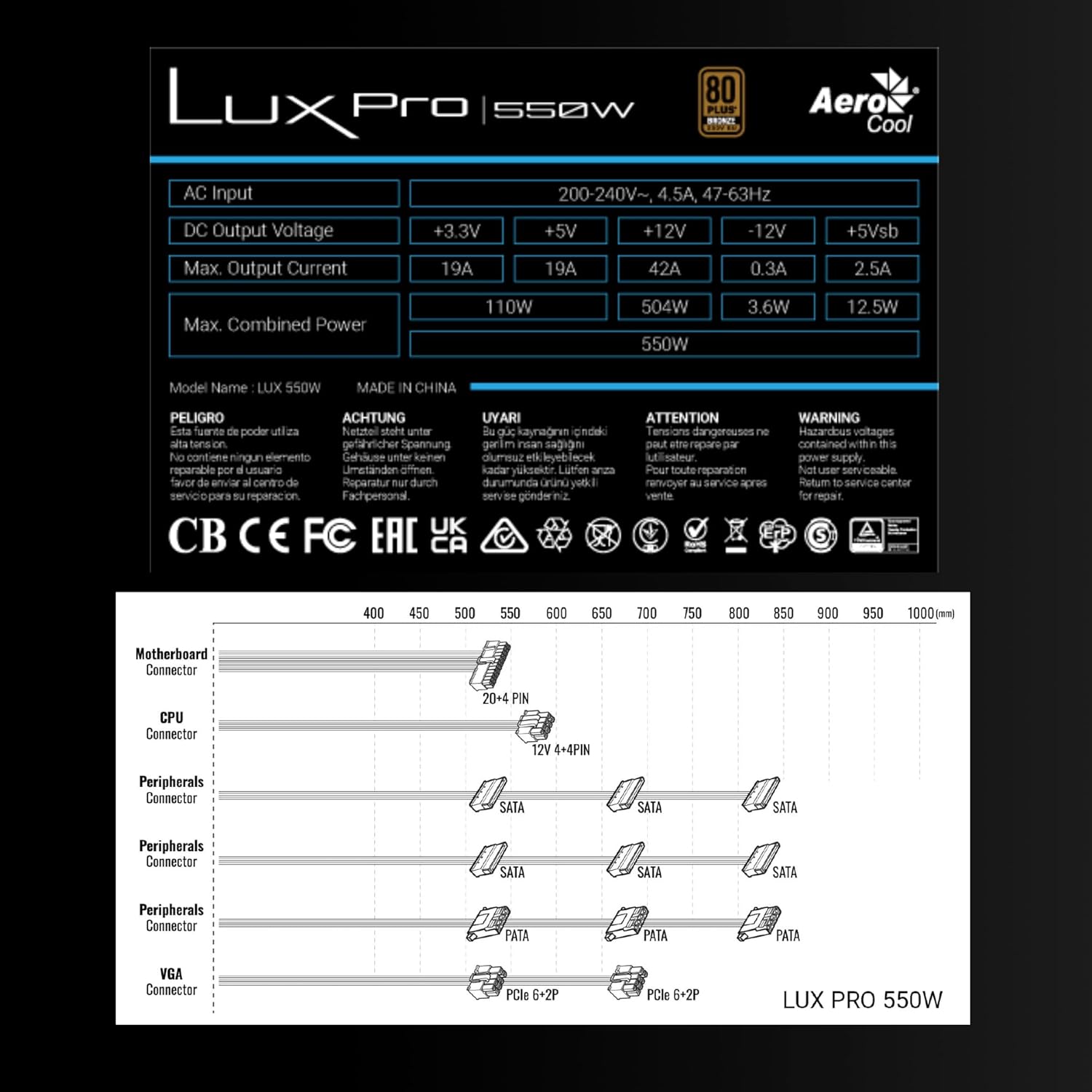
Image 3.1: Connector types and lengths for the LUXPRO550 power supply. This diagram illustrates the available connectors including Motherboard (20+4 PIN), CPU (12V 4+4 PIN), Peripherals (SATA, PATA), and VGA (PCIe 6+2 PIN).
3.3. Các bước cuối cùng
- Đóng vỏ máy tính của bạn.
- Kết nối dây nguồn AC với nguồn điện và sau đó với ổ cắm trên tường.
- Gạt công tắc nguồn ở phía sau bộ nguồn sang vị trí 'ON'.
- Bật máy tính của bạn.
4. Hướng dẫn vận hành
The Aerocool LUXPRO550 is designed for continuous and stable operation once correctly installed. Its 80 Plus Bronze certification ensures high energy efficiency, reducing power consumption and heat generation.
4.1. Active PFC Technology
The integrated Active Power Factor Correction (APFC) technology ensures efficient and reliable power distribution, contributing to overall system stability and energy savings.
4.2. Hoạt động của quạt
The 14cm FDB (Fluid Dynamic Bearing) fan features optimized thermal speed control. It operates silently, starting at less than 700 RPM, and only increases speed as the load approaches 40% at ambient temperatures of 25°C, ensuring quiet operation under typical loads.

Image 4.1: The 14cm FDB fan of the LUXPRO550, illustrating its optimized thermal speed control for efficient cooling.
5. Bảo trì
The LUXPRO550 is built with high-quality components, including 105°C Japanese capacitors, designed for maximum reliability and a long operational lifespan with minimal maintenance.

Image 5.1: High-quality 105°C Japanese capacitors, contributing to the power supply's reliability and extended lifespan.
5.1. Chăm sóc chung
- Keep the power supply and computer case free from dust. Dust accumulation can hinder cooling and reduce efficiency.
- Use compressed air to gently clean the fan and ventilation grilles periodically. Ensure the computer is powered off and unplugged before cleaning.
- Do not obstruct the airflow around the power supply.
Bên trong thiết bị không có bộ phận nào người dùng có thể tự sửa chữa. Không tự ý mở hoặc sửa chữa thiết bị.
KHAI THÁC. Xử lý sự cố
If you encounter issues with your LUXPRO550 power supply, please follow these basic troubleshooting steps:
- Không có điện:
- Hãy đảm bảo dây nguồn AC được kết nối chắc chắn với cả bộ nguồn và ổ cắm điện trên tường.
- Hãy kiểm tra xem công tắc nguồn ở phía sau bộ nguồn có đang ở vị trí 'BẬT' hay không.
- Hãy kiểm tra xem ổ cắm điện có hoạt động bình thường không bằng cách cắm thử một thiết bị khác vào.
- Hệ thống không khởi động:
- Double-check all power connections to the motherboard, CPU, graphics card, and storage devices.
- Ensure all components are properly seated in their slots.
- If possible, test the power supply with another known working system or test another power supply with your system to isolate the issue.
- Tiếng động bất thường:
- A slight hum is normal. If you hear grinding or loud fan noises, ensure the fan is not obstructed by cables or dust.
- Nếu tiếng ồn vẫn tiếp diễn, vui lòng liên hệ bộ phận hỗ trợ khách hàng.
If these steps do not resolve the issue, please contact Aerocool customer support or your retailer for further assistance. Do not attempt to repair the unit yourself.
7. Thông số kỹ thuật
| Tính năng | Đặc điểm kỹ thuật |
|---|---|
| Tên mẫu | LUXPRO550 |
| Thương hiệu | Không khí mát mẻ |
| Cái gì?tage | 550 Watt |
| Chứng nhận hiệu quả | 80 Plus Bronze 230V EU (over 88% efficiency) |
| Yếu tố hình thức | ATX |
| Tụ điện | Japanese 105°C |
| Loại quạt | 14cm FDB (Fluid Dynamic Bearing) with thermal speed control |
| PFC | PFC hoạt động |
| Kích thước (DxRxC) | 16 x 15 x 8.5cm |
| Cân nặng | 1.4kg |
| Thiết bị tương thích | PC |
7.1. Đầu ra DC Voltagbảng điện tử
The following table details the DC output voltages and maximum currents for the LUXPRO550:
| Đầu ra DC Voltage | +3.3V | +5V | +12V | -12V | +5Vsb |
|---|---|---|---|---|---|
| Tối đa Sản lượng hiện tại | 19A | 19A | 42A | 0.3A | 2.5A |
| Tối đa Sức mạnh tổng hợp | 110W | 504W | 3.6W | 12.5W | |
| Total Combined Power | 550W | ||||
8. Bảo hành và Hỗ trợ
8.1. Thông tin bảo hành
The Aerocool LUXPRO550 power supply comes with an extended Bảo hành 5 năm, reflecting its high reliability and the quality of its components, such as the 105°C Japanese capacitors.
Vui lòng giữ lại bằng chứng mua hàng của bạn để yêu cầu bảo hành.
8.2. Hỗ trợ khách hàng
For technical assistance, warranty claims, or any questions regarding your Aerocool LUXPRO550 power supply, please contact Aerocool customer support through their official webtrang web hoặc nhà bán lẻ địa phương của bạn.
Do not attempt to open or repair the power supply unit, as this will void the warranty.