
1. Giới thiệu
The SmallRig Universal Bottom Mount Plate with 15mm Rod Support System DBC2272B is designed for mirrorless and DSLR cameras, providing a versatile platform for mounting accessories. This baseplate is height-adjustable to ensure compatibility with various camera setups, adhering to the LWS standard.
It features an Arca-compatible quick release (QR) plate and receiver for efficient camera attachment and detachment. The system supports 15mm rods, allowing for the integration of accessories such as lens supports, shoulder pads, matte boxes, and follow focus systems. Multiple 1/4"-20 and 3/8"-16 threaded holes on the bottom enable attachment to tripod plates.
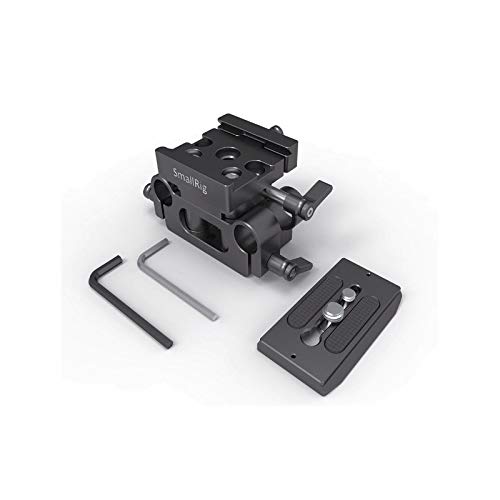
Figure 1: SmallRig Universal Bottom Mount Plate DBC2272B, showing the main baseplate, the detachable quick release plate, and the two included hex spanners.
2. Hướng dẫn thiết lập
Follow these steps to set up your SmallRig Universal Bottom Mount Plate:
- Attach the Quick Release Plate: Secure the Arca-compatible quick release (QR) plate to your camera's tripod socket or SmallRig cage using the appropriate screw. Ensure it is tightened firmly.
- Mount Camera to Baseplate: Drop the QR plate (with the camera/cage attached) into the receiver on top of the baseplate. Tighten the knob screw on the side of the receiver to secure the QR plate in place.
- Điều chỉnh chiều cao: To adjust the height of the baseplate to align with the LWS standard for your specific camera, unscrew the wingnut on the side of the baseplate. Adjust the height as needed, then tighten the wingnut to lock it.
- Attach 15mm Rods: Insert SmallRig 15mm Rods (e.g., SmallRig 1053) into the rod clamps on the baseplate. Tighten the locking screws on the rod clamps to secure the rods.
- Thêm phụ kiện: Once 15mm rods are in place, you can attach various accessories such as lens supports (e.g., SmallRig 2152), shoulder pads (e.g., SmallRig 2077), matte boxes, or follow focus systems to the rods.
- Mount to Tripod (Optional): If desired, attach a tripod plate to the bottom of the baseplate using the available 1/4"-20 and 3/8"-16 threaded holes.
3. Hướng dẫn vận hành
Once the baseplate is set up, operating it involves making minor adjustments and utilizing its quick-release functionality.
- Chức năng tháo lắp nhanh: To quickly detach your camera or cage from the baseplate, loosen the knob screw on the QR receiver until the QR plate can be lifted out. To re-attach, simply drop the QR plate back into the receiver and tighten the knob screw.
- Điều chỉnh chiều cao: If you change cameras or accessories that require a different height alignment, repeat step 3 from the Setup Instructions to adjust the baseplate's vertical position.
- Rod Accessory Adjustment: Loosen the locking screws on your 15mm rod accessories to slide them along the rods for optimal positioning, then re-tighten.
4. Bảo trì
Proper maintenance ensures the longevity and reliable performance of your SmallRig baseplate.
- Vệ sinh: Use a soft, dry cloth to wipe down the baseplate after use. For stubborn dirt, a slightly damp Có thể dùng vải, sau đó lau khô ngay. Tránh sử dụng hóa chất mạnh hoặc vật liệu mài mòn.
- Kho: Store the baseplate in a clean, dry environment, away from extreme temperatures and humidity.
- Điều tra: Periodically inspect all screws, knobs, and moving parts for tightness and wear. Use the provided hex spanners to tighten any loose screws.
- Bôi trơn: No lubrication is typically required for this product. If any moving parts feel stiff, contact support.
KHAI THÁC. Xử lý sự cố
If you encounter issues with your SmallRig Universal Bottom Mount Plate, consider the following:
- Camera không an toàn:
- Ensure the QR plate is properly attached to your camera/cage and the screw is tight.
- Verify the knob screw on the baseplate's QR receiver is fully tightened after dropping the QR plate in.
- Rods Not Holding Firmly:
- Check that the 15mm rods are fully inserted into the clamps.
- Confirm the locking screws on the rod clamps được thắt chặt.
- Các vấn đề về điều chỉnh chiều cao:
- Ensure the wingnut for height adjustment is sufficiently loosened before attempting to adjust.
- Tighten the wingnut firmly after adjustment to prevent slippage.
- Tình trạng bất ổn chung:
- Double-check all connection points, including camera, cage, QR plate, baseplate, and tripod connections, for tightness.
- Ensure all components are correctly aligned and seated.
6. Thông số kỹ thuật
| Tính năng | Chi tiết |
|---|---|
| Số hiệu mẫu | DBC2272 |
| Thương hiệu | giàn khoan nhỏ |
| Màu sắc | Đen |
| Thiết bị tương thích | Camera (Mirrorless and DSLR) |
| Kích thước sản phẩm (D x R x C) | 15D x 5W x 10H Centimet |
| Trọng lượng sản phẩm | 199 gam |
| Hỗ trợ thanh | 15mm LWS standard |
| Hệ thống phát hành nhanh | Arca-compatible |
| Mounting Points (Bottom) | Lỗ ren 1/4"-20 và 3/8"-16 |
| Nội dung hộp | 1 x Baseplate 2272, 2 x Hex Spanner |
| Nước xuất xứ | Trung Quốc |
7. Thông tin bảo hành
This SmallRig product comes with a bảo hành 1 năm from the date of purchase. Please retain your proof of purchase for warranty claims. For detailed warranty terms and conditions, please refer to the official SmallRig webtrang web hoặc liên hệ với bộ phận hỗ trợ khách hàng.
8. Hỗ trợ và Liên hệ
For technical assistance, product inquiries, or warranty support, please contact the manufacturer or authorized distributors.
- Nhà sản xuất: SHENZHEN LEQI CO LTD, 4th Floor Building 12, Asian Industrial Park Bantian Shenzhen, China.
- Nhà nhập khẩu (Ấn Độ): Shetala Agencies Pvt Ltd, 27, 5th Street, Bharathi Ave, Kaveri Nagar, Kottivakkam, Chennai, Tamil Nadu 600041.
- Packer (India): Shetala Agencies Pvt Ltd, 27, 5th Street, Bharathi Ave, Kaveri Nagar, Kottivakkam, Chennai, Tamil Nadu 600041.
- SmallRig Official Webđịa điểm: www.smallrig.com