Giới thiệu
This manual provides detailed instructions for the setup, operation, and maintenance of your Tomshine Floor Lamp. Designed for versatile lighting, this LED floor lamp features stepless dimming, four color temperature settings, and convenient control via both a touch sensor and a remote control. Its flexible gooseneck allows for precise light positioning, making it ideal for living rooms, bedrooms, offices, and reading areas.
Hướng dẫn an toàn
- Đảm bảo nguồn điện voltage khớp với lampCác yêu cầu của máy trước khi cắm điện.
- Không tháo rời hoặc sửa đổi lamp. Tham khảo mọi dịch vụ bảo dưỡng cho nhân viên có trình độ.
- Giữ lamp tránh xa nước hoặc damp environments. This product is designed for indoor use only.
- Avoid direct eye exposure to the LED light source for prolonged periods.
- Đặt lamp on a stable, flat surface to prevent tipping. The sturdy iron base is designed for stability, but caution is advised around children and pets.
- Rút phích cắmamp Rút phích cắm khỏi ổ điện trước khi vệ sinh hoặc thực hiện bất kỳ công việc bảo trì nào.
Nội dung gói
Xác minh rằng tất cả các thành phần đều có sẵn trước khi lắp ráp:
- LED sàn Lamp (Gooseneck head, multiple pole sections, base)
- Điều khiển từ xa
- Bộ đổi nguồn AC

Hình 1: Lamp Linh kiện và phụ kiện
Thiết lập và lắp ráp
Hãy làm theo các bước sau để lắp ráp sàn nhà của bạn.amp:
- Connect the power cable from the lamp base to the AC adapter.
- Carefully thread the power cable through the pole sections.
- Screw the pole sections together clockwise, ensuring a secure connection. Start from the base and work your way up to the gooseneck section.
- Once all sections are securely connected, plug the AC adapter into a standard wall outlet.
Video 1: Product Features and Assembly Guide. This video demonstrates the lamp's various lighting modes and provides a step-by-step guide for assembling the lamp components, including connecting the power cable and screwing the pole sections together.
Hướng dẫn sử dụng
Điều khiển cảm biến chạm
Cái lamp features a touch control panel located on the stand below the gooseneck:
- Nhấn nhanh: Tap the power icon to turn the lamp ON/OFF. Short press the sun icon to cycle through the 4 color temperatures (3000K, 4000K, 5000K, 6000K).
- Nhấn lâu: Slide your finger across the touch surface or long press the sun icon to adjust the brightness steplessly (20%-100%).
Điều khiển từ xa
The included remote control offers comprehensive control over the lamp's functions. The remote can be conveniently adsorbed onto the lamp post via its magnetic feature.
- Nút nguồn: Quay lamp BẬT/TẮT.
- Điều chỉnh nhiệt độ màu: Các nút để tăngasing hoặc decreasing color temperature.
- Điều chỉnh độ sáng: Các nút để tăngasing hoặc decreasinđộ sáng g.
- Chế độ đặt trước: Dedicated buttons for various lighting scenes:
- Chế độ giải trí
- Chế độ đọc
- Chế độ văn phòng
- Chế độ cho con bú
- Chế độ giải trí
- Chế độ ngủ
- Độ sáng 100%: Instantly set the lamp đạt độ sáng tối đa.
- Sleeping Timer: Đặt hẹn giờ 1 tiếng để thiết bị tự động tắt.

Figure 2: Remote Control and Touch Panel
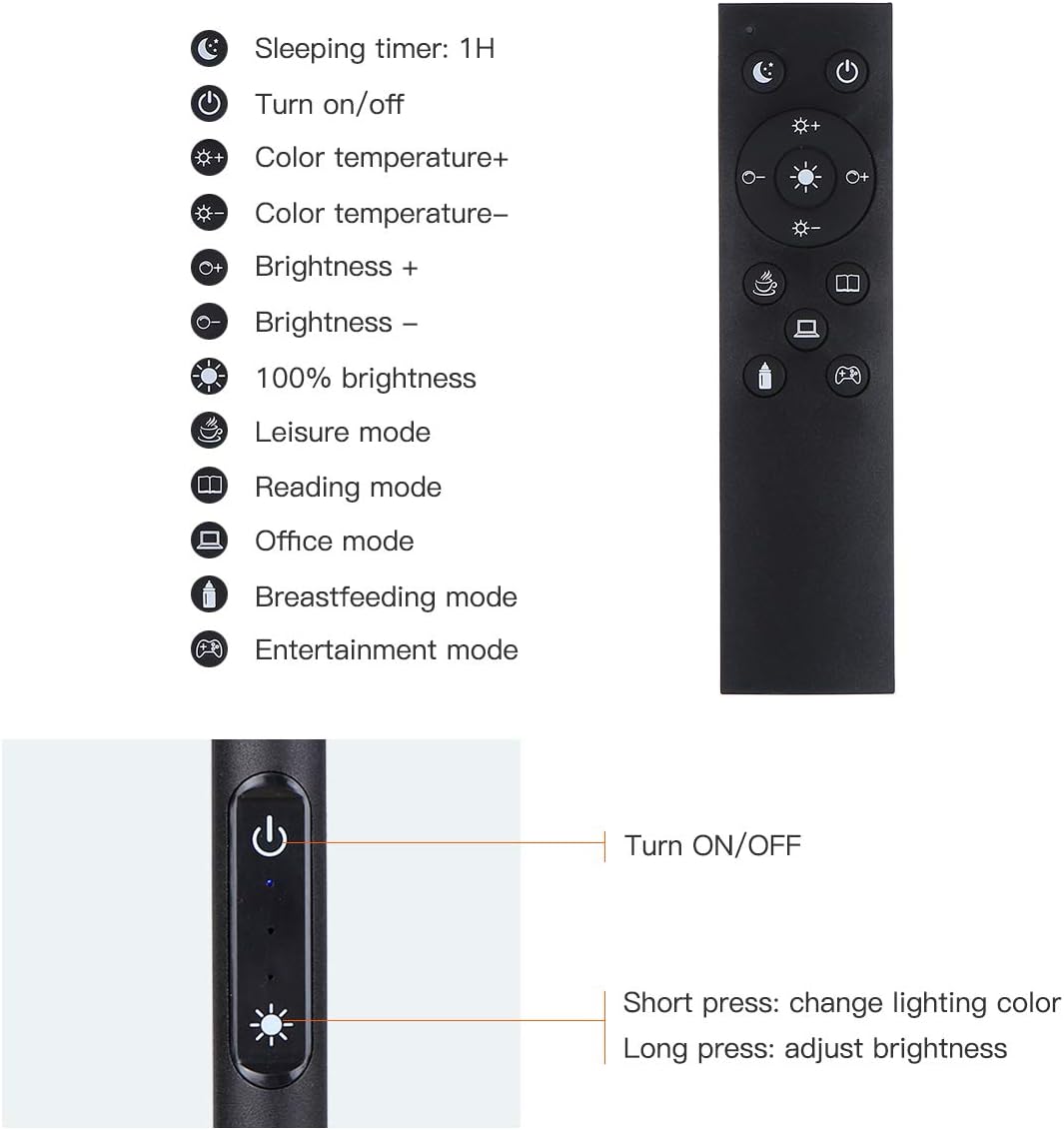
Figure 3: Remote and Touch Control Functions

Figure 4: Color Temperature and Brightness Options
Cổ ngỗng có thể điều chỉnh
Cái lamp features a flexible gooseneck and a 360° swivel head, allowing you to direct light precisely where needed. The gooseneck maintains its position once adjusted, preventing drift or drooping.

Figure 5: Flexible Gooseneck and Dimensions
BẢO TRÌ
- Vệ sinh: Ngắt nguồn điện trước khi vệ sinh. Sử dụng vải mềm, khô để lau lamp. Không sử dụng chất tẩy rửa hoặc dung môi có tính ăn mòn.
- LED Nguồn sáng: Cái lamp is equipped with integrated LED bulbs that are designed for long life and are not user-replaceable.
- Kho: Nếu lưu trữ lamp Nếu sử dụng trong thời gian dài, hãy tháo rời các bộ phận và bảo quản trong bao bì gốc ở nơi khô ráo, thoáng mát.
Xử lý sự cố
| Vấn đề | Nguyên nhân có thể | Giải pháp |
|---|---|---|
| Lamp không bật. | Không có nguồn điện; kết nối lỏng lẻo; bộ chuyển đổi bị lỗi. | Check if the power plug is securely inserted into the outlet and the lamp. Ensure the adapter is functioning. Try a different outlet. |
| Điều khiển từ xa không hoạt động. | Remote battery low or dead; remote out of range; obstruction. | Thay pin điều khiển từ xa. Đảm bảo không có vật cản giữa điều khiển từ xa và lamp. Move closer to the lamp. |
| Brightness/Color temperature not adjusting. | Incorrect button pressed; lamp ở chế độ cố định. | Refer to the operating instructions for correct button functions. If in a preset mode, try switching to manual adjustment. |
| Lamp nhấp nháy hoặc mờ đi một cách bất ngờ. | Nguồn điện không ổn định; kết nối lỏng lẻo. | Ensure the power connection is stable. Try plugging into a different outlet. If the issue persists, contact customer support. |
Thông số kỹ thuật
| Tính năng | Chi tiết |
|---|---|
| Thương hiệu | Tomshine |
| Số hiệu mẫu | 93d6461d-17a8-45d0-bfc9-82643fae0e7c |
| Lamp Kiểu | Tầng Lamp |
| Loại nguồn sáng | DẪN ĐẾN |
| Độ sáng | 1500 Lumen |
| Cái gì?tage | 10 watt |
| Nhiệt độ màu | 3000K, 4000K, 5000K, 6000K (4 modes) |
| Làm mờ | Vô cấp (20%-100%) |
| Phương pháp kiểm soát | Cảm ứng, Điều khiển từ xa |
| Kích thước sản phẩm | 63.78"D x 7.87"W x 63.6"H |
| Trọng lượng sản phẩm | 2.76 Bảng Anh |
| Vật liệu cơ bản | Sắt |
| Vật liệu che nắng | Kim loại |
| Nguồn điện | Trình cắm thêm |
| Sử dụng trong nhà/ngoài trời | Trong nhà |
Bảo hành và Hỗ trợ
Tomshine products are manufactured to the highest quality standards. For any questions, technical support, or warranty claims, please contact Tomshine customer service through the retailer's platform or visit the official Tomshine store online. Please retain your proof of purchase for warranty purposes.
Để biết thêm thông tin, hãy truy cập Tomshine Store.