
1. Giới thiệu
This manual provides instructions for the FocalTop N2QAYB000953 replacement remote control. This remote is designed to function as a direct replacement for the original Panasonic Blu-ray Player remote control models N2QAYB000953, compatible with DMP-BDT360, DMP-BDT361, DMP-BDT460, and DMP-BDT460PS Blu-ray players.
No programming is required for this remote control. Simply insert batteries, and it is ready for use.
2. Thiết lập
2.1 Lắp đặt pin
- Xác định vị trí ngăn chứa pin ở mặt sau của điều khiển từ xa.
- Trượt nắp ngăn chứa pin xuống dưới để mở.
- Insert two (2) AAA alkaline batteries (not included), ensuring the positive (+) and negative (-) terminals align correctly with the markings inside the compartment.
- Trượt nắp ngăn chứa pin trở lại vị trí cũ cho đến khi nghe thấy tiếng kêu tách.

Hình 2.1: Ngăn chứa pin sau khi tháo nắp, cho thấy vị trí đặt pin.
Ghi chú: Hãy đảm bảo lắp pin đúng cực. Lắp đặt sai có thể khiến điều khiển từ xa không hoạt động.
3. Sử dụng Điều khiển từ xa
The FocalTop N2QAYB000953 remote control is designed for intuitive operation of your compatible Panasonic Blu-ray Player. Point the remote directly at the Blu-ray player's infrared sensor for optimal performance.
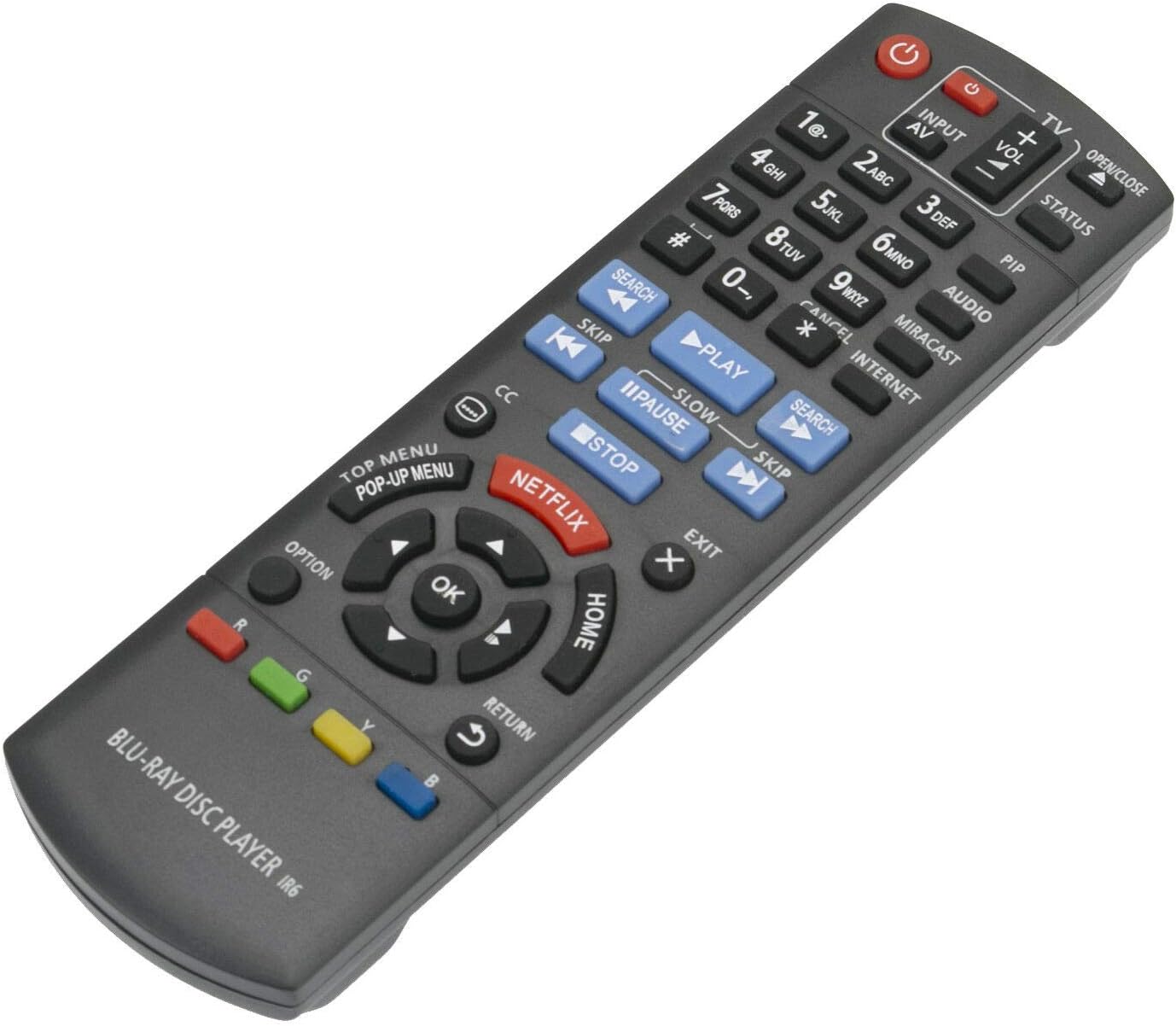
Hình 3.1: Mặt trước view Hình ảnh điều khiển từ xa với bố cục các nút.
3.1 Các chức năng chính
- Quyền lực (⏻): Bật hoặc tắt đầu phát Blu-ray.
- Input/AV: Selects the input source on your television.
- Âm lượng (+/-): Adjusts the volume of the connected audio system (if supported by the Blu-ray player's HDMI-CEC or similar function).
- Các nút số (0-9): Used for direct track selection or entering numerical data.
- Chơi (▶), Tạm ngừng (⏸), Dừng lại (■): Các điều khiển phát lại đa phương tiện tiêu chuẩn.
- Nhảy (⏭), Search (⏮): Navigate between tracks or fast-forward/rewind.
- Directional Pad (Up, Down, Left, Right) & OK: Điều hướng menu và xác nhận lựa chọn.
- TRANG CHỦ: Trở lại menu chính của đầu phát Blu-ray.
- TOP MENU/POP-UP MENU: Accesses the disc's top menu or pop-up menu.
- NETFLIX: Direct access button for the Netflix application.
- TRỞ LẠI: Trở lại màn hình hoặc menu trước đó.
- LỰA CHỌN: Displays options relevant to the current screen or playback.
- Các nút màu (Đỏ, Xanh lục, Vàng, Xanh lam): Được sử dụng cho các chức năng cụ thể trong menu hoặc ứng dụng, như được hiển thị trên màn hình.
4. Bảo trì
- Vệ sinh: Lau điều khiển từ xa bằng vải mềm, khô. Không sử dụng chất tẩy rửa dạng lỏng hoặc vật liệu mài mòn.
- Thay thế pin: Hãy thay pin khi điều khiển từ xa phản hồi chậm hoặc ngừng hoạt động. Luôn thay cả hai pin cùng lúc bằng pin mới cùng loại (pin kiềm AAA).
- Kho: Nếu không sử dụng điều khiển từ xa trong thời gian dài, hãy tháo pin ra để tránh rò rỉ và hư hỏng.
- Môi trường: Tránh để điều khiển từ xa tiếp xúc với nhiệt độ quá cao, ánh nắng trực tiếp hoặc độ ẩm cao.
KHAI THÁC. Xử lý sự cố
| Vấn đề | Nguyên nhân có thể | Giải pháp |
|---|---|---|
| Điều khiển từ xa không hoạt động. |
|
|
| Một số nút không phản hồi. |
|
|
| Làm việc từ xa không liên tục. |
|
|
6. Thông số kỹ thuật
- Người mẫu: N2QAYB000953
- Thương hiệu: FocalTop
- Khả năng tương thích: Panasonic Blu-ray Player models DMP-BDT360, DMP-BDT361, DMP-BDT460, DMP-BDT460PS
- Công nghệ kết nối: Hồng ngoại (IR)
- Loại điều khiển: Nút điều khiển
- Nguồn điện: 2 x Pin kiềm AAA (không bao gồm)
- Tính năng đặc biệt: Thiết kế công thái học
7. Bảo hành và Hỗ trợ
This product is a replacement remote control. For specific warranty information or technical support, please refer to the documentation provided by the original seller or contact FocalTop directly. No explicit warranty information is provided within this manual.