
1. Giới thiệu và kết thúcview
The Escort EDM 1111A is a versatile digital multimeter designed for accurate measurement of various electrical parameters. This device is essential for electricians, technicians, and hobbyists for testing circuits, components, and power sources. It features a clear digital display and a rotary dial for selecting different measurement functions.

The Escort EDM 1111A Digital Multimeter with red and black test leads connected, ready for use.
Các chức năng chính bao gồm:
- Tập DCtage (DCV) measurement
- điện áp xoay chiềutage (ACV) measurement
- DC Current (DCA) measurement
- AC Current (ACA) measurement
- Đo điện trở (Ω)
- Capacitance (CX) measurement
- Diode and Transistor (hFE) testing
2. Thiết lập
2.1 Lắp đặt pin
The Escort EDM 1111A requires a DC 9V 006P battery for operation. To install or replace the battery:
- Đảm bảo đồng hồ vạn năng đã được TẮT.
- Xác định vị trí ngăn chứa pin ở mặt sau của thiết bị.
- Carefully slide open or unscrew the battery cover.
- Insert a new 9V 006P battery, observing the correct polarity (+/-).
- Đậy nắp pin lại một cách an toàn.

Phía sau view of the Escort EDM 1111A Digital Multimeter, showing the battery compartment cover and the product label.
2.2 Kết nối dây dẫn thử nghiệm
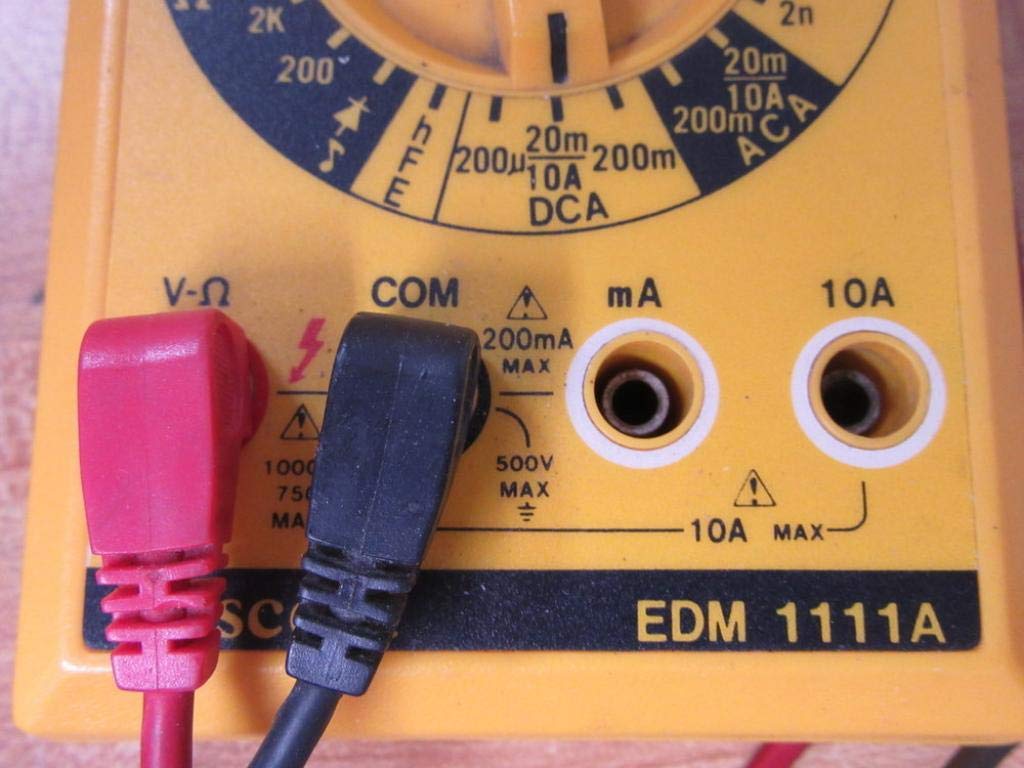
The multimeter comes with two test leads, typically one red (positive) and one black (negative/common). Proper connection is crucial for accurate and safe measurements.
- Đối với hầu hết các trường hợp,tage, resistance, and low current measurements, connect the black lead to the 'COM' (Common) jack.
- Connect the red lead to the 'V-Ω-mA' jack for voltage, điện trở và miliampđo dòng điện ở đây.
- Đối với phép đo dòng điện cao (lên đến 10A), hãy kết nối dây màu đỏ với giắc cắm '10A'. Always ensure the correct jack is used to prevent damage to the meter or circuit.

A closer look at the input jacks (V-Ω, COM, mA, 10A) and the lower portion of the rotary dial, indicating current measurement ranges.

The red and black test probes (leads) used with the Escort EDM 1111A Digital Multimeter, featuring pointed tips for electrical contact.
3. Hướng dẫn vận hành
Before taking any measurements, ensure the test leads are correctly connected and the rotary dial is set to the appropriate function and range.

Chi tiết view of the rotary selector dial on the Escort EDM 1111A Digital Multimeter, displaying various measurement functions such as DCV, ACV, Ω, DCA, ACA, and CX.
3.1 Đo DC Voltage (DCV)
- Set the rotary dial to the desired DCV range (e.g., 200m, 2, 20, 200, 1000). Choose a range higher than the expected voltage.
- Connect the red lead to the positive (+) side of the circuit and the black lead to the negative (-) side.
- Đọc tậptaggiá trị e trên màn hình.
3.2 Đo AC Voltagđiện tử (ACV)
- Set the rotary dial to the desired ACV range (e.g., 200m, 2, 20, 200, 750). Choose a range higher than the expected voltage.
- Kết nối các dây dẫn thử nghiệm qua dải điện áp ACtagnguồn điện. Cực tính không quan trọng đối với điện áp AC.tage.
- Đọc tậptaggiá trị e trên màn hình.
3.3 Đo điện trở (Ω)
- Đảm bảo mạch điện hoặc linh kiện đã được ngắt điện trước khi đo điện trở.
- Set the rotary dial to the desired Ω range (e.g., 200, 2K, 20K, 200K, 2M, 20M, 200M).
- Kết nối các dây dẫn thử nghiệm qua linh kiện cần đo.
- Đọc giá trị điện trở trên màn hình.
3.4 Measuring DC Current (DCA)
- Hãy đảm bảo mạch điện đã được ngắt.
- Set the rotary dial to the desired DCA range (e.g., 200µ, 2m, 20m, 200m, 10A).
- Quan trọng: For currents up to 200mA, use the 'V-Ω-mA' jack for the red lead. For currents up to 10A, use the '10A' jack.
- Break the circuit and connect the multimeter in series with the load. The current must flow through the multimeter.
- Cấp lại năng lượng cho mạch và đọc giá trị dòng điện.
3.5 Measuring AC Current (ACA)
- Hãy đảm bảo mạch điện đã được ngắt.
- Set the rotary dial to the desired ACA range (e.g., 200µ, 2m, 20m, 200m, 10A).
- Quan trọng: For currents up to 200mA, use the 'V-Ω-mA' jack for the red lead. For currents up to 10A, use the '10A' jack.
- Ngắt mạch điện và kết nối vạn năng kế nối tiếp với tải.
- Cấp lại năng lượng cho mạch và đọc giá trị dòng điện.
3.6 Measuring Capacitance (CX)
- Hãy đảm bảo tụ điện đã được xả hết điện trước khi tiến hành thử nghiệm.
- Set the rotary dial to the CX range (e.g., 2n, 20n, 200n, 2µ, 20µ).
- Kết nối các dây thử nghiệm qua các đầu tụ điện.
- Đọc giá trị điện dung trên màn hình.
3.7 Diode and Transistor (hFE) Testing
Refer to the specific markings on the dial for diode and transistor testing functions. Typically, diode test mode allows checking the forward voltage drop of a diode, and hFE mode is used for measuring the DC current gain of transistors.
4. Bảo trì
4.1 Thay thế pin
Replace the 9V 006P battery when the low battery indicator appears on the display or if the multimeter fails to power on. Follow the instructions in Section 2.1.
4.2 Vệ sinh
Để vệ sinh đồng hồ vạn năng, hãy sử dụng một miếng vải mềm.amp Vải. Không sử dụng chất tẩy rửa có tính mài mòn hoặc dung môi, vì chúng có thể làm hỏng vải.asing or display. Ensure the device is turned off and disconnected from any circuits before cleaning.
4.3 Lưu trữ
When not in use for extended periods, store the multimeter in a cool, dry place, away from direct sunlight and extreme temperatures. Consider removing the battery to prevent leakage, which could damage the internal components.
KHAI THÁC. Xử lý sự cố
| Vấn đề | Nguyên nhân có thể | Giải pháp |
|---|---|---|
| Không hiển thị hoặc hiển thị mờ | Pin yếu hoặc hết pin | Replace the 9V 006P battery. |
| Các bài đọc không chính xác | Incorrect range selected Poor lead connection Dây dẫn thử nghiệm bị hỏng Incorrect input jack used | Chọn phạm vi thích hợp. Ensure leads are firmly connected. Inspect and replace damaged leads. Verify leads are in the correct V-Ω-mA or 10A jack. |
| Hiển thị "OL" (Quá tải) | Kết quả đo vượt quá phạm vi đã chọn. | Chuyển sang phạm vi cao hơn. |
| Không có tiếng bíp liên tục | Continuity function not selected Mạch hở | Ensure dial is on continuity/diode test. Check the circuit for breaks. |
6. Thông số kỹ thuật
| Tham số | Giá trị |
|---|---|
| Người mẫu | EDM 1111A |
| Kích thước sản phẩm (D x R x C) | 8 x 4 x 2 inch |
| Trọng lượng sản phẩm | 1.84 Bảng Anh |
| Nguồn điện | DC 9V 006P Battery |
| Loại đo lường | Đồng hồ vạn năng |
| Nhà sản xuất | Hộ tống |
| Ngày đầu tiên có sẵn | Ngày 21 tháng 2019 năm XNUMX |
| Tập DCtage Phạm vi | 200mV, 2V, 20V, 200V, 1000V |
| điện áp xoay chiềutage Phạm vi | 200mV, 2V, 20V, 200V, 750V |
| Dải dòng điện DC | 200µA, 2mA, 20mA, 200mA, 10A |
| Dải dòng điện xoay chiều | 200µA, 2mA, 20mA, 200mA, 10A |
| Phạm vi kháng cự | 200Ω, 2KΩ, 20KΩ, 200KΩ, 2MΩ, 20MΩ, 200MΩ |
| Phạm vi điện dung | 2nF, 20nF, 200nF, 2µF, 20µF |
7. Thông tin bảo hành
For specific warranty details regarding your Escort EDM 1111A Digital Multimeter, please refer to the documentation provided at the time of purchase or contact the manufacturer directly. Warranty terms typically cover defects in materials and workmanship under normal use.
8. Hỗ trợ khách hàng
If you encounter any issues or have questions not covered in this manual, please contact Escort customer support. Have your product model number (EDM 1111A) and serial number (if applicable, found on the back label) ready when contacting support for faster assistance.
The product label on the back of the Escort EDM 1111A, indicating 'DIGITAL MULTIMETER DC 9V 006P BATTERY', serial number, and 'MADE IN TAIWAN R.O.C.'.