
BASECENT ghetrryxc-252
Basecent Wireless USB Quick Laser Barcode Scanner Reader User Manual
Brand: BASECENT | Model: ghetrryxc-252
1. Giới thiệu
Thank you for choosing the Basecent Wireless USB Quick Laser Barcode Scanner Reader. This device is designed for efficient and reliable barcode scanning in various applications, including library management, warehouse inventory, and retail operations. It offers both wireless and wired connectivity options for maximum flexibility.

Figure 1: Basecent Barcode Scanner and USB Receiver
2. Các tính năng chính
- Wireless and Wired Modes: Supports cordless scanning with a 2.4G mini USB receiver and wired scanning via USB cable, which also charges the device. No driver installation is required for either mode.
- Quick Barcode Reading: Achieves a maximum scanning speed of 300 scans per second, capable of reading UPC, ISBN, EAN, Code11, Code39, Code93, Code128, Full ASCII, Codabar, industrial/Interleaved 2/5, MSI, and other common 1D barcode labels.
- Truyền tải đường dài: Offers a wireless transmission range of 60 to 100 meters (196.8ft) indoors and up to 400 meters (1312.3ft) in open air.
- Chế độ Tải lên & Lưu trữ tức thì: Data can be transferred instantly when within wireless range or stored internally when out of range for later upload.
- Khả năng tương thích hệ thống rộng: Compatible with most operating systems and devices, including Windows (XP to 11), Mac OSX, Linux (including Google Chrome OS), iOS, and Android, for devices with a USB interface.
- Thiết kế bền bỉ: Engineered with a shock-resistant design, capable of withstanding drops from 1.5 meters (5 feet) without damage.
3. Nội dung gói hàng
Khi mở gói hàng, vui lòng đảm bảo có đầy đủ tất cả các mục sau:
- 1 x Máy quét mã vạch
- 1 x USB Cable (for Charging and Data Transmission)
- 1 x Hướng dẫn sử dụng
- 1 x 2.4G Mini Receiver
4. Thông số kỹ thuật
Thông số vật lý
- Vật liệu: ABS+PC
- Kích cỡ: 169 x 67 x 90 mm (6.65 x 2.64 x 3.54 inch)
- Trọng lượng sản phẩm: 10.2 ounce
Thông số hiệu suất
- Bộ xử lý: MCU 32 bit
- Giao diện: USB and wireless 2.4G
- Tần số vô tuyến: 2.4G
- Ắc quy: 800MAH 3.7v Lithium Polymer (included)
- Nguồn sáng: 650nm (class I)
- Khả năng: UPC / EAN (include extra code), ISBN/ISSN, Code11, Code39, Code93, Code128, Full ASCII, Codabar, industrial/Interleaved 2/5, MSI, etc.
- Chế độ kích hoạt: Manual; Auto; Continuous; Flash
- Nghị quyết: >=0.1mm (4mils) pcs 45%
- Tốc độ giải mã: 300 lần quét/giây
- Khoảng cách quét: 5cm-30cm
- Sự tương phản: 30%
- Scan Angles: Lăn 30 °, Pitch 75 °, Yaw 65 °
Các thông số khác
- Lớp bảo vệ IP: IP54
- Nhiệt độ hoạt động: 0 đến 50 ° C / 32 đến 122 ° F
- Nhiệt độ lưu trữ.: -20 đến 70 °C / -4 đến 158 °F
- Độ ẩm hoạt động: 20-95% (không ngưng tụ)
- Chống sốc: 1.5 mét (5 feet)
5. Thiết lập
5.1 Wireless Mode Setup
To use the scanner in wireless mode, simply plug the 2.4G mini USB receiver into an available USB port on your computer or device. The scanner is plug-and-play, requiring no additional driver installation.

Hình 2: Thiết lập kết nối không dây
5.2 Wired Mode Setup
For wired operation, connect the scanner to your computer using the provided USB cable. The scanner will function immediately, and the cable will also charge the scanner's internal battery simultaneously. No drivers are needed for wired use.

Figure 3: Wired Connection Setup
5.3 Khả năng tương thích
The scanner is designed for broad compatibility across various platforms and devices with a USB interface, including:
- Windows (Win XP, Win7, Win8, Win10, Win11)
- Hệ điều hành Mac OSX
- Linux (Note: Compatibility may vary with specific Linux distributions, Google Chrome OS is supported)
- iOS
- Android
Compatible devices include desktop computers, laptops, servers, and tablets with USB ports.
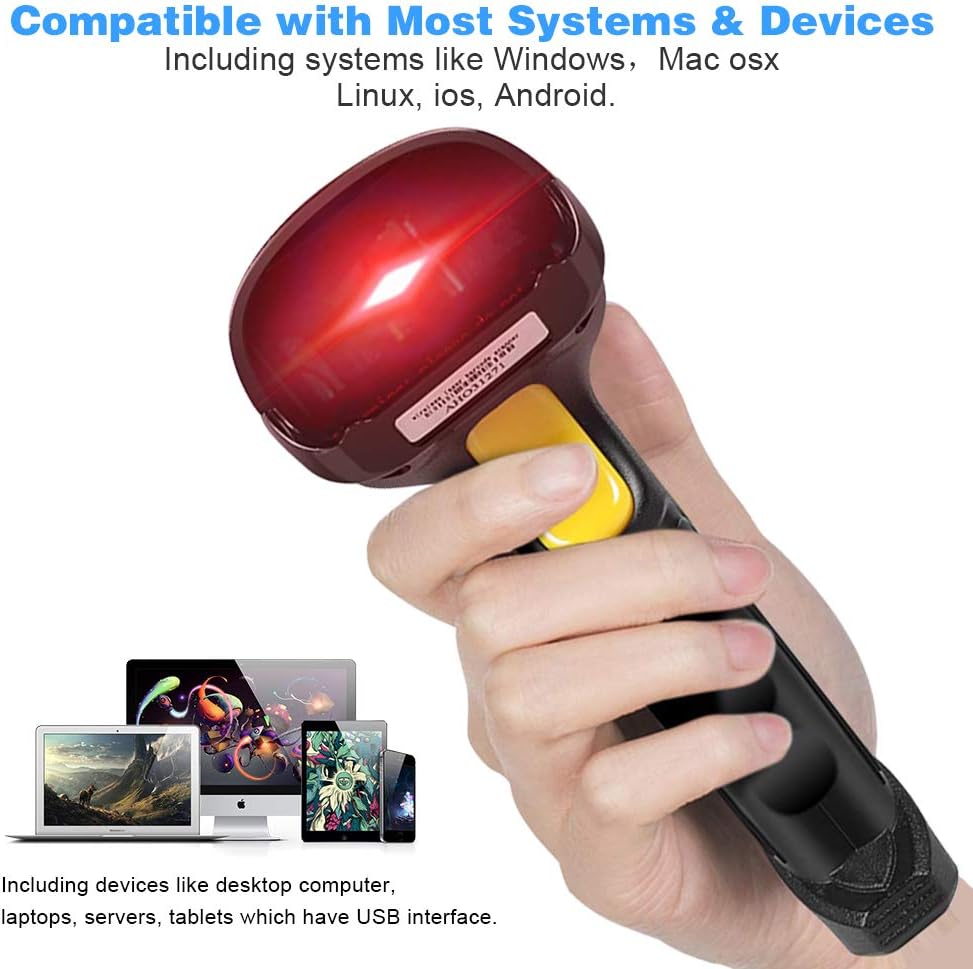
Figure 4: System and Device Compatibility
6. Vận hành máy quét
6.1 Quét cơ bản
Once connected (either wirelessly or wired), the scanner operates like a keyboard input device. To scan a barcode:
- Point the scanner's laser at the barcode you wish to read.
- Press and hold the trigger button. A red laser line will appear.
- Ensure the laser line fully covers the barcode.
- Upon successful scan, the scanner will emit a beep, and the barcode data will appear in the active text field on your connected device.
6.2 Barcode Types Supported
The scanner is optimized for reading all standard 1D barcodes, including but not limited to:
- UPC / EAN (including extra code)
- ISBN/ISSN
- Mã số 11
- Mã số 39
- Mã số 93
- Mã số 128
- ASCII đầy đủ
- Codabar
- Industrial/Interleaved 2/5
- MSI

Figure 5: Supported 1D Barcode Types
6.3 Data Upload and Storage Modes
The scanner supports two primary data handling modes:
- Chế độ tải lên tức thì: When the scanner is within the wireless transmission range of its receiver, scanned barcode data is immediately transmitted to the connected device.
- Chế độ lưu trữ: If the scanner is outside the wireless transmission range, scanned data will be stored internally in the scanner's memory. This stored data can then be uploaded to your device once the scanner is back within range or connected via USB cable. Refer to the included User Guide for specific instructions on how to retrieve stored data.
6.4 Video trình diễn sản phẩm
For a visual guide on setting up and operating your Basecent Barcode Scanner, please watch the official product video below:
Video 1: Basecent Wireless Barcode Scanner Demonstration. This video illustrates both wireless and wired setup, as well as basic scanning operations.
7. Bảo trì
Để đảm bảo tuổi thọ và hiệu suất tối ưu của máy quét mã vạch, hãy tuân theo các hướng dẫn bảo trì sau:
- Vệ sinh: Regularly wipe the scanner's exterior with a soft, dry cloth. For the scanning window, use a lint-free cloth and a mild, non-abrasive cleaner if necessary. Avoid harsh chemicals or abrasive materials.
- Kho: Bảo quản máy quét ở nơi khô ráo, thoáng mát, tránh ánh nắng trực tiếp và nhiệt độ cao.
- Xử lý: While the scanner features a durable, shock-resistant design (withstanding drops up to 1.5 meters), avoid unnecessary drops or impacts to prevent potential damage.
- Chăm sóc pin: Charge the battery regularly, even if the scanner is not in frequent use, to maintain battery health. Avoid fully discharging the battery for extended periods.

Figure 6: Durable Shock-Resistant Design
KHAI THÁC. Xử lý sự cố
If you encounter issues with your Basecent Barcode Scanner, consider the following common solutions:
- Máy quét không phản hồi: Ensure the scanner is fully charged. If using wireless mode, verify the USB receiver is securely plugged in and within range. If wired, check the USB cable connection.
- Không có dữ liệu đầu ra: Confirm the scanner is properly paired (wireless) or connected (wired). Check if the target application (e.g., Notepad, Excel) is active and ready to receive input.
- Incorrect Barcode Data: Ensure the barcode is clean, undamaged, and fully illuminated by the laser. Some specific barcode types or configurations may require scanning programming codes from the user guide to adjust scanner settings (e.g., adding prefixes/suffixes, changing baud rate).
- Sự cố kết nối không dây: Try unplugging and re-plugging the USB receiver. Ensure no other 2.4G devices are causing interference.
- Pin cạn kiệt nhanh chóng: Ensure the scanner is fully charged before use. Reduce continuous scanning if not needed, as this consumes more power.
For more detailed troubleshooting or specific configuration needs, please refer to the comprehensive User Guide included in your package or contact Basecent customer support.
9. Bảo hành và Hỗ trợ
For information regarding product warranty, returns, or technical support, please refer to the warranty card included with your product or visit the official Basecent website. You may also contact Basecent customer service directly for assistance with any product-related inquiries.