
1. Giới thiệu
This manual provides detailed instructions for the proper setup, operation, and maintenance of your Zerone USB Digital Microscope. This device is designed for various applications including industrial testing, laboratory research, educational purposes, and detailed examination of small objects. Please read this manual thoroughly before using the product to ensure optimal performance and longevity.
2. Thông tin an toàn
- Do not expose the device to extreme temperatures, humidity, or corrosive substances.
- Tránh để đèn LED chiếu trực tiếp vào mắt.
- Để thiết bị tránh xa tầm tay trẻ em.
- Use only the provided accessories or compatible replacements.
- Disconnect the device from the power source when not in use or during cleaning.
3. Nội dung gói hàng
Xác minh rằng tất cả các mục đều có trong gói hàng:
- Zerone USB Digital Microscope
- Chân đế có thể điều chỉnh
- USB Cable with LED Dimming Knob
- Software Installation CD (or download link)

Image 3.1: Contents of the Zerone USB Digital Microscope package, including the microscope, stand, USB cable, and software CD.
4. Sản phẩm hếtview
The Zerone USB Digital Microscope features a compact design with adjustable magnification and integrated LED illumination. Key components include:
- Thân kính hiển vi: Contains the lens, sensor, and control buttons.
- Zoom/Focus Wheel: Located on the microscope body for adjusting magnification and focus.
- Đèn LED: Eight adjustable LEDs surrounding the lens for illuminating the specimen.
- Nút chụp: Dùng để chụp ảnh tĩnh.
- Cáp USB: Connects the microscope to a computer.
- LED Dimming Knob: Integrated into the USB cable for brightness control.
- Chân đế có thể điều chỉnh: Provides stable support and allows for precise positioning of the microscope.

Image 4.1: The Zerone USB Digital Microscope mounted on its adjustable stand, connected via USB cable.

Hình ảnh 4.2: Gần hơn view of the Zerone USB Digital Microscope on its stand, highlighting its portable design and 1000X zoom capability.
5. Thiết lập
5.1 Cài đặt phần mềm
- Insert the provided software installation CD into your computer's CD-ROM drive. If your computer does not have a CD-ROM drive, please refer to the manufacturer's webtrang hướng dẫn tải phần mềm.
- Follow the on-screen prompts to install the digital microscope software.
- Once installation is complete, restart your computer if prompted.
5.2 Kết nối kính hiển vi
- Attach the microscope to the adjustable stand. Ensure it is securely fastened.
- Connect the USB cable from the microscope to an available USB port on your computer.
- The computer should automatically detect the device. If not, check your device manager for driver installation status.

Image 5.1: The Zerone USB Digital Microscope set up on a surface, demonstrating its use in a typical research or inspection environment.
6. Hướng dẫn vận hành
6.1 Starting the Software
Launch the digital microscope software installed on your computer. The live feed from the microscope should appear on your screen.
6.2 Điều chỉnh tiêu cự và thu phóng
- Place the object you wish to examine under the microscope lens.
- Xoay Zoom/Focus Wheel on the microscope body to adjust the magnification and bring the image into clear focus on your computer screen.
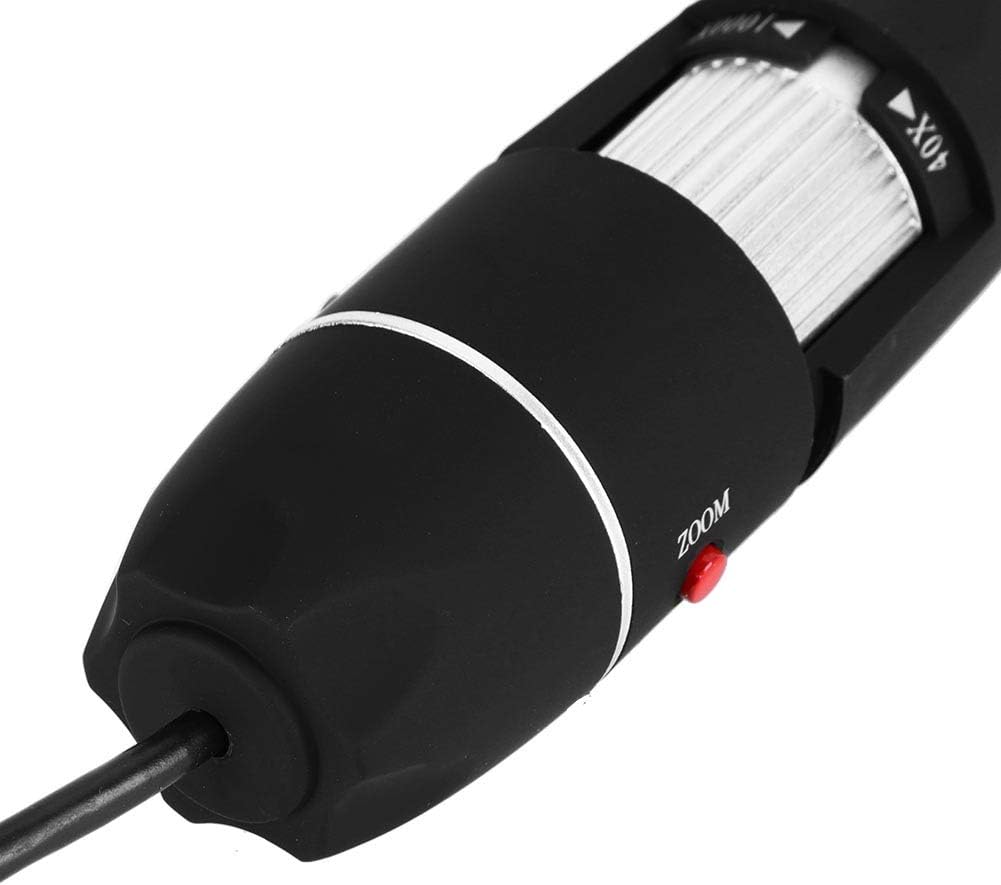
Hình ảnh 6.1: Một chi tiết view of the zoom and focus adjustment wheel on the microscope body, used for precise image clarity and magnification.
6.3 Điều chỉnh độ sáng đèn LED
The microscope is equipped with 8 adjustable LED lights. Use the LED Dimming Knob located on the USB cable to increase or decrease the brightness. Adjust the lighting to achieve optimal visibility of your specimen.

Image 6.2: A close-up showing the arrangement of the 8 LEDs around the microscope lens, designed to provide even illumination.

Image 6.3: The front of the microscope with its 8 LEDs illuminated, demonstrating the lighting capability for viewing specimens.
6.4 Chụp ảnh và quay video
To capture a still image, press the Nút chụp on the microscope body or use the corresponding function within the software. To record video, select the video recording option in the software and follow the prompts.

Image 6.4: A hand holding the Zerone USB Digital Microscope, illustrating its ergonomic design and portability for handheld use.
6.5 Video trình diễn sản phẩm
Watch this video for a visual guide on the features and operation of the Zerone USB Digital Microscope.
Video 6.1: Một video minh họaasing the Zerone 1000X Zoom USB Digital Microscope, highlighting its features and how it functions as a digital magnifier and endoscope camera.
7. Bảo trì
7.1 Vệ sinh
- Gently wipe the microscope body with a soft, dry cloth.
- Đối với ống kính, hãy sử dụng vải và dung dịch vệ sinh ống kính chuyên dụng để tránh trầy xước.
- Không sử dụng chất tẩy rửa hoặc dung môi có tính mài mòn.
7.2 Lưu trữ
When not in use, store the microscope in a clean, dry place, away from direct sunlight and extreme temperatures. Use the original packaging or a protective case to prevent dust accumulation and physical damage.
KHAI THÁC. Xử lý sự cố
| Vấn đề | Nguyên nhân có thể | Giải pháp |
|---|---|---|
| Không có hình ảnh trên màn hình | Microscope not connected properly; Software not launched; Driver issue. | Ensure USB cable is securely connected. Launch the software. Reinstall drivers if necessary. |
| Hình ảnh bị mờ | Incorrect focus; Incorrect working distance. | Adjust the Zoom/Focus Wheel. Ensure the microscope is at an appropriate distance from the object. |
| Đèn LED không sáng | LED dimming knob set to minimum; Power issue. | Rotate the LED Dimming Knob to increase brightness. Check USB connection. |
| Software not detecting device | Driver not installed or corrupted; USB port issue. | Reinstall the software and drivers. Try a different USB port. |
9. Thông số kỹ thuật
| Tính năng | Chi tiết |
|---|---|
| Thương hiệu | Số không |
| Số hiệu mẫu | SKIESOARtbx1zsgua2 |
| Độ phóng đại | Lên đến 1000X |
| Nguồn sáng | 8 đèn LED có thể điều chỉnh |
| Kết nối | USB |
| Thiết bị tương thích | Máy tính cá nhân |
| Vật liệu | Kim loại |
| Màu sắc | Đen, Bạc |
| Kích thước sản phẩm | 5.31 x 5.12 x 1.77 inch |
| Trọng lượng sản phẩm | 7 ounce |
10. Bảo hành và Hỗ trợ
For warranty information and technical support, please refer to the documentation included with your product or visit the official Zerone webtrang web. Giữ lại biên lai mua hàng làm bằng chứng mua hàng cho bất kỳ khiếu nại bảo hành nào.