
1. Giới thiệu
This manual provides instructions for the Zerone Universal Remote Control, designed as a replacement for various Haier TV models. It is compatible with Haier HTR-A18M, 55D3550, 40D3500M, and 48D3500 series televisions. This remote control offers direct access to digital TV functions without complex programming.

Image 1.1: The Zerone Universal Remote Control in use, demonstrating its compatibility with Haier HTR-A18M, 55D3550, 40D3500M, and 48D3500 TV models.
2. Thiết lập
2.1 Lắp đặt pin
Điều khiển từ xa cần hai (2) pin AAA (không bao gồm) để hoạt động. Hãy làm theo các bước sau để lắp pin:
- Xác định vị trí ngăn chứa pin ở mặt sau của điều khiển từ xa.
- Nhấn vào chốt và trượt nắp pin ra.
- Lắp hai pin AAA, đảm bảo cực dương (+) và cực âm (-) thẳng hàng với các vạch đánh dấu bên trong ngăn chứa.
- Trượt nắp pin trở lại vị trí cho đến khi nó khớp chặt.
The remote is ready for use immediately after battery installation; no additional programming is required for compatible Haier TV models.

Hình ảnh 2.1: Chi tiết view of the remote control, highlighting the battery compartment for AAA battery installation.
3. Hướng dẫn vận hành
3.1 Chức năng cơ bản
This remote control provides standard functions for your Haier TV. Point the remote directly at your television's infrared receiver for optimal performance.
- Nút nguồn (U): Bật hoặc tắt TV.
- Đầu vào: Selects video input sources (HDMI, AV, etc.).
- Các nút số (0-9)Chọn kênh trực tiếp.
- VÒNG +/-Điều chỉnh âm lượng tăng hoặc giảm.
- CH +/-: Chuyển kênh lên hoặc xuống.
- TẮT TIẾNGTắt hoặc bật âm thanh TV.
- THỰC ĐƠNTruy cập vào menu chính của TV.
- Các nút điều hướng (Lên, Xuống, Trái, Phải, OK)Điều hướng qua các menu và xác nhận lựa chọn.
- QUAY LẠI / THOÁT: Quay lại màn hình trước đó hoặc thoát khỏi menu hiện tại.
- TRƯNG BÀY: Shows current channel information.
- SAP / AUDIO: Selects audio language or mode.
- NGỦĐặt hẹn giờ ngủ.
- PICTURE / WIDE: Adjusts picture mode or aspect ratio.
- CH.LIST / FAVORITE: Accesses channel list or favorite channels.
- Media Control Buttons (Play, Pause, Fast Forward, Rewind): Điều khiển phát lại phương tiện.
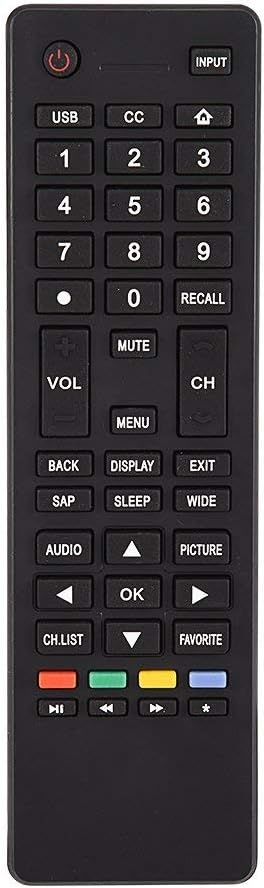
Hình 3.1: Hếtview of the remote control's button layout for easy identification of functions.
3.2 Phạm vi hoạt động
The remote control has a stable signal transmission distance of up to 10 meters (33 feet). Actual remote distance may vary depending on environmental factors and the specific model of your TV.
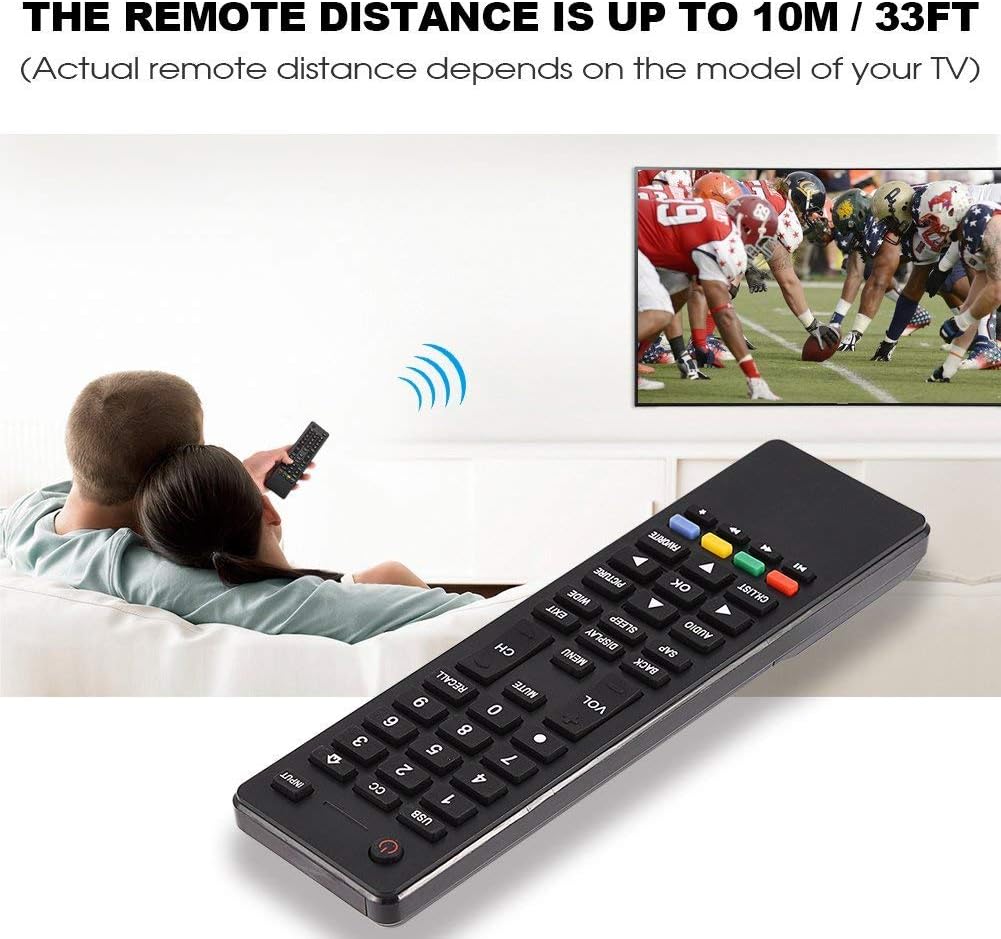
Image 3.2: Visual representation of the remote control's effective operating distance to the television.
4. Bảo trì
4.1 Vệ sinh
Để vệ sinh điều khiển từ xa, hãy sử dụng một miếng vải mềm, khô. Đối với những vết bẩn cứng đầu, hãy chà nhẹ.ampen the cloth with water or a mild cleaning solution. Avoid using harsh chemicals or abrasive cleaners, as these can damage the remote's surface or internal components.
4.2 Chăm sóc pin
- Hãy thay pin khi điều khiển từ xa phản hồi chậm hoặc ngừng hoạt động.
- Không trộn lẫn pin cũ và pin mới, hoặc các loại pin khác nhau.
- Tháo pin ra nếu không sử dụng điều khiển từ xa trong thời gian dài để tránh rò rỉ pin.
- Vứt bỏ pin đã qua sử dụng một cách có trách nhiệm theo quy định của địa phương.
KHAI THÁC. Xử lý sự cố
5.1 Điều khiển từ xa không phản hồi
- Kiểm tra pin: Ensure batteries are inserted correctly with the correct polarity (+/-) and are not depleted. Replace with fresh AAA batteries if necessary.
- Đường ngắm: Make sure there are no obstructions between the remote control and the TV's infrared sensor.
- Khoảng cách: Confirm you are within the effective operating range (up to 10 meters / 33 feet).
- Khả năng tương thích của TV: Verify that your TV model is listed as compatible (Haier HTR-A18M, 55D3550, 40D3500M, 48D3500).
5.2 Buttons Not Working Correctly
- Làm sạch từ xa: Dust or debris under buttons can cause malfunction. Refer to the Maintenance section for cleaning instructions.
- Kiểm tra pin: Weak batteries can lead to inconsistent button responses. Replace batteries.
6. Thông số kỹ thuật
| Tính năng | Chi tiết |
|---|---|
| Thương hiệu | Số không |
| Thiết bị tương thích | Haier HTR-A18M, 55D3550, 40D3500M, 48D3500 TVs |
| Công nghệ kết nối | Hồng ngoại |
| Phạm vi tối đa | 10 mét (33 feet) |
| Loại pin | 2 x AAA (không bao gồm) |
| Loại bộ điều khiển | Nút điều khiển |
| Vật liệu | ABS |
| Số hiệu mẫu | Zerone9rnag3b5y4-cr |
| Mã số UPC | 647213811490 |

Image 6.1: Physical dimensions of the Zerone Universal Remote Control.
7. Thông tin bảo hành
This product is offered as an Amazon Renewed item. Amazon Renewed products are professionally inspected and tested to work and look like new. If you are not satisfied with your purchase, renewed products are eligible for replacement or refund under the Amazon Renewed Guarantee.
Additionally, the manufacturer provides a Bảo hành có giới hạn 90 ngày. For specific details regarding the terms and conditions of this warranty, please refer to the documentation provided at the time of purchase or contact customer support.
8. Hỗ trợ khách hàng
If you encounter any issues or have questions regarding your Zerone Universal Remote Control that are not addressed in this manual, please contact the seller or Amazon Renewed customer service for assistance.
For Amazon Renewed Guarantee claims, please visit the Amazon Renewed program page or contact Amazon customer support directly.